What Does Mango Presentation Maker Professional Do?
Mango PM is a presentation maker developed by Mango Animate, designed to create animated and interactive slides. The software provides access to a library of over 500 customizable templates covering various industries. Users can build presentations by dragging and dropping vector icons, charts, and scientific symbols, or by uploading personal multimedia assets including images, videos, and audio files.
The platform distinguishes itself through its 2D and 3D display effects, allowing for cinematic movements such as zooming, panning, and rotating. To further engage audiences, Mango PM includes lifelike animated characters that function as cartoon presenters. These characters can be paired with speech bubbles and voiceovers to simulate a guided presentation experience. Users can also implement interactive elements like pop-up windows and emphasis effects to highlight specific objects within a slide.
Key functionalities include:
- Dynamic Backgrounds: A selection of well-crafted 2D and 3D scenes to enhance visual depth.
- Multimedia Integration: Support for local video, background music, and direct audio recording.
- Export Options: Files can be saved in multiple formats, such as EXE, MP4, GIF, HTML5, and Zip, ensuring compatibility across different devices.
The tool is built for users of all skill levels, requiring no prior technical or artistic expertise to produce professional-grade visual content.
Top 5 Reasons To Download Mango Presentation Maker Professional
- Unrivaled 3D Motion and Cinematic Transition Effects
- A Massive Library of 500+ Professionally Designed Templates
- Lifelike Animated Characters and Engaging Interactive Elements
- Versatile Multimedia Integration for an Immersive Experience
- Comprehensive Export Options for Maximum Reach and Flexibility
Let’s be honest for a second: we have all been victims of "Death by PowerPoint." You know the feeling—sitting in a dimly lit room, watching slide after slide of bullet points crawl across a static white screen while a voice drones on in the background. As a tech reviewer, I see hundreds of apps claiming to "revolutionize" the way we work, but most of them are just lipstick on a pig. They offer a few new icons or a slightly different font and call it a day. But every once in a while, a tool comes along that actually shifts the paradigm. Today, that tool is Mango PM.
Mango PM, developed by the animation experts at Mango Animate, isn’t just another slide creator. It is a full-blown presentation engine designed to turn dry data into a cinematic experience. If you are a teacher trying to keep a classroom of distracted teenagers engaged, a marketer pitching a high-stakes campaign, or a student wanting to blow your professor away, this is the software you’ve been waiting for. This isn't just about making "pretty" slides; it’s about storytelling, engagement, and professional branding. Here is the deep dive into why you absolutely need to download this giveaway and make Mango PM your primary presentation tool.
1. Unrivaled 3D Motion and Cinematic Transition Effects
The first thing that hits you when you open a project in Mango PM is that it doesn’t think in 2D. Most presentation software treats your work like a digital flipbook—you move from page one to page two in a linear, flat fashion. Mango PM changes the game by introducing a dynamic 3D display environment. This software allows you to utilize 3D effects like zooming, panning, and rotating that feel more like a camera moving through a movie set than a slide transition.
Why does this matter? Science tells us that the human brain is hardwired to notice movement. When you use the 3D zoom feature to dive deep into a specific data point on a chart, or pan across a large infographic to show the "big picture," you are literally forcing your audience’s eyes to follow the narrative. It creates a sense of depth and space that static slides simply cannot replicate. You can rotate your canvas to reveal hidden details or zoom out to show how different concepts interconnect. This "infinite canvas" feel makes your presentation feel like a cohesive journey rather than a series of disconnected fragments.
Furthermore, these 2D and 3D backgrounds are expertly crafted. You aren't just picking a color; you are picking an atmosphere. Whether you want a high-tech digital grid for a software pitch or a warm, organic background for a creative workshop, the dynamic elements breathe life into the workspace. It’s the difference between showing someone a picture of a house and taking them on a 3D walkthrough of the property. For anyone looking to leave a long-lasting impression, this cinematic approach is the gold standard.
2. A Massive Library of 500+ Professionally Designed Templates
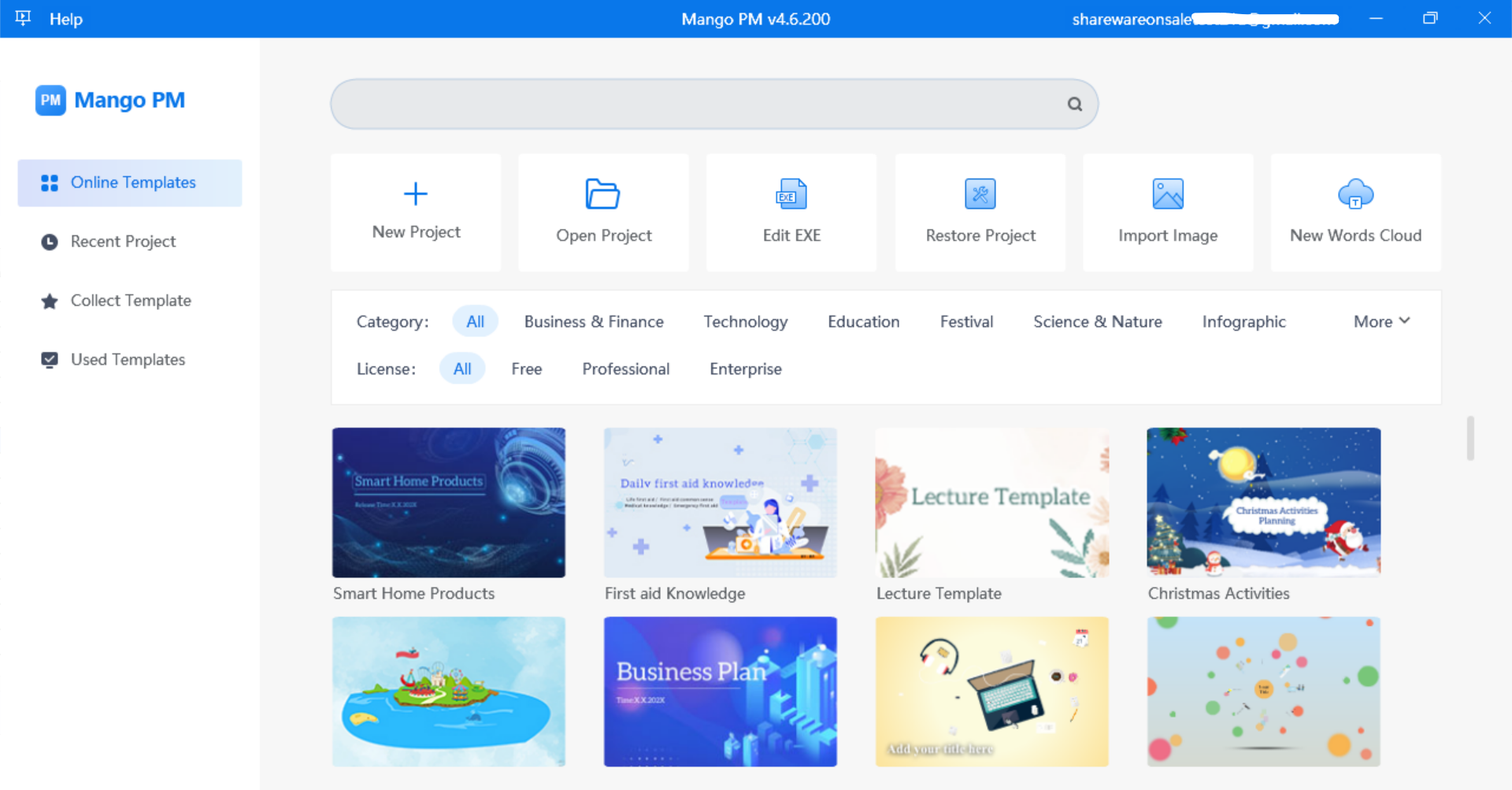
We’ve all experienced "blank canvas syndrome"—that paralyzing moment where you need to create something brilliant but have no idea where to start. Mango PM eliminates this hurdle entirely with its library of over 500 customizable templates. As a reviewer, I’ve seen template libraries before, but what sets Mango PM apart is the sheer variety and the niche-specific designs. They haven't just provided "Business" and "Education" categories; they have delved into specific industries, ensuring that the aesthetic matches the professional tone you need to strike.
These templates are not rigid. They serve as a sophisticated foundation that you can completely dismantle and rebuild using the intuitive drag-and-drop interface. You have access to a treasure trove of assets including vector icons, stickers, SWF files, shapes, and even scientific symbols. This last part is a huge win for educators and researchers; how many times have you struggled to find a clean way to represent a complex formula or a biological process? Mango PM has those assets built right in.
The beauty of these templates is that they democratize high-end design. You don’t need a degree in graphic design or years of experience with expensive animation suites to produce something that looks like it was made by a professional agency. By choosing a template that fits your goals, you are already 90% of the way to a finished product. You simply swap out the text, drop in your specific images, and let the software handle the heavy lifting of layout and transitions. It’s a massive time-saver that doesn’t force you to sacrifice quality for speed.
3. Lifelike Animated Characters and Engaging Interactive Elements
This is where Mango PM moves from being a great tool to being an essential one. We live in an era of "personal branding," and your presentation needs a "face." Mango PM allows you to include dynamic animated characters—essentially your own cartoon presenters—directly on your slides. These aren't just static clip-art images; they are lifelike characters with rich motions, distinct actions, and a range of emotions.
Imagine this: Instead of just reading a quote about customer service, you have an animated character on the screen who gestures, smiles, and reacts to the text appearing in a speech bubble next to them. This adds a layer of "showcase" quality that makes the information feel more human and accessible. You can record your own voiceover or upload audio files to sync with these characters, creating a self-running presentation that speaks directly to your audience even if you aren't in the room.
But the engagement doesn't stop with characters. Mango PM introduces interactive elements that turn a passive viewing experience into an active one. You can add "Emphasis" or "Zoom" triggers to specific objects. You can create pop-up windows that reveal more information only when clicked. This is incredibly useful for technical presentations where you want to keep the main slide clean but offer deep-dive details for those who want them. By giving your audience something to interact with, you are increasing their retention of the material. It transforms the presentation from a lecture into a conversation.
4. Versatile Multimedia Support for an Immersive Experience
In the modern digital landscape, text is rarely enough. To truly capture attention, you need a multi-sensory approach. Mango PM excels in its versatile multimedia support, acting as a hub for all your local and digital assets. You aren't limited to what is inside the software’s library; you can effortlessly upload your own images, high-definition videos, and background music to create the exact vibe you want.
The "drag-and-drop" nature of the software makes integrating these elements seamless. Want to show a product demo video right in the middle of a 3D rotating slide? No problem. Want to have a subtle ambient soundtrack playing to set the mood for a storytelling session? It’s done in two clicks. The software handles various file types with ease, ensuring that your high-res photos don't look pixelated and your videos play smoothly without stuttering.
What I find particularly impressive is the inclusion of text blocks and speech bubbles that can be animated in tandem with the media. This allows you to "direct" the viewer's attention. For example, as a video plays, a text block can fly in to highlight a key feature shown in the footage. This level of synchronization is usually reserved for professional video editing software, but Mango PM brings it into the realm of presentation making. The result is an immersive experience that feels more like a produced documentary or a high-end web experience than a traditional slideshow.
5. Comprehensive Export Options for Maximum Reach and Flexibility
The best presentation in the world is useless if you can't share it. One of the biggest pain points with "cutting-edge" software is often compatibility. You spend hours making something beautiful, only to find out it won't run on the client’s laptop or won't upload to your website. Mango PM has clearly been built with the end-user in mind, offering an impressive array of export formats that cater to every possible scenario.
You can export your work as an EXE file, which is a lifesaver for offline presentations. If you are presenting at a conference with spotty Wi-Fi, an EXE file ensures that all your animations, videos, and interactive elements work perfectly without needing an internet connection. If you want to share your presentation on social media or YouTube, you can export it as an MP4 video. For those who want to embed their presentation on a blog or a professional website, the HTML5 export option provides a modern, responsive way to display your content.
But it doesn't stop there. You can also create GIFs for quick, punchy visual aids in emails or export to a Zip file for easy distribution. This flexibility means that your work isn't trapped inside the software. You can reach your targeted audience wherever they are—on a mobile phone, a desktop computer, a projector screen, or a social media feed. This "create once, share everywhere" philosophy is exactly what busy professionals need. It ensures that the time you invest in creating a "splendid presentation" pays off across multiple platforms.
Final Thoughts from the Reviewer Desk:
If you are still using the same tools you used ten years ago, you are doing yourself and your audience a disservice. The bar for digital content has been raised. People expect movement, they expect personality, and they expect clarity. Mango PM delivers all three in a package that is accessible enough for a novice but powerful enough for a pro.
The combination of 3D environmental storytelling, a massive asset library, and lifelike animated characters makes this software a powerhouse in the creative space. When you factor in the interactive elements and the robust export options, it’s clear that Mango Animate has thought of everything. This isn't just a "download"—it's an upgrade for your professional image. Whether you're trying to sell a product, teach a lesson, or share a vision, Mango PM provides the dynamic elements you need to be heard in a noisy world. Don't miss out on this giveaway; your next audience will thank you.

Reviews for Mango Presentation Maker Professional
Click Here to Read Reviews for Mango Presentation Maker Professional >> Click Here to Submit Reviews for Mango Presentation Maker Professional >>