What Does Website Screenshot Generator Do?
Website Screenshot Generator is a dedicated automation utility designed to capture visual snapshots of web pages in bulk. Developed by Vovsoft, this software addresses the need for high-volume screen captures, allowing users to process multiple URLs simultaneously rather than capturing images manually through a standard web browser.
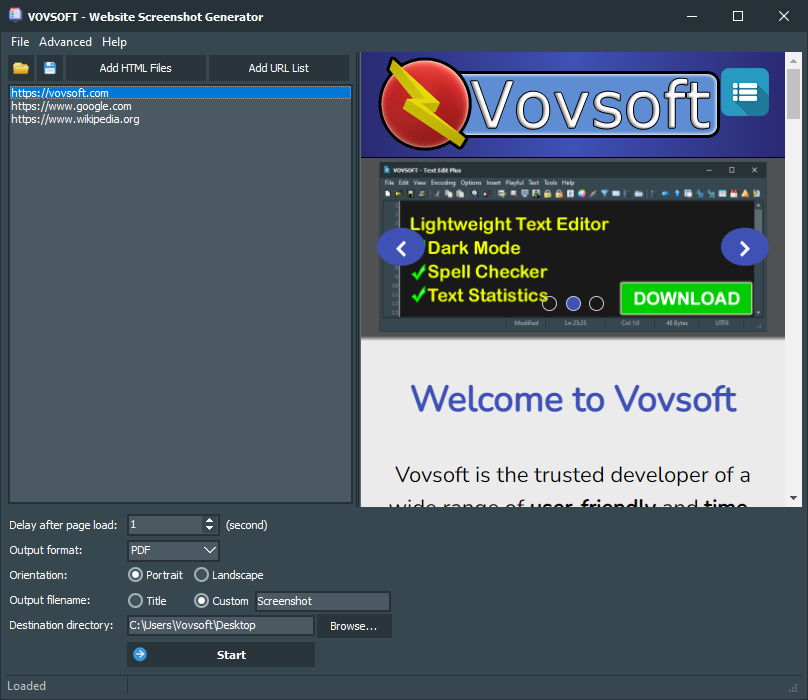
The application functions as a batch URL-to-image converter. Users input a list of target web addresses, and the tool automatically renders each page to produce a static file. The software supports several common output formats, including PNG, JPEG, and PDF documents. This versatility makes it suitable for various professional workflows, such as website testing, competitive analysis, and archival documentation.
The core features of the software include:
- Batch Processing: Automate the capture of multiple URLs in a single session to save time on repetitive tasks.
- Multiple Output Formats: Save snapshots as high-quality images or portable documents depending on project requirements.
- Simplified Interface: A streamlined UI allows for quick URL entry and configuration of capture settings.
For developers, designers, and digital marketers, this tool eliminates the manual labor involved in documenting web layouts. It provides a factual, high-quality representation of live web content for use in quality assurance logs, marketing materials, or design portfolios.
Top 5 Reasons To Download Website Screenshot Generator
- Unrivaled Batch Processing Power: Stop wasting hours capturing individual screenshots; process hundreds of URLs simultaneously with a single click.
- Versatile Multi-Format Exporting: Whether you need high-fidelity PNGs, storage-friendly JPEGs, or professional PDF documents, this tool handles it all.
- Simplified, No-Nonsense User Interface: Skip the steep learning curve found in enterprise software and get straight to work with an intuitive, minimalist design.
- Indispensable Utility for Diverse Industries: From SEO audits and marketing research to UI/UX design and legal archiving, its applications are nearly endless.
- Reliable Automation and Efficiency: Eliminate human error and browser crashes by letting a dedicated, lightweight desktop application handle the heavy lifting.
In the fast-paced world of digital marketing, web development, and content creation, time is the most valuable currency we have. We have all been there: your boss or a client asks for a visual audit of fifty different landing pages, or perhaps you need to document the state of a competitor’s website for a marketing breakdown. Doing this manually is a soul-crushing task. You open a tab, wait for it to load, hit the print-screen button, crop it, save it, and repeat. By the time you reach page ten, you are already looking for a way out. This is exactly why the Website Screenshot Generator is a game-changer, and why you need to jump on this giveaway immediately.
As a tech reviewer, I see hundreds of "productivity" apps every year. Most of them are bloated, subscription-based, or so complicated they end up creating more work than they save. However, every so often, a tool comes along that does one thing and does it perfectly. This software is a lean, mean, screenshot-generating machine. It takes the tedious, repetitive task of web capturing and turns it into a background process that you can set and forget. If you value your workflow and your sanity, here is a deep dive into why this specific tool deserves a permanent spot on your hard drive.
1. Unrivaled Batch Processing Power
The primary reason anyone should be excited about this giveaway is the sheer scale of efficiency it brings to your workstation. We live in an era of "Big Data," but we often forget that data needs to be visualized. If you are managing a portfolio of websites or performing a massive site migration, you cannot rely on manual captures. The Website Screenshot Generator allows you to feed it a list of URLs—whether it is five or five hundred—and it will march through them with mechanical precision.
Think about the implications for an SEO professional. When you are performing a site audit, you need to see how pages are rendering across the board. Loading each one individually in a browser is not just slow; it is inefficient. This tool acts as your personal digital assistant. You simply paste your list of links, and the software begins the process of "visiting" each page and snapping a high-quality image. This batch processing capability means you can start the process, go grab a cup of coffee, and return to a folder filled with perfectly organized image files. It turns a full afternoon of manual labor into five minutes of setup. For anyone who deals with volume, this feature alone makes the software worth its weight in gold.
Furthermore, the automation doesn't just save time; it ensures consistency. When you take screenshots manually, you might accidentally include your mouse cursor, a browser notification, or different zoom levels. With an automated tool, every single screenshot is captured using the same parameters, ensuring a professional and uniform look for your reports or presentations.
2. Versatile Multi-Format Exporting
One of the most common frustrations with basic screenshot tools is the lack of flexibility in file formats. Many free browser extensions force you into a single format, often compressed JPEGs that look blurry or pixelated when zoomed in. This software breaks that mold by offering support for PNG, JPEG, and even PDF. This versatility is crucial because different projects require different file types.
If you are a graphic designer or a UI/UX specialist, you likely want PNG files. PNGs offer lossless compression, meaning every pixel is preserved exactly as it appeared on the web. This is vital for analyzing typography, spacing, and color palettes. On the other hand, if you are a social media manager who needs to upload dozens of images to a project management tool, you might prefer JPEG to save on bandwidth and storage space. The ability to toggle between these formats based on the specific needs of your project is a massive advantage.
But the real "secret weapon" here is the PDF export option. For many professionals, especially those in legal, compliance, or high-level corporate environments, a PDF is the standard for documentation. Being able to convert a live URL directly into a PDF snapshot is incredibly useful for creating archives that are easy to share and print. Imagine being able to hand a client a single folder of PDFs representing their entire site’s current state. It looks professional, it’s easy to navigate, and it’s a format that everyone knows how to open. This level of versatility ensures that no matter what your "end-user" requires, you can provide it without needing additional conversion software.
3. Simplified, No-Nonsense User Interface
There is a growing trend in software development to hide features behind layers of menus or to "gamify" the interface with distracting animations. Thankfully, the Website Screenshot Generator ignores these trends in favor of raw utility. The interface is clean, functional, and refreshingly simple. As a tech reviewer, I appreciate software that doesn't try to be "clever" at the expense of usability.
When you open the app, you aren't greeted by a confusing dashboard or a mandatory tutorial. You see exactly what you need: a place to enter URLs and a place to adjust your settings. This "get in, get out" philosophy is perfect for busy professionals. You don't need to be a "techie" or a coder to use this. If you know how to copy and paste a link, you are already an expert at using this software. This low barrier to entry is a significant reason to download this giveaway. It is a tool that anyone on your team—from the intern to the CEO—can use effectively without training.
Moreover, the lightweight nature of the application means it won't hog your system resources. Many web-based screenshot services require you to keep a browser window open, which can eat up gigabytes of RAM. This standalone desktop application runs independently, allowing you to keep working on other tasks in your browser while it quietly generates your images in the background. It is the definition of a "set it and forget it" tool.
4. Indispensable Utility for Diverse Industries
While it might seem like a niche tool at first glance, the actual applications for a website screenshot generator are incredibly broad. Let’s look at why different types of users find this indispensable. For Digital Marketers, it is all about competitor analysis. You can track how a competitor’s landing page changes over time by taking weekly screenshots, giving you a visual history of their marketing strategy. You can see when they change their "Call to Action" buttons or when they update their pricing models.
For Web Developers and Quality Assurance (QA) Testers, this tool is a lifesaver. When a site goes live, you need to ensure that it looks correct across various pages. Manually checking every sub-page of a large e-commerce site is a nightmare. By using a batch generator, you can quickly scan through the resulting images to spot layout breaks, missing images, or CSS errors that didn't show up in your initial testing. It acts as a visual "smoke test" for your deployment.
Then there are Content Creators and Educators. If you are writing a blog post about web design trends or creating a course on digital literacy, you need high-quality visual aids. This tool allows you to gather all the screenshots you need for your project in one fell swoop, rather than hunting and pecking for them as you write. Even in the Legal and Compliance fields, having a time-stamped visual record of a website is often necessary for copyright claims or verifying that specific disclosures were present on a site at a given time. By downloading this giveaway, you are adding a multi-purpose tool to your arsenal that will eventually solve a problem you didn't even know you were going to have.
5. Reliable Automation and Efficiency
The final, and perhaps most compelling, reason to grab this software is the sheer peace of mind that comes with reliable automation. We have all tried to use those "free" online screenshot websites. Usually, they are riddled with ads, they limit you to one capture every sixty seconds, or they fail halfway through a long page. They are unreliable and frustrating. Desktop-based automation removes those variables.
When you use a dedicated program like the Website Screenshot Generator, you are using your own system's resources to handle the task. There are no queues, no "premium" wait times, and no data privacy concerns regarding third-party websites seeing what links you are capturing. This is your tool on your machine. It provides a level of stability that web-based alternatives simply cannot match. If you have a list of 200 URLs, you can trust that the software will work through them systematically. If a specific site is slow to load, the software can be configured to wait, ensuring you get a complete image rather than a half-loaded mess.
In the professional world, "efficient" is often a synonym for "profitable." Every minute you spend manually saving images is a minute you aren't spending on strategy, design, or closing deals. By automating the screenshot process, you are effectively buying back your time. This giveaway isn't just offering you a piece of software; it's offering you a more streamlined workday. Once you integrate this into your workflow, you will wonder how you ever managed without it. It takes a repetitive, low-value task and handles it with high-value efficiency.
In conclusion, the Website Screenshot Generator is one of those rare utilities that manages to be both powerful and incredibly simple. It solves a specific, universal pain point for anyone who works on the web. Between the batch processing capabilities, the flexible export formats, and the user-friendly design, it is a "must-have" for any digital professional’s toolkit. Don't let this giveaway pass you by. Download it, install it, and the next time you are faced with a list of URLs that need capturing, you will be the most efficient person in the room. You’ll be done in minutes while everyone else is still clicking "Save As." It is time to work smarter, not harder, and this tool is the perfect place to start.
Whether you are a freelancer looking to impress clients with professional-grade reports, or a developer needing to streamline your QA process, this software provides the speed and reliability you need. It is a small download that yields massive results. Grab this giveaway today and experience the satisfaction of watching a tedious task disappear before your eyes. You won't regret adding this powerhouse to your collection of tech tools.
The software landscape is often cluttered with "solutions" that don't actually solve anything. This tool is the exception. It is a focused, efficient, and reliable utility that respects your time and enhances your productivity. From the moment you load your first batch of URLs, you will see the difference. The images are crisp, the process is smooth, and the time saved is undeniable. Make the choice to upgrade your workflow—download the Website Screenshot Generator now and take control of your digital documentation.

Reviews for Website Screenshot Generator
Click Here to Read Reviews for Website Screenshot Generator >> Click Here to Submit Reviews for Website Screenshot Generator >>