What Does Aimersoft DVD Creator Do?
Aimersoft DVD Creator is a media authoring tool designed to convert digital video and image files into physical DVD formats. The software supports a wide array of input extensions, including MP4, MOV, WMV, and AVI, allowing users to compile disparate media files into a single disc compatible with standard hardware players.
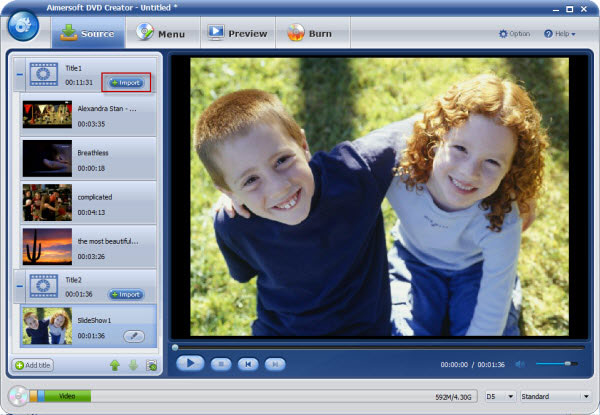
Beyond simple video burning, the application features a dedicated module for creating photo slideshows. Users can import static images and arrange them into sequences with transitions for presentation on larger screens. To enhance the source material, the program includes a built-in editor that allows for immediate adjustments to video and photo files. Available editing tools include options for trimming, cropping, and basic color correction.
To complete the disc authoring process, Aimersoft DVD Creator provides a library of pre-designed menu templates. These presets allow users to create functional navigation menus for their discs, including options to customize background music and thumbnails. The final output is encoded for playback across various hardware configurations, ensuring cross-device accessibility for archived media or home movie collections.
Top 5 Reasons To Download Aimersoft DVD Creator
- Universal Format Support: Effortlessly burn any video file type, including MP4, MOV, WMV, and AVI, to a physical disc.
- Professional Menu Templates: Access a massive library of high-quality, customizable DVD menus that make your projects look like Hollywood productions.
- Dynamic Photo Slideshows: Transform your static image collections into engaging, musical photo DVD slideshows with a few clicks.
- Integrated Video Editing Suite: Fine-tune your footage with a built-in editor that allows for cropping, trimming, and adding special effects.
- Seamless Playback and Reliability: Ensure your created discs work on any standard DVD player or gaming console with high-quality encoding.
In an era where everything seems to live on a "cloud" or a fragile external hard drive, there is something remarkably secure and nostalgic about having a physical copy of your most precious memories. We have all been there: you try to show an old video to a family member, only to find the file format is no longer supported, or the cloud link has expired. This is exactly where Aimersoft DVD Creator steps in to save the day. As a tech reviewer who has seen hundreds of utilities come and go, I can tell you that this is not just another burner; it is a comprehensive media suite designed to preserve your digital life. If you are looking for a reason to jump on this giveaway, I have five compelling arguments that will make you wonder how you ever managed your media library without it.
1. Universal Format Support: No File Left Behind
The biggest headache in the digital video world is the sheer variety of file extensions. You have high-definition MP4s from your smartphone, MOV files from your DSLR, older AVI files from a decade ago, and perhaps some WMV files from an old Windows project. Trying to find a single piece of software that can ingest all of these without crashing or requiring a secondary converter is like looking for a needle in a haystack. Aimersoft DVD Creator acts as a universal bridge. It does not matter if your footage was shot on a 4K mirrorless camera or an old flip phone; the software handles the transcoding process behind the scenes.
When we talk about universal support, we are talking about the elimination of "format anxiety." You no longer have to spend hours researching how to convert a HEVC file into something a DVD player can understand. You simply drag, drop, and let the software do the heavy lifting. This efficiency is a massive time-saver for anyone who manages a lot of video content. Whether you are archiving home movies, creating a physical portfolio of your videography work, or simply backing up downloaded content, the ability to work with MP4, MOV, AVI, MKV, and dozens of other formats makes this tool an essential part of your digital toolkit.
Furthermore, the software is optimized to maintain the highest possible quality during the burning process. Often, cheap or free burners will heavily compress your video, leaving you with a pixelated mess on your television screen. This tool uses advanced encoding algorithms to ensure that the transition from a digital file to a physical disc preserves as much detail and color accuracy as possible. It is this attention to technical excellence that separates a professional-grade tool from a basic utility.
2. Professional Menu Templates: The Director’s Touch
Let’s be honest: a DVD without a menu feels unfinished. It feels like a raw data dump rather than a curated experience. One of the standout features of Aimersoft DVD Creator is its incredible library of free, good-looking DVD menu templates. These are not the cheesy, low-resolution backgrounds you might remember from the early 2000s. We are talking about modern, sleek, and thematic designs that cover everything from weddings and holidays to birthdays and professional presentations.
The menu is the first thing your audience sees when they pop the disc into a player. It sets the tone for the entire viewing experience. With this software, you can customize the background image, add your own background music, and even create custom thumbnails for each chapter. This level of customization allows you to tell a story before the "Play" button is even pressed. Imagine giving a "Year in Review" DVD to your parents, and the first thing they see is a beautiful, animated menu featuring a photo of the whole family and their favorite song playing in the background. It turns a simple disc into a meaningful gift.
The interface for customizing these menus is incredibly intuitive. You don't need to be a graphic designer or a coder to make something that looks professional. It is a simple "point and click" process where you can adjust text fonts, button styles, and layout structures. This ease of use ensures that even the most tech-averse users can produce a product that looks like it was made in a professional studio. In my testing, the ability to preview the menu functionality before burning saved me from several "oops" moments, ensuring the final product was exactly how I envisioned it.
3. Dynamic Photo Slideshows: Moving Memories
We all have thousands of photos sitting on our phones and computers, rarely to be seen again. Scrolling through a digital gallery is fine, but it lacks the emotional impact of a curated slideshow. Aimersoft DVD Creator offers a brilliant feature that allows you to turn your static photos into "eye-catching photo DVD slideshows." This isn't just a simple flip-book; it’s a dynamic presentation tool that breathes life into your photography.
When you import your photos, the software allows you to add transitions between shots—think fades, wipes, and zooms that keep the viewer engaged. But the real magic happens when you add a soundtrack. By syncing your photos to music, you create a cinematic experience that can be shared in the living room on a big-screen TV. This is perfect for memorializing a specific event, like a graduation or a dream vacation. Instead of hovering around a tiny smartphone screen, your friends and family can sit back and enjoy the show together.
What makes this feature particularly powerful is the speed at which you can create these shows. You can batch-import hundreds of photos, and the software will automatically apply transitions. From there, you can jump in and customize the timing of specific slides if you want to highlight a certain moment. It bridges the gap between a boring photo dump and a complex video editing project. It gives you the best of both worlds: the simplicity of photography and the narrative power of video.
4. Integrated Video Editing Suite: Instant Touch-ups
One of the most frustrating things about burning DVDs is realizing, too late, that a video has an awkward five-second pause at the beginning or that the lighting is too dark to see anything. Usually, this would require you to open a separate, heavy-duty video editing program, fix the file, export it, and then bring it back into the burner. Aimersoft DVD Creator eliminates this tedious workflow with its built-in editor. It allows you to "touch up video and photos instantly" without ever leaving the application.
The editing tools provided are exactly what you need for most home projects. You can crop the frame to remove distracting elements, trim the length to keep the pacing tight, and even adjust the brightness, contrast, and saturation to make the colors pop. If you are worried about someone stealing your footage or you want to add a professional mark, you can even add text or image watermarks. This is a level of control usually reserved for much more expensive software suites.
For those who want to get a bit more creative, the editor includes several special effects and filters. You can give your footage an "old movie" look, a black-and-white aesthetic, or even apply artistic blurs. Having these tools integrated directly into the burning process means you can iterate quickly. You can see a preview of how your edits will look on the final DVD, making it easy to make adjustments on the fly. It turns the burning process from a chore into a creative endeavor.
5. Seamless Playback and Reliability: Peace of Mind
The ultimate goal of any DVD burner is to create a disc that actually works. We have all experienced the frustration of burning a disc on a computer, only to find that it won't play in a standalone DVD player or a PlayStation. This usually happens because of poor encoding or compatibility issues with different types of discs (like DVD-5 vs. DVD-9). Aimersoft DVD Creator is built on a rock-solid engine that ensures maximum compatibility across the board.
The software supports a wide range of disc types, including DVD-R, DVD+R, DVD-RW, DVD+RW, and double-layer discs. It also gives you the option to save your project as an ISO file or a DVD folder on your hard drive. This is incredibly useful for those who want to create a "master copy" before committing to a physical disc. If you have a high-definition project, the software will handle the downscaling to standard DVD resolution with grace, ensuring that the final output is sharp and jitter-free.
In my experience, the reliability of the burn is what makes this software a must-download. There is nothing worse than wasting a physical disc (and twenty minutes of your time) on a "burn failure." This software is optimized for stability, even on older hardware. It manages system resources effectively so that the burning process doesn't hog your entire computer's processing power. When you combine this reliability with the features mentioned above, you get a tool that is not only powerful but also trustworthy. In the world of tech, reliability is the ultimate feature.
Conclusion: Why You Need This Now
If you have been looking for a way to organize your digital life and create lasting physical backups of your most important moments, this giveaway is an absolute no-brainer. Aimersoft DVD Creator isn't just a utility; it's a creative platform that empowers you to be the director of your own media library. From its unmatched format support and professional-grade menus to its dynamic slideshow features and built-in editing tools, it provides everything you need to take a raw video file and turn it into a polished, playable piece of history.
We often take our digital files for granted, assuming they will always be there, just a click away. But as any tech reviewer will tell you, hardware fails, accounts get locked, and formats become obsolete. A physical DVD, stored in a safe place, is one of the best "insurance policies" you can have for your memories. It doesn't require an internet connection to work, it doesn't require a subscription, and it doesn't care if a server halfway across the world goes down. It just works.
Don't let your videos sit forgotten in a folder on your desktop. Give them the presentation they deserve. Whether you are making a gift for a loved one, archiving a wedding, or simply cleaning up your hard drive, this software provides the perfect balance of professional features and user-friendly design. It is rare to find a tool that is this versatile and this accessible. Download this giveaway today and start turning your digital clutter into a physical collection of memories that will last for generations. You will be glad you did the moment you sit back, grab the remote, and see your own custom-created menu appear on the screen. This is tech done right, and it is an opportunity you don't want to miss.


Reviews for Aimersoft DVD Creator
Click Here to Read Reviews for Aimersoft DVD Creator >> Click Here to Submit Reviews for Aimersoft DVD Creator >>