What Does 321Soft Screen Video Recorder Do?
321Soft Screen Video Recorder is a Windows-based utility designed for capturing on-screen activity. The software records either the full desktop or a specified region directly into AVI video format, making it a functional tool for creating software demonstrations, tutorials, and digital presentations. Users can record video sequences of software operations or document navigation step-by-step for later editing, DVD burning, or slideshow creation.
The application includes features specifically tailored for instructional content, such as simultaneous audio recording for voiceovers. It offers specialized mouse cursor effects, highlighting tracks and clicks to help viewers follow a presenter's movements. To protect original content, users can apply text overlays directly onto the video. Additionally, the software facilitates basic post-production tasks, including the ability to convert recorded AVI files into MPEG format.
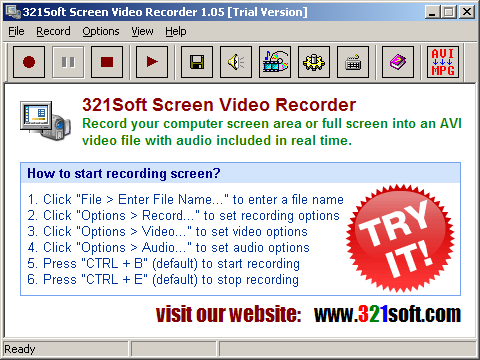
Technical customization is provided through a range of video and audio parameters. Users can adjust video codecs, frame rates, and quality levels, while audio settings support frequencies ranging from 8000Hz to 44100Hz in both Mono and Stereo. Recording control is managed via a system tray icon, a dedicated toolbar, or customizable hotkeys for starting, pausing, and stopping captures. The software supports various capture modes, including full screen, specific windows, or fixed regions, providing flexibility for different recording environments.
Top 5 Reasons To Download 321Soft Screen Video Recorder
- Comprehensive Recording Versatility and Post-Production Readiness: Capture everything from full-screen action to specific windows in high-quality AVI format.
- High-Fidelity Audio and Seamless Voice-Over Integration: Record system sounds and microphone input simultaneously with professional-grade frequency settings.
- Precision Instructional Tools with Mouse and Cursor Enhancement: Make your tutorials stand out with visual click effects and dedicated mouse tracking features.
- Advanced Technical Customization for Professional Output: Take full control over codecs, frame rates, and keyframes to ensure your videos meet industry standards.
- Built-in Content Security and Workflow Optimization: Protect your intellectual property with text overlays and manage your recording process with customizable hotkeys.
In the modern digital landscape, video has become the universal language of communication. Whether you are a software developer looking to showcase a new product, a teacher creating remote learning modules, or a business professional preparing a high-stakes presentation, the quality of your screen capture software can make or break your final product. Enter 321Soft Screen Video Recorder. This isn't just another basic screen capture tool; it is a robust, full-featured engine designed for those who demand precision and professional results. If you have been looking for a reason to upgrade your current workflow, this giveaway provides the perfect opportunity to secure a powerhouse utility that bridges the gap between simple recording and professional video production.
As a tech reviewer, I have seen dozens of screen recording applications. Many of them are either too simple, lacking the necessary settings for high-quality output, or too complex, requiring a degree in video engineering just to get started. 321Soft Screen Video Recorder strikes that elusive balance. It provides an intuitive interface while hiding some seriously powerful technical controls under the hood. Below, I am going to break down exactly why this software needs to be in your digital toolkit, focusing on the five pillars that set it apart from the competition.
1. Comprehensive Recording Versatility and Post-Production Readiness
The first thing any serious content creator looks for is flexibility. 321Soft Screen Video Recorder excels here by offering multiple recording modes. You are never locked into a single way of working. Whether you need to capture your entire desktop for a comprehensive overview or a very specific "fixed region" for a targeted tutorial, the software handles it with ease. This level of control is essential because it allows you to eliminate clutter. If you only want your audience to see a specific application window, you can set the recorder to focus solely on that area, ensuring that your viewers aren't distracted by your taskbar, open browser tabs, or desktop notifications.
Furthermore, the choice of the AVI format is a strategic advantage for power users. While many amateur tools force you into compressed formats that lose quality every time you save them, AVI serves as an excellent container for high-quality video that is ready for post-production. This makes 321Soft Screen Video Recorder the perfect first step in a larger creative pipeline. Once you have finished your recording, the file is perfectly primed for being pulled into professional editing suites, burned to a DVD for physical distribution, or converted into an MPEG for web streaming. The versatility of the recording region—normal region, fixed region, full screen, or specific windows—means you are always capturing exactly what you need, nothing more and nothing less.
2. High-Fidelity Audio and Seamless Voice-Over Integration
We have all watched a video where the visuals were great, but the audio was muffled or out of sync. It is a frustrating experience that immediately makes a professional project look amateur. 321Soft Screen Video Recorder addresses this head-on with an audio engine that is surprisingly deep for a screencasting tool. It allows you to record audio simultaneously with your video, which is a massive time-saver for anyone creating tutorials or software demos. Instead of recording your video and then trying to "dub" your voice over it later—a process that rarely results in perfect timing—you can narrate your actions in real-time.
The technical specs for the audio recording are where this software really shines for the audiophiles and professionals among us. You aren't stuck with a single low-bitrate setting. You can adjust the frequency from a standard 8000Hz all the way up to a crystal-clear 44100Hz. You can also toggle between 8-bit and 16-bit audio, and choose between Mono and Stereo channels. This means if you are just recording a quick voice memo, you can save space with lower settings, but if you are creating a high-end presentation, you can crank the settings up to match the quality of a professional podcast or studio recording. Having this level of granular control over your sound ensures that your message is heard as clearly as it is seen.
3. Precision Instructional Tools with Mouse and Cursor Enhancement
One of the biggest challenges in screen recording is making sure the viewer can follow where you are clicking. In a complex software demo, the mouse cursor can easily get lost in a sea of buttons and menus. 321Soft Screen Video Recorder includes specialized features specifically designed to solve this problem. It doesn't just "show" the mouse; it allows you to enhance the cursor's movements and clicks. This is a game-changer for educators and technical trainers. By adding enhanced effects to mouse clicks, you provide a visual cue every time you interact with the screen. This draws the viewer's eye exactly where it needs to be, reducing confusion and making your instructions much easier to follow.
This "blink" or click-enhancement feature is often overlooked in free recording tools, but it is one of those professional touches that makes a huge difference in the final user experience. When you are showing someone how to navigate a complex file structure or how to use a specific tool in a photo editor, that visual confirmation of a click acts as an anchor for the viewer's attention. It transforms a standard screen capture into an interactive-feeling training document. If your goal is to teach, these mouse-tracking tools are worth the download alone.
4. Advanced Technical Customization for Professional Output
For those of us who like to get under the hood, 321Soft Screen Video Recorder provides a suite of video options that allow you to optimize your files for any use case. Most users don't realize that the quality of a video is determined by much more than just the resolution. This software gives you control over the video codec, the overall video quality, and the number of keyframes per second. Why does this matter? Because it allows you to manage the balance between file size and visual fidelity. If you are making a video to send over email, you can adjust these settings to keep the file small. If you are making a video for a 4K display presentation, you can maximize the settings for lossless quality.
Additionally, the ability to set the recording interval between frames and the playback frames per second (FPS) is a professional-level feature that ensures smooth motion. If you are recording a high-motion sequence, such as a video game or a fast-paced animation, you can set a higher FPS to ensure every frame is captured smoothly. Conversely, for a static slideshow or a text-heavy document walkthrough, you can lower the frame rate to save on system resources. This level of customization ensures that the software works with your hardware rather than against it, providing a smooth recording experience even on machines that might not be top-of-the-line workstations.
5. Built-in Content Security and Workflow Optimization
The final reason you need to download this giveaway is the focus on the user's workflow and intellectual property. In an age where digital piracy is rampant, protecting your content is vital. 321Soft Screen Video Recorder allows you to add text directly onto the video as you record it. This isn't just for titles; it serves as a permanent watermark. By overlaying your name, your company's name, or a copyright notice directly onto the video stream, you make it much harder for others to steal your hard work and pass it off as their own. It’s a simple, effective way to claim ownership of your tutorials and demos from the moment they are created.
Beyond security, the software is built for efficiency. The integration of customizable hotkeys is a massive benefit for anyone who records frequently. You can set your own shortcuts for starting, pausing, and stopping the recording. This means you don't have to have the software interface visible in your video; you can start and stop the action with a simple keyboard command, keeping your recording clean and professional. The software also docks neatly in the system tray, staying out of your way until you need it. This focus on "low-friction" recording means you spend less time messing with settings and more time actually creating content. It is a streamlined experience that respects your time and your creative process.
In conclusion, 321Soft Screen Video Recorder is a comprehensive solution that addresses the needs of modern creators. It combines the power of professional video settings with the ease of use required for everyday tasks. Whether you are looking to protect your content, guide your audience with precision, or ensure your audio is studio-quality, this software delivers on all fronts. Don't miss the chance to add this versatile tool to your collection—it is an investment in the quality of your digital communication that will pay dividends every time you hit the "record" button.
Final Thoughts: When we look at software giveaways, we are often looking for tools that solve a specific problem. 321Soft Screen Video Recorder solves several at once. It eliminates the need for separate audio recording software, it reduces the time spent in post-production with its built-in mouse effects and text overlays, and it provides the technical depth required for high-end output. For a tech reviewer, this is an easy recommendation. It’s powerful, it’s flexible, and most importantly, it’s designed with the end-user’s needs in mind. Download it today and start creating the professional-grade videos your projects deserve.

Reviews for 321Soft Screen Video Recorder
Click Here to Read Reviews for 321Soft Screen Video Recorder >> Click Here to Submit Reviews for 321Soft Screen Video Recorder >>