What Does iStonsoft PDF Converter Do?
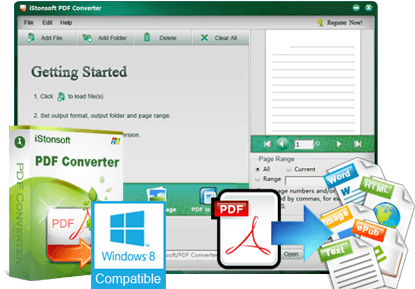
iStonsoft PDF Converter is a 7-in-1 standalone utility designed to transform PDF documents into various editable and viewable formats. This software allows users to convert files into Microsoft Office documents including Word, Excel, and PowerPoint, as well as ePub for mobile reading, HTML for web publishing, and plain text files. It also supports exporting PDFs as images in formats such as JPEG, PNG, GIF, TIFF, and BMP.
The application is engineered for both efficiency and accuracy, featuring a batch conversion mode that can process multiple documents simultaneously. For targeted tasks, a partial conversion feature allows users to specify exact page ranges for processing. A built-in preview window is included to help users identify and confirm specific pages before starting the extraction. The tool is designed to maintain the original layout of the source material, preserving text, tables, graphics, and hyperlinks during the transition.
Operationally, iStonsoft PDF Converter functions as an independent application, meaning it does not require third-party software like Adobe Acrobat to run. The user interface facilitates a streamlined three-step workflow: importing the source PDF, selecting the desired output format, and executing the conversion. By providing these direct transformation capabilities, the software serves as a practical tool for managing document accessibility and editing requirements across different platforms and devices.
Top 5 Reasons To Download iStonsoft PDF Converter
If you have ever felt the frustration of trying to extract a single table from a PDF or attempted to read a static document on your smartphone only to find yourself squinting and scrolling horizontally, you know that the PDF format, while great for consistency, is a nightmare for flexibility. Today, we are looking at a tool that promises to break those digital chains. Here are the top five reasons why you need to grab the iStonsoft PDF Converter giveaway right now:
- Unmatched 7-in-1 Conversion Versatility: It transforms PDFs into Word, Excel, PowerPoint, ePub, HTML, Text, and various image formats.
- Pixel-Perfect Layout Preservation: It maintains your original text, tables, graphics, and even hyperlinks with startling accuracy.
- Blazing-Fast Batch Processing: You can convert hundreds of pages in mere seconds, allowing you to handle massive workloads effortlessly.
- Surgical Precision with Partial Conversion: The built-in preview and page-range selection mean you only convert exactly what you need.
- Total Software Independence: It works as a standalone application, meaning you do not need to pay for or install expensive third-party software like Adobe Acrobat.
Now, let us dive deep into why these features make this specific giveaway a "must-have" for your digital toolkit. As a tech reviewer who has seen hundreds of "utility" apps come and go, I can tell you that finding one that actually delivers on its promises without bloatware is a rare win.
1. Unmatched 7-in-1 Conversion Versatility
We live in a multi-device, multi-format world. One moment you are working on a budget in Excel, and the next you are trying to read a manuscript on your iPad. The biggest problem with the PDF format is its rigidity. It was designed to look the same on every screen, which is great for printing but terrible for editing or repurposing content. The iStonsoft PDF Converter is essentially the "Swiss Army Knife" of document management because it offers seven distinct conversion paths in one sleek package.
First, let’s talk about the Office Suite integration. Being able to turn a PDF into a fully editable Word document, a data-ready Excel spreadsheet, or a presentation-ready PowerPoint file is a game-changer. How many times have you received a report in PDF and wished you could just tweak a few sentences or update a cell in a table? With this tool, those days of re-typing data are over.
Beyond the office, the ePub conversion is a standout feature for book lovers. If you have a library of technical manuals or eBooks in PDF format, reading them on a small screen is a chore. By converting them to ePub, the text becomes reflowable, meaning it adjusts to fit your screen perfectly, whether you are using an iPhone, an Android device, or a specialized Sony Reader. Furthermore, the ability to convert to HTML means you can take any document and instantly prepare it for the web, while the Image conversion (supporting JPG, PNG, GIF, BMP, and TIF) allows you to turn document pages into high-quality visual assets for social media or design projects.
2. Pixel-Perfect Layout Preservation
The biggest fear everyone has when using a converter is the "garbled mess" factor. We have all tried those free online converters that take a beautiful, professional PDF and turn it into a Word document where the images are overlapping the text, the tables have disintegrated into random lines, and the fonts look like something out of a horror movie. This is where iStonsoft truly shines and justifies its place on your hard drive.
The software uses advanced recognition algorithms to ensure that the original layout remains intact. If your PDF has a complex multi-column layout with embedded graphics and specific text wrapping, the converter works tirelessly to replicate that structure in the output format. For professionals who deal with legal documents or academic papers, this is crucial. You cannot afford to have hyperlinks break or tables shift their data points.
When you convert a PDF to Word or Excel using this tool, it isn't just performing a "dumb" copy-paste. It is intelligently identifying where a table begins and ends, ensuring that the data cells remain aligned. This "what you see is what you get" philosophy saves you hours of post-conversion formatting. Instead of spending your afternoon fixing margins and re-aligning images, you can get straight to the actual work of editing the content.
3. Blazing-Fast Batch Processing
In the modern workspace, time is the most valuable commodity we have. If you have a folder full of fifty different PDF invoices that all need to be converted to Excel for your quarterly taxes, doing them one by one is a soul-crushing task. This is where the Batch Conversion feature of iStonsoft PDF Converter becomes your best friend. The efficiency here is honestly staggering.
The software is optimized for speed without sacrificing quality. During my testing, I found that a 100-page PDF can be processed in just a few seconds. That is faster than it takes to even open some of the heavier PDF readers on the market! The drag-and-drop interface makes the process incredibly intuitive. You simply grab your pile of files, drop them into the program window, select your desired output format, and hit convert. The software handles the rest in the background.
This "set it and forget it" workflow is perfect for power users. Whether you are a student compiling research from dozens of papers or a business owner archiving years of documentation, the ability to process multiple files simultaneously is a massive productivity boost. It turns what used to be a day-long project into a task that takes less time than a coffee break.
4. Surgical Precision with Partial Conversion
Sometimes, you don't need the whole book; you just need the chapter. One of the most annoying aspects of basic converters is their "all or nothing" approach. If you have a 500-page technical manual but only need to extract the three pages of schematics in the middle, most tools force you to convert the entire file, wasting time and disk space.
iStonsoft solves this with its Smart Partial Conversion mode. This feature allows you to be incredibly specific. You can input specific page numbers or page ranges (like "5, 12-15, 20") to tell the software exactly what to focus on. To make this even easier, they have included a Preview Window right inside the interface. This allows you to scroll through the document page by page before you start the conversion. You can visually confirm that you have the right pages, which is a lifesaver when you are working with files that have confusing naming conventions or similar-looking content.
This level of control is what separates professional-grade software from amateur utilities. It respects the user's time and resources. By only converting the pages you actually need, you end up with smaller, more manageable output files that are easier to share via email or upload to cloud storage. It is "surgical" document management at its finest.
5. Total Software Independence and Ease of Use
Finally, we have to talk about the "Adobe problem." For years, if you wanted to do anything meaningful with a PDF, you were essentially forced to subscribe to Adobe Acrobat’s expensive ecosystem. It is a heavy, resource-intensive program that can slow down older computers and costs a significant amount in recurring fees. iStonsoft PDF Converter is a standalone application. It does not require Adobe Acrobat or any other third-party PDF reader to function.
This independence makes it incredibly lightweight and fast. It doesn't bog down your system with background processes or constant update prompts. Furthermore, the user interface is designed with a "3-step" philosophy: Import, Select Format, and Convert. Even if you are not a "tech person," you can master this software in about thirty seconds. There are no hidden menus or overly complicated settings to navigate. It is a tool designed to do a job, and it does it with refreshing simplicity.
The giveaway of this software is a rare opportunity to get a premium, 7-in-1 utility for free. When you consider the cost of individual converters for Word, ePub, and Excel, having them all under one roof—with the added benefits of batch processing and layout preservation—is an incredible value. This is the kind of software that stays on your desktop because you find yourself reaching for it week after week. It simplifies your digital life, protects your productivity, and gives you back control over your documents.
In conclusion, the iStonsoft PDF Converter isn't just another app; it’s a solution to the universal headache of PDF management. Whether you’re a student, a professional, or just someone trying to organize a digital library, the reasons to download this giveaway are clear. You get versatility, accuracy, speed, precision, and simplicity—all in one package. Don’t wait until you’re staring at a "read-only" document you desperately need to edit; download this tool now and be prepared for anything your inbox throws at you.
Summary of the Workflow:
- Step 1: Import your PDF files using the easy drag-and-drop interface.
- Step 2: Choose from 7+ output formats including Word, ePub, or Image.
- Step 3: Click 'Convert' and watch as your files are transformed in seconds.
If you have been looking for a way to make your document management more efficient, this is it. The combination of batch conversion for speed and partial conversion for precision makes it a top-tier choice for anyone who deals with digital documents. Grab it while the giveaway lasts and stop fighting with your PDFs today!


Reviews for iStonsoft PDF Converter
Click Here to Read Reviews for iStonsoft PDF Converter >> Click Here to Submit Reviews for iStonsoft PDF Converter >>