What Does WonderFox Video to GIF Do?
WonderFox Video to GIF is a specialized utility designed to convert video segments into lightweight, shareable animated GIF files. The software supports a broad spectrum of input formats, including AVI, MPEG, MP4, MKV, WMV, MOV, and 3GP. Users can select specific portions of a video to transform into looping animations suitable for website avatars or digital distribution.
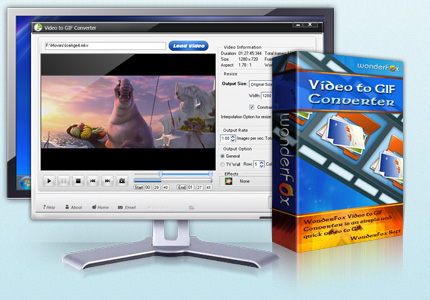
The application includes a built-in video player that allows for real-time previews of the GIF output before finalizing the conversion. Beyond simple conversion, the tool provides specific controls for output customization and frame-level editing:
- Frame Fine-Tuning: Users can manually add or delete individual frames from the sequence to ensure smooth motion and precise timing.
- Image Capture: The software can extract specific frames and save them as static image files directly from the video source.
- Output Versatility: While primarily focused on GIFs, the program also supports exporting to static photo formats including JPG, BMP, PNG, and TGA.
- Resizing Tools: The software includes options to change the dimensions of the video to fit specific GIF resolution requirements.
The interface simplifies the conversion workflow by integrating these editing and playback tools into a single environment. This allows users to create custom graphical assets from existing video libraries without requiring complex video editing suites.
Top 5 Reasons To Download WonderFox Video to GIF
- Universal Format Compatibility: Seamlessly convert any video file, including AVI, MP4, and MKV, into a high-quality GIF without worrying about codec errors.
- Precision Frame-by-Frame Editing: Take total creative control by adding or deleting individual frames to create the perfect, seamless loop.
- High-Quality Still Image Extraction: Not just for animations, it allows you to capture perfect snapshots in formats like JPG, PNG, and BMP.
- Built-In Real-Time Preview: Eliminate the guesswork with an integrated video player that lets you see exactly how your GIF looks before you hit export.
- Optimized Performance and Resizing: Easily adjust the dimensions and speed of your GIFs to meet the strict upload requirements of social media and forums.
If you have spent any amount of time on the internet in the last decade, you know that the GIF is the undisputed king of digital communication. Whether it is a reaction meme on a message board, a punchy visual for a professional presentation, or a custom avatar for your favorite gaming forum, the animated GIF is everywhere. But here is the problem: most of the "free" tools you find online are either riddled with intrusive advertisements, slap a massive watermark over your hard work, or simply crash when you try to upload a high-definition video. This is exactly why you need to pay attention to the current giveaway for WonderFox Video to GIF. As a tech reviewer who has tested dozens of these utilities, I can tell you that finding a local, desktop-based solution that combines power with simplicity is a rare find.
We are living in an era where video content is king, but sometimes a full video is just too much. You want that three-second highlight, that perfect comedic timing, or that specific instructional loop. WonderFox Video to GIF is designed specifically to bridge the gap between heavy video files and lightweight, shareable animations. In this article, I am going to break down exactly why this software deserves a spot on your hard drive and why this giveaway is an opportunity you simply cannot pass up. Let’s dive into the details of why this tool is a game-changer for creators and casual users alike.
1. Universal Format Compatibility
One of the biggest headaches in the world of video editing is the dreaded "Unsupported File Format" error message. We’ve all been there. You have a great clip saved as an MKV or an older AVI file, and you try to upload it to a basic online GIF maker, only to have it fail. WonderFox Video to GIF solves this by offering an incredibly robust engine that supports virtually every popular video format under the sun. We are talking about AVI, MPEG, MP4, MKV, WMV, MOV, 3GP, and more. It doesn't matter if the video came from your high-end DSLR, your smartphone, or a legacy digital camera; this software can handle it.
Why is this important for you? It means you don't have to waste time running your files through a secondary converter before you even start making your GIF. The streamlined workflow allows you to drag and drop your source file directly into the interface. In the tech world, efficiency is everything. By supporting such a wide array of formats, WonderFox ensures that your creative process is never stalled by technical limitations. Whether you are working with modern high-definition MP4s or obscure older formats, the software acts as a universal bridge, turning any video memory into a repeatable, shareable animation.
2. Precision Frame-by-Frame Editing
Most amateur GIF-making tools operate on a "set it and forget it" basis. You pick a start time, an end time, and hope for the best. Usually, this results in a clunky, jarring transition that ruins the effect of the loop. WonderFox Video to GIF takes a much more professional approach by offering Frame Fine-Tuning. This feature is the secret sauce for anyone who wants to create those satisfying, "perfect" loops that you see trending on social media. After you have selected your video segment, the software breaks it down into individual frames.
Within the output interface, you have the power to manually add or delete specific frames. If there is a slight stutter at the end of your clip, you can simply remove those two or three frames to make the transition seamless. If you want to shorten the animation without changing the speed, you can prune unnecessary frames with surgical precision. This level of control is usually reserved for expensive, bloated video editing suites, but here it is presented in a clean, accessible way. It’s about quality over quantity. When you can control every single millisecond of the animation, the end result looks professional, polished, and purposeful.
3. High-Quality Still Image Extraction
While the name of the software highlights its GIF-making capabilities, one of its most underrated features is the Image Capture suite. There are many times when you don't actually want an animation, but rather a perfect, high-resolution still image from a specific moment in a video. Trying to hit "print screen" on a moving video is an exercise in frustration—you usually end up with a blurry mess or a play button icon covering the subject's face. WonderFox includes a dedicated tool to capture any frame and save it as a standalone image file.
What makes this even better is the support for various photo formats. You aren't just limited to one type of file; you can export your captures as JPG, BMP, PNG, or even TGA files. This is incredibly useful for creators who need to make thumbnails for their YouTube videos, or for users who want to grab a high-quality still from a family movie to use as a wallpaper. It essentially turns the software into a dual-purpose utility: a motion graphics tool and a high-precision screenshot engine. Having both features in one package makes this giveaway an even higher value proposition for anyone who works with digital media.
4. Built-In Real-Time Preview
There is nothing more frustrating than spending ten minutes configuring an export, waiting for the rendering process to finish, and then realizing the GIF is too fast, too slow, or cropped incorrectly. WonderFox Video to GIF eliminates this "trial and error" cycle with its built-in video player. This isn't just a simple playback window; it is a dedicated preview environment that lets you see exactly how the final GIF will behave before you ever commit to saving the file. You can watch the loop, check the frame rate, and ensure the timing is exactly where you want it to be.
This feature is a massive time-saver. As a reviewer, I always look for software that respects the user's time. By allowing you to preview the GIF in real-time, the software encourages experimentation. You can tweak the Photo Resize settings—changing the dimensions from a large video scale to a compact GIF scale—and immediately see if the text remains legible or if the action is still clear. This interactive feedback loop is what separates "okay" software from "essential" software. It gives you the confidence that when you finally hit that export button, the result will be exactly what you envisioned.
5. Optimized Performance and Resizing
Finally, we have to talk about the practical side of GIFs: file size. We have all tried to upload a GIF to a platform like Discord, Slack, or a web forum, only to be told the file is "too large." Standard video files are massive, and if you simply convert them without optimization, your GIF will be a bloated, slow-loading mess. WonderFox Video to GIF includes specialized tools to change the size and scale of your animation during the conversion process. You can downscale a 1080p video to a 300-pixel wide GIF in seconds, significantly reducing the file size while maintaining visual clarity.
Furthermore, because this is a dedicated desktop application, it utilizes your computer's hardware far more efficiently than a web browser can. This means faster conversion times and better compression algorithms. You get a GIF that looks sharp and vibrant but has a footprint small enough to be shared anywhere. In a world where bandwidth and upload limits still matter, having a tool that handles the "heavy lifting" of optimization automatically is a godsend. You get the visual impact of a video with the portability of an image file.
Conclusion: Why You Should Act Now
The internet moves fast, and the way we express ourselves moves even faster. Having a reliable, powerful, and easy-to-use tool like WonderFox Video to GIF in your arsenal is a no-brainer for anyone who spends time creating or sharing content. We’ve covered the technical bases: the incredible format support, the frame-by-frame precision, the still-image extraction, the vital preview player, and the essential optimization tools. But the real reason you should download this giveaway today is simple: it puts the power of creation back in your hands.
You no longer have to rely on sketchy websites that might compromise your privacy or upload your private videos to a cloud server just to make a five-second animation. With this software, everything happens locally on your machine. It is fast, it is secure, and it is professional. Whether you are a meme connoisseur, a social media manager, or just someone who wants to share a funny moment from a family outing, this tool provides the most straightforward path from a raw video file to a polished animated GIF.
Don't wait for the giveaway to end and realize later that you are back to using clunky, ad-ridden online converters. This is your chance to snag a premium utility that streamlines your workflow and expands your creative capabilities. The process is simple, the results are professional, and the price—during this giveaway—is absolutely perfect. Download it, install it, and start turning your favorite video moments into timeless, looping animations today. You will wonder how you ever managed your media library without it.
In the end, tech tools should make our lives easier and our digital expression more fun. WonderFox Video to GIF hits both of those marks with ease. It strips away the complexity of video editing and leaves you with the fun, creative parts of making GIFs. From the fine-tuning of frames to the ease of resizing, every feature is built with the user in mind. This is a must-have addition to your software collection, and there has never been a better time to get it than right now.

Reviews for WonderFox Video to GIF
Click Here to Read Reviews for WonderFox Video to GIF >> Click Here to Submit Reviews for WonderFox Video to GIF >>