What Does Ashampoo Photo Optimizer 2025 Do?
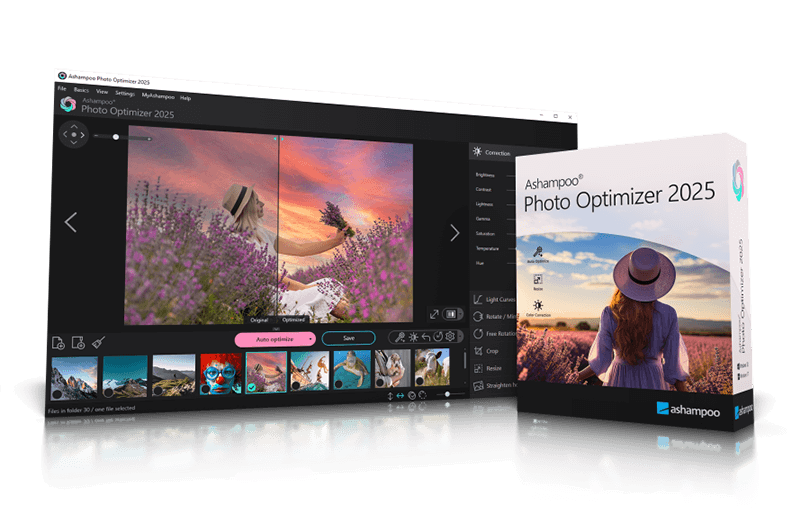
Ashampoo Photo Optimizer 2025 is a streamlined utility designed for efficient image enhancement and batch processing. The software’s core functionality centers on its 1-click optimization feature, which leverages an automated analysis system to scan images for deficiencies in lighting, color temperature, and contrast. Once analyzed, a specialized algorithm applies corrections to improve vibrancy and visual harmony, often fixing issues like image noise or poor exposure in a single pass.
In addition to its automated capabilities, the application provides a suite of manual editing tools for granular control. Users can manipulate parameters such as gamma, brightness, and light curves, or perform standard transformations including:
- Crop and Resize: Adjust dimensions for specific display or print requirements.
- Rotate and Mirror: Correct orientation and flip images horizontally or vertically.
- Sharpen: Enhance detail and clarity in soft or slightly blurred shots.
- Horizon Straightening: Fix perspective issues by leveling tilted camera angles.
The latest version introduces support for customizable text annotations, allowing for personalized labels or markers. The software also includes built-in printing functionality, ensuring that edited files can be translated into physical copies without needing external software. By combining automated corrections with classic manipulation tools, the program offers a high-speed workflow for both novice users and professionals requiring quick turnarounds for mediocre shots.
Top 5 Reasons To Download Ashampoo Photo Optimizer 2025
- Instant 1-Click Professional Optimization: The software uses an advanced algorithm to auto-analyze and fix lighting, contrast, and color temperature in a single click.
- Precision Perspective and Horizon Correction: Say goodbye to crooked shots with the new perspective tool that straightens horizons and fixes distorted angles.
- A Comprehensive Toolkit in a Streamlined Interface: Access essential tools like cropping, resizing, rotating, and sharpening without the steep learning curve of high-end editors.
- Advanced Color and Light Manipulation: Go beyond the basics with manual control over gamma, light curves, brightness, and noise reduction for total creative control.
- Personalization with Customizable Text Annotations: Easily add watermarks, notes, or artistic text to your photos to make them truly yours before sharing or printing.
Let’s be honest with ourselves for a moment. We are all living in a golden age of digital photography, but we are also drowning in a sea of "almost great" photos. Every single one of us has a smartphone or a digital camera stuffed with thousands of images. We take photos of our kids, our vacations, our meals, and our pets. But how many of those photos actually look professional? How many of them sit in a digital folder gathering dust because the lighting was a bit too dim, the colors looked washed out, or the horizon was just slightly tilted? Most people think they need to spend hundreds of dollars on a professional editing suite or spend months learning complex software to fix these issues. I am here to tell you that you don't. Today, I’m breaking down why the Photo Optimizer 2025 giveaway is the one tool you absolutely need to download right now. It is the ultimate shortcut to professional-looking photography.
1. Instant 1-Click Professional Optimization
The headline feature of this software, and the reason it has become a staple on my own desktop, is the 1-click optimization engine. We’ve all seen "auto-enhance" buttons before in various apps, and let’s be real: they usually don’t work very well. They often just crank up the saturation until your skin looks orange or blow out the highlights until the sky is a white blob. This is where Photo Optimizer is fundamentally different. It doesn’t just apply a blanket filter; it performs a deep, comprehensive auto-analysis of every individual image.
When you click that optimization button, the software's internal algorithm goes to work like a digital darkroom technician. it analyzes the white balance to ensure colors are true to life. It examines the contrast levels to make sure your blacks are deep and your whites are crisp without losing detail. It even detects color temperature issues, which is a common problem when taking photos under artificial indoor lighting. The result is a photo that looks vibrant, harmonious, and—most importantly—natural. It takes a mediocre shot and makes it look like it was captured with high-end gear and edited by a pro. For anyone who has a massive library of photos to get through, this 1-click feature is a massive time-saver that delivers results that actually hold up under scrutiny.
2. Precision Perspective and Horizon Correction
Have you ever taken a beautiful photo of a skyscraper or a landscape, only to realize later that you were holding the camera at a slight angle? Or perhaps you were looking up at a building, and the "keystone effect" made the structure look like it was falling backward? These perspective issues can ruin an otherwise perfect shot, making it look amateurish. In the past, fixing perspective and horizons was a chore that required advanced knowledge of transform tools and grids.
In the latest 2025 version of Photo Optimizer, this problem is solved with incredible ease. The software includes a dedicated tool to straighten image horizons and fix perspective issues. This is a game-changer for architectural photography and landscapes. By simply adjusting a few parameters, you can align the vertical and horizontal lines of your photo to match reality. It gives your images a sense of balance and structural integrity that is usually reserved for professional architectural photographers. Whether it’s a crooked beach sunset or a skewed photo of a monument, you can fix it in seconds, ensuring your gallery looks polished and professional.
3. A Comprehensive Toolkit in a Streamlined Interface
As a tech reviewer, I see a lot of software that suffers from "feature creep." Developers try to pack in so many tools that the interface becomes a cluttered mess of icons and menus that nobody knows how to use. Photo Optimizer avoids this trap beautifully. It provides a comprehensive suite of "classic" features but keeps them incredibly accessible. You get all the essentials: image rotation, mirroring, cropping, and resizing.
But it’s the way these tools are implemented that wins me over. The cropping tool is intuitive, allowing you to quickly find the best composition for your subject. The resizing tool is clean and doesn't degrade image quality unnecessarily. Everything is laid out in a logical manner that makes sense even if you’ve never used a photo editor before. It’s the perfect balance for the user who wants more than a simple smartphone filter but doesn't want the headache of a professional workstation. It’s about getting the job done efficiently so you can get back to what matters—capturing more memories.
4. Advanced Color and Light Manipulation
While the 1-click optimization is the star of the show, there are times when you want to get your hands dirty and tweak things manually. Maybe you want a specific "mood" for a photo, or you’re trying to recover a shot that was severely underexposed. Photo Optimizer gives you the "under the hood" access you need without making it overly complicated. You have full control over brightness, contrast, and color manipulation.
I was particularly impressed by the inclusion of gamma manipulation and light curve adjustments. These are powerful tools that allow you to fine-tune the mid-tones and shadows of an image. If you have a photo where the subject is in shadow but the background is bright, you can use these tools to bring the subject out of the darkness without overexposing the rest of the shot. Additionally, the software includes a dedicated noise reduction feature. If you’ve ever taken a photo at night or in a dark room, you know that grainy "noise" that can appear. This software helps smooth out that grain, leaving you with a cleaner, sharper image. It’s this level of control that makes the software feel like a professional tool wrapped in a user-friendly package.
5. Personalization with Customizable Text Annotations
In the age of social media and digital sharing, the ability to personalize your images is more important than ever. Whether you want to add a copyright watermark, a funny caption, or a heartfelt note to a digital greeting card, Photo Optimizer makes it simple. The 2025 version supports customizable text annotations, allowing you to add a personal touch to your photos with just a few keystrokes.
This isn't just about slapping some text on a box; you can customize the look and feel to match the aesthetic of your photo. This is perfect for small business owners who need to brand their product shots, or for families who want to label their vacation photos before sending them to the printer. Speaking of printing, the software also includes a robust printing interface. It ensures that what you see on the screen is what you get on the paper, optimizing the layout and quality for physical copies. It’s a complete end-to-end solution from the initial import to the final printed product.
The Verdict: If you are looking for a way to breathe new life into your photo collection without spending hours in front of a computer, Photo Optimizer 2025 is a no-brainer. It bridges the gap between "simple" and "powerful" better than almost any other software in its class. It treats your photos with the respect they deserve, analyzing them with a sophisticated eye and giving you the tools to make them shine. Don't let your memories stay dull and unrefined. Grab this giveaway, run your favorite photos through that 1-click optimizer, and I guarantee you’ll be stunned by the results. It’s fast, it’s effective, and it’s exactly what your photo library has been waiting for.
In conclusion, the combination of AI-driven optimization, perspective correction, and an intuitive manual toolset makes this a must-have for anyone from the casual hobbyist to the serious enthusiast. The ability to sharpen, crop, and resize with precision—all while maintaining a clean workflow—sets this software apart in a crowded market. When you consider the added benefits of text annotations and high-quality printing support, it becomes clear that this isn't just another utility; it's a comprehensive upgrade for your digital life. Download it today and see the difference for yourself.

Reviews for Ashampoo Photo Optimizer 2025
Click Here to Read Reviews for Ashampoo Photo Optimizer 2025 >> Click Here to Submit Reviews for Ashampoo Photo Optimizer 2025 >>