What Does Ashampoo HDR #10 [with AI] Do?
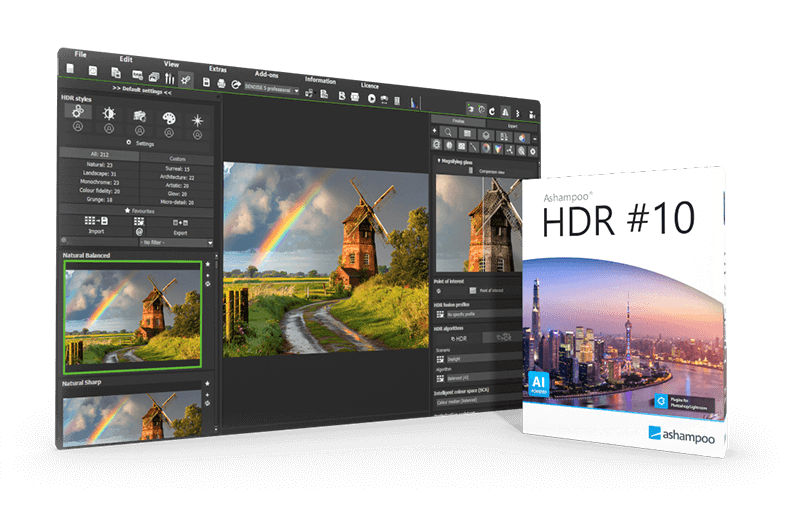
Ashampoo HDR #10 is an image processing application designed to generate High Dynamic Range (HDR) photographs from single images or exposure series. The software addresses lighting imbalances by recovering details in overexposed or shadowed areas that often exceed the capture capabilities of standard camera sensors.
The core functionality relies on 136 AI-optimized presets and two distinct AI-based HDR fusion methods. These tools automate the tone mapping process across ten categories. For images captured via exposure bracketing, the software includes an intelligent ghosting correction feature that identifies and eliminates artifacts caused by moving subjects between shots, ensuring a sharp final merge.
While the interface provides one-click optimizations for beginners, professional users can access the Expert Mode. This environment provides manual control over professional filters and the SCA intelligent color space module. The latest version introduces eleven new AI effects and specialized AI masks for localized editing of sky and depth elements. Technical highlights of the software include:
- Support for 1,296 RAW camera formats.
- Selective drawing tools for precise local adjustments.
- Automatic AI-driven motif recognition and optimization.
- Four new AI tone mapping settings for varied light scenarios.
By combining automated AI presets with granular manual tools, Ashampoo HDR #10 offers a workflow suitable for both rapid photo enhancement and technical image manipulation.
Top 5 Reasons To Download Ashampoo HDR #10 [with AI]
- Next-Generation AI-Driven Workflow: Instantly transform flat photos into masterpieces using 136 AI-optimized presets and advanced tone mapping.
- Revolutionary Ghosting Correction: Eliminate the blur and "ghost" artifacts from moving objects in exposure brackets with intelligent AI detection.
- Unrivaled Camera Compatibility: Professional-grade support for 1296 RAW formats ensures that no matter what gear you use, your files are ready for processing.
- The Perfect Hybrid Interface: Seamlessly switch between one-click automatic optimizations and a deep, granular Expert Mode for total creative control.
- Precision AI Masking Tools: Specifically target the sky or create realistic depth effects with specialized AI masks that handle the heavy lifting of selection.
If you have ever spent hours behind a lens only to return home and find your photos looking washed out, flat, or strangely dark in the corners, you are not alone. Lighting is the single most difficult element of photography to master. Even with the most expensive DSLR or mirrorless setup, the "dynamic range"—the gap between the darkest shadows and the brightest highlights—often exceeds what a digital sensor can capture in a single frame. This is where High Dynamic Range (HDR) imaging comes in, and more specifically, why Ashampoo HDR #10 is the tool you need in your digital arsenal right now.
In the world of photo editing, there are plenty of tools that claim to "fix" your photos, but Ashampoo HDR #10 is different. It isn't just a filter package; it is an AI-powered engine designed to replicate and even surpass the way the human eye perceives light. As a tech reviewer who has seen countless "auto-fix" buttons fail miserably, I can tell you that the precision found in this software is a game-changer. This giveaway is an opportunity to grab a professional-grade suite that bridges the gap between amateur snapshots and gallery-ready art. Let’s dive deep into the five core reasons why you need to download this software today.
1. Next-Generation AI-Driven Workflow
The biggest hurdle for most photographers entering the world of HDR is the complexity of tone mapping. In the past, creating a good HDR image meant fiddling with sliders for hours, often resulting in "crunchy," over-processed looks that screamed "fake." Ashampoo HDR #10 has solved this by placing a powerful suite of Artificial Intelligence at the heart of the program. This isn't just buzzword AI; it’s a functional optimization tool that analyzes the motif of your image and applies corrections based on the specific light scenario.
With 136 manually configured and AI-optimized tone mapping presets, the software does the heavy lifting for you. These presets are organized across ten distinct categories, allowing you to quickly find the right vibe for a landscape, an architectural shot, or a moody interior. Because the AI understands the difference between a sunset and a brightly lit office, the results look natural and professional. You get the benefit of "HDR fusion"—merging multiple exposures—without the headache of manual alignment and exposure balancing. For those who want immediate results that look like they were edited by a pro, this AI-driven workflow is the primary reason to hit that download button.
2. Revolutionary Ghosting Correction
One of the "dirty little secrets" of HDR photography is the problem of "ghosting." When you take an exposure bracket—a series of shots at different brightness levels—the goal is to merge them. However, if a car drives through the frame, a bird flies by, or the wind blows a tree branch between those shots, the final merged image will have translucent, blurry "ghosts" of those objects. Traditionally, fixing this required tedious manual masking in expensive software like Photoshop.
Ashampoo HDR #10 introduces an innovative ghosting correction feature that is nothing short of magic. Using intelligent detection, the software identifies moving objects across the exposure series and isolates them, ensuring that only one crisp version of the object appears in the final merge. This allows you to shoot HDR in the real world—on busy streets or on windy days—without worrying that your image will be ruined by motion. This feature alone elevates the software from a simple utility to a professional-grade necessity, making it possible to achieve flawlessly sharp images even in dynamic environments.
3. Unrivaled Camera Compatibility and RAW Support
As a reviewer, I often see software that looks great on paper but falls apart the moment you try to import a file from a niche or high-end camera. Compatibility is the backbone of any serious photography workflow. Ashampoo HDR #10 shines here by offering hardware support that recognizes and processes a staggering 1296 RAW formats. Whether you are shooting on a brand-new Sony, a classic Canon, a professional Nikon, or even specialized formats from smaller manufacturers, this software can handle it.
But the versatility doesn't stop at RAW support. While HDR is traditionally built from a "bracketed" series of multiple photos, Ashampoo HDR #10 is equally adept at processing single images. It can extract hidden detail from a single RAW or JPEG file, simulating the HDR effect by digging into the metadata and shadow details that are invisible to the naked eye. This means you can go back through your old library of single-shot photos and breathe new life into them, transforming them into vibrant, detail-rich masterpieces. The sheer range of files this software can ingest makes it a "Swiss Army Knife" for your photo library.
4. The Perfect Hybrid Interface: Presets Meet Expert Mode
One of the most impressive things about Ashampoo HDR #10 is how it caters to two very different types of users without alienating either. If you are a beginner, you can stay in the "Automatic" lane. The interface is intuitive, clean, and fast. You import your photos, click an AI preset, and you're done. It’s the perfect way to get stunning results without a steep learning curve. However, as your skills grow, the software grows with you.
For the seasoned professional or the enthusiast who demands absolute control, the Expert Mode is a revelation. This mode unlocks a robust set of tools, including professional image filters across eight different categories. You gain access to the SCA (Smart Color Adaptation) intelligent color space, which allows for incredibly fine-tuned color transitions that avoid the pixelation and banding often seen in lesser software. You also get tools for selective drawing, meaning you can apply specific effects to only one part of the image. This "best of both worlds" approach ensures that you never feel limited by the software, whether you have five minutes to edit or five hours.
5. Precision AI Masking Tools for Depth and Skies
The latest iteration of Ashampoo HDR #10 has doubled down on precision editing with the introduction of specialized AI masks. In landscape photography, the sky is often the most problematic area—it’s frequently too bright (blown out) or lacks the dramatic contrast needed to make a photo pop. The new AI sky mask automatically detects the horizon and allows you to adjust the sky independently of the foreground with incredible accuracy. No more "halos" around trees or buildings; the AI understands the edges better than most manual selections ever could.
Furthermore, the specialized AI depth mask is a professional-level feature that allows you to manipulate the "feel" of a photo. By understanding the depth of field within a 2D image, the software lets you apply adjustments that mimic a shallow depth of field or enhance the atmospheric haze in the distance. When you combine these masks with the eleven new AI effects, you have a level of local adjustment control that used to be reserved for high-end studio retouching. This level of precision ensures your final image isn't just "brightened up," but is a carefully crafted work of art with perfect balance between every element of the composition.
The Verdict: Why You Shouldn't Wait
In the tech world, we often talk about "friction." Friction is anything that stands between you and your creative goal. High-end photography used to have massive amounts of friction: expensive lenses, complicated bracketing techniques, and hours of post-processing. Ashampoo HDR #10 effectively removes that friction. It uses AI to solve the technical problems—lighting, ghosting, and masking—so that you can focus on the creative side of the craft.
The fact that this software handles nearly 1,300 RAW formats and provides 136 presets means it is ready to work for you the moment you install it. It is rare to find a tool that is this powerful yet this accessible. Whether you want to fix a dark photo of your family or create a stunning, high-contrast landscape for your portfolio, this software provides the tools to do it with "maximum professionalism," as the developers claim. This isn't just another app taking up space on your hard drive; it is a significant upgrade to your ability to tell stories through your photos.
Don't let your best memories stay hidden in flat, poorly lit files. Download Ashampoo HDR #10 during this giveaway and experience what it’s like to have an AI-powered darkroom at your fingertips. It is time to stop settling for "good enough" and start producing images that truly capture the brilliance of the world as you saw it. This is a must-have download for anyone who takes their visual content seriously. Your photos deserve to be seen in their best light—literally.

Reviews for Ashampoo HDR #10 [with AI]
Click Here to Read Reviews for Ashampoo HDR #10 [with AI] >> Click Here to Submit Reviews for Ashampoo HDR #10 [with AI] >>