What Does ZD Screen Marker Pro Do?
ZD Screen Marker is a specialized Windows utility designed for real-time screen annotation and digital whiteboarding. Primarily aimed at educators, presenters, and technical support specialists, the software integrates several presentation tools into a single desktop workflow for remote and live communication.
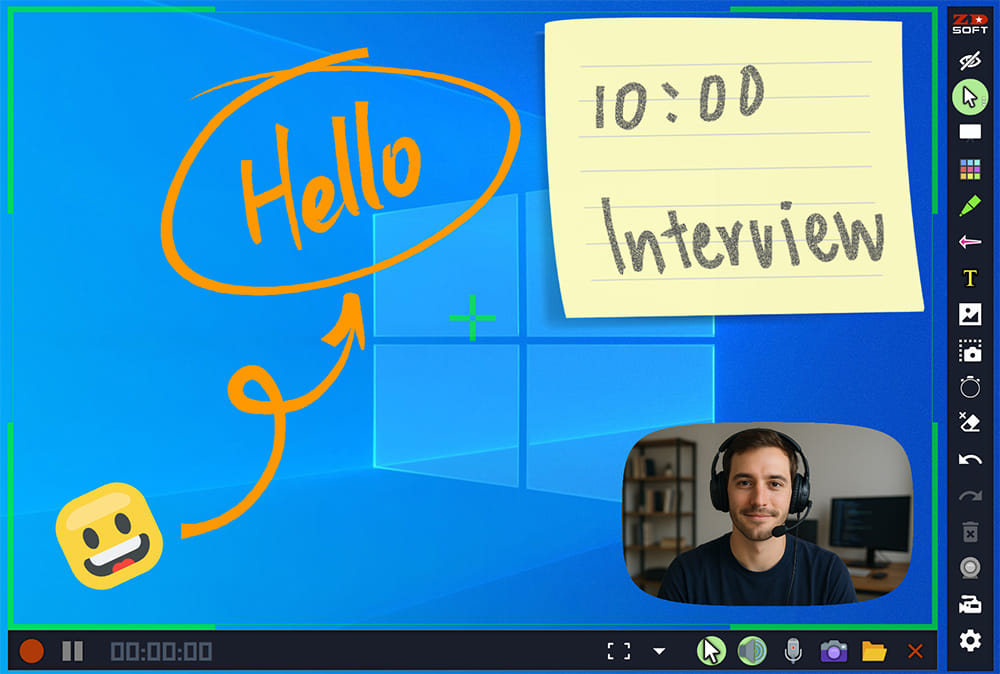
The application provides a functional suite of features intended for clear visual communication:
- Annotation Tools: Users can utilize various pens and geometric shapes to mark up active windows or the full desktop.
- Webcam Overlay: This allows presenters to display their camera feed over the screen content during software demonstrations.
- Whiteboard Mode: The software can switch from screen markup to a dedicated canvas for brainstorming or instructional sketching.
- Integrated Recording: All on-screen actions, including annotations and webcam feeds, can be captured using the built-in screen recorder.
In a professional environment, these tools facilitate product demonstrations and interactive teaching sessions. By acting as a transparent layer over existing Windows applications, ZD Screen Marker ensures that visual cues are integrated directly into the display. The software also includes snapshot capabilities for capturing specific frames during a live session, providing a comprehensive toolkit for technical presentations and support workflows.
Top 5 Reasons To Download ZD Screen Marker Pro
Here is a quick overview of the top five reasons why you need to download ZD Screen Marker today:
- The Ultimate All-in-One Desktop Workflow: It seamlessly integrates annotation tools, whiteboards, and high-quality recording into a single, lightweight system.
- Pro-Grade Visual Communication Tools: You get smooth, high-precision drawing pens, dynamic shapes, and clean markers that instantly guide your audience’s focus.
- Dynamic Picture-in-Picture Webcam Overlay: This tool allows you to place a customizable live video feed of yourself anywhere on your screen, boosting personal engagement.
- Instant Whiteboard and Blackboard Modes: You can transition from annotating existing software to presenting on a completely clean digital canvas with a single click.
- Built-In High-Performance Recording and Snapshots: Capture, save, and share your presentations, tutorials, and online lessons directly within the application without heavy background software.
Let us face it: we have all sat through a boring, flat digital presentation. Whether it is an online college lecture where the professor is just droning over a PowerPoint slide, a software demo where you cannot quite see where the presenter is clicking, or a technical support call where you are desperately trying to explain a glitch, digital communication can feel incredibly distant. The mouse cursor is simply too small to serve as an effective pointer, and traditional screen-sharing apps lack the interactive spark needed to keep an audience truly engaged. What we need is a digital laser pointer, a whiteboard, a camera feed, and a video recorder all rolled into one slick package.
Enter ZD Screen Marker. This is not just another basic utility tool; it is a complete, lightweight, and incredibly powerful desktop presentation suite designed specifically for Windows. If you are a teacher, a software developer, a content creator, a corporate presenter, or a support specialist, this app is designed to transform your desktop into an interactive stage. And because this is currently available as a special download, there is absolutely no reason to pass it up. Let us dive deep into the top five reasons why ZD Screen Marker is an absolute game-changer and why it deserves a permanent home on your Windows desktop.
1. The Ultimate All-in-One Desktop Workflow
If you have ever tried to host a live webinar or record a tutorial video, you know the absolute headache of app fatigue. To get a professional result, you usually have to run a screen recorder, open a separate digital whiteboard program, keep a webcam utility open in the corner of your screen, and somehow coordinate all of these elements without your computer lagging or crashing. It is a stressful juggling act that often results in missed cues, awkward transitions, and a cluttered desktop that looks highly unprofessional to your audience.
ZD Screen Marker solves this exact problem by consolidating your entire presentation toolkit into a single, cohesive workflow. The software sits quietly on your desktop, ready to be called up at a moment's notice. With a quick click or hotkey, you can overlay annotation tools directly on top of your live desktop environment, bring up a blank whiteboard, turn on your webcam, and start recording the entire experience. There is no need to jump between three or four different applications because everything lives under one virtual roof.
This unified workflow dramatically reduces system resource consumption. Because you are not running multiple heavy programs simultaneously, your computer stays cool and responsive. This is incredibly important for live presenters who cannot afford to have their system freeze mid-sentence. By downloading ZD Screen Marker, you are simplifying your setup, clearing away the digital clutter, and giving yourself the peace of mind that comes with a streamlined, reliable production pipeline.
2. Pro-Grade Visual Communication Tools
At its core, ZD Screen Marker is designed to make your screen interactive. Traditional screen-sharing utilities give you a tiny, hard-to-track cursor that easily gets lost in high-resolution displays. ZD Screen Marker replaces that boring pointer with a highly responsive, custom-tailored digital markup kit. Whether you need to draw freehand, highlight a specific line of code, or construct precise geometric diagrams on the fly, this software has you covered.
The drawing engine is remarkably smooth. Unlike cheap built-in tools found in video conferencing software that suffer from visible input lag and jagged lines, the pens in ZD Screen Marker feel incredibly fluid. Your digital ink flows naturally, mimicking the physical feel of writing on a physical board. You can quickly switch between a standard pen for writing, a semi-transparent highlighter for emphasizing text, and a variety of geometric shapes like rectangles, ellipses, and arrows to structure your visual thoughts.
Imagine giving a product demo of a new website design. Instead of saying, "Look at the top-right corner, near the second menu item," you can instantly draw a bright red circle around the exact button you want your clients to see, draw an arrow pointing to the next step, and write a quick note directly on the screen. It turns a passive viewing experience into an active, visually guided journey. Once you start using these high-precision markup tools, you will wonder how you ever managed to present without them.
3. Dynamic Picture-in-Picture Webcam Overlay
In the age of remote work and distance learning, human connection is more valuable than ever. When you present using only your voice and a static screen, your audience is much more likely to lose focus, check their phones, or tune out entirely. Showing your face helps humanize your presentation, builds trust, and keeps viewers engaged. However, setting up a webcam feed that sits neatly over your active workspace can be surprisingly difficult to configure.
ZD Screen Marker addresses this by featuring a built-in, highly customizable webcam overlay. With a simple toggle, you can project your live video feed directly onto your desktop workspace. You can position this window anywhere on your screen, resize it to fit your layout, and ensure that your facial expressions and gestures are part of the learning experience. This is a massive win for teachers who want to maintain eye contact with their students, and for support technicians who want to reassure clients with a friendly face.
What makes this feature truly stand out is how seamlessly it integrates with the rest of the software. Your webcam feed does not conflict with your drawing tools or block your ability to click through your system. It functions as an elegant, native layer of your screen, giving your live streams, pre-recorded tutorials, and corporate presentations a polished, television-broadcast quality. It is the easiest way to elevate your digital presence from amateur to elite.
4. Instant Whiteboard and Blackboard Modes
While annotating directly over active applications, browser windows, and slide decks is incredibly useful, there are times during a presentation when you need to step back and explain a concept from scratch. Perhaps you need to sketch out a database schema, solve a complex mathematical equation, or brainstorm a list of marketing ideas with your team. Normally, this would require you to close your current app, open a digital whiteboard program, and share a completely different window.
With ZD Screen Marker, you can instantly summon a clean whiteboard or blackboard with a single click. The software instantly masks your desktop background with a solid, clean canvas, giving you an infinite space to write, draw, and organize your thoughts. You do not have to disrupt the flow of your presentation or make your audience wait while you transition between apps. When you are done explaining the concept, another quick click brings you right back to your active desktop exactly where you left off.
The choice between a light whiteboard and a dark blackboard is also a fantastic touch. Whiteboards are perfect for formal, bright business environments, while blackboards are incredibly easy on the eyes during long night sessions or dark-themed coding tutorials. This feature essentially gives you a portable classroom chalkboard that travels with you inside your computer, ready to be deployed at a millisecond's notice.
5. Built-In High-Performance Recording and Snapshots
What good is an amazing, interactive presentation if you cannot easily save it for later? Typically, once a live meeting ends, all those brilliant drawings, annotations, and spontaneous explanations disappear into thin air. If you want to save them, you are forced to run heavy screen recording software that can bog down your CPU, or constantly mash the print-screen button on your keyboard, leaving you with a folder full of unorganized, messy image files.
ZD Screen Marker beautifully solves this problem by embedding native, high-performance recording and snapshot engines directly into the core software. Because the recording module is built directly into the annotation engine, it is incredibly efficient. It captures crystal-clear video of your screen, your drawings, your voice, and your webcam overlay without causing your system to stutter. You can record entire lectures or quick five-minute troubleshooting guides, and save them in widely compatible video formats with minimal file sizes.
If you do not need a full video, the instant snapshot feature allows you to capture pristine, high-resolution still images of your marked-up screen. You can use these snapshots to create step-by-step PDF guides, follow-up emails for clients, or study guides for your students. By downloading ZD Screen Marker, you are getting more than just a presentation tool; you are getting a complete content creation engine that helps you build a reusable library of high-quality educational and professional resources.
Conclusion: Why You Must Download This Giveaway Today
In the modern digital landscape, the way we present information is just as important as the information itself. If you want to stand out, command attention, and ensure that your message is clearly understood, you cannot rely on basic screen sharing anymore. You need professional tools that help you illustrate, record, and personalize your digital output.
ZD Screen Marker is the definitive, all-in-one solution that solves the frustrations of digital presentation. It replaces a messy web of separate apps with a single, elegant, and highly optimized workflow that works beautifully on any modern Windows PC. From its silky-smooth drawing engine and responsive shapes to its gorgeous picture-in-picture webcam overlay, instant whiteboard modes, and lightweight screen recorder, this software has everything you need to communicate like a pro.
Do not let your presentations remain flat, static, and unengaging. Take advantage of this fantastic download giveaway, streamline your desktop workflow, and start delivering highly interactive, memorable presentations today. Your audience will thank you!

Reviews for ZD Screen Marker Pro
Click Here to Read Reviews for ZD Screen Marker Pro >> Click Here to Submit Reviews for ZD Screen Marker Pro >>