What Does Ashampoo UnInstaller 15 Do?
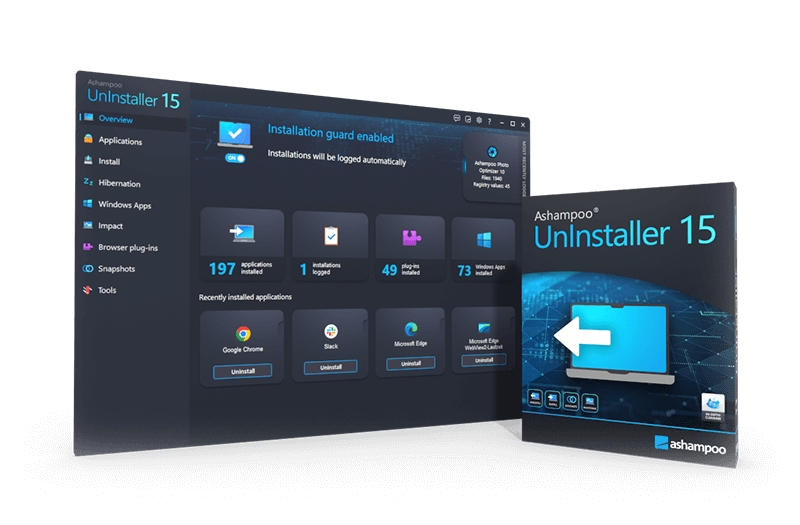
Ashampoo UnInstaller 15 is a system utility designed to remove software, Windows applications, and browser plug-ins without leaving residual data. Utilizing a five-level deletion process, the software monitors installations in real-time to log every file and Registry modification. This ensures that when a program is removed, the utility can reverse those specific changes to maintain system integrity.
The latest version features a background guard that operates up to ten times faster than its predecessors, while maintaining a significantly lower memory and CPU footprint. These performance optimizations make the tool viable for both modern hardware and aging systems. The software is engineered to detect complex, nested installation routines and provides specialized deep cleaning methods for applications that were installed without initial logging.
Key technical capabilities include:
- Snapshot Comparison: This tool analyzes two different system states to identify changes in the Registry and file structure.
- Privacy Traces Cleaner: A dedicated module that identifies and deletes sensitive usage history and tracks.
- Installation Migration: This feature allows users to move installed programs between storage drives to manage disk space without reinstallation.
- Batch Processing: The interface supports the simultaneous removal of multiple applications via a drag-and-drop mechanism.
By automating installation detection and providing a comprehensive deletion history, Ashampoo UnInstaller 15 offers a technical alternative to standard Windows uninstallation routines, focusing on thorough data removal and system performance.
Top 5 Reasons To Download Ashampoo UnInstaller 15
- Unrivaled Deep Cleaning with Five-Level Deletion: Unlike standard uninstallers that leave behind digital clutter, Ashampoo UnInstaller 15 uses a multi-layered approach to ensure every single file, registry key, and temporary folder is permanently removed.
- Blazing Fast Performance and Low Resource Impact: With a background guard that is now up to ten times faster and a significantly reduced CPU and RAM footprint, this software keeps your system protected without slowing it down—even on aging hardware.
- Comprehensive Privacy Protection: The new Privacy Traces Cleaner identifies and eliminates usage trails, ensuring that your digital footprint is wiped clean after you remove software or finish a browsing session.
- Bulletproof Installation Monitoring: By logging every change made during a software installation, the app can perfectly reverse those changes later, even for complex, nested installation routines that confuse other tools.
- Ultimate System Flexibility and Control: From the ability to move installed programs to different drives to the advanced snapshot feature that compares system states, this tool gives you total mastery over your PC’s file structure.
If you have ever felt that your PC is getting slower with every passing month, you are not imagining it. Every piece of software you install, even those you eventually delete, leaves behind a ghost. These ghosts come in the form of orphaned registry entries, empty folders, temporary files, and background services that continue to ping your processor long after the main application is gone. This is why a professional-grade uninstallation tool isn't just a "nice to have"—it is a necessity for anyone who cares about the longevity and speed of their computer. Today, we are looking at Ashampoo UnInstaller 15, and I am here to tell you why this giveaway is the one you absolutely cannot afford to skip.
1. Unrivaled Deep Cleaning with Five-Level Deletion
The biggest lie in the world of computing is the "Uninstall" button found in the Windows Control Panel. When you click that button, Windows simply runs the application's own uninstaller script. The problem? Most developers are lazy when it comes to the exit strategy. They want their software to install quickly, but they don’t put much effort into ensuring it leaves cleanly. They often leave behind "telemetry" folders, user profile data, and massive registry hives just in case you decide to reinstall the program later. Over time, these remnants clog your system like hair in a drain.
Ashampoo UnInstaller 15 tackles this problem with its signature five-level deletion process. It doesn't just ask the program to leave; it checks every room in the house to make sure it didn't leave its luggage behind. When you trigger an uninstallation, the software first utilizes the standard routine, then follows up with deep-cleaning algorithms that scan for orphaned files and registry modifications. This ensures that your system remains as lean as the day you first installed your OS. By using specialized software database profiles, Ashampoo knows exactly where specific programs tend to hide their leftovers, providing a level of cleanliness that the default Windows tools simply cannot match.
Furthermore, this deep cleaning extends beyond standard desktop programs. It also covers Windows Apps and browser plug-ins. We all know how difficult it can be to remove those stubborn "built-in" apps that Microsoft forces onto your system. With this tool, those unwanted apps are gone with a single click, freeing up space and reducing the visual clutter of your Start menu.
2. Blazing Fast Performance and Low Resource Impact
One of the most common complaints about system utility software is that the cure is often worse than the disease. Many "system optimizers" run so many background processes that they end up slowing down the computer more than the junk they are supposed to be cleaning. Ashampoo has clearly listened to user feedback because the performance metrics for version 15 are nothing short of staggering. The central background guard, which monitors your system for new installations, is now up to ten times faster than in previous versions.
What does this mean for the average user? It means you won't even notice it's there. The memory and CPU footprint have been significantly reduced, making this the perfect choice for users with aging or low-end PCs. If you are running a laptop with limited RAM or an older desktop that struggles with modern software, Ashampoo UnInstaller 15 is designed specifically to be lightweight. It provides heavy-duty protection without the heavy-duty resource drain.
Even the snapshot comparison feature—which used to be a time-consuming process—has been "significantly accelerated." You can now compare two different states of your entire registry and file system in a fraction of the time it used to take. This speed ensures that your workflow is never interrupted, allowing you to test new software, analyze its impact, and remove it within minutes, all without your PC breaking a sweat.
3. Comprehensive Privacy Protection
In the modern era, privacy is everything. Every time you use a program, browse the web, or open a document, your computer creates a "trace." These traces are often stored in hidden folders or deep within the registry, detailing what you did and when you did it. While these are sometimes intended to help programs load faster, they also represent a massive privacy risk if someone else gains access to your machine or if you are simply trying to keep your digital life private.
The new Privacy Traces Cleaner module in Ashampoo UnInstaller 15 is a game-changer. It goes beyond simple file deletion and actively hunts for usage traces that other cleaners miss. Whether it is a log of recently accessed files or temporary data stored by a web browser, the Privacy Traces Cleaner identifies these vulnerabilities and wipes them out. This creates a much safer computing environment and ensures that your personal habits stay personal.
Moreover, the software now includes a deletion history for all its cleaner modules. This provides much-needed transparency. You can see exactly what was deleted and when, giving you peace of mind and a clear audit trail of your system maintenance. In an age where data security is paramount, having a tool that prioritizes the removal of sensitive usage data is an incredible asset to any user's digital toolkit.
4. Bulletproof Installation Monitoring
The most effective way to uninstall a program is to know exactly how it was installed in the first place. This is where Ashampoo UnInstaller 15 truly shines. The software uses a sophisticated real-time monitoring system that "watches" installations from the very first second to the very last. It creates a comprehensive log of every file added and every registry entry changed. When you decide to remove that program, Ashampoo simply reverses the log, returning your system to the exact state it was in before the installation occurred.
But what about those complex installation routines? We’ve all seen them: installers that require a reboot halfway through, or those that install three other sub-programs along with the main app. Most uninstallation tools fail here because they lose track of the process. Ashampoo UnInstaller 15 has been engineered to detect the beginning and end of installations much more reliably, even when they involve nested setups or multi-stage routines. It "recognizes" the installation phases with extreme precision, ensuring that nothing slips through the cracks.
Even if you didn't have Ashampoo UnInstaller 15 installed when you originally added a program, it has you covered. By using its in-depth cleaning technology and a massive database of software profiles, it can intelligently guess and find the files associated with "unlogged" installations. This means you can clean up your existing mess just as easily as you can prevent a new one from forming.
5. Ultimate System Flexibility and Control
Finally, let's talk about the features that give you, the user, the power back over your own hardware. One of the standout features of Ashampoo UnInstaller 15 is the ability to move installed programs to a new storage location. Imagine your primary C: drive (perhaps a fast but small SSD) is getting full. Traditionally, if you wanted to move a large game or a heavy piece of creative software to a different drive, you would have to uninstall it and then reinstall it on the new drive. This is a massive waste of time.
With Ashampoo UnInstaller 15, you can simply "move" the program. The software handles the relocation of files and automatically updates all the registry links so the program still works perfectly in its new home. This is a "power user" feature that is presented in a way that anyone can use. It is perfect for freeing up space on full hard drives without the headache of a total reinstallation.
Additionally, the software features a Unified Explorer theme with hot-tracking, making the user interface incredibly intuitive and modern. You can drag and drop programs directly into the uninstaller to start the removal process, or use the batch-uninstallation feature to select a dozen programs and remove them all in one go while you go grab a cup of coffee. The snapshot function further adds to this control, allowing you to create a "save point" of your system. You can install a piece of software you're unsure about, see exactly what it does to your files and registry, and then "revert" those changes with total confidence.
In conclusion, Ashampoo UnInstaller 15 is not just another utility tool; it is a comprehensive maintenance suite for your Windows PC. It solves the "leftover" problem, protects your privacy, monitors your system with surgical precision, and does it all without slowing you down. Whether you are a tech enthusiast who loves testing new apps or a casual user who just wants their computer to work faster, this giveaway is a golden opportunity. Download it, run it, and experience the feeling of a truly clean PC.
By integrating state-of-the-art cleaner modules and maintaining a focus on user-friendliness, Ashampoo has created a product that stands at the top of its class. The 10x faster background guard and the ability to handle complex, nested setups make it more reliable than ever. Don't let your system become a graveyard for dead software. Take control with Ashampoo UnInstaller 15 and keep your Windows installation running like new for years to come. This is the kind of software that you don't realize you need until you see how much better your computer runs without all that digital baggage.
Summary of Benefits:
- Full removal of nested and complex setups.
- Drastic improvement in system stability.
- Enhanced security through the removal of privacy-leaking traces.
- Time-saving batch removals and program migration.
- Optimized for both high-end rigs and older laptops.
There is no reason to settle for the mediocre tools built into your operating system when a professional solution is available. Ashampoo UnInstaller 15 is the definitive way to manage your software lifecycle. From the moment you click "Install" to the moment you decide a program is no longer needed, this app has your back, ensuring your PC remains fast, private, and organized. Don't miss out on this essential download!

Reviews for Ashampoo UnInstaller 15
Click Here to Read Reviews for Ashampoo UnInstaller 15 >> Click Here to Submit Reviews for Ashampoo UnInstaller 15 >>