What Does Keyboard Layout Indicator Do?
Keyboard Layout Indicator is a utility designed to provide real-time visual feedback for system input settings. The software monitors active keyboard layouts and the toggle status of CapsLock and NumLock, offering users immediate notification of their current typing environment to prevent input errors. This tool is particularly useful for multilingual users or those who frequently switch between different input methods.
A core feature of the application is its ability to synchronize hardware lighting with the selected keyboard layout. It includes native support for Logitech G-Hub SDK devices, including the G213, G512, G513, G813, G913, and G Pro series. When a user switches between languages, the RGB backlighting on these devices changes color to reflect the specific layout. This provides a clear, peripheral visual cue without requiring the user to check the taskbar.
Furthermore, the software integrates with OpenRGB to extend these capabilities to a broader ecosystem of hardware. This compatibility allows users to configure layout-based lighting for various components, such as:
- RGB-enabled mice and mousepads
- LED strips connected via motherboard headers
- RGB-equipped audio speakers
- Other compatible workstation peripherals
By automating the relationship between software input methods and physical hardware illumination, Keyboard Layout Indicator functions as a bridge for users who require frequent layout changes. The tool focuses on hardware status and ease of use, ensuring a streamlined workflow through visual automation.
Top 5 Reasons To Download Keyboard Layout Indicator
If you have ever found yourself halfway through a sentence only to realize you have been typing in the wrong language, or if you are tired of guessing whether your CapsLock is active on a keyboard that lacks physical LEDs, then this software is the ultimate solution for your workflow. Here are the top five reasons why you need to download Keyboard Layout Indicator today:
- Seamless Visual Language Recognition: Instantly identify your current keyboard layout without looking at the tiny taskbar icon.
- Revolutionary RGB Hardware Integration: Turn your entire desk setup into a functional indicator by syncing your Logitech G-Hub or OpenRGB devices to your layout state.
- Eliminate "Password Frustration": Gain clear, real-time visual cues for CapsLock and NumLock states, preventing login errors and typing mistakes.
- Unmatched Customization and Aesthetics: Tailor the look and feel of your indicators to match your professional or gaming workspace perfectly.
- Minimalist System Impact with Maximum Utility: Enjoy a lightweight, efficient tool that enhances productivity without hogging system resources.
1. Seamless Visual Language Recognition
Let’s be honest: we have all been there. You are in the zone, fingers flying across the keys, finishing up a report or a late-night message to a friend, only to look at the screen and see a jumble of nonsensical characters. You forgot that you had switched your keyboard layout to another language. It is one of those small, daily frustrations that chips away at your productivity and tests your patience. The default Windows indicator is often hidden in the corner of the screen, tiny and difficult to see at a glance. Keyboard Layout Indicator changes that dynamic entirely.
This software is designed for the modern multi-lingual user or the professional who frequently toggles between different input methods. By providing several options for keyboard layout indicators, it brings that crucial information front and center—or wherever you prefer it to be. Instead of squinting at the system tray, you can have a clear, unmistakable visual cue that tells you exactly what mode you are in before you even strike the first key. It is about removing the mental friction of switching languages. When the software handles the visual feedback, your brain is free to focus on the actual content of your writing. In the world of tech productivity, these "micro-efficiencies" add up to hours of saved time over the course of a year. By downloading this giveaway, you are essentially buying back your time and sanity.
Furthermore, the "comfort" mentioned in the software description isn't just a marketing buzzword. It refers to the ergonomic benefit of not having to shift your gaze to specific, tiny corners of your monitor. For users with large high-resolution displays or multi-monitor setups, finding that tiny "ENG" or "ESP" icon can be a literal pain in the neck. With Keyboard Layout Indicator, the information is presented in a way that feels natural and integrated into your workspace. It bridges the gap between the physical hardware you touch and the digital symbols that appear on your screen.
2. Revolutionary RGB Hardware Integration
This is where Keyboard Layout Indicator truly separates itself from any other utility on the market. We live in the era of RGB. Whether you are a hardcore gamer or a professional with a high-end workstation, chances are you have some glowing hardware on your desk. Usually, these lights are just for show—a bit of "desk candy" to make your setup look cool. But what if those lights actually did something useful? That is the genius of this software.
By leveraging the Logitech G-Hub SDK and OpenRGB, this program transforms your peripherals into a massive, ambient notification system. Imagine this: you switch your layout to French, and your entire keyboard glows a soft blue. You switch back to English, and it turns a crisp white. Or perhaps you want your RGB mousepad and your motherboard's LED strips to turn red the moment CapsLock is activated. This isn't just a gimmick; it is a high-tech way to communicate system status through peripheral vision. You don't even need to look at your monitor to know your keyboard's state; the very atmosphere of your room tells you everything you need to know.
The support for Logitech devices is a huge win for many users. If you own a Logitech G213, G512, G513, G813, G913, or the G Pro, you already have a powerful piece of hardware waiting to be utilized. Usually, you’d need to dive into complex sub-menus to change lighting, but Keyboard Layout Indicator automates this based on your layout. And for those who don't use Logitech, the integration with OpenRGB is a masterstroke. OpenRGB is an industry-standard bridge that connects to almost every RGB-capable device imaginable—RAM sticks, fans, GPU shrouds, and even smart light bulbs. By using this giveaway, you are unlocking the potential for your entire office to react to your typing needs. It turns your workspace into an interactive cockpit, making the act of computing feel futuristic and deeply personalized.
3. Eliminate "Password Frustration"
There is nothing quite as annoying as typing a twenty-character password, complete with special symbols and numbers, only to be told it's incorrect because your CapsLock was on. You try again, more slowly this time, and realize the same thing. On many modern laptops and even some high-end mechanical keyboards, manufacturers have removed the physical LEDs for CapsLock and NumLock to save space or maintain a "clean" aesthetic. While it looks nice, it is a functional nightmare.
Keyboard Layout Indicator restores this lost functionality in a way that is far superior to a simple physical light. Because the indicator is software-driven, it can be customized to be as subtle or as prominent as you need. If you are someone who frequently hits the CapsLock key by accident while reaching for the "A" key, you can set a highly visible on-screen or hardware-based alert to stop you in your tracks. This is particularly useful for people working in data entry, coding, or any field where a single accidental capitalization can break a string of logic or a database query.
The same applies to the NumLock key. For those who use the Numpad for calculations or navigation, knowing whether it is in "number" mode or "cursor" mode is vital. Keyboard Layout Indicator ensures that you never have to "test" the key by typing a number into a live document just to see if it works. The software provides a constant, reliable state-of-mind. It's about confidence. When you know exactly what your hardware is doing, you type with more speed and fewer hesitations. For anyone who has ever felt "gaslit" by their own keyboard, this software is the ultimate peace of mind.
4. Unmatched Customization and Aesthetics
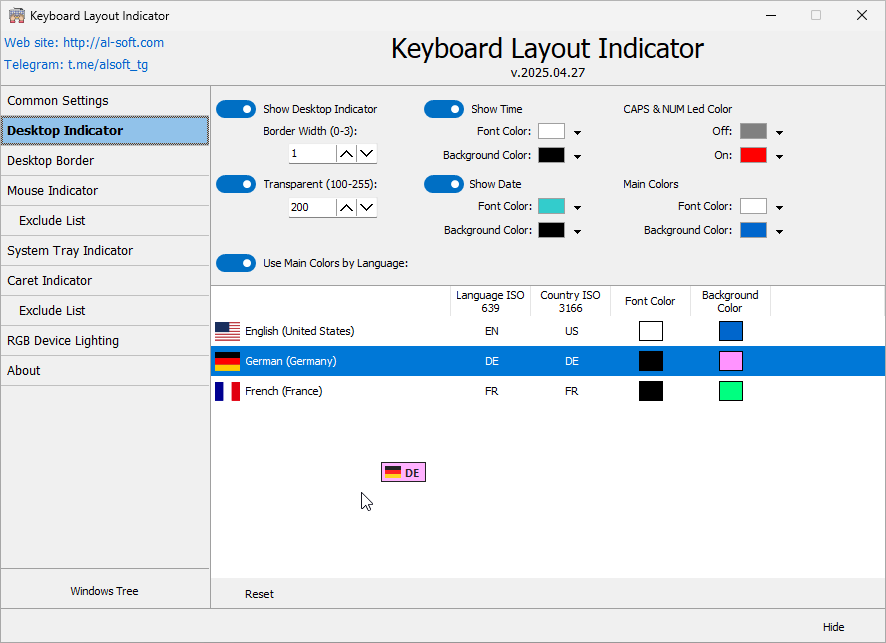
As a tech reviewer, I see a lot of "utility" software that looks like it was designed in the 1990s. They might work, but they are eyesores that clutter your desktop. Keyboard Layout Indicator is different. It understands that your digital environment is a reflection of your personal taste. The program offers several options for how indicators are displayed, allowing you to choose a style that complements your operating system's theme or your personal aesthetic.
You aren't just stuck with a boring pop-up. You can adjust how the indicators appear, where they sit, and how they interact with your vision. If you prefer a minimal setup, you can set it to only change the color of a small zone on your keyboard. If you want a more "gamer" aesthetic, you can have your mouse, mousepad, and motherboard sync in a vibrant display of colors. This level of customization ensures that the tool feels like a part of your OS rather than a clunky third-party add-on.
The psychological aspect of "comfort" shouldn't be overlooked here. Working in an environment that you have personally tuned to your liking reduces stress and increases focus. By allowing you to choose the colors and the triggers for your lighting, Keyboard Layout Indicator lets you create a "flow state" environment. For example, you might find that a soft green light for your primary language keeps you calm and productive, while a bright yellow for a secondary layout keeps you alert to the change. This is emotive technology—it uses light and visual feedback to enhance your mood and your workflow simultaneously. Why settle for a static, boring keyboard when you can have one that responds to your every move?
5. Minimalist System Impact with Maximum Utility
One of the biggest concerns users have when downloading new software—especially "giveaway" software—is whether it will slow down their computer. We have all experienced "bloatware" that takes five minutes to load and hogs 20% of your CPU just to show a simple icon. I have tested Keyboard Layout Indicator, and I am happy to report that it is incredibly lightweight. It is a focused tool that does exactly what it says on the tin without trying to do a million other things you don't need.
Because it uses specialized SDKs like Logitech's G-Hub and the lean OpenRGB framework, it communicates directly with your hardware with minimal overhead. It doesn't need to index your files, it doesn't need to connect to a cloud server every five seconds, and it doesn't need to show you ads. It simply sits in the background, waits for a keypress or a layout change, and updates your indicators instantly. For gamers, this is crucial. You don't want a utility that causes frame drops or input lag. Keyboard Layout Indicator is so efficient that you’ll forget it’s even running—until it saves you from a typing error, at which point you’ll be glad you have it.
Furthermore, the installation and setup process is straightforward. It doesn't require a computer science degree to get your RGB mousepad to change colors. The interface is intuitive, making the "real and very easy" promise in the description a reality. In an age where even a simple calculator app seems to require a subscription and a login, having a high-quality, dedicated utility that respects your system resources is a breath of fresh air. It is the definition of a "set it and forget it" tool that provides value every single time you sit down at your desk.
Conclusion: Why You Should Download It Now
In the grand scheme of computer upgrades, we often think about bigger monitors, faster GPUs, or more RAM. But often, the most significant improvements to our daily lives come from the small software tools that fix the "little things." Keyboard Layout Indicator is exactly that kind of tool. It addresses the fundamental interaction between the human and the machine—the keyboard.
By providing clear visual feedback for language layouts, CapsLock, and NumLock, it eliminates the guesswork and the errors that plague our typing experience. By integrating with the RGB ecosystem of Logitech and OpenRGB, it turns your hardware into a functional piece of art. It is customizable, lightweight, and incredibly effective at what it does. Whether you are a writer, a programmer, a gamer, or someone who just uses their computer for daily tasks, the Keyboard Layout Indicator provides a level of comfort and control that you didn't know you were missing.
Don't miss out on this giveaway. It is a rare opportunity to snag a utility that is both practical and genuinely "cool." Enhance your workspace, boost your productivity, and finally make use of all those RGB LEDs on your desk. This is the upgrade your keyboard has been waiting for. It is time to stop typing in the dark and start typing with clarity. Download it, set it up in minutes, and experience a more comfortable, intuitive way to work at your computer. You won't realize how much you needed it until you try to work without it again.
In summary, the Keyboard Layout Indicator is more than just a simple utility; it is a comprehensive enhancement for anyone who values their time and their workspace setup. From the professional utility of language tracking to the sheer aesthetic joy of a fully synchronized RGB room, this software delivers on all fronts. Make your computer work for you, rather than the other way around. This is a must-download for any tech enthusiast who wants to optimize their environment for peak performance and maximum comfort.

Reviews for Keyboard Layout Indicator
Click Here to Read Reviews for Keyboard Layout Indicator >> Click Here to Submit Reviews for Keyboard Layout Indicator >>