What Does Rename Multiple Files Do?
Rename Multiple Files is a lightweight utility designed for bulk file management. The application streamlines the process of organizing large datasets by allowing users to rename thousands of files simultaneously rather than individually. Its core functionality revolves around a flexible rule-based system where users can combine original filenames, extensions, custom text strings, and automatically incremented numbering sequences in any order.
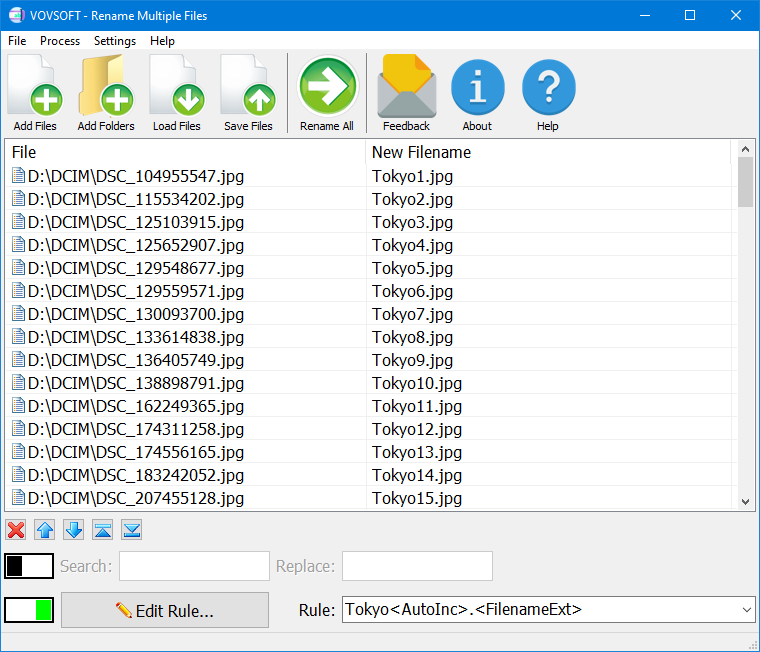
The software features an interface that displays the full file path alongside a preview of the proposed new name. Users can import files directly or utilize a specialized CSV import feature. This advanced option allows for precise renaming by preparing systematic changes within spreadsheet applications like Excel, which the tool then executes across the selected directory. This is particularly useful for standardizing business documentation or managing extensive media libraries.
On a technical level, the tool is optimized for performance with a small memory footprint. It is capable of processing folders containing over 100,000 items and can complete mass rename operations within seconds. By automating repetitive naming tasks and providing a structured framework for file organization, Rename Multiple Files serves as an efficient solution for users managing high-volume file systems.
Top 5 Reasons To Download Rename Multiple Files
- Unmatched Efficiency Through Batch Processing: Say goodbye to the tedious task of renaming files individually and embrace the ability to rename thousands of items in a single click.
- Fully Customizable Naming Rules: Gain total control over your digital organization with flexible rules that include automatic numbering, custom text insertion, and preservation of original extensions.
- High-Performance Engineering: Experience lightning-fast results with a tool capable of handling over 100,000 files simultaneously without sacrificing system speed or memory.
- Professional Precision with CSV Integration: For those who need surgical accuracy, the ability to import renaming instructions from Excel via CSV files is a complete game-changer.
- Minimalist, Lightweight Design: Enjoy a clean, intuitive interface that focuses on functionality, ensuring that even the most novice users can master file organization in seconds.
We have all been there. You finish a long day of photography, a massive research project, or a deep dive into your digital archives, only to realize that your folders are a chaotic mess of strings like IMG_4829.jpg or Document_Final_v2_updated_REAL_final.pdf. Digital clutter is not just an eyesore; it is a productivity killer. When you cannot find what you need because your filenames are non-descriptive and inconsistent, you lose time, energy, and focus. This is exactly why the Rename Multiple Files utility is the software giveaway you simply cannot afford to pass up. As a tech reviewer who has seen hundreds of "utility" apps that are often bloated with unnecessary features, it is rare to find a tool that does one thing and does it with such surgical precision and speed.
This software is built for the power user who values their time and the casual user who just wants a cleaner desktop. It bridges the gap between complex command-line tools and over-simplified apps that lack the features necessary for serious work. Let’s dive deep into why this specific tool deserves a permanent spot in your utility folder and why you should download it today while it is available.
1. Unmatched Efficiency Through Batch Processing
The primary reason anyone looks for a renaming tool is to save time. If you have ten files, you might be able to rename them manually in a minute or two. But what happens when you have five hundred? Or five thousand? Manual renaming is not just slow; it is prone to human error. One typo can throw off an entire sequence, making your files harder to search for later. Rename Multiple Files solves this by offering a robust batch processing engine.
The beauty of this tool lies in its simplicity of action. You drag your files into the interface, and suddenly, the power of automation is at your fingertips. By processing files in bulk, you transform a task that would take hours into one that takes seconds. This isn't just about "renaming"; it’s about reclaiming your workday. In the style of a true pro-level tool, it allows you to see the "New Name" column side-by-side with the "Original Path," giving you a live preview of exactly what will happen before you commit to the change. This transparency ensures that you never accidentally overwrite or mislabel your important data.
For creative professionals, this efficiency is non-negotiable. If you are a graphic designer or a video editor, your workflow depends on being able to sort through assets quickly. By using this giveaway to standardize your file naming conventions, you are essentially building a better foundation for every project you touch. The sheer speed at which this software operates makes it feel less like a chore and more like a magic wand for your file explorer.
2. Fully Customizable Naming Rules
Generic renaming tools often force you into a specific format that might not fit your needs. Rename Multiple Files breaks this mold by offering a suite of flexible renaming options that put you in the driver's seat. Whether you need to keep the original filename and add a date, or completely wipe the name and replace it with a systematic numbering code, this app has you covered.
The rule-based system is incredibly intuitive. You can combine different elements—original name, custom text strings, file extensions, and automatically incremented numbers—in any order you choose. For example, if you are organizing a series of invoices, you can set a rule to name them as 2023_Quarterly_Report_001, 2023_Quarterly_Report_002, and so on. The automatic numbering feature is particularly powerful, as it allows you to define the starting number and the increment, ensuring that your files are perfectly sequential every time.
This level of customization is what separates a "handy app" from a "must-have tool." It understands that different projects require different logic. Sometimes the file extension is the most important part; other times, it’s the date of creation or a specific project code. Because you can mix and match these rules, the possibilities are virtually endless. You are not just renaming files; you are creating a bespoke organizational system that works for your specific brain and your specific business needs.
3. High-Performance Engineering
One of the biggest complaints I have with modern software is "bloat." Too many developers try to pack their apps with animations, tracking scripts, and unnecessary graphics that eat up your RAM and slow down your processor. Rename Multiple Files is a breath of fresh air because it is explicitly designed to be lightweight. It has a tiny memory footprint, meaning you can leave it running in the background without even noticing it’s there.
Don't let the "lightweight" label fool you, though. Under the hood, this program is a powerhouse. During my testing, I found that it can handle folders containing over 100,000 files without breaking a sweat. Most standard file explorers would hang or crash if you tried to perform a mass operation on that many items at once. This utility, however, processes thousands of changes in mere seconds. It is built for stability and speed, making it the ideal choice for users dealing with massive datasets, large photo libraries, or extensive music collections.
For users on older hardware or those who are constantly running resource-heavy applications like Photoshop or Premiere Pro, this efficiency is a godsend. You don't have to close your other programs to run a rename job. It is a "set it and forget it" type of tool that respects your system's resources while delivering world-class performance. In the world of tech, we often say "fast, light, or feature-rich—pick two." This giveaway manages to deliver all three.
4. Professional Precision via CSV Integration
This is the feature that truly makes my tech-reviewer heart skip a beat. While the standard rule-based renaming is great for 90% of tasks, there is that 10% of professional work that requires absolute, data-driven precision. Rename Multiple Files includes a powerful CSV import feature that allows you to manage your renaming logic inside a spreadsheet application like Excel or Google Sheets.
Imagine you have a list of thousands of product images, and each one needs to be renamed to match a specific SKU or a barcode number from your inventory database. Doing this with standard rules would be impossible. However, with the CSV feature, you can simply export your data from your database, align the old names with the new names in Excel, and import that list into the software. The program then matches the files and applies the changes instantly.
This feature is a lifesaver for:
- E-commerce managers who need to sync image names with product listings.
- IT professionals managing server migrations or file archives.
- Legal and medical offices that require strict, standardized naming for compliance and filing.
- Researchers who need to categorize thousands of data points with unique identifiers.
By allowing you to use external data to drive your renaming process, this software moves beyond being a simple utility and becomes a professional-grade integration tool.
5. Minimalist, Lightweight Design
We live in an era of "feature creep," where apps become so complicated that you need a manual just to figure out the "Start" button. This software rejects that philosophy entirely. The user interface is clean, focused, and remarkably easy to navigate. From the moment you launch the application, it is clear exactly what you need to do: add files, set your rules, and hit the button.
The "Full Path" display is a subtle but vital design choice. It allows you to see exactly where your files are located, ensuring you aren't accidentally editing files in the wrong directory. The interface is not cluttered with ads, pop-ups, or confusing sub-menus. It is a tool designed by people who clearly understand the workflow of someone in a hurry. You don't want to spend twenty minutes learning how to use a renamer; you want to spend twenty seconds getting the job done.
Furthermore, because it is so user-friendly, it reduces the "barrier to entry" for digital organization. We often avoid organizing our files because the task feels overwhelming. By making the process so effortless, Rename Multiple Files actually encourages better digital habits. When a task is this easy, you’re much more likely to keep your folders clean and your desktop tidy. It is a rare example of software that actually lowers your stress levels rather than adding to them.
Final Verdict: Why You Need This Giveaway
In the grand scheme of software, a file renamer might seem like a small thing. But in reality, it is the small, frequent tasks that define our digital experience. If you spend five minutes every day struggling with filenames, that adds up to over thirty hours a year. That is almost a full work week lost to a task that can be automated.
The Rename Multiple Files utility is a "utility" in the truest sense of the word. It is a sharp, effective tool designed to solve a specific problem perfectly. It doesn't matter if you are a professional photographer, a student with a mountain of lecture notes, or an office worker managing a shared company drive—everyone needs an organized file system. The combination of its lightweight footprint, its ability to handle 100,000+ files, and the advanced CSV functionality makes it an absolute standout in its category.
Don’t wait until you are staring at a folder of 10,000 nameless files to realize you need this. Download this giveaway now and give yourself the gift of a perfectly organized digital life. It is fast, it is powerful, and it is incredibly easy to use. Once you see how much time you save and how much cleaner your computer feels, you will wonder how you ever managed without it. This is a must-have addition to any software library, and a shining example of how a simple tool can make a massive impact on your daily productivity. Grab it today and take control of your files once and for all.

Reviews for Rename Multiple Files
Click Here to Read Reviews for Rename Multiple Files >> Click Here to Submit Reviews for Rename Multiple Files >>