What Does Ashampoo Snap 16 Do?
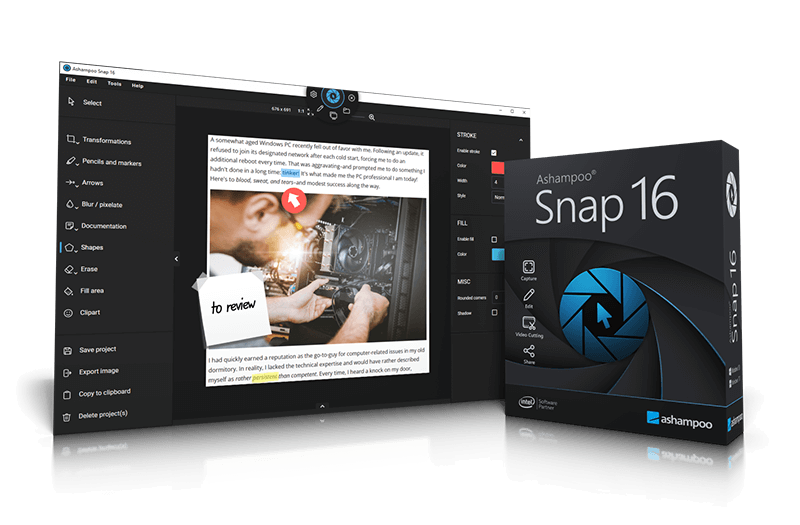
Ashampoo Snap 16 is a specialized utility designed to capture desktop activity through both static screenshots and high-definition video. The software consolidates the entire workflow—from capture to distribution—by integrating annotation and editing tools directly into the application, removing the requirement for secondary image or video editors.
The program supports a wide range of capture modes, including scrolling areas, timed intervals, custom window sizes, and multi-display environments. Technical highlights of this version include:
- An improved image and video capturing engine for enhanced performance.
- New scroll-capture technology for long web pages or documents.
- A dedicated toolbar for seamless zooming during active captures.
- A context menu for rapid access to core recording functions.
For post-processing, users can apply graphics, text, and effects to clarify visual information. The software also features automated numbering to assist in creating structured tutorials or documentation. The built-in video editor allows for precise cuts and the merging of clips into consolidated files or individual episodes. Finalized captures can be saved to local storage or uploaded directly to the Ashampoo cloud space for sharing.
Top 5 Reasons To Download Ashampoo Snap 16
- Cutting-Edge Capture Engine for Immaculate Quality
- Revolutionary New Scroll-Capture Technology
- A Comprehensive Built-In Editing and Annotation Suite
- High-Performance Video Recording and Editing Workflow
- Seamless User Experience with Enhanced Performance and Zooming Tools
In the fast-paced world of digital communication, the ability to capture, curate, and convey information visually is no longer just a "nice-to-have" skill—it is an absolute necessity. Whether you are a remote worker trying to explain a complex software bug to your IT team, an educator building tutorials for students, or a creative professional documenting a design process, the standard "Print Screen" button simply does not cut it anymore. We need tools that are as dynamic as the work we do. This is where Ashampoo Snap 16 enters the frame, and let me tell you, as someone who has tested dozens of screen capture utilities over the years, this latest iteration is a total game-changer. It is not just a screenshot tool; it is a full-fledged visual communication command center.
When I first sat down to review Ashampoo Snap 16, I was looking for efficiency. I wanted to see if this software could actually save me time in my daily workflow. What I found was a powerhouse of a program that manages to balance high-end professional features with an interface so intuitive that anyone can master it in minutes. If you are on the fence about whether you need another utility on your desktop, let me break down the top five reasons why Ashampoo Snap 16 is the download you didn’t know you were missing.
1. Cutting-Edge Capture Engine for Immaculate Quality
The core of any screen capture software is its engine, and Ashampoo Snap 16 features a cutting-edge image and video capturing engine that sets a new industry standard. We have all experienced the frustration of taking a screenshot only to find that the colors are slightly off, the text is blurry, or the resolution doesn't match what we see on our high-definition monitors. Ashampoo has clearly gone back to the drawing board to ensure that what you see on your screen is exactly what you get in your file.
This engine is designed to handle the most demanding environments. Whether you are working on a standard 1080p setup or a cutting-edge 4K multi-display environment, Snap 16 scales beautifully. It supports multi-display environments with ease, allowing you to capture content across different monitors without the weird scaling issues that plague lesser software. This is particularly vital for developers and data analysts who often have multiple windows open across several screens and need to capture the "big picture" without losing detail.
The "immaculate results" promised by the developers are not just marketing speak. When you capture a window or a specific region, the edge detection is razor-sharp. There is no guesswork involved. The engine also powers the "timed captures" feature, which is perfect for capturing those elusive context menus or hover-over effects that disappear the moment you try to click a capture button. By setting a delay, you can prepare the screen exactly how you want it, and the engine takes a perfect snapshot the moment the timer hits zero. It’s that level of precision that makes this software a professional-grade tool.
2. Revolutionary New Scroll-Capture Technology
How many times have you tried to take a screenshot of a long webpage, a lengthy PDF, or a deep conversation in a messaging app, only to realize you have to take five separate shots and try to stitch them together in a photo editor? It is a tedious, soul-crushing task. Ashampoo Snap 16 solves this once and for all with its new scroll-capture technology. This is, in my opinion, the standout feature of this version.
The technology works by intelligently scrolling through the active window and "stitching" the content together in real-time as it captures. The result is one seamless, high-resolution image of the entire page. Whether it is a website that goes on for miles or a complex spreadsheet, Snap 16 handles the vertical (and horizontal!) movement with incredible grace. This isn't just about saving time; it’s about accuracy. When you stitch images manually, you often lose pixels or end up with misaligned text. With Snap 16’s automated scrolling, the integrity of the original content is preserved perfectly.
For researchers and web designers, this feature is worth the download alone. Imagine being able to capture an entire landing page design to show a client, or documenting an entire article for offline reference, with a single click. The software handles the scrolling speed and the alignment automatically, so you don't have to worry about jerky movements ruining the capture. It is smooth, reliable, and incredibly efficient.
3. A Comprehensive Built-In Editing and Annotation Suite
A screenshot by itself is often just the beginning. To truly communicate an idea, you usually need to point things out, highlight specific areas, or add explanatory text. Usually, this means opening the image in another program like Photoshop or GIMP, adding your layers, and then exporting it again. Ashampoo Snap 16 eliminates this entire workflow by including a robust post-processing and annotation suite directly within the app.
The moment you take a capture, Snap 16 provides you with a wealth of tools to augment your image. You can add:
- Automated numbering: Perfect for creating step-by-step tutorials where you need to label "Step 1," "Step 2," etc., without manually typing each number.
- Arrows and shapes: Guide the viewer's eye exactly where it needs to go with professional-looking graphics.
- Text and callouts: Add context or instructions directly onto the image.
- Highlighting and blurring: Draw attention to important data or blur out sensitive information like passwords or personal addresses for privacy.
What makes this editing suite special is how "live" it feels. It’s not a clunky add-on; it’s a seamless part of the capturing process. The interface is designed to keep you in the "flow state." You can apply effects, add shadows to your objects to make them pop, and even use various graphics to make your captures look like they were designed by a pro. This turns a simple screenshot into an illustrated explanation that conveys more information in five seconds than a five-hundred-word email ever could. It’s about the "fast lane to success," as the developers put it, and having these tools at your fingertips saves an unbelievable amount of effort.
4. High-Performance Video Recording and Editing Workflow
We are living in the age of video. Sometimes, a static image just won't cut it, especially when you are trying to demonstrate a process or record a webinar. Ashampoo Snap 16 isn't just for screenshots; it is a powerful video recording tool that can capture anything on your desktop. Whether you are recording your entire screen or just a specific window, the video quality is top-tier.
But recording is only half the battle. Most screen recorders leave you with a raw file that you then have to take into a video editor to trim the beginning and end. Snap 16 changes the game with its built-in video editor. This allows you to make custom cuts, merge different clips, or store individual segments as episodes. If you are a content creator or an educator, this is a massive benefit. You can record a long session, cut out the "ums" and "ahs" or the dead air, and have a polished video ready to share in minutes.
The video engine is optimized for performance, meaning it won't tank your system resources while you are trying to record a high-def stream or a complex software demonstration. You can also capture your webcam and microphone simultaneously, making it the perfect tool for creating "picture-in-picture" style tutorials or video messages. The ability to store these finished captures locally or upload them to the Ashampoo cloud space means your videos are safe and easily shareable with teammates or clients across the globe.
5. Seamless User Experience with Enhanced Performance and Zooming Tools
A tool is only as good as its usability, and this is where Ashampoo Snap 16 truly shines as a tech reviewer’s favorite. The developers have focused heavily on performance improvements across the board, making the software feel light, snappy, and responsive. It doesn't bloat your system; it sits quietly in the background until you need it, and then it springs into action instantly.
One of the most user-friendly additions is the handy toolbar for seamless zooming. When you are trying to capture a very specific, small detail on your screen, precision is everything. The zoom tool allows you to see exactly what you are selecting down to the pixel. No more "close enough" captures—you get exactly what you want on the first try. This is complemented by a convenient context menu that gives you quick access to all the primary recording and capturing features without having to dig through complex menus.
The user interface has been refined to be as "frictionless" as possible. Every feature is exactly where you expect it to be. The convenience features, like the ability to automatically save captures or the smart handling of multi-monitor setups, show that the developers have actually listened to user feedback. It’s the small things, like the way the toolbar hides when you don't need it or the speed at which the editor opens, that make Snap 16 a joy to use. When a piece of software removes the "friction" from your workday, it becomes an essential part of your toolkit.
In conclusion, Ashampoo Snap 16 is much more than a simple utility; it is a comprehensive solution for anyone who works on a computer. By combining a high-end capture engine with revolutionary scrolling technology, a professional editing suite, robust video capabilities, and a lightning-fast user interface, it provides everything you need to communicate visually and professionally. If you are looking for a way to boost your productivity and ensure your screen captures always look immaculate, this is the giveaway you cannot afford to miss. Download it, explore the features, and you'll quickly realize that you’ll never go back to the basic "Print Screen" button again.
The digital world moves fast, and your tools should help you keep up, not hold you back. Ashampoo Snap 16 puts you in the driver’s seat, giving you the power to capture, edit, and share your world with unparalleled ease. Don't let this opportunity pass you by—your workflow will thank you.

Reviews for Ashampoo Snap 16
Click Here to Read Reviews for Ashampoo Snap 16 >> Click Here to Submit Reviews for Ashampoo Snap 16 >>