What Does Compare Two Lists Do?
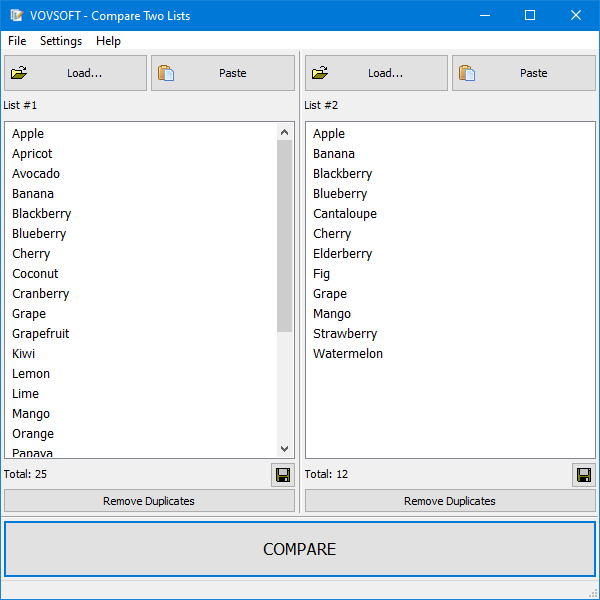
Compare Two Lists is a specialized utility designed to perform set operations on text-based datasets. The application allows users to process two distinct lists—containing words or numbers—to identify intersections, unions, and differences without the need for complex spreadsheet formulas. The interface features a split-panel layout where data can be imported via file loading, drag-and-drop, or clipboard pasting.
The software provides several analytical functions for data reconciliation:
- Set Intersections (AND): Identifies items present in both lists.
- Set Unions (OR): Concatenates lists into a single set.
- Set Differences: Isolates items appearing exclusively in List 1 or List 2.
Users can customize the comparison logic with toggles for case sensitivity and whitespace ignore. Additionally, the tool includes a dedicated function to purge duplicates within individual listings. Unlike traditional spreadsheet software that often encounters performance bottlenecks when handling millions of cells, this tool is optimized for high-volume data processing.
Upon completion of the analysis, results can be exported as text files. The software supports custom encoding selection for the output, ensuring compatibility across different environments. This streamlined approach focuses on factual data comparison and efficient resource management for large-scale text analysis.
Top 5 Reasons To Download Compare Two Lists
1. Unmatched Speed and Scalability: Unlike standard spreadsheet software that crawls to a halt with large datasets, this tool is optimized to handle millions of items effortlessly, ensuring your workflow never skips a beat.
2. No-Code Simplicity: You can perform complex set operations—like intersections, unions, and differences—without writing a single line of code or memorizing complicated Excel formulas.
3. Powerful Set Logic Functions: The software provides professional-grade mathematical set operations (AND, OR, and Differences) to identify exactly what is unique or shared between two lists in seconds.
4. Intelligent Data Cleaning: With built-in features to ignore whitespace, toggle case-sensitivity, and remove internal duplicates with a single click, your data remains pristine and accurate.
5. Streamlined, Lightweight Interface: The dual-panel design allows for a drag-and-drop workflow that is intuitive for beginners but powerful enough for power users, making list management a breeze.
Reason 1: Defeating the "Excel Lag" Once and for All
If you have ever tried to compare two columns of data containing hundreds of thousands of rows in a traditional spreadsheet program, you know the frustration. You stare at the "Not Responding" message, your computer fans start spinning like a jet engine, and you pray that you saved your work before the inevitable crash. For many of us in the tech world, Excel is a daily necessity, but it is not always the right tool for the job—especially when it comes to massive list comparisons.
This is where "Compare Two Lists" truly shines as a specialized powerhouse. This software is engineered specifically for the task of list comparison, which means it doesn't carry the "bloat" of a full-scale spreadsheet suite. Because it is lightweight and optimized for memory management, it can process millions of items in the time it takes you to take a sip of coffee. When you are dealing with massive server logs, extensive customer databases, or long-form inventory sheets, you need a tool that respects your time. By offloading these heavy-duty comparison tasks to this dedicated app, you free up your system resources and eliminate the "spreadsheet anxiety" that comes with handling giant datasets.
As a reviewer, I have seen many tools claim to be "high performance," but this software actually delivers by focusing on one thing and doing it exceptionally well. It treats your data as raw text or numbers, bypassing the complex cell-rendering engines that slow down other software. If you are a data analyst or a developer who frequently deals with "Big Data" on a local level, this reason alone makes the download an absolute no-brainer.
Reason 2: The End of Complex Formula Nightmares
Let’s be honest: not everyone wants to spend their afternoon nesting VLOOKUP, INDEX-MATCH, or XLOOKUP functions just to find out which email addresses are in List A but not List B. Even for those of us who consider ourselves "power users," the risk of a syntax error or a misplaced dollar sign in a formula can lead to catastrophic data errors. One wrong click and your entire comparison is invalid.
The beauty of "Compare Two Lists" lies in its "No-Code" philosophy. The software replaces hours of formula writing with a single, glorious "Compare" button. You don't need to know how to write a script; you don't need to understand Boolean logic on a programming level; and you certainly don't need to consult a manual every time you want to find a difference. The interface is designed to be self-explanatory. You have List 1, you have List 2, and you have the "Compare" button. It is the ultimate "get things done" tool for professionals who value efficiency over technical complexity.
By removing the barrier of entry that comes with complex functions, this software democratizes data analysis. Whether you are a small business owner trying to clean up a mailing list or a student comparing research citations, the simplicity of this tool ensures that you get accurate results every time without the steep learning curve. It’s about working smarter, not harder.
Reason 3: Mathematical Precision with Set Logic
At the heart of "Compare Two Lists" are three fundamental operations that are the bread and butter of data management: Intersections, Unions, and Differences. While these might sound like terms from a college math class, in this app, they are powerful features that solve real-world problems.
- Set Intersections (AND): This is your "duplicate finder." If you have two lists and you need to know exactly which items appear in both, the Intersection feature will pull them out instantly. This is perfect for identifying returning customers or cross-referencing two different database exports.
- Set Differences (Only #1 and Only #2): This is perhaps the most useful feature for most users. It allows you to see exactly what is missing from one list compared to another. For example, if you have a "Full Inventory" list and a "Items Sold" list, finding the difference will tell you exactly what is still on your shelves.
- Set Unions (OR): Need to combine two lists into one master list without worrying about the mess? The Union feature concatenates your data, creating a comprehensive overview of every unique item across both datasets.
The software presents these results in a clear, organized summary. You aren't just given a pile of data; you are given a breakdown that makes sense. As a tech reviewer, I appreciate when a tool provides a "Summary of Results" because it gives you that immediate bird's-eye view of your data health. You can see the count of items in List 1, List 2, and the resulting comparison set, which is vital for verifying the integrity of your work.
Reason 4: Granular Control and Data Hygiene
Data is rarely perfect. Often, it's messy, filled with inconsistent capitalization, trailing spaces, and annoying duplicates that hide within the same list. A tool that only does a "exact match" comparison is often useless in the real world where "Apple" and "apple " (with a space) are technically different but logically the same. This is where the advanced options of "Compare Two Lists" prove their worth.
First, the Case-Sensitive vs. Case-Insensitive toggle is a lifesaver. If you are comparing computer code or case-specific passwords, you can keep the comparison strict. However, if you are comparing a list of names or cities, you can set it to ignore case, ensuring that "London" and "london" are recognized as the same entity. This prevents you from missing crucial matches just because of a typo or formatting inconsistency.
Second, the "Ignore Whitespaces" option is a subtle but powerful feature. Many database exports accidentally include hidden spaces at the end of a string. In most software, this would break the comparison. Here, you can simply tell the program to ignore those invisible characters, saving you hours of manual cleaning. Furthermore, the "Remove Duplicates" button at the bottom of each list allows you to sanitize your data before you even run the comparison. This dual-layered approach—cleaning the input and then performing the comparison—ensures that your final output is the highest quality possible.
Reason 5: Optimized Workflow from Input to Export
The final reason you absolutely need to download this giveaway is the seamless workflow it offers. A software's utility is often determined by how easily you can get data in and how reliably you can get it out. "Compare Two Lists" excels in both directions. The UI is split into two panels, allowing you to drag and drop text files directly into the program. If your data is already open in another window, you can simply paste from your clipboard. There is no clunky "Import Wizard" to navigate; it just works.
Once your analysis is complete, the software doesn't trap your data. You have full control over how you export your results. You can choose the specific type of result you want to save—whether it's the intersection, the unique items, or the union. More importantly for the tech-savvy crowd, you can select the encoding of your output file. This is a critical feature if you are working with international characters or if you need your text file to be compatible with specific legacy systems or web servers.
The ability to save results directly as a text file means your work is ready for the next step of your project immediately. Whether you need to upload that list back to a server, email it to a colleague, or use it as an input for another program, the transition is fluid. This software isn't just a destination; it's a high-speed bridge in your data processing pipeline.
Conclusion: Why You Need This Tool Today
In the world of productivity software, we often get caught up in "all-in-one" apps that try to do everything but end up being mediocre at most tasks. "Compare Two Lists" takes the opposite approach. It identifies a specific, universal pain point—comparing lists—and provides a surgical, high-performance solution. It removes the friction of data management, eliminates the risk of human error in formulas, and handles the heavy lifting that makes other software crash.
Think about your current workflow. How many times have you manually scrolled through two lists to see what was missing? How many times have you struggled with Excel's VLOOKUP only to get an #N/A error? This giveaway is an opportunity to add a "utility player" to your digital toolkit that will save you hours of frustration over the coming months. It is simple, it is fast, and it is incredibly effective.
Whether you are a developer checking code diffs, a marketer managing leads, an educator organizing student rosters, or just someone who loves a clean and organized digital life, this software is designed for you. It turns a chore into a click. Do not miss the chance to download this tool; it’s one of those rare utilities that you’ll find yourself reaching for again and again. Once you experience the speed of a dedicated list comparison tool, you will wonder how you ever managed without it.
Download "Compare Two Lists" now and experience the peak of data comparison efficiency. Your workflow—and your computer’s RAM—will thank you!

Reviews for Compare Two Lists
Click Here to Read Reviews for Compare Two Lists >> Click Here to Submit Reviews for Compare Two Lists >>