What Does Serial Port Monitor Do?
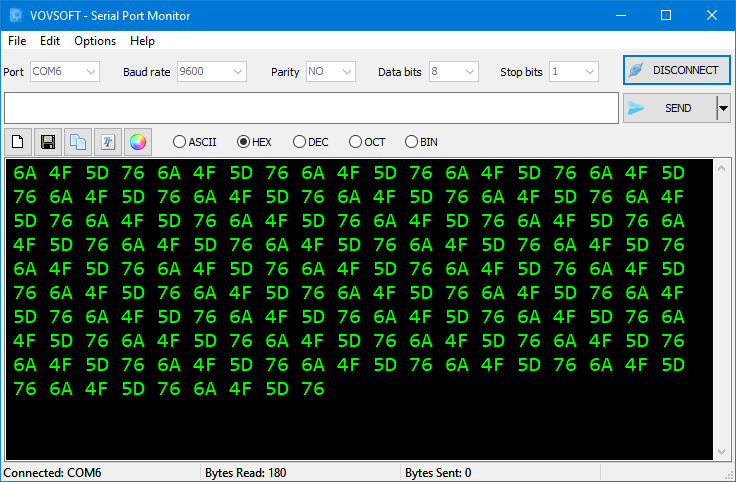
Serial Port Monitor is a technical utility designed to track, analyze, and manage data traffic across computer COM ports. The application enables users to monitor incoming serial data from RX pins and dispatch outgoing commands to TX pins. Users maintain full control over connection parameters, including baud rate, parity, data bits, and stop bits, ensuring synchronization with specific hardware requirements.
The software supports a variety of data encoding methods for both transmission and display:
- Standard ASCII text
- Hexadecimal and Decimal
- Octal and Binary formats
This tool acts as a sniffer and logger for hardware utilizing RS-232, RS-485, or RS-422 protocols. It is compatible with microcontrollers such as Arduino and Raspberry Pi, and it functions through USB-to-RS232 converters, straight-through cables, or null modem configurations.
Workflow efficiency is enhanced by integrated automation and scheduling features. Users can set the software to transmit serial commands at specific millisecond intervals or schedule them for a precise future date. The application also manages automated file transfers, featuring looping capabilities and automated program termination once a transfer is complete. The interface is customizable, allowing for font and color adjustments, while dedicated controls facilitate the clearing, copying, and saving of data logs directly to local storage.
Top 5 Reasons To Download Serial Port Monitor
If you have ever dabbled in electronics, attempted to program a microcontroller, or worked on industrial automation systems, you already know how incredibly frustrating it can be when your hardware refuses to talk to your computer. You plug in your device, open a basic terminal, and... nothing. Or worse, you get a screen full of unreadable, garbled nonsense. Serial communication is the bedrock of the hardware world, yet finding a reliable, powerful, and easy-to-use tool to monitor and analyze this data can feel like searching for a needle in a haystack. Many existing tools are either hopelessly outdated, incredibly bloated, or lock their best features behind steep subscription fees.
That is precisely why you need to pay attention to this exclusive giveaway. Today, we are looking at Serial Port Monitor, a highly intuitive, incredibly versatile utility designed to track, analyze, and control data traffic across your computer's COM ports. Whether you are a professional software engineer, an electrical engineering student, or a weekend hobbyist building your first smart-home device with an Arduino, this software is about to become your absolute favorite debugging tool. It strips away the complexity of serial data sniffing while packing in advanced automation features that you would usually only expect from expensive, enterprise-grade suites.
Before we dive into the deep technical analysis of why this utility is a must-have for your digital toolkit, let us lay out the core features that make this software stand out from the crowd. Here are the top five reasons you need to download this giveaway today:
- Comprehensive Multi-Format Data Encoding and Display
- Seamless Universal Hardware and Protocol Compatibility
- Granular, Real-Time Control Over Connection Parameters
- Powerful Automation and Precision Scheduling Features
- An Intuitive, Fully Customizable, and High-Performance Interface
Now that you have seen the quick overview, let us take a deep, technical dive into each of these points. As a reviewer who has spent years testing developer utilities and debugging hardware setups, I am going to explain exactly why each of these features is a game-changer and how they will save you hours of hair-pulling frustration during your next development project.
1. Comprehensive Multi-Format Data Encoding and Display
When you are monitoring serial traffic, data does not always arrive in neat, human-readable English text. In fact, more often than not, you are dealing with raw raw byte streams representing sensor values, coordinate systems, or system statuses. A basic terminal program will try to force this data into standard ASCII, resulting in a screen filled with bizarre symbols, question marks, and blank spaces. It makes debugging virtually impossible.
This is where Serial Port Monitor completely changes the game. The software fully supports a wide array of encoding methods for both sending and displaying received data. You can easily switch between:
- Standard ASCII: Perfect for simple text-based commands, debugging prints, and basic command-line interfaces.
- Hexadecimal (Hex): The industry standard for analyzing raw binary packets, checking register values, and verifying checksums.
- Decimal: Ideal for reading direct numeric outputs from analog-to-digital converters or sensor arrays.
- Octal and Binary: Essential for low-level bitmask analysis, allowing you to see the exact state of individual microchip registers or GPIO pins in real time.
Imagine debugging a complex sensor module that outputs a payload containing a mix of text headers and binary data. Instead of having to copy raw data into an external hexadecimal converter or a web tool, Serial Port Monitor displays the exact format you need directly inside the log window. You can write your outgoing commands in hexadecimal and read the response in ASCII, or vice versa. This flexibility eliminates translation errors, speeds up your workflow, and ensures that you always have an accurate, native representation of the physical signals traveling along your communication lines.
2. Seamless Universal Hardware and Protocol Compatibility
The modern hardware landscape is incredibly diverse. Depending on your project, you might be working with legacy industrial equipment, modern educational prototyping boards, or custom-designed PCBs. A truly useful serial sniffer must be able to adapt to all of these environments without requiring a complex web of drivers and software patches. This software is built from the ground up to offer universal compatibility across a massive spectrum of protocols and hardware standards.
Whether your hardware complies with RS-232, RS-485, or RS-422 protocols, Serial Port Monitor serves as an incredibly stable sniffer, logger, and tester. This broad protocol support makes it the ultimate companion for establishing UART communication between your PC and microcontrollers. If you are a student working with an Arduino Uno, a developer prototyping a complex system on a Raspberry Pi, or an engineer interfacing with industrial PLCs, this software handles the connection flawlessly.
But what if your modern laptop or desktop computer does not have a native, physical COM port? Most modern computers have phased out these legacy ports in favor of USB. This software has you covered. It works seamlessly with any standard USB-to-RS232 converter, allowing you to bridge the gap between cutting-edge computer hardware and classic serial devices. Furthermore, the application adapts to your specific wiring configuration. If you are connecting a terminal directly to a device, it supports standard straight-through cabling. If you are setting up a PC-to-PC testing environment to simulate a complex hardware network, it handles null modem crossover cables with ease. No matter how complex or archaic your physical setup is, this tool acts as the perfect digital bridge.
3. Granular, Real-Time Control Over Connection Parameters
In the world of serial communication, timing and configuration are absolutely everything. If your computer and your hardware device are not perfectly synchronized, communication will break down instantly. Even a tiny mismatch in transmission speeds or error-checking configurations will result in corrupted data or complete connection dropouts.
Many basic serial programs hide these crucial connection parameters deep within nested configuration menus, or worse, require you to restart the entire application just to change a single setting. Serial Port Monitor puts full control over your connection parameters right at your fingertips. Within its clean interface, you can effortlessly adjust:
- Baud Rate: From standard speeds like 9600 and 115200 all the way to custom high-speed baud rates required by modern, high-bandwidth microprocessors.
- Parity: Instantly configure Even, Odd, Mark, Space, or None to match the exact error-detection protocol of your target hardware.
- Data Bits: Standardize your packet structure by choosing between 5, 6, 7, or 8 data bits depending on how compact your data payload needs to be.
- Stop Bits: Adjust between 1, 1.5, or 2 stop bits to properly signal the end of a data transmission frame to your receiving hardware.
Having this level of granular control means you can troubleshoot connection issues dynamically. If you connect to a mysterious piece of legacy hardware with unknown specifications, you do not have to waste time rewriting code or restarting software. You can simply cycle through different baud rates and parity settings in real time until the data stream clears up. This interactive, hands-on control makes it an invaluable diagnostic tool that turns hours of frustrating guesswork into a simple, systematic process of elimination.
4. Powerful Automation and Precision Scheduling Features
One of the biggest pain points of manual hardware testing is repetition. If you are stress-testing a device, you might need to send the exact same command every few seconds to see how the system handles continuous operation. Doing this manually is not only mind-numbing, but it is also highly prone to human error. You cannot manually guarantee a perfect, consistent millisecond-interval delay between commands.
Serial Port Monitor elevates itself from a basic terminal utility to a high-end testing suite thanks to its robust automation and scheduling capabilities. It allows you to automate repetitive tasks with incredible precision. For instance, you can set the software to transmit specific serial commands periodically at exact millisecond intervals. Whether you need to ping a sensor every 100 milliseconds to monitor temperature fluctuations or send an keep-alive signal to a motor controller every second, the software handles it automatically in the background with microsecond-level accuracy.
But the automation features do not stop there. You can also schedule commands to be sent at a precise future date and time. This is incredibly useful for long-term stress testing or environmental monitoring where you need to trigger an action hours or even days after you leave the laboratory. Additionally, the application features advanced file transfer automation. You can configure the program to:
- Automatically load and transmit a specific configuration file the moment the application launches.
- Repeat file contents in a continuous loop to simulate constant data streaming or heavy network loads.
- Automatically close the program once a file transfer is complete, allowing you to integrate the utility into larger, automated command-line scripts.
These automation capabilities transform the software from a simple monitoring tool into an active, automated testing assistant, allowing you to run complex hardware diagnostics while you focus on analyzing the results.
5. An Intuitive, Fully Customizable, and High-Performance Interface
When you are deep in a debugging session that lasts for hours, the user interface of your software tools matters immensely. A cluttered, rigid, or poorly designed interface can cause eye strain, slow down your workflow, and increase the likelihood of missing critical data anomalies in your logs.
Serial Port Monitor features a beautifully streamlined, highly accessible interface that manages to pack in advanced features without overwhelming the user. Unlike older command-line-style utilities, this application provides a clean, visual workspace where everything is exactly where you expect it to be. Crucially, the interface is fully customizable. You can adjust the fonts and background colors to your exact liking. Whether you prefer a high-contrast dark mode to protect your eyes during late-night programming sessions, or a clean, highly legible light mode for presentations and laboratory documentation, you can tailor the environment to suit your personal preferences.
In addition to its aesthetic flexibility, the software is packed with quality-of-life features that dramatically streamline your workflow. It includes convenient, dedicated buttons to instantly clear the active data screen, copy selected logs to your clipboard, or save your entire data stream directly to a local text file. This built-in logging capability is an absolute lifesaver. Instead of trying to scroll back through thousands of lines of terminal history to find a specific error code, you can simply write the entire session to a log file and search through it using your favorite text editor or analytical software. It is a highly optimized, responsive, and reliable environment that turns the chore of data monitoring into a smooth, seamless experience.
Conclusion: Why You Cannot Afford To Miss This Giveaway
In the world of tech utilities, we frequently see software that tries to do everything and ends up doing nothing particularly well. Serial Port Monitor is the exact opposite. It focuses on a highly specific, critically important task—managing and analyzing serial data—and executes it with absolute perfection. By combining multi-format data visualization, universal hardware compatibility, granular connection control, advanced automation, and a highly customizable user interface, it provides an all-in-one workspace that meets the needs of absolute beginners and seasoned professional engineers alike.
Think about the last time you struggled to get a microcontroller to talk to your PC, or the hours you spent trying to figure out why a piece of industrial hardware was sending corrupt data. Having a professional-grade tool like this in your software arsenal means that the next time you face a serial communication problem, you will have the diagnostics, logging, and automation tools needed to solve it in minutes rather than days.
This giveaway is a rare opportunity to get your hands on a premium, highly reliable utility that will instantly elevate your hardware development, testing, and prototyping workflows. Do not wait until you are stuck in the middle of a frustrating hardware debugging session to wish you had a better tool. Download this incredible Serial Port Monitor giveaway today, unlock the full potential of your computer's serial ports, and take absolute control over your hardware communication projects!

Reviews for Serial Port Monitor
Click Here to Read Reviews for Serial Port Monitor >> Click Here to Submit Reviews for Serial Port Monitor >>