What Does AFKLiveTranslate Do?
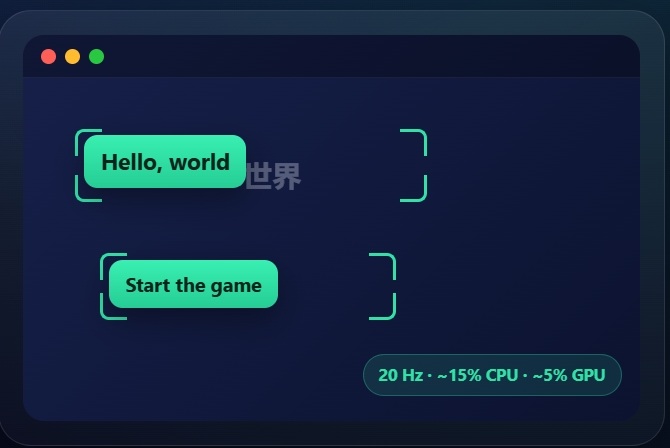
AFKLiveTranslate v1 is a desktop utility designed for real-time translation of on-screen content. The software allows users to define specific screen regions—covering videos, video games, or static documents—and convert the text within those areas using local Optical Character Recognition (OCR). The translated text is presented as a clean, readable overlay that integrates directly into the user's workspace.
A primary focus of the application is data security. It operates with zero telemetry by default and supports offline translation once the necessary language packs are downloaded. For users seeking specialized translation quality, AFKLiveTranslate features a Bring Your Own Key (BYOK) model. This integration supports third-party APIs including DeepL, Microsoft Azure, Google Translate, and LibreTranslate, giving users full control over their data flow and preferred service providers.
The tool includes several features optimized for productivity and content creation:
- Stream-Safe Overlays: Translation windows remain hidden during screen recordings and live broadcasts.
- Scroll Support: The OCR engine maintains accuracy even while the user is navigating through scrolling text or dynamic feeds.
- Unobtrusive UI: A fixed top-right capture button provides instant access without obstructing the primary application window.
By processing text locally and offering granular control over external API connections, the software serves as a secure bridge for interacting with foreign-language digital environments without compromising privacy.
Top 5 Reasons To Download AFKLiveTranslate
Every now and then, a piece of software lands on my testing bench that makes me wonder why operating system developers haven't built the functionality directly into the desktop environment yet. If you have ever tried to play an untranslated Japanese role-playing game, decipher a foreign technical PDF that disables text selection, or follow along with a live international broadcast on YouTube or Twitch, you know the absolute misery of modern translation workflows. You are usually stuck awkwardly holding your smartphone up to your computer monitor using Google Lens, or painstakingly typing out foreign characters using a virtual keyboard just to copy-paste them into a browser tab.
AFKLiveTranslate v1 completely obliterates that friction. It is a dedicated desktop screen translator engineered with a local-first philosophy, blazing-fast optical character recognition (OCR), and an ingenious user experience tailored for real-world computer users, gamers, professionals, and live streamers. Even better, it offers Bring-Your-Own-Key (BYOK) cloud integration alongside fully offline processing, granting you the choice between peerless neural machine translation and absolute local privacy.
If you are on the fence about grabbing this software during this promotional window, let me break down the top five reasons why this download deserves an immediate, permanent spot in your daily digital utility belt.
- Local-First Processing and Uncompromising Zero-Telemetry Privacy
- Fluid, Real-Time Translation Across Videos, Games, and Scrolling Feeds
- Streamer-Safe Invisible Overlays Tailored for Broadcasters and Content Creators
- Unrestricted Power-User Control with Bring-Your-Own-Key (BYOK) Engine Flexibility
- Zero-Friction Desktop Workflow Featuring an Unobtrusive Persistent Interface
Now, let us examine each of these compelling advantages in exhaustive detail to understand why AFKLiveTranslate v1 stands head and shoulders above typical translation utilities.
1. Local-First Processing and Uncompromising Zero-Telemetry Privacy
In our modern software landscape, practically every utility is morphing into a bloated, data-harvesting cloud subscription. When you install an application that reads your screen, privacy should not be an afterthought; it must be your primary consideration. Think about what is displayed on your monitor throughout a normal workday: sensitive financial statements, private personal chats, confidential enterprise source code, proprietary business documentation, and password-protected client communications. Allowing a standard cloud-based screen-reading tool to capture your screen means you are constantly transmitting raw image data to remote third-party servers.
AFKLiveTranslate flips the script by prioritizing a local-first architecture. Right out of the box, the software operates with zero telemetry by default. It does not ping home to analyze your behavioral metrics, it does not harvest your personal identifiers, and it certainly does not upload screenshots of your monitor to an unknown server farm for analysis. When you use AFKLiveTranslate in its native state, the optical character recognition engine runs entirely on your local hardware.
Once you download your selected language packs, the core translation functionality can run entirely offline. This means you can be on a transcontinental flight with your laptop in airplane mode, working inside a secure enterprise sandbox with strict firewall constraints, or surviving a home internet outage, and AFKLiveTranslate will still function without a hitch. For privacy advocates, corporate workers handling non-disclosure agreements, and security-minded enthusiasts, this offline local pipeline turns what could have been a catastrophic security vulnerability into a secure, air-gapped productivity asset. You never have to compromise your confidential operational data just to read text in another language.
2. Fluid, Real-Time Translation Across Videos, Games, and Scrolling Feeds
Static OCR is relatively simple. Plenty of archaic desktop tools allow you to take a still screenshot, wait four or five seconds, and spit out an unformatted block of text inside a clunky separate window. But modern media is rarely static. We consume digital content through high-frame-rate streaming video, dynamic visual novels, interactive web applications, social media feeds, and fast-paced video games. If an on-screen translator cannot keep pace with continuous movement, it is practically useless.
AFKLiveTranslate excels precisely where legacy OCR utilities fail. The application allows you to simply draw a targeted bounding box over any active region on your display—be it a video player window, an imported foreign game client, a digital comic viewer, or a scanned PDF document. Once that region is established, the high-speed local engine continuously samples the frame, recognizes text updates, and projects clean, highly readable overlays directly over the original source text.
Crucially, the software features built-in stability for dynamic environments, including continuous page scrolling. Anyone who has attempted to translate foreign webtoons, vertical-scrolling manga, or lengthy foreign documentation knows that scrolling usually breaks screen scrapers, resulting in garbled text duplicates, flashing artifacts, and system lag. AFKLiveTranslate dynamically handles frame changes and scrolling buffers with graceful precision. The overlay updates in lockstep with the on-screen action, giving you the sensation of interacting with a natively localized product rather than an awkward machine-translated patch. Whether you are following live gameplay dialogue in a fast-paced title or parsing an instructional video tutorial in real time, the process is fast, coherent, and visually seamless.
3. Streamer-Safe Invisible Overlays Tailored for Broadcasters and Content Creators
For content creators, digital broadcasters, and remote presenters, live translation has historically been an absolute minefield. If you are a video game streamer playing an unlocalized Japanese or Korean import on Twitch, YouTube, or Kick, you want to understand the menu systems, quest objectives, and storyline dialogue for yourself. However, you rarely want your audience's visual experience cluttered by chaotic OCR bounding boxes, translation pop-ups, and raw user-interface toggles. Even worse, if you are conducting a business presentation via Zoom, Google Meet, or Microsoft Teams, having your private translation overlays visible to clients or colleagues looks deeply unprofessional.
AFKLiveTranslate solves this dilemma with an inspired, creator-focused feature: stream-safe invisible overlays. By tapping into modern graphics compositing architectures, AFKLiveTranslate renders its translated text overlays on an isolated visual layer that is invisible to capture programs like OBS Studio, Streamlabs Desktop, XSplit, and video conferencing software when utilizing standard window or display capture methods.
This means you get the best of both worlds with zero friction. On your physical monitor, you see the rendered, translated English text floating cleanly over the native foreign interface, allowing you to react naturally, navigate complex menus, and digest the narrative in real time. Meanwhile, your capture software records pristine, unblemished game footage or native application feeds for your viewers. You avoid visual clutter on stream, protect your workflow setups from prying eyes, and deliver a pristine broadcast without sacrificing your own comprehension. For any creator diving into imported gaming or international content coverage, this feature alone justifies the installation.
4. Unrestricted Power-User Control with Bring-Your-Own-Key (BYOK) Engine Flexibility
When it comes to machine translation, one size definitely does not fit all. Different translation models excel at wildly different tasks. For instance, DeepL is universally celebrated among linguists for its nuanced, context-aware, and natural-sounding sentence structures, especially with European languages and Japanese. On the other hand, Google Translate maintains an absurdly massive lexicon covering obscure dialects and low-resource global languages. Microsoft Azure offers rock-solid enterprise terminology management, while self-hosted solutions like LibreTranslate prioritize open-source decentralization and personal autonomy.
Most commercial translation utilities lock you into their single proprietary, mediocre translation model, or worse, force you into an exorbitant monthly recurring subscription fee just to cover their backend API markup. AFKLiveTranslate rejects this restrictive model completely through its Bring-Your-Own-Key (BYOK) framework.
While the software operates completely free and offline utilizing local translation models, it also empowers power users to configure their own developer API keys for DeepL, Google Cloud Translation, Microsoft Azure Translator, or LibreTranslate. This puts total control back into your hands. If you already have free-tier API keys or corporate developer accounts with these cloud providers, you can drop your keys directly into AFKLiveTranslate and unlock elite-grade neural machine translation with virtually zero latency. You pay only for what you personally consume directly at the provider's base rates—often pennies per million characters—entirely bypassing predatory third-party subscription middle-men. You have the ultimate freedom to balance speed, linguistic nuance, and data privacy according to your exact needs.
5. Zero-Friction Desktop Workflow Featuring an Unobtrusive Persistent Interface
Even the most powerful software utility will end up abandoned in your downloads folder if its day-to-day usability is annoying or cumbersome. Many translation tools suffer from bloated, heavy interfaces loaded with visual clutter, oversized control panels, and convoluted multi-step workflows. If you have to bring up a massive software dashboard, navigate through three dropdown menus, and configure your languages every single time you want to read a four-word menu button, you will quickly give up and stop using it.
The design philosophy behind AFKLiveTranslate centers on utter simplicity and immediate accessibility. The application features an unobtrusive, lightweight persistent capture trigger anchored neatly in the top-right corner of your workspace. It remains quietly out of your visual way, consuming negligible system resources in the background while you browse, game, or write code. It never demands your attention until the exact moment you encounter foreign text.
When you need a translation, the workflow is effortless: click or trigger the regional capture mechanism, draw your quick rectangle across the screen, and let the software do the heavy lifting. The readable text overlay appears immediately, accurately placed, with zero disruption to your active windows or focus states. When you are finished, dismiss it with a single motion. By eliminating the mental overhead of switching windows, toggling settings, or handling heavy application windows, AFKLiveTranslate integrates into your daily computing habits as naturally as your clipboard manager or screenshot utility. It is lightweight, blazingly fast, and respectful of your screen real estate and system memory.
The Final Verdict: Why You Need to Claim This Giveaway Now
The modern digital landscape is truly international. Every single day, the barriers between different linguistic communities are breaking down. Groundbreaking open-source software repositories are frequently documented in Mandarin; the most thrilling indie games and visual novels are originating in Tokyo and Seoul; and revolutionary investigative journalism or technical deep dives are published in German, French, and Spanish. Remaining isolated inside a single linguistic bubble means missing out on an enormous fraction of the world's most innovative ideas, media, and tools.
AFKLiveTranslate v1 is the exact kind of utility that solves this issue once and for all. It bridges the linguistic divide without invading your privacy, without burdening your computer's processing resources, and without trapping you inside an expensive, recurring subscription ecosystem. Whether you choose to rely entirely on its local, zero-telemetry offline OCR engine or supercharge your translations with high-end neural networks via DeepL and Azure, the tool conforms perfectly to your personal workflow.
Finding a real-time screen translator that features local offline processing, streaming-safe overlays, dynamic scrolling detection, and multi-engine BYOK integration in a single, lightweight package is an extraordinary rarity. Take advantage of this giveaway, secure your download of AFKLiveTranslate v1, and eliminate the desktop language barrier permanently.

Reviews for AFKLiveTranslate
Click Here to Read Reviews for AFKLiveTranslate >> Click Here to Submit Reviews for AFKLiveTranslate >>