What Does Auto Video Redaction Software Do?
Auto Video Redaction Software provides an automated solution for masking identities in digital recordings. The program is specifically engineered to handle footage from body-worn cameras, CCTV systems, vehicle dashcams, and formal interviews. By utilizing an integrated detection engine, the software eliminates the need for tedious frame-by-frame manual editing.
The tool’s primary function is to identify and track individuals across a video sequence. Once a person is detected, the software applies a persistent blur or pixelation mask that follows their movement throughout the entire clip. This ensures that sensitive information and personal identities remain obscured from the initial frame until the final second of the footage.
Security is a core component of the software's architecture. It operates strictly offline on a local PC, preventing sensitive video data from being uploaded to external servers or cloud environments. This local processing model, combined with high-speed export capabilities, allows users to generate GDPR-ready video files efficiently. This utility is particularly relevant for police departments, legal professionals, and privacy compliance teams tasked with managing large volumes of sensitive visual evidence.
Top 5 Reasons To Download Auto Video Redaction Software
- Zero Frame-by-Frame Editing: Automatic face detection eliminates hours of tedious manual keyframing.
- Relentless Motion Tracking: Smart blur and pixelation masks follow every person smoothly from the first frame to the last.
- 100% Offline Privacy: Everything processes locally on your own PC, keeping sensitive recordings completely off the cloud.
- Effortless GDPR Compliance: Export privacy-ready, compliant video in just a few clicks without a steep learning curve.
- Built for Real-World Footage: Purpose-built to handle body-cam, CCTV, dashcam, and interview clips—and available right now as a giveaway.
If you spend any time testing software giveaways, you already know the drill. Nine times out of ten, you come across bloated system cleaners or recycled utilities you will install once and forget about by Tuesday. Every once in a while, however, a genuinely practical tool lands in the giveaway spotlight—one that solves a massive, time-consuming headache that almost everyone who works with video eventually runs into. Auto Video Redaction Software is easily one of those rare finds.
Anyone who has ever tried to blur out a bystander’s face in a standard video editor knows just how miserable the process can be. You open a sprawling timeline, draw a manual mask, nudge it forward a few frames, adjust the size when the person walks closer, add another keyframe when they turn their head, and repeat that cycle until your wrist hurts. Whether you are managing legal discovery files, reviewing dashcam clips, or preparing interview footage for publication, manual redaction eats up hours you simply do not have. After looking closely at what Auto Video Redaction Software brings to the table, it is clear this is a utility you want sitting in your toolkit—especially while you can grab it as a giveaway. Here is a closer look at the five biggest reasons why you should download it today.
1. Zero Frame-by-Frame Editing Saves Hours of Tedious Work
Let us start with the single biggest selling point: time. In traditional non-linear video editors, hiding identities is treated as an afterthought. Those programs are built for color grading, cutting, and audio mixing, not rapid privacy compliance. As a result, blurring even a short two-minute clip with three or four people walking through the background can easily turn into an afternoon-long chore of dragging Bezier curves and setting dozens of keyframes per second.
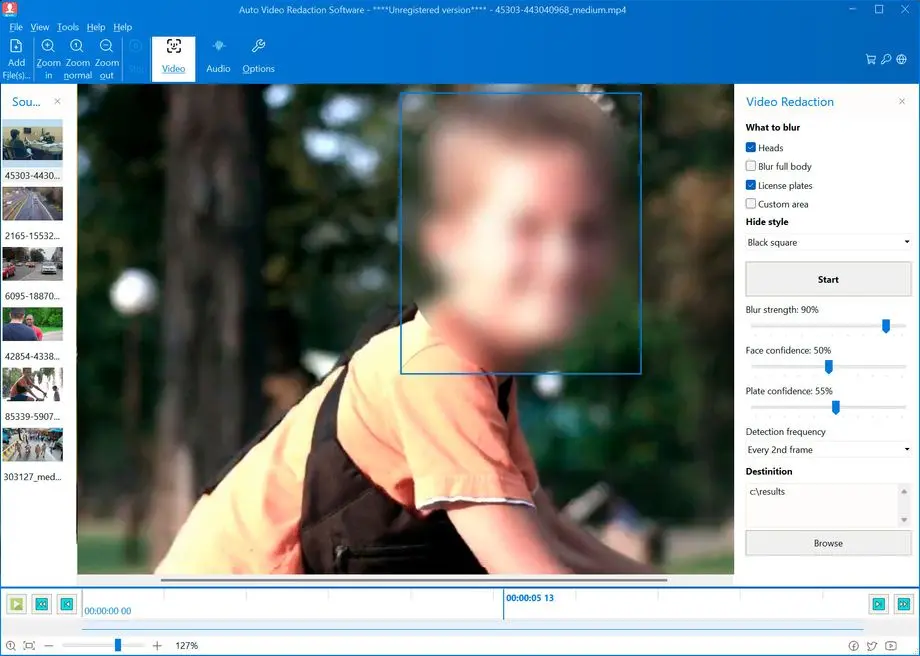
Auto Video Redaction Software flips that workflow on its head by automating the hardest part of the job. The moment you load your footage, the software’s automatic face detection steps in to scan the video and locate every face in the scene. There is no frame-by-frame scrubbing required just to mark who needs to be hidden. Instead of treating you like a manual rotoscoping artist, the program does the heavy lifting upfront so you can move straight to reviewing and exporting.
From a productivity standpoint, that difference cannot be overstated. If you are a solo creator or a small business owner, freeing yourself from manual keyframing means getting projects out the door faster. If you work inside a police department, a legal office, or a corporate privacy team where dozens of clips pile up every week, eliminating frame-by-frame editing transforms a major bottleneck into a routine, predictable step in your workday.
2. Relentless Motion Tracking From the First Frame to the Last
Automatic detection is only half the equation; what really separates mediocre blurring tools from dependable redaction software is tracking consistency. Detecting a face in a single still frame is easy, yet real video is chaotic. People walk across rooms, duck behind furniture, turn toward their shoulders, or step out of shadows into bright sunlight. If a mask drifts off target for even a fraction of a second, an identity gets exposed—and the entire purpose of redacting the clip falls apart.
This is where the built-in detector inside Auto Video Redaction Software really proves its worth. Rather than applying static masks that sit awkwardly in one spot, the software actively tracks each person across the entire clip. As subjects move across the frame, the privacy mask moves right alongside them, adjusting dynamically so identities remain concealed from the very first frame to the very last.
Even better, you are not locked into a single look. The software lets you choose between applying a smooth blur or a classic pixelation mask depending on your standards or preferences. Blur masks tend to look cleaner and less distracting for interview footage and public communications, while pixelation masks remain a staple for law enforcement, CCTV reviews, and formal evidentiary releases. Having both options tied to continuous motion tracking ensures your finished video looks professional and stays airtight from start to finish.
3. 100% Offline Processing Keeps Sensitive Recordings Strictly Private
As someone who reviews tech tools regularly, one of my biggest pet peeves in recent years is the push to force every single utility into the cloud. While online editors can be convenient for trimming a vacation clip, uploading sensitive footage to a third-party server is a massive security gamble—especially when the whole reason you are editing the video is to protect people’s identities.
Think about the contradiction of using an online AI redaction website: to hide faces in confidential CCTV, body-cam, or witness interview footage, you first have to transmit the completely unredacted original file over the internet to someone else’s servers. That introduces unnecessary exposure risks, potential data retention concerns, and painful upload wait times if you are dealing with large high-definition video files.
Auto Video Redaction Software avoids that trap completely by running 100% offline on your own PC. Nothing leaves your hard drive, nothing gets uploaded to an external cloud queue, and no third party ever touches your raw recordings. For privacy teams, legal professionals, and anyone bound by strict chain-of-custody or confidentiality policies, local processing is not just a nice bonus—it is a mandatory requirement. Plus, running locally means you are never throttled by slow internet speeds or stuck waiting in line behind other users on a busy web server.
4. Export GDPR-Ready Video in Just a Few Clicks
Modern privacy regulations have raised the stakes dramatically for anyone who records, stores, or shares video featuring identifiable individuals. Under frameworks like the General Data Protection Regulation (GDPR) and similar regional privacy laws, releasing footage where bystanders, clients, or uninvolved parties can be recognized can quickly lead to formal complaints, legal headaches, and steep financial penalties.
Unfortunately, many organizations delay compliance simply because the software required to anonymize video feels overly technical. You should not need a degree in post-production just to share a clip safely. Auto Video Redaction Software bridges that gap with a streamlined workflow built around getting you to a GDPR-ready export in just a few clicks.
Because the interface focuses strictly on what matters—loading your video, letting the automated detector track and mask faces, and exporting the protected result—virtually anyone on a team can pick it up and use it within minutes. You do not have to train staff on complex timeline layers, render pipelines, or codec math. You simply process the clip, verify that every face is obscured, and output a clean file that is ready for legal review, public release, or internal archiving.
5. Engineered for Challenging Real-World Footage—And Free as a Giveaway
A lot of consumer video tools look impressive when tested on staged studio clips with crisp lighting and people staring straight into the lens. Put those same tools up against actual field footage, however, and they fall apart fast. Real-world recordings are messy, unpredictable, and full of challenging angles.
Auto Video Redaction Software is specifically tailored for the toughest everyday video categories out there: body-cam, CCTV, dashcam, and interview footage. Each of these formats brings its own quirks. Body-cam video involves constant motion and shifting perspectives. CCTV cameras are often mounted high up in corners, capturing people at awkward angles under harsh lighting. Dashcams deal with high-speed movement, windshield glare, and pedestrians crossing from the edges of the frame. Interviews frequently involve multiple speakers shifting posture or crossing paths.
Having a dedicated tool built with those exact environments in mind makes it useful across a remarkably wide range of users:
- Police and Law Enforcement Units: Quickly anonymize bystanders, minors, and undercover personnel in body-cam and cruiser footage prior to public records requests.
- Legal and Discovery Teams: Prepare surveillance evidence and recorded depositions without risking accidental exposure of protected identities.
- Corporate Privacy and HR Teams: Redact workplace CCTV clips for internal investigations, training sessions, or compliance audits while keeping data strictly on-premise.
- Everyday Dashcam Owners and Content Creators: Blur out pedestrians, neighbors, and passersby before sharing road incidents or street interviews online.
On top of that versatility, the fact that you can pick it up through a giveaway makes downloading it an absolute no-brainer. Specialized redaction platforms are often priced exclusively for enterprise budgets or locked behind recurring cloud subscriptions that charge by the minute of processed video. Being able to install a dedicated, offline desktop redaction utility at zero cost gives you permanent capability right on your PC whenever you need it.
The Final Verdict: Grab This Giveaway While You Can
In tech, the best software utilities are the ones that quietly remove friction from tasks you dread doing. Auto Video Redaction Software does not try to be a bloated do-it-all video suite, and that focus is precisely its greatest strength. It sets out to do one critical job—automatically detecting, tracking, and masking faces across moving footage—and executes it locally on your own machine with impressive simplicity.
Even if you do not redact video every single day, having a reliable offline anonymization tool installed on your computer is like keeping a good fire extinguisher in the kitchen: when the moment arrives where you suddenly need to share a dashcam clip, review CCTV footage, or release an interview without compromising someone’s privacy, you will be very glad it is already there. Between the automated motion tracking, the choice of blur or pixelation masks, the rock-solid offline security, and the effortless GDPR-ready exports, Auto Video Redaction Software easily earns a spot on your PC. Do not hesitate on this giveaway—download it, install it, and save yourself hours of manual editing down the road.

Reviews for Auto Video Redaction Software
Click Here to Read Reviews for Auto Video Redaction Software >> Click Here to Submit Reviews for Auto Video Redaction Software >>