What Does Aunsoft TransMXF Do?
Aunsoft TransMXF is a specialized utility designed for videographers using professional-grade hardware like Panasonic P2 or Canon XF camcorders. The software facilitates the conversion of MXF files into formats compatible with a wide range of non-linear editing systems and mobile devices.
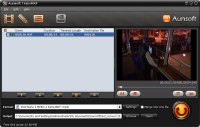
For post-production workflows, TransMXF provides optimized presets for applications including Adobe Premiere, Sony Vegas, and Windows Movie Maker. Beyond professional editing, the tool handles conversions for consumer hardware such as iPads, Android tablets, and iPhones. Users can adjust technical parameters through advanced settings, allowing for specific control over video dimensions and quality.
The software includes a suite of processing features:
- Batch conversion for multiple video files.
- Retention of 5.1-channel audio during the transcoding process.
- Hardware acceleration via NVIDIA CUDA for increased rendering speeds.
- Integrated editing tools for cropping, watermarking, and applying filters.
- Merging capabilities to combine several clips into a single file.
- Synchronized audio and video output to ensure playback accuracy.
- Visual snapshot functionality for capturing still frames from footage.
By maintaining original video quality and offering high-speed processing, TransMXF serves as a bridge between specialized camera hardware and standard media environments.
Top 5 Reasons To Download Aunsoft TransMXF
- Seamless Integration with Professional Non-Linear Editors (NLEs): Effortlessly bridge the gap between high-end MXF footage and editing suites like Adobe Premiere, Sony Vegas, and Windows Movie Maker.
- High-Fidelity Audio Preservation: Retain the full depth of your recordings with support for 5.1 channel audio pass-through and perfect synchronization.
- Cutting-Edge Hardware Acceleration: Leverage the power of NVIDIA CUDA technology to achieve lightning-fast conversion speeds without sacrificing original video quality.
- Universal Mobile Device Compatibility: Transform bulky professional files into optimized formats for iPad, iPhone, Galaxy Tab, and other mobile devices with a single click.
- Built-in Suite of Post-Production Tools: Perform essential edits like trimming, cropping, merging, and watermarking directly within the converter to streamline your workflow.
If you have ever spent an afternoon wrestling with a high-end camcorder only to find that your computer treats your footage like a foreign language it refuses to translate, you know the specific brand of frustration that professional videographers face. The MXF (Material eXchange Format) is a professional container format for digital video and audio media, defined by a set of SMPTE standards. While it is incredibly robust and packed with metadata, it is notoriously "heavy" and difficult for standard consumer software and even some professional editors to handle natively. Whether you are shooting on a Panasonic P2, a Canon XF, or a Sony XDCAM, the struggle to move that footage from the card to the timeline is real.
Enter Aunsoft TransMXF. This isn't just another generic file converter that you might find in a dark corner of the internet; this is a precision tool designed specifically for the professional and the prosumer who demands excellence. As a tech reviewer, I see hundreds of utilities that claim to "do it all," but usually, they fail when it comes to the heavy lifting required for MXF files. TransMXF stands out because it addresses the specific pain points of the modern videographer. Below, I am going to break down exactly why you need to jump on this giveaway and make this software a permanent resident in your production toolkit.
1. Seamless Integration with Professional Non-Linear Editors
The primary reason any professional needs a dedicated MXF converter is the workflow. Let’s be honest: while Adobe Premiere Pro and Sony Vegas have made strides in native MXF support, they often struggle with the complex directory structures of P2 cards or the specific codecs used by Canon XF cameras. You might find your system lagging, your audio dropping out, or worse, the software crashing mid-render because it is struggling to decode the MXF wrapper in real-time. This is where Aunsoft TransMXF becomes your best friend.
By using this software, you are essentially creating a bridge. You can take those cumbersome MXF files and convert them into formats that are "native" to your editor of choice. If you are a Windows Movie Maker enthusiast or using Magix Movie Edit Pro, you know that these programs don't even want to look at an MXF file. TransMXF allows you to transcode your footage into high-quality AVI, WMV, or MP4 files that these programs can handle with ease. For the more advanced users, it provides the flexibility to prepare files for Ulead DVD MovieFactory or Cyberlink PowerDirector, ensuring that your production pipeline never hits a bottleneck.
The beauty here is the "format preset" system. You don't need to be a codecs expert to get the best results. The software comes pre-loaded with optimized settings for all the major editing suites. You simply select your target software, and TransMXF handles the bitrates, frame rates, and resolutions to ensure that when you import that clip into Sony Vegas, it plays back as smooth as silk. This saves hours of troubleshooting and lets you get straight to the creative process.
2. High-Fidelity Audio Preservation
In the world of professional cinematography, video is only half the story. The audio captured by P2 and Canon XF camcorders is often multi-channel, high-bitrate PCM audio that carries the atmosphere and the nuance of the scene. One of the biggest crimes committed by budget converters is the "flattening" of this audio. Most converters will take a beautiful 5.1 channel surround sound recording and smash it down into a muddy stereo track, or worse, lose the synchronization between the mouth moving and the words being heard.
Aunsoft TransMXF treats your audio with the respect it deserves. One of its standout features is the ability to convert MXF files while keeping the 5.1 channels intact. This is absolutely critical for filmmakers who are planning on doing a professional sound mix later in post-production. If you’ve gone to the trouble of setting up multiple microphones or using a high-end internal array, you shouldn’t lose that data just because you need to change the file container.
Furthermore, the software boasts a "perfect synchronization" engine. We have all seen those poorly converted videos where the audio drifts further and further away from the video as the clip progresses. It is the hallmark of amateur software. TransMXF uses a sophisticated export algorithm to ensure that every frame of video is perfectly aligned with its corresponding audio sample. Whether you are converting a thirty-second clip or a two-hour documentary, the sync remains frame-accurate.
3. Cutting-Edge Hardware Acceleration
Time is the most valuable asset any creator has. If you are coming back from a shoot with 64GB or 128GB of MXF data, the last thing you want to do is wait twelve hours for your computer to churn through the conversion process. Many converters rely solely on the CPU (Central Processing Unit), which can create a massive bottleneck, especially if you are trying to use your computer for other tasks while the conversion runs.
This is where the CUDA acceleration in Aunsoft TransMXF becomes a literal lifesaver. By tapping into the parallel processing power of NVIDIA graphics cards, TransMXF shifts the heavy lifting from your CPU to your GPU. The result is conversion speeds that can be up to five or six times faster than traditional methods. When you combine this hardware acceleration with the software’s ability to perform batch conversions, you have a powerhouse of efficiency. You can load up all your clips from a day’s shoot, hit "convert," and have them ready for editing in the time it takes to grab a cup of coffee.
Crucially, this speed does not come at the expense of quality. Some "fast" converters achieve their speed by cutting corners—dropping frames or using low-quality encoding passes that result in blocky shadows and soft edges. Aunsoft TransMXF maintains the original video quality, ensuring that the crispness of your P2 HD or Canon XF footage is preserved in the new format. You get the speed of a sprinter with the precision of a surgeon.
4. Universal Mobile Device Compatibility
We no longer live in a world where video is only consumed on a television or a desktop monitor. As a professional, you often need to show your "dailies" to a client, or perhaps you want to review your footage while traveling. Carrying a heavy laptop that can handle raw MXF files is a chore. The ability to quickly throw your footage onto an iPad, a Galaxy Tab, or even your iPhone is a massive advantage.
Aunsoft TransMXF isn't just for the edit suite; it is an expert-level tool for mobile optimization. The software includes a library of expert settings for the latest multimedia devices. This means you don’t have to guess what resolution an Apple TV requires or what bitrate an Android phone can handle. You simply choose your device from the list, and the software optimizes the MXF file for that specific screen.
This "transcoding for consumption" is a huge part of the modern workflow. Whether you are an influencer who needs to get high-quality camcorder footage onto social media quickly, or a director who needs to send clips to a producer's smartphone, TransMXF makes the process painless. It bridges the gap between the professional world of MXF and the consumer world of H.264 and MP4, making your high-end footage as portable as a photo taken on a phone.
5. Built-in Suite of Post-Production Tools
Sometimes, you don’t need to do a full edit in a heavy program like Premiere. Sometimes, you just need to clean up a clip, remove some dead air at the beginning, or add a watermark before sending it to a client for review. Aunsoft TransMXF recognizes this by including a surprisingly robust set of editing tools directly within the conversion interface. This allows you to perform "pre-production" tasks during the conversion process, saving you an extra step later on.
The Trim and Crop functions are intuitive and precise. If you have a five-minute clip but only need ten seconds of it, you can trim the clip before conversion, saving disk space and processing time. If you need to remove letterboxing or focus on a specific area of the frame, the crop tool handles it with ease. But it goes beyond just cutting; you can apply filter effects to give your footage a specific look or use the Watermark tool to protect your intellectual property before sharing it online.
Perhaps one of the most useful features for P2 users is the Merge function. Because of how some camcorders span recordings across multiple cards or files, you often end up with a single scene split into three or four MXF clips. TransMXF allows you to merge several video clips into one continuous file. This ensures smooth playback and a much cleaner timeline when you finally move into your NLE. It’s these thoughtful, "editor-first" features that make this giveaway a no-brainer for anyone who handles professional video.
In conclusion, the Aunsoft TransMXF giveaway is an opportunity that no serious videographer should pass up. It is a specialized, high-performance utility that solves the very specific, very annoying problems inherent in the MXF format. It respects your time through CUDA acceleration, respects your art through high-quality 5.1 audio preservation, and respects your workflow by integrating seamlessly with the tools you already use. If you want to stop fighting your files and start editing your footage, this is the download you’ve been waiting for. Don't let the technical hurdles of the MXF format hold your creativity hostage—grab this tool and set your workflow free.
Final thoughts for the tech-savvy: Remember that a tool like this is often the difference between meeting a deadline and missing one. In a professional environment, stability and speed are the two metrics that matter most. TransMXF delivers on both fronts, providing a rock-solid conversion engine that leverages your hardware to its fullest potential. Whether you are converting for the big screen, the edit suite, or the smartphone in your pocket, this software ensures the transition is seamless. Download it today and experience the difference that a professional-grade converter makes.


Reviews for Aunsoft TransMXF
Click Here to Read Reviews for Aunsoft TransMXF >> Click Here to Submit Reviews for Aunsoft TransMXF >>