What Does CloudBuckit Do?
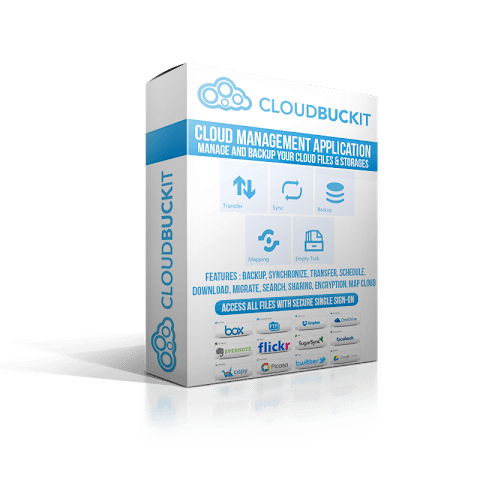
CloudBuckit is a desktop-based management application designed to consolidate multiple cloud storage accounts, FTP connections, and WebDAV services into a single interface. The software provides a centralized hub for users to organize, transfer, and synchronize files across disparate platforms without navigating individual web portals.
The application offers several core management utilities, including a dual-pane CloudCommander and a MyAccounts view modeled after Windows Explorer. Key functionalities include:
- File Transfer and Sync: Direct storage-to-storage transfers with scheduling capabilities for backups, migrations, and folder synchronization.
- Cloud Drive Mapping: Integration that allows cloud services to appear as local drives in Windows, enabling drag-and-drop operations and offline file access.
- Universal Search: A cross-platform search engine that locates files across all connected cloud, social, and FTP services simultaneously.
- Sharing and Favorites: Tools to share documents via email or social media, and a unified list to aggregate frequently accessed files from different providers.
Security is managed through Single Sign-On using OAuth2 authentication, meaning the software utilizes tokens rather than storing account passwords. All data communication is encrypted via HTTPS over SSL. CloudBuckit operates without intermediate third-party servers for file transfers and maintains a strict no-logging policy to ensure user privacy during management tasks.
Top 5 Reasons To Download CloudBuckit
If you are anything like me, your digital life is scattered across a dozen different platforms. You have photos on Google Drive, work documents on Dropbox, old backups on an FTP server, and maybe some personal projects on OneDrive. Managing all of these separately is a productivity nightmare. That is where CloudBuckit comes in. This desktop application is designed to be the "one ring to rule them all" for your cloud storage, and right now, there is a massive opportunity to get your hands on it. As a tech reviewer who has seen countless "management" tools come and go, I can tell you that this one is different. It is fast, it is secure, and it integrates directly into your existing workflow.
Before we dive into the nitty-gritty details of why this software is a must-have, here are the top 5 reasons you need to download CloudBuckit today:
- Unified Cloud Management: Access and manage all your cloud accounts, FTP servers, and WebDav connections from a single, intuitive interface.
- Seamless Drive Mapping: Map your cloud storage directly as a network drive in Windows Explorer for easy drag-and-drop functionality.
- High-Speed Direct Transfers: Move files directly from one cloud service to another without having to download them to your local computer first.
- Advanced Backup and Synchronization: Protect your data with scheduled backups and real-time syncing across multiple platforms.
- Enterprise-Grade Security and Privacy: Benefit from Single Sign-On (SSO) using OAuth2 tokens and encrypted HTTPS transfers with zero logging of your data.
1. Unified Cloud Management: The End of Tab Fatigue
We have all been there. You are looking for a specific PDF, but you cannot remember if you saved it to your personal Box account or your work Google Drive. You end up opening five different browser tabs, logging into each one, and manually searching through folders. It is a waste of time and mental energy. CloudBuckit solves this by providing a unified interface that feels immediately familiar. If you know how to use Windows Explorer, you know how to use CloudBuckit.
The "MyAccounts" feature is the heart of the application. It lists all your connected services in a clean side-panel, allowing you to jump from an FTP server to a OneDrive folder with a single click. But the real star of the show for power users is the "CloudCommander." This feature provides a two-pane file window view, sitting side-by-side. This is a game-changer for organization. You can have your local "C:" drive open on the left and your Amazon S3 bucket on the right. Moving files becomes a simple matter of dragging from one pane to the other. You can open, view, rename, and search across all your accounts simultaneously. It turns a fragmented mess of web interfaces into a streamlined, professional workstation.
Furthermore, the "Favorites" tool is a massive timesaver. If you have specific project folders buried deep within different cloud providers, you can "star" them and access them from a single unified list. You no longer have to remember the directory structure of five different services. Your most important files are always one click away, regardless of where they are actually stored.
2. Seamless Drive Mapping: The Cloud Becomes Local
This is arguably the coolest feature CloudBuckit offers. Most cloud services require you to either use a clunky web browser or download a specific "sync" app that eats up your local hard drive space. CloudBuckit offers a third, much better option: Cloud Drive Mapping. This allows you to "mount" your cloud storage as if it were a physical hard drive or a USB stick plugged into your computer. When you open "This PC" in Windows, you will see your Google Drive or your FTP server listed right alongside your local disk drives.
Why does this matter? Because it allows you to use your cloud files with any application on your computer. If you are an editor using Photoshop, you can open a file directly from the mapped cloud drive, edit it, and hit "Save." The changes are pushed back to the cloud automatically. You don't have to download the image, edit it, and then re-upload it manually. It creates a seamless bridge between your local environment and the cloud.
The software even supports an offline mode with a synchronization option. If you know you are going to be away from a stable internet connection, you can sync specific folders to be available offline. Once you reconnect, CloudBuckit handles the heavy lifting of updating the cloud versions with the changes you made while offline. It is the ultimate productivity hack for anyone who works on the go.
3. High-Speed Direct Transfers: Move Data Like a Pro
One of the biggest frustrations with cloud storage is "migration." Suppose you decide to move all your photos from Dropbox to Google Drive because you got a better storage deal. Normally, you would have to download hundreds of gigabytes to your computer and then upload them all over again. This takes forever, consumes your bandwidth, and puts a strain on your hardware. CloudBuckit changes the rules of the game with storage-to-storage transfers.
Because CloudBuckit handles the connection between services, it can facilitate transfers with extraordinary efficiency. You can initiate a transfer of thousands of files and then simply walk away. The software handles the "handshake" between the services. Even better, there are no limits on data or the number of transfers. Whether you are moving a 2KB text file or a 50GB 4K video project, the process is the same.
For those who manage data professionally, the scheduling feature is a lifesaver. You can set a transfer to begin at 2:00 AM when you aren't using your internet for anything else. This level of control is something you usually only find in expensive enterprise-level software, but CloudBuckit brings it to the everyday user. Whether you are migrating data to a new service or just reorganizing your files, the speed and ease of these transfers cannot be overstated.
4. Advanced Backup and Synchronization: Total Peace of Mind
Data loss is a "when," not an "if." Hard drives fail, accounts get locked, and accidental deletions happen to the best of us. CloudBuckit serves as a powerful insurance policy for your digital life. The backup and synchronization tools are robust enough for IT professionals but simple enough for casual users. You can choose to synchronize entire storage volumes or just specific folders. This means you can keep a "mirror" of your most important work documents on two different cloud services automatically.
The "Migrate" function is specifically designed for those who are switching platforms. It ensures that every bit of data is moved correctly without corruption. But the real power lies in the automation. You can schedule regular backups so that you never have to remember to do it manually. For example, you can set CloudBuckit to backup your local "Documents" folder to an encrypted FTP server every Friday night.
This "set it and forget it" mentality is what makes the software so valuable. You can go about your day knowing that your data is being duplicated and protected in the background. If one service goes down, you have a perfect copy waiting for you elsewhere. In an era where our photos and documents are our most valuable assets, this kind of redundancy is essential.
5. Enterprise-Grade Security and Privacy: Your Data, Your Business
In today's world, security is not optional. When you use a tool that connects to all your cloud accounts, you need to be 100% certain that your credentials and data are safe. CloudBuckit was built with a "security-first" architecture. One of the most important aspects of this is the use of Single Sign-On (SSO) combined with OAuth2. When you connect your Google Drive or Dropbox, you aren't giving CloudBuckit your password. Instead, you are authorizing the app via the service's own secure portal, which provides a "token." CloudBuckit stores these tokens, not your passwords, which is the industry gold standard for security.
Furthermore, all communications and data transfers are protected by highly secure HTTPS over SSL. This ensures that even if someone were "listening" to your internet connection, they wouldn't be able to see your files or your login information. But perhaps the most impressive thing about CloudBuckit is its commitment to privacy. Unlike many other "free" tools, CloudBuckit does not use a third-party server to process your files. The transfers happen between the services and your machine. There is no middle-man. There is also no logging or monitoring of your activity. Your file names, your data content, and your transfer habits remain 100% private.
For business users, this is a non-negotiable requirement. For private users, it is a breath of fresh air. In a world where every app seems to be tracking our every move, having a tool that respects your privacy while providing top-tier functionality is rare. You get all the convenience of a unified cloud manager without any of the privacy risks usually associated with third-party aggregators.
The "Extras" That Seal the Deal
While the top 5 reasons above are enough to justify the download, CloudBuckit doesn't stop there. It includes several "extra" features that show the developers really thought about the user experience. For instance, the sharing capabilities are integrated directly into the file manager. You can select a file and share it to Facebook, Twitter, VK, or Weibo with a single click, or send it as a direct link via email. This bypasses the need to open the specific cloud service's website just to share a photo with a friend.
The universal search engine is another highlight. Finding a file across six different cloud services is usually impossible. With CloudBuckit, you just type the filename into the search bar, and it scans all your connected accounts simultaneously. It is fast, accurate, and saves an incredible amount of time. Whether the file is on an FTP server or your social media photo storage, CloudBuckit will find it in seconds.
Finally, we have to talk about the style of the app. It is a desktop application, which means it is much more responsive than a web-based tool. It doesn't suffer from the lag or "timeout" issues that plague many browser-based cloud managers. It feels like a native part of the Windows environment. It is stable, it is lightweight, and it doesn't hog your system resources.
Conclusion: Why You Shouldn't Wait
We are currently living in the "Cloud Era," but the tools we use to manage that cloud are often stuck in the past. CloudBuckit is the modern solution for anyone who is tired of juggling multiple logins, struggling with slow uploads, or worrying about data security. It takes the complexity of the cloud and simplifies it into a single, powerful desktop app.
Let's recap: You get a unified interface that works like Windows Explorer, the ability to map your cloud as a local drive, the power to transfer files directly between services, automated backup and sync, and top-tier security that keeps your data private. When you add in the extra features like universal search and social sharing, it becomes clear that this isn't just a utility—it's an essential part of a modern digital workflow.
As a reviewer, I see a lot of software that claims to make your life easier, but CloudBuckit actually delivers. It removes the friction from cloud storage. It gives you back the time you used to spend logging in and out of different websites. It gives you the peace of mind that comes with knowing your files are backed up and secure. This giveaway is the perfect opportunity to upgrade your digital organization and see what you have been missing. Do not let your files remain scattered across the internet. Bring them all home with CloudBuckit. Download it now and take control of your digital world once and for all.
Whether you are a freelancer managing client assets, a student with research spread across different drives, or a company looking for a secure way to manage team files, CloudBuckit has the tools you need. It is professional-grade software that is accessible enough for everyone. This is one download you definitely do not want to skip. Get it today and start experiencing the cloud the way it was meant to be: simple, fast, and completely under your control.

Reviews for CloudBuckit
Click Here to Read Reviews for CloudBuckit >> Click Here to Submit Reviews for CloudBuckit >>