What Does PGWARE SuperRAM 6 Do?
SuperRam is a system utility designed to optimize computer performance by managing physical memory (RAM). When memory levels drop, Windows traditionally moves active program data to the hard drive's page file. Because the hard drive is significantly slower than RAM, this process causes system lag. SuperRam modifies this behavior by ensuring that active programs remain in the physical RAM while shifting idle data to the page file.
The software operates in the background, monitoring memory levels against user-defined thresholds. When these thresholds are met, the application automatically frees up physical memory for the system. Unlike standard memory managers, SuperRam tracks CPU utilization to ensure optimization processes do not occur during high-load tasks, preventing performance bottlenecks. Additionally, the tool detects full-screen applications, such as games or media players, and suspends memory clearing to prevent frame rate drops or visual stuttering.
Key features of the software include:
- Intelligent Memory Allocation: Prioritizes physical RAM for newly opened and active applications.
- Customizable Thresholds: Users can manually define when and how much memory is freed back to the OS.
- Battery Awareness: An option to disable background processes when a laptop is running on battery power to conserve energy.
- Background Monitoring: A minimalist interface allows for automated memory management without constant user intervention.
By providing granular control over memory allocation and prioritizing physical RAM for active tasks, SuperRam maintains system responsiveness during intensive use.
Top 5 Reasons To Download PGWARE SuperRAM 6
- Optimized RAM Prioritization: SuperRam fundamentally changes how Windows handles memory, forcing active applications into high-speed physical RAM while moving idle tasks to the slower page file.
- Intelligent CPU Monitoring: Unlike "dumb" memory cleaners, SuperRam monitors your processor usage to ensure it never attempts to free memory during heavy processing tasks, preventing system stutters.
- Automated Performance Management: With its "set and forget" interface, the software runs silently in the background, automatically recovering memory the moment your system hits a critical low threshold.
- Gaming and Media Detection: The app features a specialized full-screen detection mode that pauses memory management during games or movies, ensuring an uninterrupted, lag-free experience.
- Granular Customization for Power Users: SuperRam offers deep control over memory thresholds, laptop battery settings, and manual clearing options for those who want to fine-tune their PC’s performance.
We have all experienced the frustration of a computer that starts off lightning-fast in the morning but slows to a crawl by the afternoon. You open a few tabs in your browser, start a word processor, maybe have a music streaming app running in the background, and suddenly, the "spinning wheel of death" appears. Your mouse stutters, your windows take seconds to minimize, and your overall productivity takes a massive hit. Most users assume their computer is simply getting old or that they need to go out and buy expensive new hardware modules. However, the reality is often much simpler: your operating system is mismanaging your memory.
This is where SuperRam comes into play. As a tech reviewer, I see a lot of "system boosters" that promise the world but deliver very little. SuperRam is different because it targets the fundamental way Windows interacts with your hardware. It doesn't just "clean" memory; it manages it with a level of intelligence that the native Windows kernel often lacks. If you want to breathe new life into your current setup without spending a dime on hardware, this giveaway is exactly what you have been looking for. Below, I will dive deep into the five primary reasons why you need to download and install this software today.
1. Optimized RAM Prioritization
To understand why SuperRam is so effective, you first have to understand the bottleneck that slows down most PCs: the Windows Page File. Your computer has two types of memory: physical RAM (which is incredibly fast) and the page file on your hard drive (which is significantly slower). When Windows starts running out of physical RAM, it begins moving data to the hard drive to make room. The problem is that Windows is often inefficient at deciding what stays in the fast lane and what gets relegated to the slow lane. This results in your active, important programs getting stuck in the page file, leading to those annoying delays and lags.
SuperRam completely flips this script. It takes active control over the memory management process to ensure that your physical RAM is always available for the programs you are currently using. By intelligently switching the behavior of the operating system, SuperRam pushes old, idle programs into the Windows page file and ensures that any newly opened or currently active programs are seated firmly in the actual RAM. This change in how Windows operates allows programs and games to run at their maximum potential speed. It is like having a traffic controller for your computer’s data, ensuring the fast cars stay on the highway while the parked cars are moved to the side streets. This prioritization is the single most effective way to eliminate system sluggishness.
2. Intelligent CPU Monitoring
One of the biggest complaints about legacy memory management tools is that they often cause more problems than they solve. Many older programs would "flush" the RAM at arbitrary intervals, often doing so right when the computer was in the middle of a complex task. This would lead to a massive spike in CPU usage, causing the very lag the user was trying to avoid. SuperRam is a modern solution that is much smarter than its predecessors. It doesn't just look at your RAM; it keeps a constant, watchful eye on your computer processor (CPU) utilization.
If SuperRam detects that your processor is currently working hard—perhaps you are rendering a video, compiling code, or extracting a large compressed file—it will intelligently delay any memory-freeing operations. It recognizes that your system is under a heavy load and that adding a memory management task to the queue would be counterproductive. This level of contextual awareness ensures that SuperRam never causes a slowdown while trying to fix one. It waits for a moment of relative calm to perform its optimizations, making the entire experience seamless for the user. As a reviewer, this is the "killer feature" that sets this software apart from the generic utilities found elsewhere on the internet.
3. Automated Performance Management
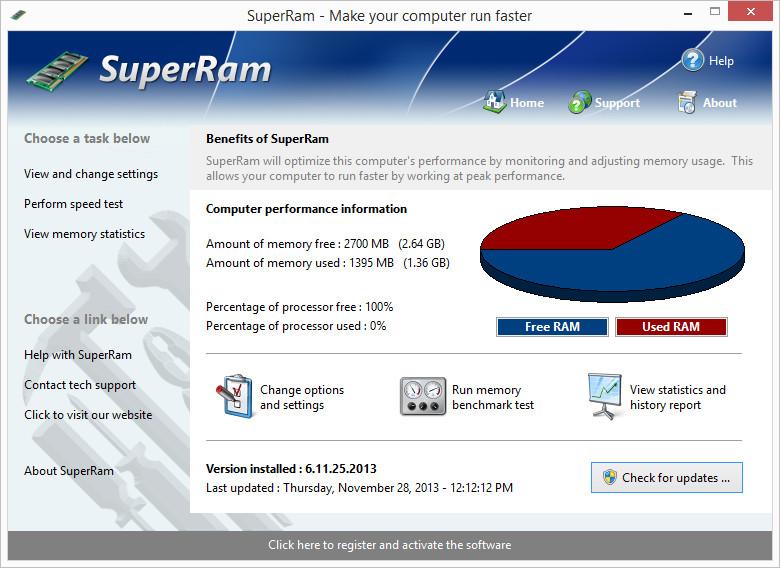
Most users don't want to spend their day looking at graphs of megabytes and percentages; they just want their computer to work. SuperRam excels here because of its "set and forget" philosophy. Once you install the software, it sits quietly in the system tray, running in the background with a minimal footprint. It constantly monitors your memory levels against a specific "low threshold." The moment your available memory drops below this safe zone, SuperRam springs into action, immediately freeing up space and returning it to the system pool.
This automated cycle means that you never have to manually intervene to keep your PC running smoothly. Whether you are a casual user who just wants a faster web browsing experience or a professional who keeps dozens of apps open at once, the software adapts to your usage patterns. You can literally install it, click the activation button, and never look at it again, all while enjoying a computer that feels snappy and responsive every time you wake it up. It removes the "maintenance" aspect of PC ownership and replaces it with automated efficiency.
4. Gaming and Media Detection
For gamers and movie buffs, there is nothing worse than a "hitch" or a "stutter" in the middle of the action. Even a minor background process can cause a frame-rate drop that ruins a competitive gaming session or breaks the immersion of a high-definition film. The developers of SuperRam understood this perfectly, which is why they included a dedicated Full Screen Detection mode. This feature is a game-changer for anyone who uses their PC for entertainment.
When you launch a game or a DVD and the application goes into full-screen mode, SuperRam detects this change instantly. It then enters a specialized state where it prevents any memory from being freed or shifted. This ensures that the system resources remain locked and dedicated to the primary task at hand—your entertainment. By preventing background memory management during these critical times, SuperRam eliminates the risk of video lag, screen tearing, or audio desyncing. It gives you the best of both worlds: a highly optimized PC during work hours and a dedicated, uninterrupted performance machine during your downtime.
5. Granular Customization for Power Users
While the "set and forget" mode is perfect for most, there are always those of us who want to get under the hood and tweak every single setting. SuperRam provides an impressive array of customization options that allow you to dictate exactly how your computer should behave. You aren't stuck with the developer's default settings; instead, you can manually adjust the low memory threshold to suit your specific hardware configuration. If you have 32GB of RAM, your needs are very different from someone with 8GB, and SuperRam allows you to reflect that in its configuration.
Furthermore, the software is exceptionally considerate of mobile users. If you are using a laptop, you know that every background process consumes precious battery life. SuperRam includes a specific setting that allows you to disable memory management when the laptop is running on battery power. This ensures that the software only performs its optimization routines when you are plugged into a wall outlet, preserving your battery for when you are on the move. This level of control—from CPU thresholds to power states—makes SuperRam a versatile tool that fits into any workflow, whether you are a power user with a liquid-cooled desktop or a student with a portable ultrabook.
Final Thoughts: Why You Should Download It Now
The beauty of a software giveaway like this is the ability to try a professional-grade tool that genuinely solves a universal problem. Computer lag isn't just a minor annoyance; it is a drain on your time and your patience. We spend hours every day in front of our screens, and those small delays of three or four seconds add up to massive amounts of wasted time over the course of a year. SuperRam offers a sophisticated, intelligent, and highly customizable way to reclaim that time.
By shifting the burden of memory management away from the often-clumsy Windows default settings and into its own optimized engine, SuperRam provides a noticeable boost in speed. It handles the "dirty work" of managing the page file, monitors your CPU to prevent interference, respects your gaming and movie sessions, and even looks out for your laptop's battery life. It is rare to find a utility that balances such deep technical functionality with an interface that is simple enough for a beginner to use.
In my professional opinion, if you have noticed even a slight decrease in your computer's performance, or if you simply want to ensure you are getting the most out of the hardware you paid for, SuperRam is a mandatory download. It’s an easy-to-use solution that tackles the root cause of PC slowdowns rather than just masking the symptoms. Don't wait until your computer freezes during an important project or a high-stakes game. Take control of your memory management today and experience what your PC is actually capable of when it isn't being held back by poor RAM allocation. Download the giveaway, run the installer, and let SuperRam do what it does best: making your computer run faster, smoother, and more reliably than ever before.
In conclusion, the combination of physical RAM prioritization, intelligent CPU awareness, and user-centric features like battery saving and full-screen detection makes SuperRam a standout product in the utility space. It is a lightweight yet powerful addition to any system. Whether you are looking to extend the life of an aging laptop or maximize the output of a high-end workstation, the benefits are immediate and tangible. This is one piece of software that truly earns its place on your hard drive.

Reviews for PGWARE SuperRAM 6
Click Here to Read Reviews for PGWARE SuperRAM 6 >> Click Here to Submit Reviews for PGWARE SuperRAM 6 >>