What Does Flashpaste Do?
Flashpaste is a productivity utility designed to streamline repetitive typing tasks by extending the functionality of the standard Windows clipboard. The software allows users to create and organize a library of frequently used text segments—such as email responses, code snippets, or technical documentation—into categorized templates.
Instead of manual re-typing, users can insert these pre-defined blocks into any text field with minimal clicks. This tool is aimed primarily at web developers, customer support representatives, and professionals who handle high volumes of correspondence. By utilizing these templates, users can reduce typographical errors and eliminate the need to search through legacy documents for reusable content.
Beyond static text, Flashpaste supports macros that automatically insert dynamic data, such as the current date and time, into a template. It also features a clipboard history function. Unlike the native Windows clipboard, which typically overwrites data with each new copy command, this software retains a running history of copied items for later retrieval.
Initial setup involves configuring the desired templates, after which the library remains available for instant use. The interface facilitates rapid navigation through stored categories, ensuring that even large databases of snippets remain accessible during active workflows.
Top 5 Reasons To Download Flashpaste
- Revolutionary Text Template Management: Create, categorize, and deploy frequently used text snippets or code blocks with just a few clicks.
- Powerful Macro Support: Automate dynamic data insertion, such as current dates and times, directly into your templates for a truly hands-off experience.
- Extended Clipboard History: Break free from the "one-item-only" limitation of the standard Windows clipboard and access a deep history of everything you have copied.
- Substantial Professional Productivity Gains: Specifically designed to eliminate the repetitive strain and time-waste for developers, support staff, and writers.
- Error Reduction and Workflow Accuracy: Eliminate typos and "misprints" by using pre-verified templates instead of manual, repetitive typing.
If you have ever spent your afternoon toggling between a dozen different windows just to copy and paste the same three sentences, you know the frustration of the modern digital workspace. We are living in an era of information, yet our most basic tool—the clipboard—has remained largely unchanged for decades. It is a bottleneck. It is a relic. And frankly, it is costing you hours of your life every single week. This is exactly why you need to pay attention to today’s giveaway: Flashpaste. This is not just another utility; it is a fundamental upgrade to how you interact with your computer. As a tech reviewer who has seen a thousand "productivity" apps come and go, I can tell you that this is the one that actually sticks because it solves a problem you face every few minutes.
The core philosophy of this software is simple: stop typing, start pasting. It sounds almost too simple to be revolutionary, but when you see it in action, you realize how much cognitive energy you have been wasting on repetitive tasks. Whether you are a coder, a customer service representative, or just someone who sends a lot of emails, Flashpaste is the secret weapon you didn't know you needed. Let’s dive deep into why this specific giveaway is the one you absolutely cannot afford to skip.
1. Revolutionary Text Template Management
The headline feature of Flashpaste is its ability to turn your most-used phrases into a library of templates. Think about the things you type every day. Your email signature, your office address, a standard "thanks for your inquiry" message, or a specific block of CSS or Python code. Typing these out manually is not just slow; it is a waste of your mental "RAM." Even using the standard Ctrl+C and Ctrl+V method is clunky because you can only hold one thing in your clipboard at a time. If you need to paste three different things, you are constantly switching back and forth.
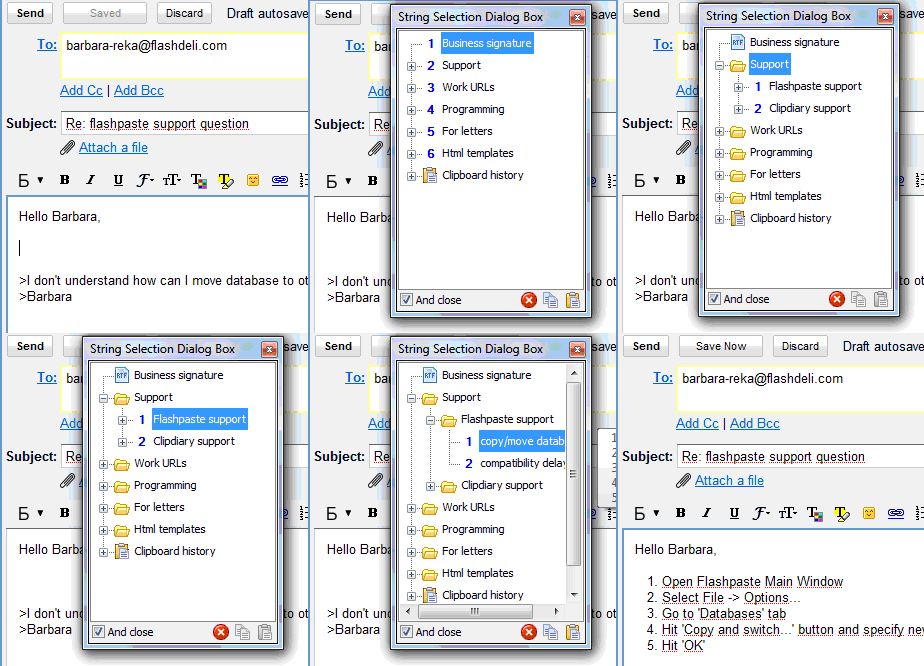
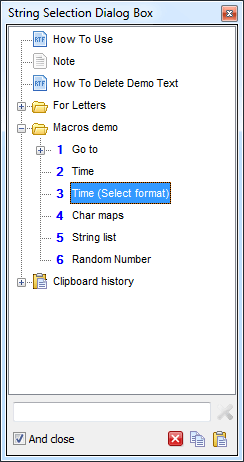
Flashpaste changes the game by allowing you to create a structured hierarchy of templates. You can organize your snippets into folders and categories. For example, you could have a folder for Email Replies, another for Code Snippets, and another for Personal Info. When you need a specific piece of text, you don't have to go searching through old sent items or Notepad files. You simply bring up the Flashpaste menu with a hotkey or a mouse click and select what you need. It is instantaneous. The software acts as an external brain, holding all the boring, repetitive stuff so you can focus on the creative, high-level work. This isn't just about saving seconds; it’s about maintaining your flow. Every time you have to stop what you are doing to go find a piece of text to copy, you break your concentration. Flashpaste keeps you in the zone.
2. Powerful Macro Support
Where most clipboard managers stop, Flashpaste is just getting started. Many people assume that "template" means "static text," but that is not the case here. One of the most compelling reasons to download this giveaway is the robust support for macros. A macro, in this context, is a small piece of logic that allows your template to change based on the situation. This is where the software moves from being a simple "storer of text" to a true automation tool.
Imagine you have a template for a daily report. Normally, you would paste the template and then have to manually type in today’s date. With Flashpaste, you can include a macro that automatically inserts the current date and time the moment you paste the snippet. But it goes deeper than that. You can use macros to simulate keypresses, like the Tab key or the Enter key. This means you could potentially fill out an entire digital form with a single click. The software could paste a name, "hit" Tab, paste an email, "hit" Tab, and then paste a message. The level of customization available here is staggering. For power users, these macros are the difference between a tool that is "handy" and a tool that is "essential." It’s about making your computer work for you, rather than you working for your computer.
3. Extended Clipboard History
We have all had that sinking feeling: you copied something important, then five minutes later you copied something else, and the first item is gone forever. The standard Windows clipboard is a "one-in, one-out" system, which is incredibly primitive by modern standards. One of the best features included in this giveaway is the Clipboard History. Flashpaste monitors your clipboard and saves a running list of everything you copy.
This feature is a lifesaver. Maybe you copied a URL an hour ago and now you realize you need it again. Instead of going back to your browser, digging through your history, and finding the page, you just open your Flashpaste clipboard history and there it is. It keeps your recent copies organized and accessible. It turns your clipboard into a searchable database of your recent activity. This is particularly useful when you are doing research or compiling data from multiple sources. You can go through a document and copy ten different facts one after another, and then go to your destination document and paste them all in sequence. It eliminates the "back-and-forth" dance that defines so much of modern office work. Once you have used a computer with an extended clipboard history, using a standard one feels like trying to drive a car with only one gear.
4. Substantial Professional Productivity Gains
While everyone can benefit from this software, there are certain professions where Flashpaste isn't just a luxury—it's a necessity. If you work in Customer Support, this tool will change your life. Support agents often find themselves answering the same twenty questions over and over again. Typing those responses manually is a recipe for burnout and repetitive strain injury. With Flashpaste, you can have a "Frequently Asked Questions" folder ready to go. You can provide faster, more accurate service to your customers because the "perfect" answer is always just two clicks away.
The same applies to Web Developers and Programmers. Coding is full of boilerplate—segments of code that are necessary but tedious to type out every time. Instead of "reinventing the wheel" for every new project, you can have your favorite loops, headers, and function structures stored in Flashpaste. It ensures that your code is consistent and free of the tiny syntax errors that often come from rushed typing. Even Digital Marketers and Writers will find it invaluable for storing brand guidelines, HTML tags, or common outreach templates. This giveaway is essentially giving you back several hours of your work week. What would you do with an extra five hours every week? That is the real value of what you are downloading here.
5. Error Reduction and Workflow Accuracy
We are all human, and humans make mistakes. When you are tired, or when you are rushing to meet a deadline, "misprints" and typos are inevitable. In some contexts, a typo is just embarrassing; in others—like when you are typing a server command, a legal disclaimer, or a piece of code—a typo can be catastrophic. Flashpaste acts as a quality control mechanism for your typing.
When you use a template, you know the text is correct because you verified it when you created the template. You don't have to worry about whether you spelled a client's name right for the fifth time today, or if you included all the digits in a long product key. You type it once, verify it, and then you never have to worry about it again. This "set it and forget it" approach to accuracy is a massive weight off your shoulders. Furthermore, the ease of use cannot be overstated. While there is a brief setup period where you'll want to input your most common templates, the interface is intuitive and straightforward. It doesn't require a computer science degree to figure out. It integrates seamlessly into your Windows environment, sitting quietly in the background until you need it. It is the definition of "user-friendly" tech that actually delivers on its promises.
In conclusion, we often look for "big" tech solutions to solve our productivity problems—new laptops, faster internet, or complex project management software. But usually, the biggest gains come from fixing the smallest, most frequent actions. We type and paste thousands of times a day. By optimizing those two simple actions, Flashpaste provides a cumulative benefit that outweighs almost any other software in your toolkit. This giveaway is a rare opportunity to grab a professional-grade tool that will immediately make your digital life easier, faster, and more accurate. Do yourself a favor: stop the manual grind. Download this giveaway, set up your templates, and experience the sheer joy of watching your work speed up. You’ll wonder how you ever got along without it.
Whether you are looking to save your wrists from the strain of typing, or you just want to get your work done faster so you can enjoy your evening, Flashpaste is the answer. It’s effective, it’s powerful, and for a limited time, it’s an absolute must-have addition to your software library. Don't let the simplicity fool you; the most powerful tools are often the ones that do one thing perfectly. And Flashpaste does speed-typing perfectly.
Final Verdict: This is a "must-download" for anyone who spends more than an hour a day on a keyboard. The time you save in the first week alone will more than justify the few minutes it takes to install and configure. This is the ultimate productivity hack, packaged in an easy-to-use interface that stays out of your way while helping you soar. Get it now and start pasting your way to a more efficient future.


Reviews for Flashpaste
Click Here to Read Reviews for Flashpaste >> Click Here to Submit Reviews for Flashpaste >>