What Does iSkysoft iPhone Data Recovery Do?
iSkysoft iPhone Data Recovery provides a technical solution for retrieving lost or deleted information from iOS devices, including iPhones, iPads, and iPod touches. The software addresses data loss resulting from accidental deletion, system crashes, failed jailbreaks, or physical hardware damage. It supports the recovery of up to 12 different file types, such as contacts, SMS messages, photos, call logs, Safari bookmarks, and voice memos.
The utility offers two primary recovery modes:
- Direct Recovery: Users can scan their devices directly to retrieve files. For older hardware like the iPhone 4 and iPad 1, the software can recover both media files and text-based data. For newer models, the direct scan focuses on text data, including notes and call history.
- iTunes Backup Extraction: This mode extracts data from existing iTunes backup files. This is a functional workaround if the original device is lost, stolen, or has been reset to factory settings, as it does not require the hardware to be present.
The interface facilitates a selective recovery process. Users can preview found files—including text content and original-quality images—before choosing which specific items to restore. Recovered documents such as messages and contacts are saved to a computer in .html format for easier reading and transfer. Additionally, the tool functions as a backup utility, allowing users to move both existing and deleted data from their mobile device to a desktop environment.
Top 5 Reasons To Download iSkysoft iPhone Data Recovery
- Unrivaled Multi-Mode Recovery: Whether your device is in your hand or lost forever, you can retrieve data directly from the hardware or via iTunes backups.
- Comprehensive File Support: It doesn't just find photos; it recovers 12 distinct file types including SMS, contacts, call logs, and Safari bookmarks.
- Rescue from Any Disaster: Designed to handle system crashes, forgotten passwords, "White Apple Logo" loops, and even physical damage or theft.
- Intelligent Preview and Selection: You can view your deleted files in high quality before committing to the recovery, saving you time and storage space.
- Broad Device Ecosystem Compatibility: Full support for a massive range of Apple products, from the classic iPhone 3GS and iPad 1 to the iPhone 5S and iPad Air.
We have all experienced that sudden, sinking feeling in the pit of our stomachs. You go to show a friend a photo from your last vacation, or you try to look up an important business contact, only to find that the data is simply gone. Maybe you accidentally hit the delete button, or perhaps a recent iOS update went sideways and wiped your device clean. In the worst-case scenarios, maybe your phone was crushed, dropped in water, or stolen. In the past, these situations meant your digital life was gone forever. But today, I am telling you that there is a definitive solution that every iPhone and iPad user needs to have in their digital toolkit. I am talking about iSkysoft iPhone Data Recovery, and this giveaway is something you absolutely cannot afford to pass up.
As a tech reviewer, I see hundreds of "utility" apps every year. Most of them are fluff—tools that promise the world but deliver very little. However, data recovery is one of those rare categories where the software actually matters. When you are dealing with the architecture of iOS, you need a tool that is surgical, powerful, and incredibly reliable. iSkysoft has built a reputation for being the "Swiss Army Knife" of data retrieval, and after putting it through its paces, it is clear why this is the industry standard. Let’s dive deep into the top five reasons why you need to download this software right now.
1. Unrivaled Multi-Mode Recovery Options
The biggest problem with most recovery tools is that they only work if your phone is plugged in and functioning. But what happens if your phone is at the bottom of a lake? Or what if it was stolen from your bag while you were commuting? This is where iSkysoft iPhone Data Recovery truly shines and separates itself from the pack. It offers two distinct, powerful recovery solutions that cover almost every possible scenario.
First, there is the Direct Recovery mode. This is for those moments when you still have the device in your hand. Perhaps you just deleted a text thread or a photo by accident. The software performs a deep, hardware-level scan of your iPhone, iPad, or iPod Touch. It bypasses the standard user interface to find data that has been marked for deletion but hasn't been overwritten yet. It is fast, efficient, and incredibly effective at bringing back files that you thought were gone for good.
Second, and perhaps more importantly, is the iTunes Backup Extraction mode. We all know that iTunes creates backups, but those backups are notoriously difficult to use if you only want one specific thing. Usually, iTunes forces you to do a full restore, which wipes your current data and replaces it with the old stuff. iSkysoft changes the game by allowing you to scan and extract files from your iTunes backup without actually needing to perform a full restore. This is a lifesaver if your device is lost or broken. You can simply point the software at your computer's backup files, and it will pull out your photos, contacts, and messages as if the phone were right there in front of you. This flexibility is the hallmark of a professional-grade tool.
2. Comprehensive File Support for Your Entire Digital Life
When people think of data recovery, they usually only think about photos. While photos are vital, our phones hold so much more than just images. Our entire social and professional lives are stored in databases of contacts, SMS threads, and call histories. iSkysoft understands this, which is why it supports the recovery of 12 different file types. This isn't just a "photo saver"; it is a total system recovery suite.
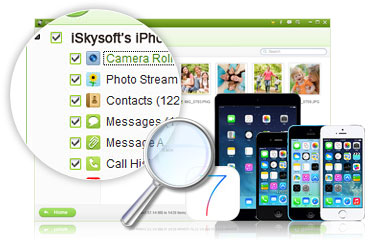
With this software, you can recover your Camera Roll, Photo Library, and Photo Stream, ensuring that every memory is accounted for. But it goes much deeper. Have you ever lost a long-running text message thread that contained important instructions or sentimental value? This tool recovers messages and their attachments. Did you lose your entire address book after a failed sync? It brings back your contacts with all their details intact. It even handles the "small" things that are actually huge when they go missing: call history, calendars, reminders, voice memos, notes, and even your Safari bookmarks. Imagine being able to recover your entire browsing history and saved sites after a device crash. That is the level of detail we are talking about here.
3. Rescue from Any Disaster Scenario
The "why" of data loss is often just as important as the "what." Some software only works for simple deletions. But iSkysoft iPhone Data Recovery is built for the "disaster" end of the spectrum. As tech enthusiasts, we like to push our devices to the limit. We jailbreak them, we install beta versions of iOS, and we perform massive system upgrades the day they are released. Sometimes, these actions result in a "bricked" device—the dreaded White Apple Logo screen or a continuous reboot loop.
This software is specifically designed to navigate these high-stress situations. If your system has crashed or you are stuck on the white screen of death, iSkysoft can often still communicate with the device's storage to pull your data off before you are forced to do a factory reset. It also handles hardware damage. If your screen is shattered and the touch interface doesn't work, you can't unlock your phone to get your data out through traditional means. iSkysoft bypasses these obstacles. Even if you have forgotten your password and are locked out of your own device, this software provides a path to retrieve your essential files. It is the ultimate insurance policy against both human error and hardware failure.
4. Intelligent Preview and Selective Recovery
One of my personal favorite features of this tool—and something I think every user will appreciate—is the Preview functionality. In many other recovery programs, you have to click "Recover All" and hope for the best. You end up with a giant folder of thousands of files, most of which you don't actually want, and you have to sift through them manually. It's a secondary headache that you just don't need.
iSkysoft solves this by providing a highly organized, crystal-clear preview window. Before you click the "Recover" button, you can browse through the found data. You can read the actual text of your deleted SMS messages and notes. You can see the names and numbers in your contact list. You can view your photos in their original quality and even check your videos and voice memos. This allows for Selective Recovery. You can check the boxes for only the three or four photos you actually care about, or that one specific contact you lost, and ignore the rest. This makes the process incredibly fast and keeps your computer's storage from being cluttered with junk. The software even saves text-based data like messages and contacts in .html format, making them incredibly easy to read and share on your computer without needing any special software. It is a user-centric design that respects your time and your storage space.
5. Broad Device Ecosystem Compatibility
We live in a world where Apple is constantly releasing new hardware, but many of us still rely on older devices for specific tasks. Maybe you have an old iPod Touch that acts as your dedicated gym music player, or an original iPad that the kids use for games. When data is lost on these older devices, it can be even harder to find support for them. One of the standout reasons to download iSkysoft is its massive compatibility range.
This software doesn't just cater to the latest flagship models; it covers the entire history of the iOS ecosystem. It works perfectly with legacy devices like the iPhone 4, iPhone 3GS, iPad 1, and iPod Touch 4G. For these older models, it offers incredibly deep scanning capabilities. But it doesn't stop there. It is fully optimized for the (then) newer generation, including the iPhone 5S, 5C, iPad Air, and iPad Mini with Retina Display. No matter which device you own, or how old it is, iSkysoft provides a tailored recovery path. You don't have to worry about whether your hardware is "too old" or "too new." This broad compatibility ensures that no matter where your data lives within the Apple ecosystem, this tool has the keys to get it out.
In conclusion, iSkysoft iPhone Data Recovery is not just a utility; it is peace of mind. In an age where our entire lives—our memories, our schedules, our professional networks—are stored on glass and silicon, we are always one accident away from losing it all. This giveaway offers you a professional-grade safety net that is usually reserved for data recovery specialists who charge hundreds of dollars for their services. You are getting a fast, powerful, and user-friendly interface that can handle everything from a simple "oops" to a catastrophic system failure.
Think about the photos on your phone right now. Think about the contacts you haven't backed up in months. What would you do if they disappeared tomorrow? By downloading this software today, you are ensuring that "lost" never stays lost. You are getting the ability to scan your devices directly, extract from hidden iTunes backups, preview your files in high definition, and recover exactly what you need with a single click. It is efficient, it is powerful, and as a tech reviewer who has seen it all, I can tell you: this is the one tool you will be glad you have when the unthinkable happens. Don't wait for the disaster to strike. Be proactive, grab this giveaway, and protect your digital legacy today.
The interface is intuitive enough for a novice, yet the recovery algorithms are sophisticated enough for a pro. It bridges the gap between complex data forensics and everyday usability. Whether you are trying to recover a deleted business contract or a video of your child’s first steps, iSkysoft handles the task with the same level of precision and care. It’s rare to find a tool that offers this much power without a steep learning curve, but iSkysoft has managed to do it. All saved files are easily readable on your computer, making the transition from "lost on phone" to "safe on PC/Mac" seamless. This is, without a doubt, a must-have download for any serious iPhone or iPad user.

Reviews for iSkysoft iPhone Data Recovery
Click Here to Read Reviews for iSkysoft iPhone Data Recovery >> Click Here to Submit Reviews for iSkysoft iPhone Data Recovery >>