What Does 4K Stogram Do?
4K Stogram is a specialized desktop client designed for the archival and retrieval of Instagram media. The software allows users to download photos and videos directly to a PC by inputting a username, hashtag, or specific post URL. By utilizing the "Follow user" function, the application automates the process of mirroring an account's content onto a local hard drive.
The utility supports bulk operations, enabling the simultaneous monitoring of multiple accounts. Media is systematically saved in standard formats, including JPEG for images and MP4 for video content. A primary feature of the software is its ability to access and back up content from private accounts, provided the user logs in with their own credentials to verify their existing access to those feeds.
Functional highlights of the application include:
- Automated Downloads: The program tracks selected profiles and automatically fetches the latest uploads.
- Private Account Archiving: Users can download media from private friends' accounts they already follow on the platform.
- Integrated Media Viewer: Downloaded images and videos can be viewed directly within the application’s minimalist interface.
- Concurrent Processing: The software handles data from various sources at once, streamlining the backup of large libraries.
By providing a local repository for digital imagery, 4K Stogram serves as a functional tool for users seeking to maintain offline copies of social media content without manual individual saves.
Top 5 Reasons To Download 4K Stogram
- Effortless Batch Downloading for Multiple Accounts: Save entire profiles, including photos and videos, simultaneously without the tedious manual "save-as" process.
- Secure Access to Private Profile Content: Log in securely to back up the memories shared by friends and family on their private accounts.
- Automated Subscription-Based Updates: Automatically track your favorite creators and have their newest content delivered straight to your desktop the moment they post.
- High-Fidelity Offline Media Archiving: Convert ephemeral social media posts into permanent, high-quality JPEG and MP4 files stored locally on your hard drive.
- Clean, Minimalist User Experience: Enjoy a distraction-free, bloatware-free interface designed specifically for efficiency and ease of use.
In the modern digital landscape, Instagram has become the world’s living photo album. It is the place where we store our most precious memories, follow our creative idols, and discover visual inspiration that shapes our daily lives. However, there is a fundamental flaw in the way we interact with this platform: it is a "walled garden." Your data, your friends' photos, and the art you love are all locked behind an interface that can be changed, censored, or even deleted at a moment's notice. As a tech reviewer who has seen dozens of apps come and go, I have always advocated for one thing above all else: data ownership. This is exactly why you need to download 4K Stogram.
4K Stogram is not just another utility; it is a powerful desktop gateway that bridges the gap between the fleeting nature of social media and the permanence of your personal digital library. Whether you are a professional photographer looking to archive your portfolio, a researcher gathering visual data, or simply someone who wants to make sure their family photos never disappear, this software is the gold standard. Let’s dive deep into the five primary reasons why this giveaway is an absolute must-have for your PC.
1. Effortless Batch Downloading for Multiple Accounts
We have all been there. You find an incredible artist or a travel blogger whose entire feed is a masterpiece. You want to save those images for a mood board, a screensaver, or just for offline inspiration. On a mobile device or a standard browser, this is a nightmare. You are forced to click every individual image, take screenshots (which ruins the resolution), or use sketchy browser extensions that often break or compromise your privacy. 4K Stogram changes the game by introducing true multi-account simultaneous downloading.
When you use 4K Stogram, you aren't limited to a one-by-one workflow. You can input multiple usernames, hashtags, or even locations at once. The software works in the background, reaching out to the Instagram servers and pulling down every piece of media associated with those parameters. It saves them in organized folders on your desktop as high-quality JPEGs. This is a massive time-saver. Imagine trying to download 500 photos manually—it would take hours of clicking and naming files. With 4K Stogram, it takes a few seconds to set up and the software handles the heavy lifting while you grab a coffee. For power users who manage multiple interests, this batch processing capability is worth the download alone.
Furthermore, the ability to download via photo links or specific hashtags allows for targeted curation. If you are following a specific event—say, a wedding or a tech conference—via a hashtag, you can tell 4K Stogram to grab everything associated with that tag. You end up with a localized, high-resolution archive of the event without ever having to scroll through an endless, algorithm-driven feed. It turns the chaos of Instagram into an organized, searchable database on your own computer.
2. Secure Access to Private Profile Content
This is perhaps the most requested feature for any Instagram tool, and 4K Stogram executes it with a focus on security and simplicity. We all have friends or family members who keep their accounts private for safety and privacy reasons. While we respect those boundaries, it often makes it incredibly difficult to save a copy of a photo they’ve shared of a shared holiday, a child’s birthday, or a graduation. Usually, you are stuck with low-quality screenshots that crop out the edges and look terrible on larger screens.
By logging into 4K Stogram with your own Instagram credentials, the app acts as a desktop client that respects the permissions already granted to your account. It doesn't "hack" anything; rather, it uses your legitimate access to allow you to backup the content you are already authorized to see. This is a vital tool for creating "digital heirlooms." If a relative decides to deactivate their account or if Instagram’s servers have an outage, those private memories could be lost forever. 4K Stogram ensures that you have a local copy of the media that matters most to you, stored safely in the format you choose.
As a reviewer, I am always wary of apps that ask for logins, but the 4K Download team has a long-standing reputation for software integrity. The login process is handled through the standard Instagram API protocols, ensuring that your password isn't being whisked away to some unknown third-party server. It provides a seamless way to bridge your "Following" list with your local storage, making the "walled garden" of private accounts feel a lot more like your own personal library.
3. Automated Subscription-Based Updates
In the world of software, we often talk about "set it and forget it" solutions. 4K Stogram embodies this philosophy perfectly with its automatic update feature. Think of it like an RSS feed, but for visual content. Most of us have a handful of "must-follow" accounts—perhaps a favorite digital artist, a news outlet, or a close friend who posts frequently. Checking their profiles daily to see if they’ve posted something new is a chore.
With 4K Stogram, you can "Follow" these users within the application interface. Once you do, the software periodically checks those accounts for new posts. The moment a new photo or video is uploaded to Instagram, 4K Stogram detects it and automatically downloads it to your PC. You don’t even have to have the app front-and-center; it can work quietly in the background. When you open your download folder, your favorite creators' latest work is already there, waiting for you.
This level of automation is a dream for curators and fans alike. It removes the "FOMO" (fear of missing out) because you know that even if a user deletes a post shortly after uploading it, your 4K Stogram instance likely already grabbed a copy for your archive. This is also incredibly useful for professional environments where keeping track of a competitor's visual branding or a partner's social media presence is part of the job. It transforms Instagram from a passive scrolling experience into an active, automated data-gathering tool.
4. High-Fidelity Offline Media Archiving
We often forget that social media platforms are services, not storage. Instagram compresses your photos and videos to save space on their servers, and they provide no easy way to get that content back out in its original form. Moreover, the "Save" feature within the Instagram app is merely a bookmark; if the original poster deletes the image, your bookmark vanishes too. This is digital decay in action.
4K Stogram provides a permanent solution to digital decay by offering high-fidelity archiving. When you download a photo, it is saved as a high-quality JPEG. When you download a video, it is saved in the MP4 format. These are universal file types that can be played on any device, from your smartphone to your smart TV, without needing an internet connection or the Instagram app. Having an offline archive means you are no longer at the mercy of the platform’s uptime, your data plan, or the whims of an algorithm.
For video lovers, the MP4 support is a massive "pro" in the pros-and-cons column. Instagram’s video player can be finicky, often lagging or refusing to loop properly. By having the raw MP4 file on your desktop, you can use your favorite media player (like VLC or MPC) to frame-advance, zoom, or loop the content as you see fit. You can also easily move these files into video editing software for fair-use projects, school presentations, or personal montages. 4K Stogram empowers you to treat Instagram content as actual files on your system rather than just pixels on a screen.
5. Clean, Minimalist User Experience
One of the biggest complaints I have with modern software is "feature creep." Too many developers try to turn every app into a Swiss Army knife, adding unnecessary social features, ads, and confusing menus that distract from the core purpose. 4K Stogram is a breath of fresh air in this regard. Its minimalistic interface is designed with a singular focus: getting the job done as efficiently as possible.
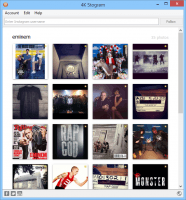
The UI is incredibly intuitive. There is a search bar at the top where you enter a username, hashtag, or link. You hit the "Follow" button (or "Download"), and the magic happens. The app displays the thumbnails of the downloading content in a clean grid, allowing you to see progress in real-time. There are no flashing banners, no "suggested content" to distract you, and no convoluted settings menus to navigate. It is a professional tool that looks and feels like a native part of your operating system.
Additionally, the app includes its own built-in viewer. This means you don't even have to leave the application to review what you've downloaded. You can browse through your archived accounts, click on an image to see it full-screen, and manage your library all from within the 4K Stogram window. It strikes the perfect balance between a powerful downloader and a lightweight media browser. This simplicity is what makes it accessible to everyone—from tech-savvy power users to grandparents who just want a way to save photos of their grandkids. It’s a tool that respects the user’s time and intelligence.
The Tech Reviewer’s Final Word
In an era where our digital lives are increasingly ephemeral, 4K Stogram offers a sense of permanence and control. We spend hours every week scrolling through feeds, only for those images to be forgotten minutes later. By downloading this software, you are giving yourself the ability to curate a personal museum of the things you find beautiful, important, or inspiring. You are taking the power back from the platform and putting it back where it belongs: in your hands.
The technical benefits—the batch downloading, the private account access, the MP4 video support, and the automation—are all industry-leading. But the real value of 4K Stogram is the peace of mind it provides. Knowing that your favorite memories and artistic inspirations are backed up on your physical hard drive, accessible even if the internet goes down or an account is deleted, is a luxury that every Instagram user should have.
Don’t let your digital history be written in sand. 4K Stogram allows you to carve it in stone (or at least, in high-speed storage). The interface is minimalist, the performance is robust, and the functionality is essential. This is one of those rare utilities that, once you start using it, you’ll wonder how you ever managed your digital life without it. It’s time to move beyond the limitations of the mobile app and open up wide new vistas of imagery right from your desktop. This is a must-download giveaway for anyone who takes their visual media seriously. Get it, set up your subscriptions, and start building your ultimate offline archive today.
Final Tip: When you first launch the app, try entering your favorite travel hashtag. Watching the grid fill up with high-resolution imagery from around the world is not just satisfying—it’s a testament to how much content we usually miss when we rely on the standard Instagram algorithm. 4K Stogram doesn't just download photos; it unlocks the full potential of the platform's visual library.


Reviews for 4K Stogram
Click Here to Read Reviews for 4K Stogram >> Click Here to Submit Reviews for 4K Stogram >>