What Does AnVir Task Manager Do?
AnVir Task Manager is a comprehensive system utility designed to replace the native Windows Task Manager while providing advanced monitoring and optimization capabilities. The software consolidates process management, security scanning, and hardware diagnostics into a single interface, allowing users to oversee all active elements of their operating system.
The tool provides granular control over startup programs, services, and active processes. By managing these components, users can reduce boot times and improve overall PC responsiveness. Additionally, AnVir Task Manager includes security features aimed at identifying and removing Trojans, spyware, and other malicious software that standard antivirus programs might fail to detect.
Key functionalities provided by this utility include:
- System Monitoring: Real-time tracking of CPU usage, HDD activity, and memory consumption.
- Startup Management: Tools to disable unnecessary programs that slow down the Windows boot process.
- Security Analysis: Identification of suspicious background tasks and potential malware threats.
- Windows Tweaking: Access to hidden system settings to customize performance and behavior.
By offering these features in a unified dashboard, the application eliminates the need for multiple standalone performance and security tools. It provides a more detailed perspective on system health and resource allocation than the standard built-in Windows utilities, serving as a centralized hub for system maintenance and optimization.
Top 5 Reasons To Download AnVir Task Manager
1. Comprehensive System Transparency and Monitoring: You get an unprecedented look into every process, service, and startup program running on your machine, including real-time monitoring of your CPU, HDD, and network activity.
2. Enhanced Security Beyond Traditional Antivirus: It acts as a powerful secondary defense line, identifying and removing Trojans, spyware, and viruses that standard antivirus software often overlooks by utilizing a unique security risk rating system.
3. Drastic Performance and Startup Optimization: The software allows you to significantly speed up your PC by managing startup items, including a "Delayed Startup" feature that ensures your desktop is ready to use immediately upon login.
4. A Superior Task Manager Replacement: It replaces the limited Windows Task Manager with a high-powered interface that provides more data, more control, and more convenience than the native OS tools ever could.
5. All-in-One Utility Convenience and Cost Savings: Instead of purchasing separate tools for system cleaning, security monitoring, startup management, and UI tweaking, you get everything in a single, streamlined interface.
The Ultimate Power Tool for Your Windows PC
If you have ever felt that your computer was acting like a "black box"—doing things behind your back, slowing down for no apparent reason, or feeling sluggish despite having high-end hardware—then you know the frustration of limited visibility. Windows is a complex beast, and the default tools provided by Microsoft often feel like they are designed to keep you in the dark rather than empower you. This is why AnVir Task Manager is such a revelation for tech enthusiasts and casual users alike. In this review, I am going to break down exactly why this software is a mandatory download and how it will transform your computing experience.
We have all been there: the spinning blue circle, the sudden fan noise, the keyboard lag. Usually, our first instinct is to hit Ctrl+Alt+Del and see what is going on. But the standard Task Manager is like looking through a keyhole. You see some names, you see some percentages, but you don't really see the "why" or the "how." AnVir Task Manager opens the door wide, giving you a panoramic view of your system's soul. It is not just about seeing what is running; it is about taking absolute command over your digital environment.
1. Comprehensive System Transparency and Monitoring
The first and most compelling reason to grab this giveaway is the sheer depth of information it provides. When we talk about monitoring, we aren't just talking about a simple list of apps. AnVir Task Manager provides a granular look at every single process, service, and hidden thread running on your system. It monitors your CPU usage, hard drive temperature and health, memory allocation, and network traffic in real-time. This isn't just data for the sake of data; it is actionable intelligence.
For example, have you ever noticed your hard drive light blinking incessantly even when you aren't doing anything? With this tool, you can see exactly which process is reading or writing to the disk at that exact second. You can track down "zombie" processes that refuse to close or find out which background service is hogging your bandwidth. The level of detail includes showing you the path of the executable, the company that created it, and even the DLLs (Dynamic Link Libraries) it is currently using. For a tech reviewer like me, this is like having X-ray vision for your PC. It turns troubleshooting from a guessing game into a surgical procedure.
Furthermore, the monitoring extends to your system tray. AnVir puts useful icons right next to your clock that show you your CPU load, disk activity, and even battery life for laptops. This means you don't even have to open the program to know exactly how your hardware is performing. It is about staying informed without being interrupted, which is the hallmark of well-designed software.
2. Enhanced Security Beyond Traditional Antivirus
Let's be honest: no antivirus is 100% effective. New threats are created every hour, and often, the most dangerous ones are the ones that don't look like "traditional" viruses. They look like legitimate processes or hide deep within your startup registry keys. This is where AnVir Task Manager becomes your best friend. It doesn't just look for "signatures" like a standard scanner; it looks at behavior and risk.
Every process and startup item in AnVir is given a Security Risk Rating. This rating is based on a sophisticated algorithm that looks at whether the file is signed, its location on the disk, whether it is hidden, and how it interacts with the system. If a process has a high risk rating, it is flagged immediately, allowing you to investigate it before it can do damage. This is how you catch the "zero-day" Trojans and spyware that your expensive antivirus suite might have missed. It puts the power of a security analyst in your hands.
When a new program tries to add itself to your startup—a classic move for malware—AnVir alerts you instantly. You are given the choice to allow it, block it, or quarantine it. This proactive approach to security is far more effective than the reactive approach of most security software. By monitoring the "entry points" of your system, AnVir ensures that nothing gets a foothold on your hard drive without your express permission. It turns your computer into a digital fortress.
3. Drastic Performance and Startup Optimization
Nothing kills the "new PC" feeling faster than a bloated startup sequence. Over time, every app you install thinks it is important enough to start the moment you turn on your computer. Before you know it, your boot time has gone from twenty seconds to three minutes. AnVir Task Manager tackles this head-on with one of the most sophisticated startup managers I have ever used. It lists every single item that launches at login, including hidden registry entries that are invisible to the standard Windows "Startup" tab.
But the real "killer feature" here is the Delayed Startup. This is a game-changer. Instead of letting twenty programs fight for CPU cycles and disk I/O the moment you log in, you can tell AnVir to stagger them. You can tell your chat app to wait one minute, your cloud storage to wait two minutes, and your peripheral software to wait three minutes. This means your core Windows services load instantly, your desktop is responsive immediately, and the "heavy lifting" happens in the background while you are already checking your email. It makes an old PC feel new and a new PC feel like a supercomputer.
Beyond startup, AnVir helps with ongoing performance. It allows you to free up memory with a single click and allows you to set the "priority" of certain tasks. If you are gaming or editing video, you can ensure that those applications get the lion's share of your CPU power while background tasks are pushed to the side. It is about optimizing the resources you have to ensure you are getting the maximum performance out of your hardware investment.
4. A Superior Task Manager Replacement
The native Windows Task Manager has improved over the years, but it is still fundamentally a "lite" tool. It is designed for the average user who just wants to "End Task" on a frozen browser window. For anyone who wants more control, it is woefully inadequate. AnVir Task Manager is designed to completely replace the default tool, and once you make the switch, you will never want to go back. It offers a "Replace Task Manager" function that redirects the Ctrl+Shift+Esc shortcut directly to AnVir.
Why would you want to do this? Because AnVir offers context. In the standard Task Manager, you might see a process called "svchost.exe" running ten times. In AnVir, you can hover over those entries and see exactly which services are contained within each instance. You can see the command line that launched the process, the parent process that spawned it, and the exact amount of memory it is "leaking."
The interface is also significantly more customizable. You can filter processes, group them by type, and even add "tags" to them. It also includes a "Tweak" section that allows you to modify hidden Windows settings. You can change how windows behave, customize your title bars, and even add a "Roll up" button to your windows (a feature Mac users have loved for years). It isn't just a utility; it is a total enhancement of the Windows User Interface. It makes using your computer more intuitive and far more efficient.
5. All-in-One Utility Convenience and Cost Savings
We live in an age of "subscription fatigue" and "app bloat." If you wanted to do everything AnVir does using other software, you would need a startup manager, a process monitor, a security scanner, a system tweaker, and a hardware monitor. Not only would this cost you a significant amount of money in licenses, but it would also clutter your system with five different background services, likely slowing down your PC in the process of trying to "fix" it.
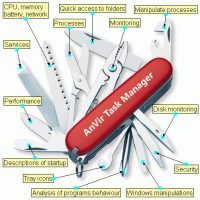
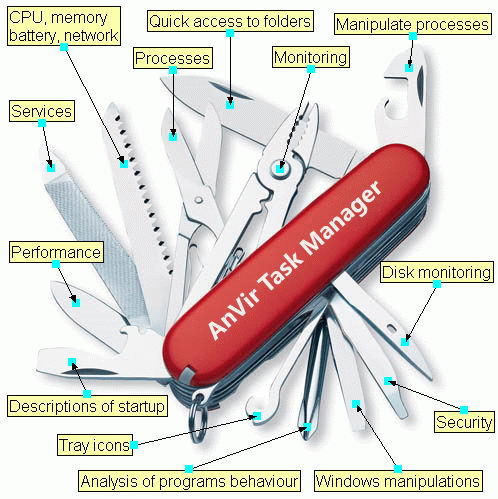
The beauty of this giveaway is that it provides all of these features in a single, lightweight package. It is the ultimate "Swiss Army Knife" for Windows. Because all these features are integrated into a single interface, they work together seamlessly. Your startup manager knows which programs are risky because it shares the security database with the process monitor. Your performance tweaks are informed by the real-time monitoring of your hardware. This integration creates a synergy that separate apps simply cannot match.
By downloading this tool, you are essentially saving yourself the cost of a full suite of system utilities. It provides the convenience of having one place to go for all your system maintenance needs. Whether you are a "set it and forget it" user who wants the security alerts, or a "power user" who wants to tweak every registry key and delay every startup item, this software scales to your needs. It is efficient, it is powerful, and most importantly, it puts you back in the driver's seat of your own computer.
Final Thoughts: Why You Need to Download This Now
In the world of tech, we often talk about "essential" software. Usually, that list includes a browser, an office suite, and maybe a photo editor. But for me, AnVir Task Manager belongs in that top tier. It is the bridge between the user and the operating system. It removes the mystery of what is happening under the hood and replaces it with clarity and control. You wouldn't drive a car without a dashboard that shows you your speed, oil pressure, and engine temperature—so why would you run a complex operating system like Windows without the proper instrumentation?
This is more than just a giveaway; it is an upgrade for your digital life. Whether you are looking to squeeze more speed out of an aging laptop, or you want to ensure your high-end gaming rig is running at peak efficiency without the threat of hidden malware, this tool is the solution. The "Security Risk Rating" alone is worth the download, providing a peace of mind that is hard to come by in today's landscape of digital threats. When you add in the "Delayed Startup" feature and the comprehensive process monitoring, it becomes a no-brainer.
Don't settle for the "basic" experience that Microsoft provides. Take control of your processes, secure your system against Trojans, and make your PC start faster than it ever has before. This software is lightweight, powerful, and incredibly user-friendly despite its deep feature set. It is rare to find a tool that is equally useful for my grandmother and for my most tech-savvy colleagues, but AnVir manages to hit that sweet spot. It provides convenience, saves you money, and most importantly, it gives you the confidence that your computer is working for you, not against you. Download it, explore the features, and I promise you will wonder how you ever managed without it.
The power to control everything running on your computer is just a click away. Make your Windows experience faster, safer, and better today.

Reviews for AnVir Task Manager
Click Here to Read Reviews for AnVir Task Manager >> Click Here to Submit Reviews for AnVir Task Manager >>