What Does Photo Print Pilot Do?
Photo Print Pilot is a dedicated utility designed for home users to manage and execute digital photograph printing. The software streamlines the process of organizing multiple images onto a single sheet of paper, effectively reducing the need for repetitive manual printer feeding. Users can aggregate image files from various local directories into a single print queue.
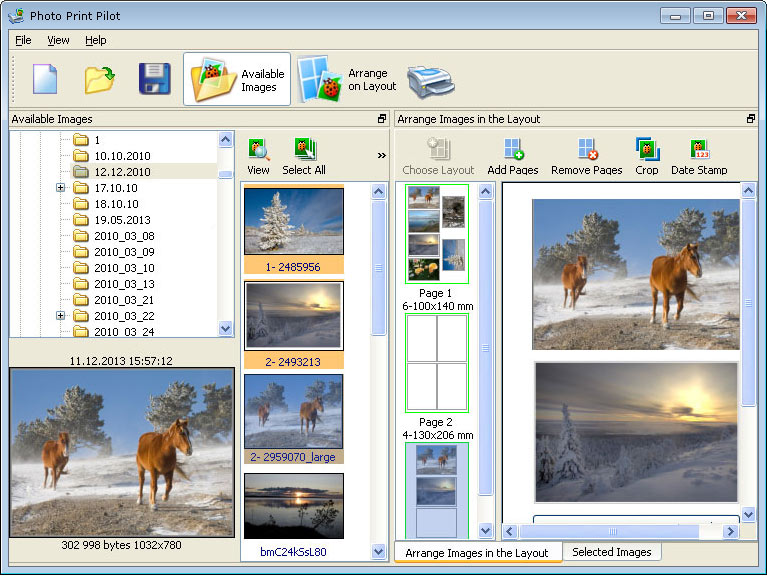
The application features a selection of layout templates that determine both image dimensions and their specific arrangement on the page. Prior to printing, the software allows for composition adjustments, enabling users to select and print only specific areas of an image. This functionality ensures that the final physical output matches the user's framing requirements.
Photo Print Pilot supports a standard range of graphic file formats, including:
The primary utility of the program lies in its ability to consolidate different images onto one page. This provides a practical solution for individuals who frequently print large volumes of graphics and require a tool to optimize paper usage and simplify the layout process without specialized design experience.
Top 5 Reasons To Download Photo Print Pilot
Before we dive into the nitty-gritty details of why every home photography enthusiast needs this tool in their arsenal, let's look at the highlights. If you have ever struggled with the standard Windows print wizard or found yourself frustrated by the limitations of basic photo viewers, here are the top five reasons you need to download Photo Print Pilot today:
- Seamless Multi-Folder Image Sourcing: Pull photos from anywhere on your hard drive into a single print queue without moving files.
- Professional Layout Templates: Automatically arrange multiple photos of varying sizes on a single sheet of paper to eliminate waste.
- Precision Composition Control: Crop and adjust your images directly within the software to ensure the perfect focal point before hitting print.
- Comprehensive Format Support: Full compatibility with BMP, GIF, JPEG, PNG, and TIFF files for a truly universal workflow.
- Cost and Resource Efficiency: Drastically reduce paper and ink consumption by maximizing every square inch of your photo paper.
1. Revolutionizing Your Workflow with Multi-Folder Integration
We have all been there. You have a folder for your summer vacation, another folder for your daughter’s birthday party, and perhaps a third folder where you keep your best professional shots. When it comes time to print a physical album or a collage, the traditional method involves a tedious process of copying and pasting files into a temporary "Print Me" folder, or worse, opening multiple instances of a photo viewer and trying to manage the printer queue manually. This is where Photo Print Pilot steps in to save your sanity.
The beauty of this software lies in its ability to act as a central hub for your entire digital library. As a tech reviewer, I have tested countless utilities that claim to simplify organization, but few handle the actual output phase as gracefully as this. When you open the application, you aren't tethered to a single directory. You can navigate through your entire file system, cherry-picking the specific images you want from various locations. This non-destructive approach means your original files stay exactly where they belong, organized by date or event, while your print queue becomes a curated collection of your best work.
This feature is particularly vital for those who work with massive libraries. Imagine you are putting together a "Year in Review" photo board. You need images from January through December. Instead of opening twelve different folders in Windows Explorer and getting lost in a sea of thumbnails, you simply point Photo Print Pilot to your root directory and start adding photos to the layout. It streamlines the "pre-flight" stage of printing in a way that feels intuitive and, more importantly, fast. For anyone who prints a high volume of graphics, the time saved here alone justifies the download.
2. Professional Layout Templates: The End of Paper Waste
Let’s talk about the elephant in the room: photo paper is expensive. Whether you are using high-gloss, matte, or semi-gloss finishes, every sheet represents a financial investment. Most basic printing software treats a sheet of paper like a single-use container. If you want to print a 4x6 photo, the software often centers it on an 8.5x11 sheet, leaving a massive amount of white space that usually ends up in the trash. It’s inefficient, it’s wasteful, and frankly, it’s frustrating.
Photo Print Pilot solves this by offering a robust library of templates designed for maximum efficiency. These templates are the secret sauce that turns a home printer into a professional-grade production station. You can choose a layout that fits two 5x7 prints on a single page, or perhaps four 4x6 prints, or even a mix of different sizes. The software handles the complex "nesting" math for you. All you have to do is choose the template that matches your goals, and the program arranges the images with perfect margins.
For parents printing school photos, hobbyists creating scrapbooks, or even small business owners who need to print promotional materials, these templates are a game-changer. You no longer have to worry about "feeding the page back into the printer" and hoping the alignment is correct for a second pass. By arranging everything on a single page before the ink ever touches the paper, you ensure that every cent you spend on paper and ink is used to its fullest potential. This level of arrangement precision is usually reserved for high-end desktop publishing software, but here, it’s presented in a way that anyone can master in minutes.
3. Precision Composition and In-App Adjustments
One of the biggest mistakes people make when printing at home is assuming that the digital image on their screen will look exactly the same once it’s printed. Because of different aspect ratios—the relationship between the width and height of an image—photos often get "auto-cropped" by printer drivers in ways that cut off people's heads or important background details. Photo Print Pilot gives you the power to prevent these disasters through its composition adjustment tools.
When you place a photo into a template, the software allows you to adjust the composition within the frame. This means you can zoom in, pan around, and select the exact "safe area" that will be printed. If you have a wide-angle landscape shot but you want to print it in a square format, you can manually select the most interesting part of the image without ever needing to open a heavy-duty photo editor like Photoshop. This is on-the-fly editing that focuses specifically on the final physical product.
This feature is particularly impressive because it allows you to print only a "selected area" of an image. If you have a group photo but you only want a portrait of one specific person, you can define that area within the software. It removes the need for a multi-step workflow where you edit, save a copy, and then print. By combining the selection and printing process, the software maintains the highest possible resolution from your original file while giving you the creative control to frame your memories exactly how you want them to appear on your wall.
4. Universal Format Support: Compatibility Without Compromise
In the world of digital imaging, file formats matter. While most people are familiar with JPEGs, different cameras and editing suites often output files in various formats to preserve quality or metadata. A common pain point for users is finding out that their printing software doesn't "recognize" a specific file type, forcing them to undergo a tedious conversion process. Photo Print Pilot eliminates this headache by supporting a wide array of the most common and professional graphic formats: BMP, GIF, JPEG, PNG, and TIFF.
The inclusion of TIFF support is a major win for those who care about quality. TIFF files are often used by photographers because they are "lossless," meaning they don't lose detail when saved. Being able to print directly from TIFF files ensures that you are getting the absolute maximum detail your printer is capable of producing. On the other end of the spectrum, support for PNG and GIF means you can easily print web graphics or digital art that may contain transparency or specific color indexing. BMP support covers the classic Windows standard, ensuring even your oldest digital memories are accessible.
As a reviewer, I always look for software that "just works" regardless of what the user throws at it. You shouldn't have to be an IT expert to understand why a photo won't open. With this software, you can drag in a mix of file types—a JPEG from your phone, a TIFF from your DSLR, and a PNG you designed in a drawing app—and Photo Print Pilot will handle them all simultaneously on the same page. It’s this kind of "under-the-hood" robustness that separates professional tools from amateur utilities.
5. Maximum Economic Impact and Productivity
Finally, we have to talk about the sheer productivity and cost-saving benefits of this giveaway. In an era where subscription services are trying to nickel-and-dime users for every feature, having a dedicated, lightweight, and powerful printing solution like Photo Print Pilot is a breath of fresh air. This software is specifically designed for people who "print a lot of graphics," and it shows in the efficiency of the user interface.
The most significant productivity boost comes from the batch printing capability. In a standard setup, printing twenty 4x6 photos might require you to click "Print" twenty times, waiting for the printer to cycle between each job. With this software, you can fill up multiple pages with images, hit print once, and walk away. The software communicates the entire job to the printer in a streamlined way, reducing the "thinking time" of your hardware and getting your physical photos into your hands much faster.
Furthermore, by optimizing the layout, you are significantly extending the life of your printer’s mechanical components. Fewer paper feeds mean less wear and tear on the rollers and less chance of a paper jam. When you combine the saved time, the saved paper, the saved ink, and the reduced stress, the value proposition of Photo Print Pilot becomes undeniable. It turns a chore—printing photos—into a streamlined, enjoyable process that produces professional results every single time.
Final Verdict: Why You Should Download It Now
If you have a printer sitting on your desk, you owe it to yourself to have software that actually makes use of it properly. Most of us have thousands of photos sitting on our hard drives, hidden away in folders, never to be seen. We don't print them because the process is usually too difficult, too expensive, or too unpredictable. Photo Print Pilot removes every one of those barriers.
It is a simple, handy, and powerful solution for anyone from the casual family documentarian to the serious digital artist. It bridges the gap between the digital and physical worlds with a level of ease that is rare in today’s software market. You get the flexibility to source images from anywhere, the intelligence of professional layout templates, the control of precision cropping, and the reliability of universal format support. And most importantly, you get a tool that respects your time and your wallet by maximizing your resources.
Don’t let your memories stay trapped behind a screen. Download Photo Print Pilot and experience how easy it can be to create beautiful, high-quality prints right from the comfort of your home. It’s efficient, it’s intuitive, and it’s exactly the kind of tool that makes technology feel like a help rather than a hindrance. This is one download you definitely won't regret.

Reviews for Photo Print Pilot
Click Here to Read Reviews for Photo Print Pilot >> Click Here to Submit Reviews for Photo Print Pilot >>