What Does Fort Professional Edition Do?
Fort is a dedicated file encryption and password management application built specifically for the Windows ecosystem. It provides a localized method for securing sensitive data before it reaches the cloud or is stored on portable hardware. By integrating directly into Windows Explorer, the software allows users to encrypt individual files or entire directories with minimal friction. This utility is particularly effective for users who rely on services like OneDrive or Dropbox, as it ensures data remains unreadable to third parties even if a cloud account is compromised.
Security is handled through 256-bit AES encryption. Users can authenticate using a standard passphrase, a 4096-bit keyfile, or a combination of both for heightened protection. To mitigate local threats, the software includes an on-screen keyboard to bypass keyloggers and utilizes FIPS-compliant cryptographic modules. Each encryption task employs a random salt and initialization vector to prevent pattern recognition and ensure that no two encrypted files are identical.
The technical framework of Fort is designed for transparency and performance. Its core components are open-source, allowing for independent security auditing. Key features include:
- Tamper detection to verify file integrity during decryption.
- Support for Windows Vista through Windows 10 in both 32-bit and 64-bit versions.
- Automatic file associations for one-click decryption.
- Lightweight system footprint to maintain machine performance.
- Optional backup of original files prior to the encryption process.
Top 5 Reasons To Download Fort Professional Edition
- Uncompromising Military-Grade Encryption: Fort utilizes AES with 256-bit keys and FIPS-compliant modules to ensure your data is virtually impenetrable to unauthorized users.
- Seamless Cloud Storage Security: Effortlessly protect sensitive files stored in OneDrive, Dropbox, and other cloud services, ensuring your privacy remains intact even on third-party servers.
- Intuitive Windows Explorer Integration: The software blends perfectly into your existing workflow with right-click functionality and simple file associations for maximum ease of use.
- Advanced Multi-Factor Protection: Beyond simple passwords, Fort supports 4096-bit keyfiles and an on-screen keyboard to thwart keyloggers and sophisticated hacking attempts.
- Open-Source Transparency and Integrity: With core components available for auditing, Fort guarantees a "no backdoors" policy, providing a level of trust that proprietary software simply cannot match.
In the modern digital landscape, the phrase "I have nothing to hide" has become a dangerous fallacy. We live in an era where our personal lives, financial records, and professional intellectual property are constantly shuttled back and forth across the internet. We rely on cloud providers, external hard drives, and portable laptops to carry our most sensitive information, often forgetting that every one of these points represents a potential vulnerability. This is where Fort steps in. As a seasoned tech reviewer, I’ve seen countless security "solutions" that are either too bloated to use or too flimsy to trust. Fort is a breath of fresh air—a lightweight, powerful, and incredibly transparent tool designed for the modern Windows user who takes their privacy seriously. Here is a deep dive into why you need to download Fort today.
1. Uncompromising Military-Grade Encryption
When we talk about encryption, the "gold standard" is a term thrown around loosely, but Fort actually earns it. At the heart of this software is the AES (Advanced Encryption Standard) with 256-bit keys. To put that in perspective, 256-bit encryption is used by government agencies and top-tier financial institutions worldwide. It is computationally impossible to crack using current technology. If you were to try and brute-force a 256-bit key, it would take billions of years with the world’s fastest supercomputers. By downloading Fort, you are essentially putting your files inside a digital vault that is as secure as a nuclear bunker.
But Fort doesn’t stop at just locking the door; it checks to see if anyone tried to pick the lock. One of the standout technical features of this software is its ability to detect data tampering. When you decrypt a file, Fort verifies the integrity of the data. If a malicious actor or a corrupted sector on your drive has altered even a single bit of that encrypted file, Fort will alert you immediately. This is a critical layer of security because it prevents "bit-flipping" attacks and ensures that the file you are opening is exactly the file you saved. Furthermore, Fort generates a random initialization vector for every single file and a random one-time salt for every key. This ensures that even if you encrypt two identical files with the same password, their encrypted versions will look completely different to an outside observer. This level of cryptographic rigor is usually reserved for high-end enterprise tools, yet Fort brings it to your desktop in a user-friendly package.
2. Seamless Cloud Storage Security
We are all guilty of it: we upload our tax returns, medical records, and private photos to OneDrive, Dropbox, or Google Drive because it’s convenient. However, the reality of the cloud is that "the cloud" is just someone else's computer. When your files are sitting on a server owned by a massive corporation, they are susceptible to data breaches, rogue employees, and government subpoenas. Even worse, many "free" services harvest your data to build advertising profiles. As the legendary security expert Bruce Schneier famously noted, privacy is about maintaining personal dignity and controlling how we present ourselves to the world. It is not about having something to hide; it is about the right to keep things private.
Fort provides the perfect solution to the "cloud privacy" dilemma. Because Fort is designed to encrypt individual files and entire directories locally before they ever leave your machine, you can safely move those encrypted files into your Dropbox or OneDrive folder. Even if the cloud provider is hacked, or if someone gains unauthorized access to your cloud account, all they will see is a meaningless jumble of encrypted data. They won't even be able to see the contents of the files without your specific passphrase or keyfile. Fort acts as a shield between your private life and the prying eyes of the internet, allowing you to enjoy the convenience of the cloud without the inherent risks to your privacy.
3. Intuitive Windows Explorer Integration
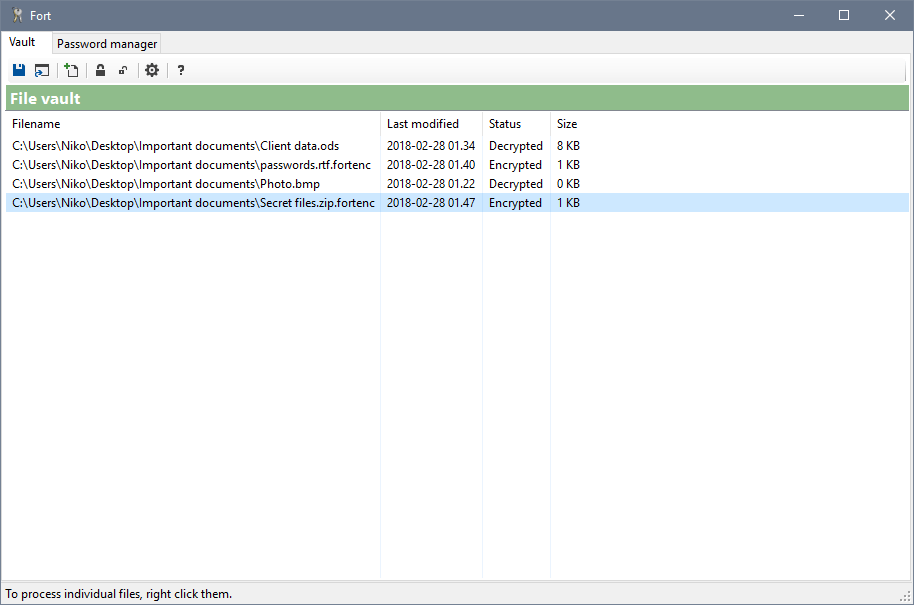
The biggest hurdle to digital security is often the "friction" of the software. If a program is hard to use, people won't use it. The developers of Fort clearly understood this, as they have integrated the software directly into the Windows Explorer interface. You don't have to open a bulky dashboard every time you want to protect a file. Instead, you simply right-click on a file or folder within your standard Windows environment and select the encryption option. It feels like a native part of the operating system.
This ease of use extends to the decryption process as well. Fort establishes its own file associations, meaning that once a file is encrypted, it appears with a distinct icon. To get your data back, you simply double-click the file, enter your credentials, and you're in. This streamlined workflow is essential for productivity. Whether you are a business professional handling client contracts or a student protecting your research, Fort doesn't get in your way. It is incredibly lightweight and won't bog down your system resources. Unlike some heavy-duty encryption suites that require constant background processes and massive RAM consumption, Fort stays out of the way until you need it, ensuring your Windows 7, 8, or 10 machine remains fast and responsive.
4. Advanced Multi-Factor Protection
In the world of cybersecurity, a password is often the weakest link. We tend to pick passwords that are easy to remember, which unfortunately makes them easy for hackers to guess or "brute-force." Fort addresses this vulnerability by offering Multi-Factor Authentication (MFA) through the use of 4096-bit keyfiles. You can choose to encrypt your files using a traditional passphrase, a physical keyfile (which could be stored on a secure USB drive), or—for the ultimate level of security—a combination of both.
Think of it like a bank vault that requires both a combination code and a physical key. Even if a hacker manages to install a keylogger on your machine and steals your password, they still cannot access your files without that physical keyfile. Speaking of keyloggers, Fort includes a built-in on-screen keyboard. This allows you to enter your passphrases using mouse clicks rather than typing on your physical keyboard, effectively bypassing malware that records keystrokes. This feature is a lifesaver if you ever need to decrypt a file on a computer that you don't entirely trust, such as a work terminal or a laptop in a public space. By offering these tiered layers of protection, Fort ensures that you are protected against both digital and physical threats.
5. Open-Source Transparency and Integrity
Trust is the most important commodity in the security industry. When you use a "closed-source" encryption tool, you are essentially taking the developer's word that there are no "backdoors" that would allow them (or a government agency) to peek at your data. In an era of increased surveillance, that's a big leap of faith. Fort sets itself apart by making its core components open-source. This means that the source code is available for independent security experts to audit. When software is open-source, there is nowhere for malicious code or "phoning home" features to hide.
The developers of Fort are vocal about their commitment to privacy as a basic human right. They have built a tool that uses only FIPS-compliant cryptographic modules, ensuring that the math behind the encryption is sound and verified. There are no backdoors, no malware, and no hidden agendas. Furthermore, for the more tech-savvy users or developers among us, the FortMachine.dll library is available, showing a commitment to the broader security community. By choosing Fort, you aren't just downloading an app; you are supporting a philosophy of transparency and digital sovereignty. You are choosing a tool that is designed to serve you, and only you.
Conclusion: Why You Should Act Now
We often don't think about security until after a disaster has occurred. We think about encryption after a laptop is stolen from a car, or after we realize a sensitive email was intercepted. But security is not something you can apply retroactively. You need to build your "Fort" before the storm arrives. Fort offers a rare combination of high-end cryptographic power and everyday usability. It supports multiple languages—including English, Finnish, French, and Brazilian Portuguese—making it a global tool for a global problem. It even offers an optional file backup before encryption, giving you a safety net as you organize your digital life.
Whether you are running an old version of Windows Vista or the latest build of Windows 10, Fort is compatible and ready to protect your 32-bit or 64-bit system. It is a small download that provides a massive amount of peace of mind. In a world where your privacy is constantly under siege, Fort gives you the tools to fight back. It allows you to take control of your digital footprint, protect your personal dignity, and ensure that your private thoughts and actions remain exactly that: private. Don't wait for a data breach to remind you why encryption matters. Download Fort today and turn your Windows PC into a digital stronghold.
Summary of Features:
- Military-grade AES-256 encryption.
- Protection against data tampering.
- Full integration with Windows Explorer for ease of use.
- Support for OneDrive, Dropbox, and other cloud services.
- Anti-keylogger support with an on-screen keyboard.
- Dual-factor protection using passphrases and 4096-bit keyfiles.
- Open-source core for maximum transparency and trust.
- Lightweight design that does not slow down your PC.
The digital world is vast and often unfriendly. Secure your corner of it with Fort. It is simple, it is powerful, and most importantly, it is secure. This is the one utility that every Windows user should have in their toolkit. Protect your files, protect your identity, and protect your peace of mind.

Reviews for Fort Professional Edition
Click Here to Read Reviews for Fort Professional Edition >> Click Here to Submit Reviews for Fort Professional Edition >>