What Does GDocsDrive Do?
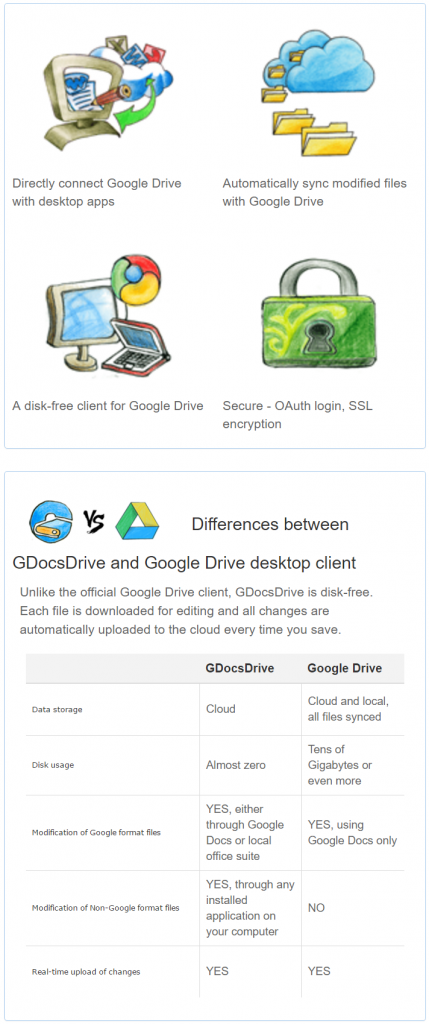
GDocsDrive is a dedicated Windows desktop client designed to interface directly with Google Drive. Unlike standard synchronization tools, this software allows users to manage and access cloud-hosted files without occupying local disk space. It effectively transforms cloud storage into a functional extension of the local operating system, bypassing the need for a web browser.
With this tool, users can leverage the full suite of their installed Windows applications to interact with cloud data. The software provides several key functionalities for streamlined file management:
- Local Application Integration: Open and modify Google Drive files using native desktop software. This applies to standard office documents, spreadsheets, and presentations.
- Extended Format Support: Beyond Google’s native formats, users can edit images, text files, and any other file type supported by their local PC software.
- Desktop File Management: Perform common tasks such as organizing, renaming, and moving files within the cloud environment through a familiar desktop interface.
By utilizing GDocsDrive, the user bridges the gap between cloud storage and desktop power. It allows for complex workflows—such as professional photo editing or advanced data processing—to be performed on cloud-based files as if they were stored locally. This approach maintains the accessibility of the cloud while utilizing the specialized features of local Windows tools.
Top 5 Reasons To Download GDocsDrive
- Zero Hard Drive Footprint: Unlike traditional sync clients, GDocsDrive lets you access all your files without eating up your precious SSD space.
- Universal Windows App Compatibility: Edit any file on your Google Drive using your favorite desktop software, from Photoshop to Notepad++, not just Google Docs.
- True Desktop Integration: Experience a familiar, Windows-native interface that makes managing cloud files as easy as managing local ones.
- Enhanced Productivity and Speed: Skip the laggy browser interface and leverage batch operations, drag-and-drop, and faster file handling.
- Rock-Solid Security and Stability: Benefit from a dedicated client that maintains a stable connection and uses secure authentication without the risks of browser-based sessions.
If you are like most modern professionals, students, or tech enthusiasts, Google Drive has become the backbone of your digital life. It is where we store our most important documents, our cherished photos, and our vital project backups. However, as much as we love the cloud, we have all faced the same frustrating dilemma: how do we actually manage those files? The web interface is often slow and cumbersome, especially when dealing with hundreds of files. On the other hand, the official desktop sync apps are notorious for gobbling up every last gigabyte of your hard drive by mirroring your cloud storage locally. It feels like you are forced to choose between a slow workflow or a full hard drive.
Enter GDocsDrive. This isn't just another utility; it is a fundamental shift in how you interact with your cloud storage. This software bridges the gap between the power of your Windows desktop and the convenience of Google Drive. After putting this app through its paces, I am convinced that it is an essential tool for anyone who wants to take their cloud management to the next level. If you have been looking for a way to streamline your workflow and reclaim your local storage, this giveaway is exactly what you need. Let’s dive deep into the top five reasons why GDocsDrive is a game-changer for your PC.
1. Zero Hard Drive Footprint
We live in an era where high-speed SSDs are the standard, but they come with a catch: they are often much smaller than the old, clunky hard drives of yesteryear. When you have a 256GB or 512GB drive, every gigabyte counts. The traditional Google Drive desktop client works by "syncing," which is a fancy way of saying it downloads a copy of everything you have in the cloud onto your local machine. If you have 100GB of data in the cloud, you lose 100GB of space on your laptop. For many of us, that simply isn't an option.
GDocsDrive solves this problem brilliantly. It functions as a virtual gateway to your Google Drive. Instead of downloading your entire library, it allows you to browse and interact with your files as if they were on a local disk, but they remain safely stored in the cloud. You get the visual convenience of seeing your files in a folder structure without the physical burden of those files taking up space. This is a massive advantage for users with large cloud libraries and limited local storage. You can effectively have a multi-terabyte "drive" on your computer that takes up virtually zero megabytes of your actual disk space. This "on-demand" access is the future of computing, and GDocsDrive brings it to your desktop today.
2. Universal Windows App Compatibility
The biggest limitation of using Google Drive through a web browser is that you are often stuck using Google’s web-based editors. While Google Docs, Sheets, and Slides are great for basic tasks, they lack the raw power and feature sets of dedicated Windows applications. If you need to do heavy photo editing, complex coding, or high-end data analysis, a browser-based tool just won't cut it. Usually, this means you have to download the file, edit it, and then manually upload it back to the cloud, making sure you don't lose track of versioning.
With GDocsDrive, that friction disappears. Because the software presents your Google Drive as a local environment, you can open any file with any Windows application. Do you have a high-resolution image stored on your Drive? Right-click it and open it in Adobe Photoshop. Making changes to a configuration file? Open it in Notepad++ or VS Code. When you hit "Save" in your application, GDocsDrive automatically handles the heavy lifting of updating that file on the Google servers. You get the full power of your local software suite with the convenience of cloud storage. This isn't just limited to office documents; it works for specialized formats, architectural designs, video project files, and more. It turns your Google Drive into a functional extension of your PC’s local file system.
3. True Desktop Integration
Let's be honest: the web browser was never meant to be a file manager. Dragging and dropping files in a browser tab is often hit-or-miss, and navigating deep folder structures can feel sluggish and unintuitive. We are all power users of the Windows interface; we know the shortcuts, we love the right-click context menus, and we are used to the speed of the desktop. GDocsDrive respects that experience by providing a native Windows client that feels like it belongs on your OS.
When you use GDocsDrive, you are working within a familiar environment. You can move files between folders with simple drag-and-drop actions. You can rename files, create new directories, and organize your digital life with the same speed you would use on your C: drive. This familiarity leads to a significant reduction in "cognitive load." You don't have to think about "how do I do this in the cloud?" because the answer is "the same way you do it on your computer." This seamless integration makes the distinction between local storage and cloud storage almost invisible, allowing you to focus on your work rather than the mechanics of file management.
4. Enhanced Productivity and Speed
Time is the most valuable resource we have, and fighting with a laggy web interface is a notorious time-sink. If you've ever tried to move fifty files from one folder to another in the Google Drive web UI, you know the frustration of waiting for the page to refresh or hoping the command actually went through. GDocsDrive is built for speed. Because it is a dedicated desktop application, it communicates with Google's API much more efficiently than a browser can.
For power users, the productivity gains are enormous. Batch operations that would take minutes in a browser—like selecting hundreds of files to move or delete—happen almost instantaneously. The app is optimized for performance, meaning you spend less time looking at loading spinners and more time actually getting things done. Furthermore, GDocsDrive includes a robust search feature that allows you to find exactly what you need without waiting for a web page to index. For anyone who manages large volumes of data daily, the minutes saved every hour quickly add up to hours saved every week. This giveaway is an investment in your own efficiency.
5. Rock-Solid Security and Stability
Security is always a concern when dealing with the cloud, and browsers can be a weak point. We often leave our Google accounts logged in across multiple tabs, and session timeouts or browser crashes can interrupt important uploads or leave your data in a state of limbo. GDocsDrive provides a more stable and secure way to interact with your data. By using a dedicated client, you are creating a direct, secure bridge to Google's servers.
The app uses industry-standard authentication protocols, ensuring that your login credentials and your data remain protected. Because it isn't running inside a browser, it isn't subject to the same vulnerabilities that web-based sessions might face, such as malicious browser extensions or cross-site scripting risks. Furthermore, the stability of a dedicated app cannot be overstated. If your browser crashes, you might lose the progress of a file upload or an edit. GDocsDrive operates independently, providing a consistent and reliable connection that remains active and stable even if you are multitasking across dozens of other applications. It gives you the peace of mind that your files are being handled with the utmost care and professional-grade reliability.
The Verdict: Why You Should Download This Now
In the world of tech utilities, there are many "nice-to-have" apps, but GDocsDrive falls firmly into the "must-have" category for anyone serious about their digital workflow. We are moving toward a world where the cloud is our primary storage, but the tools we use to access that storage haven't always kept pace. This software is the missing link. It provides the perfect balance: the limitless storage capacity of Google Drive combined with the raw power and familiarity of the Windows desktop.
Think about the freedom of never having to worry about your hard drive getting full just because you wanted your files to be accessible. Think about the convenience of opening a complex spreadsheet in Excel or a photo in a professional editor directly from the cloud with one click. Think about the speed of managing your files without the "web browser tax." This isn't just about saving a few clicks; it's about transforming your computer into a more capable, more flexible machine.
As a tech reviewer, I see hundreds of apps, but few offer such a clear and immediate benefit to the user's daily life. GDocsDrive is clean, efficient, and incredibly powerful. It respects your system resources while maximizing your cloud potential. Whether you are a creative professional who needs to edit assets on the fly, a student managing years of coursework, or a business owner keeping track of vital documents, this tool will make your life easier. Do not miss out on this giveaway. Download it, set it up, and experience what it feels like to truly master your cloud storage. Your hard drive—and your productivity—will thank you.
Summary of Key Features:
- Direct Desktop Access: Map your Google Drive as if it were a local disk.
- No Local Storage Required: Keep your files in the cloud until the moment you need them.
- Edit with Any App: Seamlessly use Photoshop, Word, or any other local software.
- Fast File Operations: Drag, drop, copy, and paste with desktop speed.
- Secure Connection: Dedicated client-side security for your Google account.
If you are tired of the limitations of the web browser and the storage-heavy nature of traditional sync apps, GDocsDrive is the solution you have been waiting for. It is the smartest way to manage Google Drive on Windows, period. Make sure to grab this giveaway while it's available and take full control of your digital workspace today.



Reviews for GDocsDrive
Click Here to Read Reviews for GDocsDrive >> Click Here to Submit Reviews for GDocsDrive >>