What Does Ultimate Settings Panel Pro Do?
Ultimate Settings Panel Pro is a centralized configuration utility designed for Windows 7, 8.1, and 10, as well as Windows Server and System Center Configuration Manager (SCCM). The software consolidates a wide array of administrative tools and system settings into a single, tabbed interface, reducing the need to navigate through multiple nested menus within the operating system.
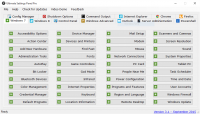
The current release features 13 distinct configuration tabs covering 238 individual items. These settings span various platforms and applications, including PowerShell, Microsoft Outlook, and Server Administration. For Windows users, the utility integrates the "God Mode" feature, providing immediate access to a vast collection of control panel shortcuts from a single location.
Navigating the application is streamlined; users select a specific category tab and click the button corresponding to the configuration item they wish to modify. Beyond standard desktop support, the tool includes dedicated panels for enterprise environments, such as those managing Windows Server or SCCM deployments. This utility is compatible with legacy versions of Windows and the latest Windows 10 builds, offering a unified dashboard for system management and optimization.
Top 5 Reasons To Download Ultimate Settings Panel Pro
- Unified Centralization: Consolidates hundreds of fragmented Windows settings and administrative tools into a single, cohesive interface.
- Comprehensive Administrative Reach: Offers deep configuration options for Windows Server, System Center Configuration Manager (SCCM), and PowerShell.
- Massive Configuration Library: Features over 230 individual configuration items covering everything from Outlook to advanced OS tweaks.
- Instant God Mode Access: Seamlessly integrates the legendary Windows "God Mode" for total control over system shortcuts.
- Cross-Version Versatility: Provides a consistent management experience across Windows 7, 8.1, 10, and Microsoft Office environments.
If you have ever spent more than five minutes digging through the labyrinthine menus of the Windows Control Panel, or if you have found yourself frustrated by the disjointed "Settings" app in Windows 10, then you already know the primary struggle of the modern power user. Windows is an incredibly powerful operating system, but its greatest strength is also its greatest weakness: its complexity. Over decades of updates, Microsoft has layered setting upon setting, hiding critical configuration tools behind obscure paths, registry keys, and legacy menus. For the average user, it is a nuisance; for the IT professional or the dedicated tech enthusiast, it is a significant drain on productivity. This is exactly where the Ultimate Settings Panel Pro steps in to save the day, and why you absolutely need to jump on this giveaway right now.
As a tech reviewer, I see a lot of "optimization" software. Most of it is fluff—bloatware designed to look pretty while doing very little. However, every once in a while, a utility comes along that feels like it was built by someone who actually spends their day managing systems. Ultimate Settings Panel Pro is that utility. It doesn’t try to reinvent the wheel; instead, it puts all the wheels in one room and gives you the steering wheel to all of them. It is a lean, mean, tabbed machine that turns a disorganized mess of configurations into a streamlined workflow. Let’s dive deep into the five core reasons why this tool belongs in your digital toolkit.
1. Unified Centralization: Solving the "Where is that setting?" Problem
The biggest headache in modern computing is the fragmentation of administrative tools. In Windows 10, for example, we are stuck in a weird transitional phase where some settings are in the modern "Settings" app, while others remain buried in the legacy "Control Panel." If you need to manage your network adapters, you might start in one place only to be kicked over to a menu that looks like it was designed in 2005. It is inefficient, confusing, and frankly, a waste of time.
The Ultimate Settings Panel Pro solves this by acting as a "Master Console." By utilizing a clever tab-based interface, the software brings every essential configuration path into a single window. You no longer have to remember if a specific security setting is under "Update & Security" or "System and Maintenance." With this tool, you simply select the tab that corresponds to your operating system or the specific category you are looking for, and there it is. This centralized approach isn't just about convenience; it is about cognitive load. When you don't have to hunt for your tools, you can focus on the actual work of optimizing your machine. It turns a ten-click process into a two-click process, which, over the course of a week, saves you hours of frustration.
2. Comprehensive Administrative Reach: A Professional’s Best Friend
While home users will find plenty to love here, the real "pro" in Ultimate Settings Panel Pro shines when you look at its administrative capabilities. This isn't just a tool for changing your wallpaper or adjusting your sound settings. It reaches deep into the enterprise-level aspects of the Microsoft ecosystem. We are talking about dedicated tabs for Windows Server and System Center Configuration Manager (SCCM). For sysadmins, this is a game-changer.
Managing a server environment often requires jumping between various Management Consoles (MMC), command prompts, and remote desktop sessions. Ultimate Settings Panel Pro provides a localized hub for these high-level tasks. Whether you are managing server roles or diving into SCCM configurations, having those buttons ready at a moment’s notice is invaluable. Furthermore, the inclusion of a dedicated PowerShell tab signifies that this tool understands the modern admin. PowerShell is the backbone of Windows automation, and having a quick-launch portal for PowerShell scripts and commands within the same utility that handles your GUI settings is a stroke of genius. It bridges the gap between the point-and-click user and the command-line warrior.
3. Massive Configuration Library: 238 Reasons to Smile
The sheer volume of what you get with this download is staggering. We are talking about over 230 configuration items. To put that in perspective, think about how many settings you actually use on a daily basis. Now imagine having 238 of the most critical, hidden, and useful settings all indexed and ready to go. The software doesn't just cover the operating system itself; it extends its reach into the applications we use most, specifically Microsoft Office and Outlook.
Outlook is a notoriously finicky beast. From managing data files to tweaking the way it handles attachments or view settings, getting Outlook "just right" usually involves digging through multiple sub-menus within the app. Ultimate Settings Panel Pro brings those configuration items to the surface. It covers multiple versions of Windows and Office, ensuring that whether you are on an older machine running Windows 7 or a modern Windows 10 workstation, you have the same level of granular control. This library is essentially a curated list of everything a power user needs to keep their system running at peak performance. It’s like having a master key that fits every lock in your digital house.
4. Instant God Mode Access: Unleash the Full Power of Windows
For those in the know, "God Mode" is the holy grail of Windows shortcuts. Formally known as the Windows Master Control Panel shortcut, it is a hidden folder that populates a list of every single control panel setting in one long, searchable list. Usually, you have to create a specifically named folder with a long string of GUID code to activate it. It is a neat trick, but it is one more thing to remember.
Ultimate Settings Panel Pro has Windows God Mode built directly into its interface. This is a massive win for efficiency. When you click that button, you are granted an all-access pass to the inner workings of your OS. Want to manage your web credentials? It's there. Need to configure your biometric sensors? It's there. Want to tweak the behavior of your taskbar buttons down to the pixel? It's there. By integrating God Mode, the developers have ensured that no setting is off-limits. It transforms the user from a passive occupant of the OS into an active commander. For a tech reviewer, this is the kind of feature that makes a tool an "instant install." It demonstrates a deep respect for the user's desire for total control.
5. Cross-Version Versatility: Consistency in a Fragmented World
We live in a multi-OS world. You might have a desktop running Windows 10, a laptop still on Windows 8.1 for specific software compatibility, and a home server running a version of Windows Server. Learning the quirks and locations of settings for each individual OS is a chore. One of the most compelling reasons to download this utility is the consistency it brings to your workflow across different environments.
Ultimate Settings Panel Pro supports Windows 7, 8.1, and 10. This cross-version compatibility is vital. If you are a consultant or an IT tech who moves from machine to machine, having a portable tool that looks and acts the same regardless of the OS version is a lifesaver. You don't have to "re-learn" where the firewall settings are on a Windows 7 machine versus a Windows 10 machine. You just open the panel, find the tab, and execute. This versatility extends to the Microsoft Office suite as well, providing a unified management experience that Microsoft themselves has failed to provide. It is a bridge across the various eras of Windows, making the old feel new and the new feel familiar.
The Verdict of a Power User
In the world of tech, we often talk about "friction." Friction is anything that slows you down, anything that stands between you and your goal. Standard Windows navigation is full of friction. Ultimate Settings Panel Pro is the lubricant that makes everything slide into place. It is a small, lightweight utility that punches far above its weight class. It doesn't require a steep learning curve; if you can click a tab and a button, you are already a master of the software.
The fact that this is currently available as a giveaway makes it a mandatory download. There is zero risk and an immense amount of reward. You are gaining a professional-grade administrative suite that simplifies your life, secures your settings, and empowers you to customize your computing environment to an incredible degree. Whether you are a casual user who wants to find things faster, or a seasoned sysadmin who needs to manage SCCM and PowerShell on the fly, this tool is designed with you in mind.
Don't let the simplicity of the interface fool you. Beneath that tabbed window lies a powerful engine that can manipulate almost every facet of the Microsoft ecosystem. From the "God Mode" integration to the 238 configuration items, it is clear that Ultimate Settings Panel Pro was built with a philosophy of "Total Access." It removes the barriers built by modern UI designers and gives the power back to the person sitting in front of the screen. In an era where operating systems feel like they are becoming more restrictive and opaque, tools like this are a breath of fresh air.
So, if you value your time, if you enjoy having total control over your hardware, and if you want to stop the endless clicking through nested menus, this is the solution you have been looking for. Download it, explore the tabs, and witness just how much control you have been missing out on. Your Windows experience will never be the same again, and you will wonder how you ever managed to get work done without it. This isn't just another app; it's the ultimate upgrade for your operating system's brain. Get it now while the giveaway is live—you won't regret it.


Reviews for Ultimate Settings Panel Pro
Click Here to Read Reviews for Ultimate Settings Panel Pro >> Click Here to Submit Reviews for Ultimate Settings Panel Pro >>