What Does Sothink Blu-ray Creator Do?
Sothink Blu-ray Creator is a specialized utility designed to convert diverse digital video files into professional Blu-ray movie formats. The software caters to users who need to compile footage from various sources—including smartphones, camcorders, and web downloads—into physical or digital high-definition libraries.
The application supports a comprehensive list of input formats such as MKV, MP4, AVI, M2TS, TS, MOV, and WMV. For output, users can burn projects directly to physical media, including BD-50, BD-25, DVD-9, and DVD-5 discs. For those preferring digital storage, the tool can generate Blu-ray ISO files or folders directly onto a hard drive.
Key functional features include:
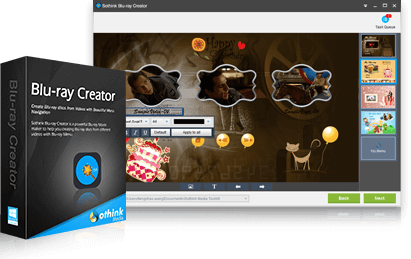
- Customizable Menus: An integrated library of themed templates provides options for various occasions, such as weddings and birthdays.
- Interface Editing: Users can resize, remove, or relocate menu widgets and set custom background images for the disc interface.
- Hardware Acceleration: The engine utilizes Intel Quick Sync and NVIDIA CUDA technologies to optimize conversion speeds via multi-core CPUs.
- Playback Control: Detailed settings allow for the adjustment of playback order, navigation modes, and font properties for subtitles and menus.
This software provides a factual solution for high-definition video authoring while maintaining compatibility with standard home Blu-ray players and computer-based media software.
Top 5 Reasons To Download Sothink Blu-ray Creator
Before we dive into the nitty-gritty details of why Sothink Blu-ray Creator is a mandatory addition to your digital toolkit, here is the quick breakdown of the top five features that make this software a powerhouse for media enthusiasts:
- Unrivaled Format Support: The ability to convert virtually any video file—from MKV and MP4 to obscure camcorder formats—into a professional Blu-ray structure.
- High-Octane Performance: Full utilization of multi-core CPUs and hardware acceleration technologies like Intel Quick Sync and NVIDIA CUDA for lightning-fast processing.
- Professional Menu Customization: A robust suite of themed templates and widget-editing tools that allow you to create a cinematic navigation experience.
- Versatile Output Options: Flexibility to burn directly to various physical disc types (BD-50/25, DVD-9/5) or save projects as ISO files and folders for digital storage.
- Granular User Control: Detailed settings for playback order, font styles, and background images that ensure your final product looks exactly how you envisioned it.
In an age where we are constantly bombarded by digital files, there is something uniquely satisfying about creating a physical piece of media. Whether it is a compilation of family vacations, a wedding highlight reel, or a backup of your favorite high-definition internet videos, having a tangible Blu-ray disc offers a level of permanence and "theatrical feel" that a folder on a hard drive simply cannot match. This is where Sothink Blu-ray Creator steps in. It bridges the gap between the chaotic world of raw video files and the polished world of home cinema. Let’s explore why this specific giveaway is something you cannot afford to miss.
1. Unrivaled Format Support for the Modern Creator
One of the most significant hurdles in video production is the nightmare of file compatibility. We live in a world where every device seems to record in a different format. Your smartphone might capture in MOV, your DSLR in high-bitrate MP4, your old camcorder in MTS, and your desktop screen recorder in AVI. Trying to get all these disparate files to play nicely together on a single disc is usually a recipe for technical headaches. This is the first area where Sothink Blu-ray Creator truly shines as a "must-download" tool.
The software is designed with a "Simple yet not simpler" philosophy. It acts as a universal translator for your media. It supports almost every known video format, including MKV, MP4, AVI, M2TS, TS, MOV, WMV, WMA, 3GP, FLV, M4V, and VOB. For the user, this means you can stop worrying about whether your footage needs to be pre-converted before you start your project. You simply drag and drop your files into the interface, and the software handles the heavy lifting of transcoding them into the strict Blu-ray standard.
This universal compatibility is particularly vital for those who collect high-definition content from various sources. If you have downloaded high-quality MKV files or saved 4K clips from social media, you know that many basic burning tools will choke on the codecs. Sothink Blu-ray Creator is built to be resilient, ensuring that if it can play on your computer, it can live on your Blu-ray disc. This peace of mind is invaluable for anyone who wants to preserve their digital memories without spending hours researching file extensions and codec packs.
2. High-Octane Performance and Hardware Acceleration
If you have ever tried to author a Blu-ray or convert a high-definition video file, you know the biggest enemy is time. Processing gigabytes of HD video data is an intensive task that can bring a standard PC to its knees. Many software solutions rely solely on the CPU to do the work, which results in hours of waiting while your computer fans scream in agony. Sothink Blu-ray Creator changes the narrative by implementing cutting-edge hardware acceleration.
By leveraging technologies like Intel Quick Sync and NVIDIA CUDA, the software offloads the grueling mathematical calculations of video encoding to your graphics card and specialized processor instructions. This isn't just a minor tweak; it is a transformative jump in efficiency. In a world where your time is the most valuable resource, being able to cut conversion times by 50% or more is a game-changer. This means you can start a project after dinner and have a finished disc ready for a movie night before the popcorn is done popping.
Furthermore, the software is optimized for multi-threading and multi-core CPUs. It doesn't just use one "lane" of your processor; it uses every available resource to ensure the task is finished as quickly as possible. For the tech reviewer, this is often the "make or break" feature. We want software that respects our hardware's power, and Sothink Blu-ray Creator does exactly that. It transforms a tedious chore into a swift, background process, allowing you to focus on the creative side of disc authoring rather than the technical waiting game.
3. Professional Menu Customization and Aesthetics
What separates a "data disc" from a "Blu-ray movie" is the presentation. A movie experience begins the moment you insert the disc and the menu fades in. Without a menu, you are just watching a series of files. Sothink Blu-ray Creator understands the importance of this aesthetic touch and provides a suite of tools that allow you to create professional-grade menus without needing a degree in graphic design.
The software comes packed with a variety of integrated menu templates. These aren't just generic backgrounds; they are themed for specific life events. Whether you are creating a disc for Children’s Day, a wedding anniversary, a birthday, or a holiday, there is a template that sets the right mood. But the "Simple yet not simpler" mantra really comes into play with how you can customize these templates. You aren't locked into the defaults.
Users have the freedom to restyle the widgets within the menu. Do you want the play button to be larger? You can shrink, enlarge, or relocate it. Do you find a certain graphic distracting? You can remove it entirely. Perhaps the most powerful feature for personalization is the ability to use your own pictures as the background cover. This means your wedding Blu-ray can feature a beautiful shot of the couple as the backdrop for the menu, creating a truly bespoke product that looks like it was authored in a professional studio. These small details are what turn a giveaway software into a cherished part of your creative workflow.
4. Versatile Output Options for Every Use Case
One of the most impressive aspects of Sothink Blu-ray Creator is its flexibility regarding how you actually save and use your project. Not everyone has a physical Blu-ray burner attached to their computer, and not everyone wants to carry around physical discs. This software acknowledges the hybrid world we live in by offering multiple output paths.
If you are a traditionalist or want to gift a physical copy to a relative, you can burn your project directly onto blank BD-50 or BD-25 discs. But the software goes a step further by allowing you to burn Blu-ray structures onto standard DVD-9 and DVD-5 discs. This is a fantastic "pro tip" for users on a budget—you can get high-definition content onto much cheaper DVD media that will still play in most modern Blu-ray players. This level of versatility is rare and highly appreciated.
On the other hand, if you are looking to archive your collection digitally, the software allows you to save your projects as ISO files or Blu-ray folders on your hard drive. This is perfect for those who use media servers or home theater PCs (HTPCs). By saving as an ISO, you preserve the entire disc experience—including the menus and chapter markers—in a single digital file. Whether you are aiming for the physical longevity of a disc or the convenience of a digital library, Sothink Blu-ray Creator provides the tools to satisfy both needs without requiring separate software packages.
5. Granular Control and "Simple yet not simpler" Settings
The final reason you need to download this giveaway is the sheer amount of control it gives you over the final product without overwhelming you with a cluttered interface. Many professional authoring suites are so complex that you need a manual just to find the "start" button. Conversely, many "simple" tools strip away all the settings, leaving you with a generic, unchangeable result. Sothink hits the "Goldilocks zone" of software design.
Beyond the menus and the formats, you can dive into the *Other Convenient Settings* that make a big difference in the user experience. You can customize the playback order of your clips, ensuring the story unfolds exactly how you want. You can choose different playback modes—such as looping a single clip or playing all and then stopping. These are the kinds of features that are essential for creating things like promotional loops for a business or a continuous slideshow for a party.
Even the typography is under your control. You can adjust the font color, style, and size of the text within your menus. This might seem like a small detail, but in the world of design, the font is the voice of the project. Being able to match the font style to the theme of your video adds that final layer of polish that makes the software feel like a professional tool. It is this balance of ease-of-use and deep customization that makes Sothink Blu-ray Creator an essential download for anyone who takes their video collection seriously.
Final Thoughts: Why You Should Grab This Now
As a tech reviewer, I see hundreds of utilities every year. Most are forgotten within days because they either try to do too much or they don't do enough. Sothink Blu-ray Creator is different. It identifies a specific need—the desire to turn digital video chaos into organized, beautiful, and playable media—and it executes that task with precision and speed.
The value of this giveaway cannot be overstated. You are getting a tool that utilizes your hardware to its fullest potential, supports every file you can throw at it, and gives you the creative freedom to design a professional-looking product. Whether you are preserving family history or just want to see your favorite internet clips on the big screen in your living room, this software is the bridge that gets you there. Don't let your videos sit forgotten in a folder on your desktop. Give them the cinematic treatment they deserve.
In summary, Sothink Blu-ray Creator is:
- Fast thanks to hardware acceleration.
- Flexible with its support for DVD and Blu-ray media.
- Creative with its customizable templates.
- Powerful with its wide range of input formats.
- Intuitive for users of all skill levels.
If you value your time and your memories, downloading this software is a no-brainer. It is time to take those files off your hard drive and put them where they belong: on the big screen, with a beautiful menu, running at the highest possible quality. This giveaway is your ticket to a more organized and professional-looking media library. Make sure to grab it while you can and start creating your own high-definition masterpieces today.


Reviews for Sothink Blu-ray Creator
Click Here to Read Reviews for Sothink Blu-ray Creator >> Click Here to Submit Reviews for Sothink Blu-ray Creator >>