What Does Macphun Focus for Mac Do?
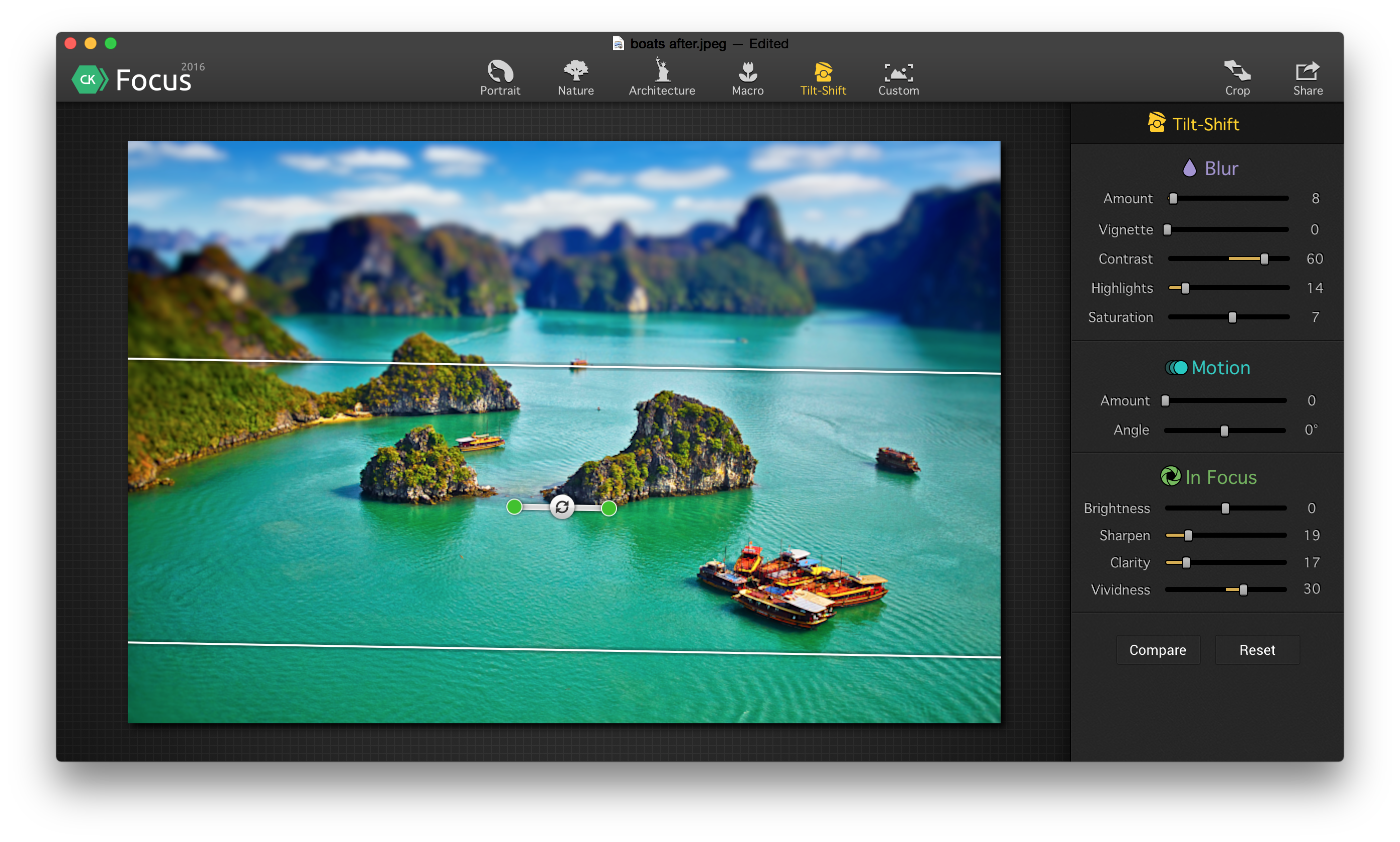
Focus is an image processing application designed to simulate high-end optical effects without the requirement for expensive physical lenses or camera gear. Compatible with images captured via smartphones or professional DSLR cameras, the software allows users to apply sophisticated lens blur, selective focus, and motion blur in post-production. By providing tools to isolate subjects and soften backgrounds, the application enables the creation of tilt-shift and macro-style aesthetics that typically necessitate specialized hardware.
The software functions as both a standalone application and a dedicated plugin for professional editing suites. It offers full integration with Adobe Photoshop, Photoshop Elements, Adobe Lightroom, and Apple Aperture. This flexibility allows photographers to incorporate Focus into their existing digital workflows to enhance depth of field and artistic composition. By extending the functionality of standard digital files, the tool provides a streamlined method for adding professional-grade lens effects to any photograph regardless of the original equipment used. Users can precisely control the placement and intensity of blurs to draw attention to specific subjects within a frame.
Top 5 Reasons To Download Macphun Focus for Mac
- Professional Bokeh Without the Professional Price Tag: Focus allows you to mimic the creamy, blurred backgrounds of high-end f/1.2 or f/1.4 lenses without spending thousands on hardware.
- Mastering the Tilt-Shift and Miniature Effect: You can create stunning architectural shots or "toy-world" miniature effects with specialized tools that are far easier to use than physical tilt-shift lenses.
- Dynamic Motion Blur Controls: Focus gives you the ability to add a sense of speed and energy to static images through customizable motion blur that looks natural and intentional.
- Seamless Professional Workflow Integration: Whether you use it as a standalone app or as a plugin for Adobe Photoshop, Lightroom, or Apple Aperture, it fits perfectly into any existing editing pipeline.
- Total Control Over the Viewer’s Eye: By using selective focus tools, you can instantly eliminate distractions and guide your audience exactly where you want them to look in every frame.
Every photographer, from the casual smartphone snapper to the seasoned pro, eventually hits the same wall: gear limitations. We have all been there. You see a stunning portrait with that buttery-smooth background blur—what the pros call bokeh—and you realize your current camera setup just can’t replicate it. To get that look naturally, you would typically need a full-frame sensor and a prime lens that costs more than a used car. But what if you could achieve that exact aesthetic in post-production with just a few clicks? This is where Focus comes in, and why this giveaway is an absolute game-changer for your creative toolkit.
Focus, developed by the experts at Macphun, is designed to bridge the gap between "standard" photography and "artistic" photography. It isn't just a simple blur tool; it is a comprehensive lens simulation engine. It allows you to replicate the physics of expensive glass inside a digital environment. As a tech reviewer who has tested hundreds of photo editing suites, I can tell you that the "feel" of a blur matters just as much as the sharpness of the subject. Focus understands this, providing a sophisticated algorithm that creates realistic transitions between what is sharp and what is soft. Here is an in-depth look at why you need to download this software today.
1. Professional Bokeh Without the Professional Price Tag
The most sought-after look in modern photography is "subject separation." This is the ability to make a person or object pop out from the background. In the world of hardware, this requires a wide aperture lens. If you are shooting on a smartphone or a kit lens, your "depth of field" is often too deep, meaning everything from the person’s nose to the trees three blocks behind them is in sharp focus. This makes for a cluttered, amateurish photo.
By downloading Focus, you are essentially adding a virtual bag of prime lenses to your setup. The software allows you to select your subject and apply a lens-quality blur to the rest of the image. What makes Focus stand out from generic "blur" filters is its realism. It doesn't just smudge the pixels; it simulates the way a physical lens aperture creates "out-of-focus highlights." This means your backgrounds look organic and professional. You can take a photo shot on an iPhone and make it look like it was captured with a Canon 5D and an 85mm f/1.2 lens. For anyone on a budget, this feature alone is worth the download.
Furthermore, the software gives you the ability to adjust the intensity and type of the blur. You aren't stuck with one look. You can tweak the settings to get a soft, dreamy atmosphere for a wedding photo, or a slightly more textured blur for a gritty street portrait. It empowers you to fix "missed" shots where the background was too distracting, effectively saving photos that you might have otherwise deleted.
2. Mastering the Tilt-Shift and Miniature Effect
If you have ever seen those cool videos or photos where a city looks like a tiny model train set, you have seen the tilt-shift effect. To do this in-camera, you need a specialized "Tilt-Shift" lens. These lenses are notorious for being difficult to use, manual focus only, and incredibly expensive. Most photographers can't justify spending $2,000 on a lens they might only use once or twice a month.
Focus includes a dedicated Tilt-Shift mode that is incredibly intuitive. By manipulating a simple linear gradient, you can control the plane of focus. When applied to high-angle shots of cities, harbors, or crowds, it creates an optical illusion that tricks the human brain into seeing the world as a miniature. It is a fantastic tool for architectural photographers or anyone looking to add a whimsical, artistic touch to their portfolio.
But it goes beyond just making things look small. The Tilt-Shift tool is also excellent for directing the eye in landscape photography. Sometimes a foreground is too busy; by using the tilt-shift settings in Focus, you can soften the bottom and top of the frame, sandwiching the viewer's attention onto the horizon or a specific mountain peak. It’s about creative intentionality, and Focus makes that accessible to everyone.
3. Dynamic Motion Blur Controls
Photography is a static medium, but the best photos often feel like they are moving. Capturing motion blur in-camera is a delicate balancing act. You have to lower your shutter speed, which often leads to the entire image being blurry because of "camera shake." Unless you are carrying a tripod and using neutral density filters, getting that perfect "speed" look is nearly impossible in the field.
Focus solves this with its Motion Blur engine. This tool allows you to add directional blur to your images after the fact. Imagine a photo of a car parked on a street—with Focus, you can add a sense of high-speed travel to the background while keeping the car tack-sharp. Or think of a sports photo where the athlete looks static; by adding a touch of motion blur to the limbs or the background, you suddenly communicate the energy and intensity of the moment.
The control here is surgical. You can choose the angle of the motion and the "streak" length. This level of customization ensures that the effect doesn't look like a cheap digital overlay. Instead, it looks like a perfectly executed "panning shot" that would normally take a professional years of practice to master. For action photographers or social media influencers looking to add some "wow" factor to their feed, this is a must-have tool.
4. Seamless Professional Workflow Integration
One of the biggest headaches for photographers is "software friction." No one wants to jump through hoops to move a photo from one app to another. The developers of Focus understood this perfectly. While Focus works as a powerful standalone application, its true strength for professionals lies in its ability to function as a plugin.
If you are already a user of Adobe Photoshop, Lightroom, or Photoshop Elements, Focus integrates directly into your existing workflow. You can be editing a portrait in Lightroom, realize the background needs some work, and send it directly to Focus with a single click. Once you have applied your lens effects, the photo sends right back to your library. It also supports Apple Aperture for those still utilizing that platform.
This integration is vital because it means you don't have to change the way you work. You don't have to learn a whole new file management system. You simply use Focus as a "super-filter" within the tools you already know and love. It’s also worth noting that Focus handles high-resolution images with ease, ensuring that you don't lose quality when moving between programs. It respects your metadata and your color profiles, making it a reliable tool for serious professional work.
5. Total Control Over the Viewer’s Eye
At its heart, photography is the art of exclusion. You are choosing what to show the viewer and, more importantly, what to hide. A common mistake in photography is having a "busy" frame where the viewer doesn't know where to look. Focus is the ultimate tool for fixing this. It provides a variety of selective focus modes, including macro, nature, and portrait presets, that help you emphasize the most important subject.
The "Macro" mode is particularly impressive. True macro photography (extreme close-ups) has a very thin "depth of field," which is hard to achieve with standard lenses. Focus allows you to simulate that macro look, making a flower or an insect stand out against a completely melted background. This creates a sense of intimacy and detail that is visually arresting.
Because the interface is so user-friendly, you can experiment with "drawing" focus in ways that aren't even possible with a real camera. You can create custom shapes of focus to highlight multiple subjects or follow an irregular path. This level of artistic touch is what separates a "snapshot" from a "photograph." Focus gives you the brush to paint with light and clarity, ensuring that your audience sees exactly what you intended them to see, without the distraction of a messy background.
Conclusion: Why You Should Act Now
We live in an era where everyone has a camera in their pocket, but very few people have the tools to make their images truly stand out. Focus by Macphun is one of those rare "secret weapon" apps that can instantly elevate your work. Whether you are looking to fix a photo that didn't come out quite right, or you want to push your creative boundaries with tilt-shift and motion effects, this software provides the professional-grade tools to do it.
The beauty of this giveaway is that it removes the final barrier to entry: cost. You are getting a suite of tools that mimic thousands of dollars of optical equipment for absolutely nothing. It is a lightweight, fast, and powerful application that belongs on every creator's hard drive. Don't settle for "ordinary" photos. Download Focus, break out of the mundane, and start creating images that capture attention and tell a story. You will be amazed at how easy it is to achieve a perfect artistic touch with just a few minutes in the app. Do not miss out on this opportunity to upgrade your digital darkroom.
In summary, Focus is more than just a blur tool. It is an investment in your creative vision. From the realistic bokeh to the professional plugin support, it covers every base a photographer needs. Whether you are an amateur wanting to make your family photos look professional, or a pro looking to speed up your workflow, Focus is the answer. Grab this giveaway today and see the difference that professional lens effects can make in your photography!

Reviews for Macphun Focus for Mac
Click Here to Read Reviews for Macphun Focus for Mac >> Click Here to Submit Reviews for Macphun Focus for Mac >>