What Does DayBook Do?
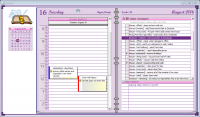
DayBook is a desktop productivity application designed to integrate calendar management, task tracking, and personal journaling into a single interface. Modeled after traditional physical planners, the software provides a digital workspace for organizing daily schedules and long-term projects with a minimal learning curve.
The application offers flexibility in how time is visualized. Users can toggle between 1-day, 5-day work week, 7-day full week, and monthly views. Additionally, the software supports custom date ranges for specific planning needs. Navigation is handled primarily through mouse clicks, streamlining the movement between different dates and views.
Key functional features include:
- Task Management: Users can create, edit, and track tasks. Incomplete items automatically persist in the manager until officially marked as completed.
- Integrated Reminders: System alerts can be configured for both specific appointments and pending tasks.
- Daily Journaling: A daily notes function allows for record-keeping and personal reflections within the calendar structure.
- Visual Customization: The interface supports user-defined themes, allowing for modifications to fonts, colors, and background graphics.
- Astronomical Data: An included moon calendar tracks lunar phases and provides data regarding the distance to the sun.
DayBook serves as a factual, straightforward tool for users seeking an organized and customizable desktop environment for managing their daily routines and administrative requirements.
Top 5 Reasons To Download DayBook
- Unrivaled Calendar Flexibility and Custom Date Ranges
- Persistent Task Management That Eliminates Forgetfulness
- The Perfect Fusion of Analog Aesthetics and Digital Power
- Deep Personalization Through Custom Themes and Graphics
- A Holistic Approach to Productivity with Integrated Journaling and Astronomical Data
In the modern digital landscape, we are constantly bombarded by an overwhelming array of "productivity" tools that claim to simplify our lives, yet often end up adding to the clutter. Between browser-based apps that eat up your RAM and mobile notifications that never seem to stop, finding a dedicated, reliable, and aesthetically pleasing desktop environment to manage your life can feel like searching for a needle in a haystack. That is precisely why I am so excited to dive into DayBook. This isn't just another calendar; it is a meticulously crafted desktop companion designed to streamline your appointments, tasks, and personal reflections into one cohesive, beautiful interface. If you have been looking for a reason to ditch the fragmented web-apps and return to a focused desktop experience, this giveaway is the golden ticket you have been waiting for.
As a tech reviewer, I have seen it all—from overly complex project management suites to minimalist "to-do" lists that lack the depth required for a professional workflow. DayBook strikes a rare balance. it offers the robust functionality of a high-end planner while maintaining a learning curve so small it’s practically non-existent. It is built for the user who wants to get things done without having to spend hours reading a manual. Let’s break down exactly why you need to download DayBook today and how it is going to transform your daily routine from chaotic to controlled.
1. Unrivaled Calendar Flexibility and Custom Date Ranges
The core of any scheduling software is its calendar, but most applications lock you into very rigid viewing structures. You usually get a choice between a day, a week, or a month, and if you want to see something specific—like a ten-day sprint for a project or a specific two-week vacation window—you are out of luck. DayBook shatters these limitations by offering a variety of views that cater to every possible workflow. Whether you need the granular detail of the 1 Day view to manage back-to-back meetings or the broader perspective of the Month view to plan long-term goals, DayBook has you covered.
But the real "killer feature" here is the custom date range. For those of us who work in agile environments or manage freelance projects that don't fit into a standard seven-day week, this is a game-changer. Imagine being able to display exactly twelve days on your screen to track a specific project deadline, or perhaps an eighteen-day window to oversee a product launch. This level of flexibility ensures that the software adapts to your life, rather than forcing you to adapt your life to the software. By allowing you to navigate through the calendar with a simple click of a mouse, DayBook makes the process of temporal planning feel fluid and intuitive. It removes the friction of "clicking through pages" and replaces it with a seamless flow of information that keeps you oriented and prepared for whatever is coming next.
Furthermore, the Work Week view (5 days) is perfect for the professional who wants to keep their eyes on the prize from Monday to Friday without being distracted by weekend clutter. Having these distinct modes allows you to mentally "toggle" between your professional obligations and your personal time, which is essential for maintaining a healthy work-life balance in today’s always-on world.
2. Persistent Task Management That Eliminates Forgetfulness
We have all been there: you write a task on a sticky note or enter it into a digital list, the day ends, and suddenly that task is buried under a new pile of digital debris. Standard task managers often fail because they allow uncompleted tasks to simply disappear into the "yesterday" void. DayBook solves this psychological pitfall with its persistent task manager. Tasks can be added, edited, and completed with ease, but the most important feature is that tasks not completed keep showing up until you actually finish them.
This creates a powerful "nagging" effect that is actually beneficial for productivity. It ensures that nothing slips through the cracks. If you didn’t get to that invoice on Tuesday, it will be staring you in the face on Wednesday morning. This accountability is what separates a mere "list app" from a true productivity tool. It forces you to confront your backlog and deal with it, rather than letting it accumulate in a hidden archive. In a world full of distractions, this persistent visibility is the ultimate antidote to procrastination.
Coupled with the ability to set reminders for both appointments and tasks, DayBook acts as a digital personal assistant. It doesn't just hold your information; it actively prompts you to act on it. Whether it is a crucial client meeting or a simple reminder to pick up groceries, the system ensures that you are alerted at exactly the right time. This level of reliability allows you to offload the "mental load" of remembering everything, freeing up your brain to focus on the creative and analytical work that actually matters.
3. The Perfect Fusion of Analog Nostalgia and Digital Power
One of the most striking aspects of DayBook is its unique interface. In an age where every piece of software is moving toward "flat design"—which often looks sterile and uninspiring—DayBook embraces a skeuomorphic approach. Its interface resembles an actual physical daybook, complete with the visual cues that make traditional paper planners so satisfying to use. There is something deeply psychological about using a tool that looks and feels like a tangible object. It provides a sense of grounding and permanence that a web-based spreadsheet or a minimalist app simply cannot replicate.
This design choice isn't just about "looking pretty"; it's about usability. Humans are tactile creatures, and by mimicking the layout of a physical book, DayBook leverages our existing mental models of how organization should look. You don’t have to learn where the "notes" section is—it’s right where you would expect it to be in a real planner. This reduces the cognitive load required to use the app, making the experience feel natural and "right."
For those who have struggled to make the switch from paper to digital because they miss the "feel" of a planner, DayBook is the bridge you have been looking for. You get the beauty and structure of a physical journal combined with the undeniable power of digital search, instant editing, and automated reminders. It is the best of both worlds, packaged in a desktop application that feels like a premium piece of stationery on your computer.
4. Deep Personalization Through Custom Themes and Graphics
Most productivity apps are "one size fits all." You get one font, one color scheme (usually white or "dark mode"), and very little room for expression. DayBook rejects this cookie-cutter approach. It recognizes that your digital workspace is an extension of your personality. To that end, it offers an incredible level of customization. You can modify your copy of Daybook with your own choice of colors, fonts, and graphics.
This is a feature that tech enthusiasts and creatives will absolutely love. You aren't just using a tool; you are designing an environment. If you want a high-contrast, professional look for your work hours, you can create it. If you prefer a soft, pastel-toned aesthetic with custom graphics for your personal journaling, you can do that too. These configurations can then be saved as themes, allowing you to switch between different looks or even share your style with others. Several themes are included out of the box, but the ability to create your own ensures that you will never grow bored of the interface.
Why does this matter? Because we spend hours every day looking at our screens. A workspace that is visually appealing and personalized to our tastes can actually reduce fatigue and increase our willingness to engage with our tasks. When your calendar looks like "yours," you feel more in control of your time. It turns the chore of scheduling into a creative outlet, making it more likely that you will stick with your organizational habits over the long term.
5. Beyond Basic Scheduling: Integrated Journaling and Astronomical Data
What truly sets DayBook apart from the competition is its "Daily Notes" function, which doubles as a daily journal. Most people have to use two or three different apps to manage their schedule, their to-do list, and their personal reflections. DayBook brings them all under one roof. Journaling has been scientifically proven to reduce stress, improve memory, and help with goal setting. By integrating this directly into your calendar, DayBook encourages a more holistic approach to your day.
Instead of just tracking what you did, you can track how you felt about it. You can jot down ideas that occur to you during the day, keep a record of your achievements, or simply vent about a difficult project. Because it is tied to the date, your journal becomes a searchable history of your life. This integration makes it incredibly easy to look back at previous weeks and see patterns in your productivity or your mood, providing valuable insights that a standard calendar would miss.
And let’s not forget the built-in moon calendar. While this might seem like a small addition, it is a testament to the "cool factor" that DayBook brings to the table. For those interested in astronomy or those who just enjoy knowing the phases of the moon and the distance to the sun, this feature provides a touch of wonder to the daily grind. It’s a reminder that there is a world outside of our tasks and appointments. It provides astronomical data that you won't find in any other mainstream productivity app, making DayBook feel like a comprehensive almanac for your life. It is these small, thoughtful touches that make the software feel like a premium, handcrafted product rather than a mass-produced piece of code.
The Verdict: If you are tired of the clutter, the subscriptions, and the lack of personality in your current organizational tools, you owe it to yourself to download this DayBook giveaway. It is a rare example of software that is powerful enough for a power user but simple enough for a beginner. Between the custom date ranges, the persistent tasks, the gorgeous skeuomorphic interface, the deep theme customization, and the added value of the journal and moon calendar, it is a complete package. This is more than just a calendar; it is a desktop sanctuary for your time and thoughts. Don't let this opportunity pass you by—take control of your schedule with DayBook and experience the difference that a well-designed, dedicated desktop application can make in your daily life.
In conclusion, the giveaway offers you a chance to secure a tool that will likely become the most-used icon on your desktop. In an age where we are often "renting" our software via monthly fees, having a solid, dependable desktop application like DayBook is a breath of fresh air. It is simple, it is easy to use, and it has a very small learning curve, meaning you can download it today and be fully organized by tonight. From the professional who needs to manage complex work weeks to the individual who wants to start a daily journaling habit, DayBook is the answer. Grab it while you can, and start turning your chaotic to-do lists into a beautifully organized daybook.


Reviews for DayBook
Click Here to Read Reviews for DayBook >> Click Here to Submit Reviews for DayBook >>