What Does Batch Image Enhancer Do?
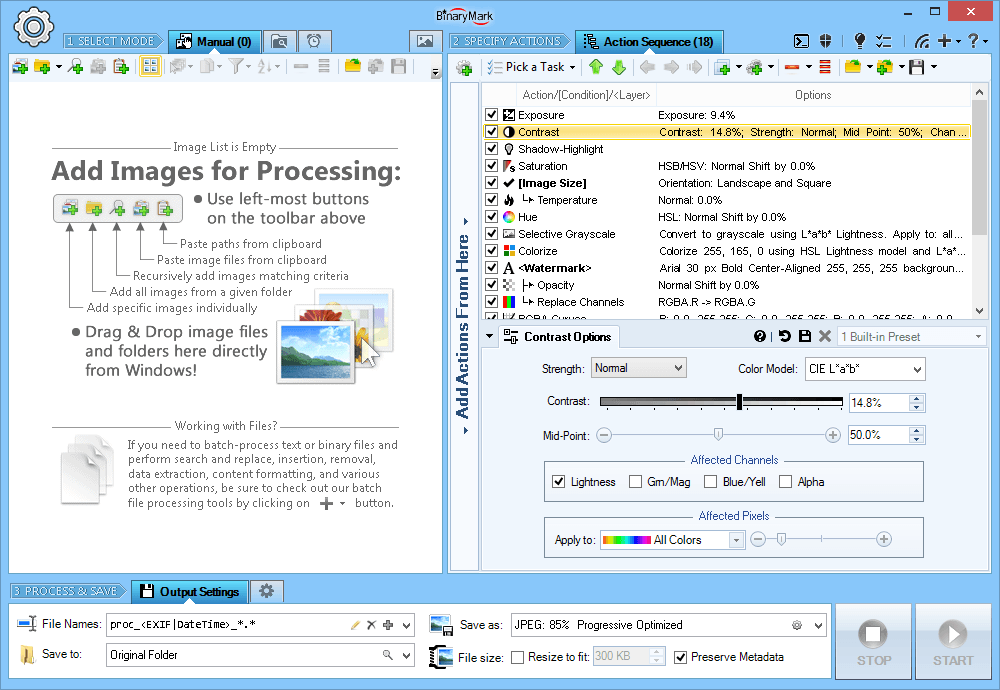
This software provides a comprehensive suite for batch image manipulation, offering over 120 adjustments, filters, and actions. It allows for precise control over color characteristics, including HSL and RGB corrections, gamma, exposure, and saturation. Users can improve image quality through specialized noise reduction, sharpening, and auto-level filters, or apply creative effects via 40 blending modes and pixel filtering layers.
The tool excels in workflow automation, supporting manual, background, scheduled, and console-based processing. It features 20 scaling modes—such as Lanczos and Bicubic—alongside automatic and lossless JPEG cropping, rotation, and flipping. Conditional processing enables specific actions based on image orientation or size, while parallel processing ensures high-speed execution on multi-core CPUs.
Key technical capabilities include:
- Conversion between more than 30 image formats, including JPG, PNG, TIFF, and BMP.
- Static and dynamic watermarking using metadata or file information tags.
- Comprehensive metadata management for EXIF, IPTC, GPS, and XMP data.
- Dynamic file renaming and the ability to save results to multiple locations simultaneously.
This utility serves as a bridge between basic photo editors and high-end automation tools, streamlining the enhancement and conversion of large image libraries through a structured, data-driven approach.
Top 5 Reasons To Download Batch Image Enhancer
Every once in a while, a piece of software comes across my test bench that completely changes how I view everyday digital tasks. We have all been there: you return from a photo shoot, an event, or a product catalog session with hundreds—or even thousands—of raw or semi-processed images. Some are slightly underexposed, some need heavy cropping, others are turned sideways, and all of them are far too large to publish to the web or send to clients. You sit at your computer, fire up a bulky, subscription-based graphics suite, and realize you are about to spend hours clicking through the exact same menus, sliders, and export dialogs over and over again.
Today is your lucky day. The giveaway we are examining today is an absolute powerhouse designed specifically to obliterate that repetitive friction. Packed with over 120 adjustments, an ultra-fast parallel processing engine, and enterprise-grade automation features, this tool turns ordinary snapshots into polished, professional-grade visual assets with minimal effort. If you have been searching for a reason to claim this free software release before the promotion expires, here is the executive summary right upfront.
- Pro-Level Color Grading and Channel Precision: Access to over 120 dynamic filters, 8 distinct color models, per-channel mixing, and 40+ blending modes that rival costly digital darkroom subscriptions.
- True Multi-Core Automation Across Four Distinct Modes: Run your image jobs via Manual, Background, Scheduled, or Console CLI modes powered by lightning-fast multi-core parallel architecture.
- Surgical Scaling, Conversion, and Lossless JPEG Manipulation: Seamlessly convert across 30+ image formats utilizing 20 specialized resampling algorithms and lossless JPEG operations.
- Intelligent Dynamic Watermarking and Deep Metadata Mastery: Protect your intellectual property using metadata-driven dynamic text, visual effects, 12 compositing modes, and full EXIF/IPTC/GPS read-write capabilities.
- Smart Conditional Processing and Rule-Based Renaming: Set up branching automation that crops, resizes, and saves to multiple folders simultaneously based on aspect ratio, image orientation, or file attributes.
Now, let us dig into the technical nuances of why each of these features makes this software an indispensable addition to your digital utility belt.
1. Pro-Level Color Grading and Channel Precision
The core promise of any image manipulation package begins with its image enhancement engine. Many lightweight tools provide a couple of elementary sliders—brightness, contrast, and perhaps a rudimentary saturation filter—that quickly wash out highlights or introduce severe digital artifacting. This giveaway completely departs from that amateur approach by giving you an exhaustive suite of over 120 professional adjustments, filters, and creative actions.
Under the hood, you are not simply restricted to basic RGB calculations. The software grants you native access to eight independent color models: RGB, HSB/HSV, HSL, HSI, HWB, YCbCr, Lab, and LCH. For serious digital artists, photographers, and graphics technicians, having direct access to perceptual color spaces like CIELAB or LCH is a complete game changer. In these spaces, luminosity is separated cleanly from chrominance, meaning you can adjust the perceived brightness, exposure, or gamma of a photograph without inadvertently shifting color balance or causing harsh saturation spikes in skin tones.
The per-channel processing tools allow you to isolate individual components, extract specific channels, mix color matrices, replace individual tones, and calibrate pixel distribution with remarkable precision. If you are handling images plagued with sensor noise or color cast issues, the platform features auto-levels, color temperature and tint controls, high-fidelity noise reduction algorithms, and dedicated unsharp masking tools. Furthermore, with an integrated real-time preview accompanied by interactive histograms, you never have to guess how an adjustment affects dynamic range. You can monitor clipping across highlights and shadows in real time before processing a single file.
Add to that a comprehensive layering framework that supports over 40 distinct blending modes—such as overlay, soft light, color burn, vivid light, and exclusion—and you suddenly have the power to create complex, painterly textures, vintage film simulations, and high-impact commercial aesthetics directly within a batch utility.
2. True Multi-Core Automation Across Four Distinct Modes
Most image editors are built for interactive, single-image manual labor. You open a file, tweak it, export it, close it, and repeat the sequence. When you are managing an entire photo library, an e-commerce catalog, or an archival scanning project, this manual pattern destroys productivity. What separates this particular software from conventional utilities is its uncompromising focus on high-throughput automation.
First and foremost, the engine is architected specifically for multi-core CPUs. Rather than plodding through files sequentially on a single processing thread, the software detects your system's processor architecture and spins up parallel worker threads. Whether you are running a four-core laptop or a thirty-two-thread desktop workstation, the software saturates your silicon to ensure maximum hardware utilization, completing in seconds what would take other programs half an hour.
Beyond raw throughput, the real architectural triumph is found in its four operation modes:
- Manual Mode: Perfect for hands-on, creative experimentation where you want to preview individual adjustments, test presets, and manually fine-tune your parameters before running an export.
- Background Mode: Allows the processing engine to run silently in the background with reduced CPU priority, letting you continue drafting documents, editing video, or browsing the web without experiencing system stutter.
- Scheduled Mode: Turns the software into an automated daemon. You can configure the utility to wake up at designated hours, scan specific directories, process incoming image assets, and cleanly organize the output while you sleep.
- Console Mode: A dream come true for system administrators, developers, and power users who love scripting. You can execute batch routines, trigger complex processing pipelines, and pass dynamic parameters straight from the command line, terminal scripts, or custom batch files.
This level of operational versatility means the software easily adapts to your specific workflow rather than forcing you into a rigid interface loop. It bridges the gap between interactive graphic software and headless server-grade image processing.
3. Surgical Scaling, Conversion, and Lossless JPEG Manipulation
Digital images are rarely one-size-fits-all. A raw photograph straight out of a camera might measure 8,000 pixels wide and occupy 30 megabytes of storage. When that image needs to appear as an online thumbnail, a mobile responsive banner, and a high-resolution print proof, resizing is mandatory. However, resizing algorithms are not created equal, and choosing the wrong scaling method can result in jagged edges, blurry details, or moiré patterns.
This utility delivers a stunning selection of 20 distinct scaling algorithms, including world-class Lanczos, Bilinear, Bicubic, Box, and the HqX pixel-art scaling engine. This means you can select the exact mathematical interpolation algorithm that fits your content. Lanczos preserves striking edge fidelity and crisp textures for landscape photography; Bicubic creates buttery-smooth gradients for portrait work; Box scaling offers fast downsampling for clean drafts; and HqX upscales sharp graphics and interface icons without blurring high-contrast contours.
The software handles format transformations across more than 30 file formats, encompassing legacy staples, modern standards, and niche compression types such as JPG, PNG, GIF, TIFF, BMP, and J2K. If your platform needs to optimize assets for web distribution, you will fall in love with the target file size feature: you can instruct the engine to automatically compress and fit images into a strict file size ceiling measured in kilobytes without having to manually calculate compression quality ratios for each individual picture.
Even more impressive is the engine's capability to execute lossless JPEG operations. Most programs decompress a JPEG file into raw memory, apply a crop or rotation, and then re-encode it, unavoidably degrading the visual quality through generation loss. This software performs lossless rotations, flips, and crops directly on the discrete cosine transform coefficients whenever mathematically possible. The result? Your JPEG files stay pristine without re-compression degradation.
4. Intelligent Dynamic Watermarking and Deep Metadata Mastery
Content theft is rampant across the modern internet. Whether you are an independent photographer, a commercial designer, or an online merchant, publishing unprotected high-resolution images is a recipe for having your hard work copied, re-hosted, or sold without your consent. Yet, manually stamping watermarks onto dozens of individual files is an exhausting chore.
This software features one of the most comprehensive watermarking systems available in any desktop utility. It supports both static and dynamic watermarks across text and image overlays. You can style multiline text using system typography, custom font weights, drop shadows, glows, and outline effects. More importantly, you can make these watermarks completely dynamic by using variables pulled directly from file attributes and metadata tags. You can automatically burn the shoot date, camera model, exposure settings, copyright notices, or file names directly onto the corner of the picture.
With 12 distinct compositing modes (including source-over, source-in, and source-out) and more than 40 layer-blending modes, you can apply subtle, translucent watermarks that are practically impossible for unauthorized parties to remove via content-aware fill, while remaining aesthetically pleasing to prospective buyers.
The software's treatment of image metadata goes well beyond surface watermarking. It incorporates full read, write, and editing capabilities for EXIF, IPTC, GPS, and XMP schemas. You can scrub private location telemetry before uploading photos to public forums, inject uniform copyright details across thousands of historical archive items, or automatically read orientation tags to ensure your images appear upright in every browser.
5. Smart Conditional Workflows That Eliminate Repetitive Manual Labor
In standard image editing software, applying a single action across mixed folders often produces chaotic errors. For example, if you set up a batch job to resize images to 1920 pixels wide, what happens to your vertical portrait photos? They become gigantic tall ribbons. What happens to files that are already smaller than your target dimension? They get stretched, distorted, and pixelated.
This software eliminates that frustration entirely through its sophisticated conditional processing architecture. Instead of blindly executing actions on every file, you can build logical branching workflows that respond to file attributes in real time:
- Orientation Branching: Apply separate cropping, rotation, or sizing dimensions based on whether an image is horizontal, vertical, or perfectly square.
- Dimension Filtering: Automatically skip files that are already below a specific resolution, or scale down only the images that exceed your custom size constraints.
- Aspect Ratio Snapping: Force-fit imagery to specific width-to-height ratios, crop cleanly inward from outer margins, or crop fixed regions from the center or corners based on intelligent heuristics.
- Simultaneous Multi-Destination Export: Process an incoming image once and automatically dispatch a high-resolution TIFF to your local archive folder, a medium-resolution watermarked JPEG to your proof directory, and an ultra-compressed thumbnail PNG to your web server staging folder.
- Dynamic Metadata-Driven Renaming: Completely restructure your file-naming conventions using dynamic EXIF/IPTC tokens, camera capture data, dimension indicators, and chronological timestamps.
This conditional intelligence transforms a simple image editor into a fully autonomous digital assembly line. Once you configure your ideal pipeline, all you need to do is drop a folder of unsorted, messy assets into the queue, trigger the operation, and walk away.
The Final Verdict: An Essential Free Upgrade for Your Workflow
As tech reviewers, we encounter hundreds of software giveaways every year. Many of them turn out to be stripped-down trial editions, obsolete utilities, or repackaged open-source code with a clumsy interface slapped on top. This software stands out as a genuine, professional-grade powerhouse that delivers real, measurable value from the moment you install it.
Whether you need to color-correct a batch of underexposed family snapshots, optimize thousands of product photos for an online storefront, stamp copyright metadata across your professional portfolio, or automate format conversions via scheduled terminal scripts, this tool provides the exact engineering muscle required to get the job done right. It replaces multiple disjointed plugins, costly recurring subscriptions, and clunky manual routines with one unified, hyper-fast desktop environment.
Giveaways with this degree of deep functionality, comprehensive format support, and multi-core processing architecture do not come around often. If you work with digital imagery in any capacity—whether as a hobbyist, a content creator, a web developer, or a seasoned visual artist—grabbing this software right now is an absolute no-brainer. Download it, test its rich feature set on your most challenging image folders, and experience the immense satisfaction of watching hours of tedious manual photo editing dissolve into a single, effortless click.

Reviews for Batch Image Enhancer
Click Here to Read Reviews for Batch Image Enhancer >> Click Here to Submit Reviews for Batch Image Enhancer >>