What Does Hornil StylePix Pro Do?
Hornil StylePix Pro is a lightweight raster graphics editor designed for users who require a streamlined interface without compromising on professional-grade functionality. The software operates as a three-in-one utility, integrating a comprehensive image editor, a built-in image viewer with EXIF support, and a robust batch processor.
The editing suite includes a versatile brush system featuring adjustable blending, scattering, and color effects. Selection capabilities are extensive, offering auto-color, polygonal lasso, and alpha selection tools. For precise composition, the application supports layer masks, quick masks, and region transformations. Users can perform detailed retouching using the clone brush and dedicated restoration tools to remove scratches or red-eye artifacts.
Beyond basic adjustments, StylePix Pro provides advanced enhancement tools such as burn, dodge, and smudge, alongside 50 practical filters and automated color balance. Design elements are supported through vector paths, customizable shapes, and a layer style engine that includes drop shadows, inner glows, and textures. For high-volume workflows, the batch processor automates repetitive tasks, allowing for simultaneous resizing, renaming, and filter application across large image sets. The inclusion of a slideshow feature and broad file format support makes it a capable solution for both quick edits and complex projects.
Top 5 Reasons To Download Hornil StylePix Pro
- Pro-Level Performance in a Lightweight Package: Experience the power of a professional raster graphics editor without the system bloat or the heavy resource drain associated with traditional industry giants.
- Sophisticated Layering and Masking Capabilities: Unlock complex creative workflows using advanced layer styles, quick masks, and alpha selection tools that are usually reserved for expensive subscription software.
- All-in-One Efficiency with Built-in Image Viewing: Streamline your workflow with an integrated image viewer and EXIF data support, allowing you to browse, organize, and edit your library without switching between multiple applications.
- The Ultimate Batch Processing Powerhouse: Save hours of manual labor by automating repetitive tasks like resizing, rotating, renaming, and applying filters to hundreds of images at once with just a few clicks.
- Comprehensive Suite of Precision Retouching Tools: From red-eye removal and scratch restoration to advanced dodge, burn, and smudge tools, you have everything needed to polish your photos to perfection.
If you have been in the creative game for any length of time, you know the struggle of finding that perfect "Goldilocks" software. On one end of the spectrum, you have the basic image viewers and "Paint" clones that are too simple for any serious work. On the other end, you have the massive, expensive, subscription-based juggernauts that take five minutes to load, eat up all your RAM, and require a PhD to navigate. Today, I am here to tell you that the search is over. Hornil StylePix Pro is the bridge between those two worlds, and this giveaway is an absolute must-have for anyone from casual hobbyists to professional digital artists.
Hornil StylePix Pro manages to pack an incredible amount of punch into a remarkably small footprint. It is described as a "lightweight and powerful" image editor, but those words almost feel like an understatement once you actually get your hands on the UI. It doesn't just "edit photos"; it provides a comprehensive ecosystem for digital creation. Let’s dive deep into why you need to stop what you are doing and download this software right now.
1. Pro-Level Performance in a Lightweight Package
In the modern tech landscape, "bloatware" has become a dirty word. We are used to software that demands the latest hardware just to open a single JPEG. Hornil StylePix Pro flips the script. It is designed with a lightweight philosophy that ensures it runs smoothly on almost any machine, from high-end workstations to older laptops. But don't let the "lightweight" tag fool you into thinking it lacks features. This is a full-featured raster graphics editor.
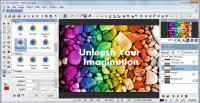
The user interface is a masterclass in intuitive design. It feels familiar to anyone who has used professional software, yet it is streamlined to remove the clutter that usually slows down your creative process. You get the tools you need exactly where you expect them to be. Because it doesn't hog your system resources, you can keep it running in the background while you browse the web or work on other tasks, making it the perfect tool for quick edits or long, intensive design sessions. When we talk about "Top 5 Reasons To Download Hornil StylePix Pro," the sheer accessibility and speed of this app are at the top of the list for a reason. It respects your time and your computer's hardware.
2. Sophisticated Layering and Masking Capabilities
Any pro will tell you that the difference between a "photo edit" and a "digital masterpiece" lies in the layers. Hornil StylePix Pro treats layers with the respect they deserve. You aren't just slapping one image on top of another; you are building a composition. With the inclusion of Layer Masks and Quick Masks, you have surgical control over transparency and blending. This allows for non-destructive editing that lets you experiment without the fear of ruining your original image.
The Region Tool is another standout feature here. Whether you need an auto-selection, a color-based selection, or the precision of a Polygonal Lasso or Alpha Selection, StylePix Pro provides the tools to isolate exactly what you want. The Region Transform tool then allows you to manipulate those selections with ease. When you combine these selection methods with the Quick Mask functionality, you can create complex composites that look like they were made in software costing hundreds of dollars. For a giveaway, getting access to this level of layering and masking is essentially like being handed a professional toolkit for free.
Furthermore, the Layer Styles available in StylePix Pro are genuinely impressive. We are talking about Drop Shadows, Inner Shadows, Outer Glows, Inner Glows, Reflections, Frames, and Textures. You can even apply Gradation Fills with Transparency. These aren't just basic overlays; they are dynamic styles that give your text and shapes a professional, three-dimensional look. If you are making thumbnails for social media, headers for a website, or digital flyers, these layer styles will become your best friends.
3. All-in-One Efficiency with Built-in Image Viewing
One of the biggest friction points in digital photography is the constant back-and-forth between your file explorer, your image viewer, and your editor. You find a photo, you open it, you realize it's the wrong one, you go back, you repeat. Hornil StylePix Pro solves this by including a Built-in Image Viewer right inside the application. This isn't just a simple file browser; it is a sophisticated viewer that supports a wide range of formats and includes an EXIF Viewer.
Being able to see your camera settings—shutter speed, ISO, aperture—directly while you are deciding how to edit the image is a game-changer for photographers. You can organize your workflow from within the app, moving from browsing to editing seamlessly. It even features a Slideshow mode, which is perfect for presenting your work or reviewing a batch of shots after a session. This integration of the viewer and the editor means you spend less time managing files and more time being creative. It’s about creating a "flow state" where the software gets out of your way and lets you work, which is why this is one of the most practical reasons to download this giveaway.
4. The Ultimate Batch Processing Powerhouse
If you are a professional, or even just a very active hobbyist, you know that some tasks are just plain boring. Resizing 200 photos for a web gallery? Rotating vertical shots that the camera didn't tag correctly? Renaming a massive folder of "IMG_8342.jpg" files to something meaningful? These are the tasks that suck the joy out of digital creativity. This is where Hornil StylePix Pro’s Batch Process tool becomes your secret weapon.
The batch processor in this software is remarkably robust. You can handle Sizing, Rotation, Renaming, and Format Conversion all at once. But it goes even further than the basics. You can actually apply Filters and special adjustments like Levels and Curves in a batch process. Imagine being able to color-correct and sharpen an entire folder of photos simultaneously while you go grab a cup of coffee. You can even save and load your batch processing presets, so if you have a specific workflow for your blog or your online store, you can trigger it with a single command. This feature alone is worth the price of admission, and getting it as part of this giveaway is an incredible value proposition.
5. Comprehensive Suite of Precision Retouching Tools
Finally, we have to talk about the sheer variety of tools available for cleaning up and enhancing your images. Hornil StylePix Pro isn't just about big changes; it's about the fine details. The Restore Tool is a lifesaver, featuring dedicated functions to Remove Scratches and Remove Red Eye. If you are digitizing old family photos or trying to save a portrait where the flash was a bit too aggressive, these tools are indispensable.
For those who want to get artistic, the Brush Tool is surprisingly deep. It doesn't just give you a "circle" to paint with. You can adjust the Size, Edge softness, Distance, Blending modes, and Opacity. You can even use Brush Images and manipulate Scattering, Rotation, and Scaling. This turns the brush tool into a powerful engine for digital painting and texture creation. Whether you are using the Clone Brush to remove an unwanted object from the background or the Spray tool for atmospheric effects, the control is in your hands.
The Enhance Tools further extend this power. You have access to Burn, Dodge, Blur, Sharpen, Desaturate, Saturate, and Smudge. These are the tools that allow you to guide the viewer's eye, creating depth and focus where there was none. Combine this with over 50 kinds of practical filters—including Auto Color Balance, Auto Level, and Auto Contrast—and you have a suite of tools that can turn a "meh" photo into a "wow" photo in minutes. You even have Path, Line, Curve, and Shape tools (including stars, arrows, and polygons) for those times when you need to lean into graphic design rather than just photo editing.
Conclusion: Why You Can't Pass This Up
When you look at the total package, Hornil StylePix Pro is a formidable piece of software. It offers the depth of a professional editor, the speed of a lightweight utility, the convenience of a file manager, and the automation of a batch processor. It is rare to find a tool that balances these different needs so effectively without feeling bloated or confusing.
As a tech reviewer, I see a lot of software come and go. Most "giveaways" are for tools that do one thing okay. This is different. This is a comprehensive creative suite that earns its place on your taskbar. Whether you are looking to edit your vacation photos, create assets for a business, or dive into the world of digital art, Hornil StylePix Pro provides a stable, powerful, and incredibly fast platform to do so. Don't wait on this one. The combination of the Batch Processor, the Layer Styles, and the Lightweight UI makes this one of the best software deals you will find all year. Download it, explore the filters, master the masks, and see for yourself how much more enjoyable image editing can be when you have the right tool for the job.
In summary, if you want a program that starts instantly, handles complex tasks with ease, and doesn't require a monthly subscription fee to keep your files accessible, Hornil StylePix Pro is the answer. It is a professional raster graphics editor that fits in your pocket (metaphorically speaking), and it is ready to help you bring your visual ideas to life. This is, without a doubt, a "must-download" giveaway for anyone who values their time and their creativity.


Reviews for Hornil StylePix Pro
Click Here to Read Reviews for Hornil StylePix Pro >> Click Here to Submit Reviews for Hornil StylePix Pro >>