What Does SQLPro for Postgres for Mac Do?
SQLPro for Postgres is a specialized database management tool designed for users who require a lightweight yet advanced client for PostgreSQL servers. The application focuses on streamlining database interactions through a clean interface while maintaining the performance required for complex administrative tasks.
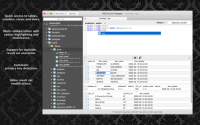
The software includes a suite of developer-centric features intended to increase productivity. Key tools include syntax highlighting and Intellisense, which provide real-time code suggestions and visual aids for writing SQL queries. The interface utilizes a tabbed interface, enabling users to manage several connections or query windows simultaneously within a single workspace.
Functionality extends to the execution of multiple queries at once, allowing for efficient batch processing of data commands. For navigation, the client provides quick access to schema elements such as tables and columns, minimizing the need for manual searching through database hierarchies. By combining these tools, the app provides a robust environment for both basic data retrieval and advanced database architecture management without the system overhead often associated with heavier enterprise suites.
Top 5 Reasons To Download SQLPro for Postgres for Mac
Before we dive into the nitty-gritty details of why this software is a game-changer for your development workflow, let’s look at the highlights. If you are working with PostgreSQL, these are the primary reasons you need to get your hands on SQLPro for Postgres right now:
- Blazing Fast, Native Performance: Unlike bulky, cross-platform tools that hog system resources, this app is lightweight and optimized for speed.
- Intelligent Code Assistance: With full support for Intellisense and syntax highlighting, your coding speed and accuracy will skyrocket.
- Masterful Multitasking: The tabbed-based interface allows you to manage dozens of connections and queries without losing your place.
- Batch Query Power: The ability to execute multiple queries simultaneously and view results efficiently transforms how you interact with data.
- Effortless Schema Navigation: Quick access to tables, columns, and constraints means you spend less time searching and more time building.
As a tech reviewer, I’ve seen my fair share of database management tools. Some are so bloated they feel like they’re trying to run an entire operating system inside your terminal, while others are so bare-bones that you might as well be typing directly into a command prompt from 1985. Finding that "Goldilocks" zone—where the software is powerful enough for advanced database administrators but lightweight enough for a quick-fix developer—is rare. That is exactly where SQLPro for Postgres lives. It is a sleek, native, and incredibly efficient tool that focuses on what matters: getting you into your data and out again with as little friction as possible.
1. Blazing Fast, Native Performance
In the modern world of software development, "Electron" has become a bit of a dirty word for many performance purists. We’ve all seen those apps that take four seconds to open a context menu because they are essentially running a hidden instance of a web browser. When you are deep in the zone, trying to troubleshoot a production database issue or optimize a complex query, the last thing you want is input lag. This is where SQLPro for Postgres truly shines. It is built as a native application, which means it feels snappy, responsive, and integrated with your operating system’s natural behaviors.
Because it is a lightweight client, the initial launch time is near-instant. You aren’t waiting for a heavy splash screen or a dozen plugins to initialize. This efficiency extends to how it handles large datasets. When you pull a thousand rows from a table, SQLPro renders them smoothly. Scrolling through your data doesn't result in the stuttering or "choppiness" that often plagues web-based or Java-based database tools. For a developer who spends eight hours a day inside a database client, these small performance gains add up to a massive amount of saved time and reduced frustration. Choosing a native tool like this is a commitment to a smoother, more professional workflow.
Furthermore, being lightweight doesn't mean it lacks power. It simply means the power is directed toward the database tasks rather than maintaining a heavy UI framework. You’ll notice that your CPU and RAM usage stay low, even when you have multiple connections open to different servers across the globe. This makes it the perfect companion for developers working on laptops where battery life and resource management are critical. If you want a tool that respects your hardware, this is the one to download.
2. Intelligent Code Assistance: Syntax Highlighting and Intellisense
Writing SQL can be a repetitive and error-prone process. A single misplaced comma or a misspelled table name can result in a frustrating syntax error that halts your progress. SQLPro for Postgres tackles this head-on with a robust implementation of syntax highlighting and Intellisense. For those who might not be familiar, Intellisense is the app’s ability to "predict" what you are trying to type. As you begin typing a table name or a SQL command, a dropdown appears with suggestions. This isn't just a simple dictionary lookup; it is context-aware, meaning it understands the schema of the database you are currently connected to.
Imagine you have a table with twenty different columns, all named with complex prefixes. Instead of having to memorize every column name or keep a separate window open for reference, you simply type the first few letters, and SQLPro suggests the rest. This drastically reduces typos and speeds up the writing of complex JOIN statements. When combined with high-quality syntax highlighting—which color-codes your keywords, strings, and operators—your SQL becomes much more readable. This makes it easier to spot logic errors at a glance before you even hit the "execute" button.
The beauty of this feature is that it caters to both the veteran and the novice. If you’re a pro, you’ll appreciate the speed. If you’re just learning PostgreSQL, the syntax highlighting acts as a visual guide, helping you understand the structure of the language. It transforms the experience from "typing in a dark room" to "working with an assistant who knows exactly what you’re looking for." Once you get used to an editor that provides this level of feedback, going back to a plain-text SQL editor feels like a major step backward.
3. Masterful Multitasking with a Tabbed Interface
We’ve all been there: you’re working on a complex data migration, but suddenly you need to check a value in a different table, and then a colleague asks you to run a quick report on user sign-ups. In a poorly designed database client, this results in a chaotic mess of overlapping windows, or worse, you have to close your current query to run a new one. SQLPro for Postgres solves this organizational nightmare with its sleek, tabbed-based interface. This design philosophy borrows the best elements of modern web browsers and applies them to database management.
Each query, table view, or server connection can live in its own tab. You can easily flip between a production environment and a staging environment without getting confused about where you are. The interface allows you to keep your workspace organized and focused. You can have your main "work" query in one tab, a reference table open in another, and a "scratchpad" for temporary snippets in a third. This prevents the "mental context-switching" tax that usually occurs when you have to hunt for information.
What I find particularly impressive is how the tabbed interface handles results. You don't just get a single results pane that gets overwritten every time you run a query. You can maintain multiple sets of data simultaneously. This is a life-saver when you need to compare the output of two different queries side-by-side. The UI is clean, intuitive, and stays out of your way, allowing you to focus on the data itself rather than fighting with the window management of your operating system. It’s an elegant solution for a messy job.
4. Massive Productivity Boost with Multi-Query Execution
Sometimes, running one query at a time just isn't enough. Whether you are setting up a new database schema, performing a series of updates, or generating a multi-part report, you need the ability to fire off a batch of commands and see the results in one go. SQLPro for Postgres supports the execution of multiple queries at once, and it does so with a level of sophistication that many of its competitors lack. When you execute a block of SQL containing multiple SELECT statements, the app doesn't just show you the last result; it provides a clear, organized view of every result set generated by that block.
This "batch" functionality is a massive time-saver. Instead of clicking "Execute" five times for five different queries, you can write your entire script, hit the button once, and then analyze the data at your leisure. This is especially useful for developers who work with complex stored procedures or those who are performing data integrity checks across several tables. The feedback loop is shortened significantly, allowing for a much faster iterative process.
Furthermore, the way SQLPro handles these multiple result sets is highly intuitive. You can toggle between the different outputs easily, making it simple to correlate data between different tables. If one query in your batch fails, the app provides clear error reporting that helps you pinpoint exactly where the problem occurred in your script. This level of transparency and control is what separates a basic database tool from a professional-grade client. It’s about giving you the power to handle "bulk" work without the "bulk" headache.
5. Intuitive Schema Navigation and Quick Access
A database is often like a giant library with thousands of books but no index. If you don't know exactly what you’re looking for, you can spend an eternity wandering the aisles. SQLPro for Postgres acts as the ultimate librarian. One of its standout features is the "quick access" panel, which gives you an immediate, hierarchical view of your entire database structure. At a glance, you can see your tables, views, stored procedures, and functions. But it goes deeper than that: you can expand those tables to see individual columns, data types, primary keys, and indexes.
This sidebar isn't just a static list; it’s an interactive tool. You can quickly filter through your tables if you’re working in a database with hundreds of entities. Need to find that one table that starts with "auth_"? Just start typing in the filter box, and the list shrinks instantly. This eliminates the need to run DESCRIBE TABLE or d commands constantly just to remember the name of a column. For me, this is the single biggest "quality of life" improvement in the app. It makes the database feel "knowable" and accessible.
Additionally, the quick access features extend to common tasks. You can often right-click an item in the sidebar to perform common actions like viewing data, scripting the table creation, or checking indexes. It bridges the gap between a pure "coding" environment and a "visual" management tool. By providing this bird's-eye view of your data architecture, SQLPro ensures that you always have your bearings, no matter how complex the project becomes. It turns the daunting task of navigating a massive enterprise database into a simple, point-and-click affair.
Conclusion: Why You Should Grab This Now
In conclusion, SQLPro for Postgres is not just another utility; it is a specialized instrument designed for people who take their data seriously. It moves away from the "one-size-fits-all" approach of cross-platform behemoths and instead offers a tailored, high-performance experience that respects the user's time and system resources. By combining the speed of a native app with the intelligence of modern IDE features like Intellisense and syntax highlighting, it creates a workflow that feels natural and empowering.
The tabbed interface and multi-query execution features are clearly designed by people who understand the day-to-day struggles of database administrators and backend developers. These aren't just "extra" features; they are essential tools for managing the complexity of modern data environments. When you add in the intuitive schema navigation, you have a complete package that makes PostgreSQL a joy to work with rather than a chore.
If you are currently using a clunky, slow, or outdated client, this giveaway is your perfect opportunity to upgrade your toolkit. It’s rare to find a tool that manages to be this "advanced" while remaining "lightweight," but SQLPro manages it with ease. Whether you’re managing a small personal project or a massive corporate cluster, this app will make you faster, more accurate, and ultimately more productive. Don't let this chance pass you by—download this giveaway and see for yourself how much better your database life can be. Your workflow will thank you, and your "alt-tab" finger will finally get a well-deserved rest.
SQLPro for Postgres is the definitive choice for the modern Mac user who needs to interact with PostgreSQL. It’s clean, it’s fast, and it’s built to help you succeed. Download it today and take the first step toward a more efficient development future.


Reviews for SQLPro for Postgres for Mac
Click Here to Read Reviews for SQLPro for Postgres for Mac >> Click Here to Submit Reviews for SQLPro for Postgres for Mac >>