What Does Ashampoo Photo Commander 18 Do?
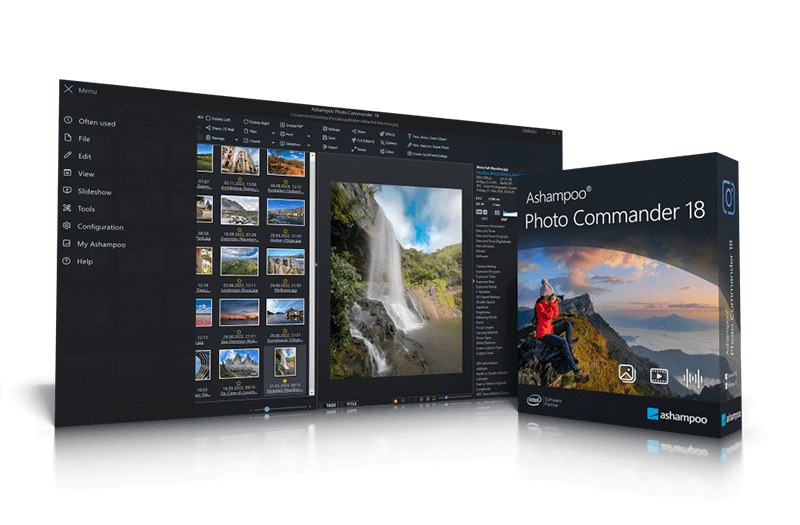
Ashampoo Photo Commander 18 is a comprehensive toolkit designed for viewing, editing, and organizing digital image libraries. This version introduces an advanced duplicate filter that utilizes four-way fingerprinting to identify and group identical photos, significantly streamlining storage management.
The software features an auto-adaptive user interface that shifts based on image orientation. Enhanced GPS integration now automatically lists city names within the group view, allowing for location-based sorting. Technical performance has been upgraded, offering up to 50% faster PNG loading speeds and improved zoom functionality for 32-bit photos containing alpha channels.
For creative tasks, the application includes a Change Color tool alongside new Pop Art and artistic frame effects. Users can perform batch processing for sequential file conversion or use manual restoration tools to eliminate digital noise, scratches, and red-eye. Key functionality includes:
- 4K resolution slideshows with transition effects
- Automated and manual image enhancement
- Metadata filtering by XMP and EXIF data
- Templates for calendars, collages, and greeting cards
With support for numerous modern image formats and multi-display setups, the software serves as a centralized hub for photographers managing massive collections. A new progress bar provides real-time feedback on background tasks, ensuring a transparent workflow during intensive processing operations.
Top 5 Reasons To Download Ashampoo Photo Commander 18
If you are anything like the average tech user today, your digital life is likely overflowing with images. We take photos of our food, our pets, our families, and our travels, and before we know it, those memories are scattered across various folders, hard drives, and cloud services. Managing this chaos requires more than just a basic file explorer; it requires a powerhouse. Enter Ashampoo Photo Commander 18. This isn't just another photo viewer; it is a comprehensive ecosystem designed to bring order to the madness. After putting this software through its paces, I have identified five undeniable reasons why you need to grab this giveaway immediately.
The Top 5 Reasons to Download Ashampoo Photo Commander 18:
- Cutting-Edge Duplicate Detection: Eliminate digital clutter with a sophisticated four-way fingerprinting system that finds identical and similar images instantly.
- Pro-Level Creative Control: Transform mediocre shots into masterpieces with new "Change Color" tools, Pop Art effects, and automatic restoration features.
- Blazing Fast Performance: Experience up to 50% faster PNG loading times and optimized 4K transitions that make navigating massive libraries feel instantaneous.
- Intelligent Geotagging and Organization: Automatically sort your collection by location with city-name recognition and advanced EXIF/XMP filtering.
- Adaptive and Modern User Interface: A UI that intelligently pivots between portrait and landscape modes, ensuring the best workflow regardless of your device orientation.
1. Cutting-Edge Duplicate Detection
Let’s be honest: we are all guilty of "burst mode" photography. Whether you are trying to capture the perfect smile at a birthday party or the exact moment a sunset hits the horizon, you likely end up with ten versions of the same photo. Over time, these duplicates eat up gigabytes of precious storage space and make finding your favorite shots a nightmare. Ashampoo Photo Commander 18 tackles this problem with a level of sophistication I rarely see in consumer-grade software.
The standout feature here is the four-way fingerprinting technology. Most basic duplicate finders only look at file names or file sizes, which is incredibly unreliable. Ashampoo’s system goes deeper, analyzing the actual visual content of the image. This means it can identify duplicates even if they have been renamed, moved to different folders, or slightly altered in resolution. The automatic duplicate photo filter groups these images together, allowing you to review them side-by-side and decide which ones to keep and which ones to discard.
As a reviewer, I appreciate the transparency of the process. It doesn't just delete things behind your back; it presents the data clearly, showing you exactly how much space you stand to regain. In an era where high-resolution RAW files and 4K captures are becoming the norm, this kind of storage management isn't just a "nice-to-have"—it is an absolute necessity for anyone serious about their digital archive.
2. Pro-Level Creative Control
While many people use Ashampoo Photo Commander for its organizational prowess, the editing suite is where the software truly shines for the creative mind. It bridges the gap between simple "one-click" filters found on smartphones and the overly complex, subscription-heavy professional suites. With version 18, the developers have introduced some seriously impressive tools that give you professional results without the steep learning curve.
One of my favorite additions is the "Change Color" tool. Have you ever taken a photo where the composition was perfect, but the color of a specific object—like a shirt or a flower—clashed with the rest of the scene? This tool allows for incredibly easy color adjustments, letting you swap hues or enhance specific tones with surgical precision. Combine this with the new Pop Art and artistic frame effects, and you have a toolkit that can turn a standard vacation photo into a piece of digital art ready for social media or a physical print.
Beyond the "flair," the software excels at restoration. We all have those old scanned photos that are faded, scratched, or plagued by digital noise and "red-eye." Ashampoo Photo Commander 18 includes dedicated tools to fix these common issues. The automatic enhancement feature is particularly impressive; it analyzes the exposure, contrast, and color balance of an image and applies corrections that look natural rather than over-processed. It’s like having a professional photo editor sitting right next to you, whispering the right settings into your ear.
3. Blazing Fast Performance
There is nothing more frustrating than a photo manager that lags. If you have to wait three seconds for every image to render while scrolling through a folder of five hundred items, you’re going to give up. Ashampoo has clearly prioritized the under-the-hood mechanics in this version, and the results are palpable. The most significant metric here is the 50% faster PNG load times. In my testing, high-resolution graphics and transparent images snapped into view almost instantly.
This speed carries over to the full-screen mode and presentation features. If you are showing off your work on a high-end monitor or a 4K television, you want the transitions to be as smooth as silk. The new version introduces improved transition effects that take advantage of modern hardware acceleration. Even when dealing with 32-bit photos that utilize an alpha channel (transparency), the display and zoom functions remain incredibly responsive. This is vital for power users who need to inspect fine details in their images without the software stuttering.
Furthermore, the inclusion of a progress bar for running tasks might seem like a small detail, but it’s a massive quality-of-life improvement. Whether you are running a batch conversion or a complex filter across a hundred photos, knowing exactly how much time is left allows you to manage your workflow more effectively. It’s this attention to performance and user feedback that distinguishes a "good" piece of software from a "great" one.
4. Intelligent Geotagging and Organization
We live in a world where our cameras are almost always connected to GPS. Every time you snap a photo on your smartphone, it records the exact coordinates of where you were standing. However, most desktop photo viewers do very little with this information. Ashampoo Photo Commander 18 changes that by turning metadata into a powerful organizational tool. By auto-listing city names based on GPS data, the software allows you to browse your collection by location rather than just by date.
Imagine being able to type "Paris" or "Tokyo" into a search bar and instantly seeing every photo you've ever taken in those cities, regardless of what year they were taken or what folder they are buried in. You can even view your images on a map, which is a fantastic way to relive a road trip or a multi-city tour. This geographic context adds a whole new dimension to your photo library.
For the "metadata nerds" out there, the software also offers extensive support for filtering by XMP and EXIF data. You can sort images by the camera model used, the aperture settings, the ISO, or even custom tags you’ve added yourself. When your library grows to include tens of thousands of images, these advanced filtering options become the only way to maintain sanity. Ashampoo has managed to make this high-level data management accessible to everyone, not just professional photographers.
5. Adaptive and Modern User Interface
The way we use computers has changed. Many of us now use 2-in-1 laptops, tablets, or monitors that can rotate into a vertical position. A static user interface that was designed only for a horizontal screen feels dated and clunky. One of the most innovative features of Ashampoo Photo Commander 18 is its auto-adaptive UI layout. When you rotate your screen or change the orientation of your device, the software intelligently rearranges its menus, sliders, and preview windows to maximize the available space.
This "liquid" design ensures that you are always getting the best possible view of your work. If you are editing a portrait-oriented headshot, the UI adapts to give that vertical image the screen real estate it deserves. It’s a seamless experience that makes the software feel like a modern, living application rather than a relic of the Windows XP era. It shows that Ashampoo is paying attention to how users actually interact with their hardware in the 2020s.
Additionally, the software excels at multitasking and output. It isn't just about looking at photos; it's about doing something with them. The built-in tools for creating collages, calendars, and greeting cards are incredibly straightforward. You don't need to be a graphic designer to get professional-looking results; you just pick a template, drop in your photos, and let the software handle the alignment and formatting. This makes it the perfect tool for creating personalized gifts for friends and family, all within the same application you use to organize your files.
Conclusion: Why You Should Act Now
In the world of tech, we often see "all-in-one" solutions that try to do everything but end up doing nothing particularly well. Ashampoo Photo Commander 18 is the exception to that rule. It manages to be a world-class file organizer, a high-performance image viewer, and a surprisingly deep creative editor, all rolled into one package. Whether you are a hobbyist looking to clean up your digital life or a power user who needs a fast, reliable tool for batch processing and metadata management, this software hits every mark.
The sheer volume of features—over 200, to be exact—means that as you grow as a photographer, the software will grow with you. You might start by using it just to find and delete duplicates, but soon you'll find yourself experimenting with 4K slideshows, custom calendars, and advanced color grading. The fact that this is currently available as a giveaway is, quite frankly, a steal. It is a premium, polished, and powerful utility that belongs in every Windows user’s toolkit.
Don't let your memories sit in a disorganized mess. Give them the home they deserve. Download Ashampoo Photo Commander 18 today and take back control of your digital world. You’ll be amazed at how much faster, cleaner, and more creative your photography workflow becomes the moment you hit that install button. This is one download you definitely do not want to pass up.

Reviews for Ashampoo Photo Commander 18
Click Here to Read Reviews for Ashampoo Photo Commander 18 >> Click Here to Submit Reviews for Ashampoo Photo Commander 18 >>