What Does Bandicut Do?
Bandicut is a specialized video manipulation tool designed for trimming and clipping video files with high efficiency. Its primary function is the extraction of specific segments from a larger video source. By utilizing a dedicated High-Speed Mode, the software allows users to cut footage without the need for re-encoding. This ensures that the original video quality remains entirely intact while significantly accelerating the export process.
The application provides several technical capabilities for precise media editing:
- Lossless Cutting: Extract segments from the original file without decreasing resolution or bitrate.
- Frame Precision: Users can navigate and select exact cut points down to the individual frame.
- Extensive Format Support: Compatibility includes AVI, MP4, MOV, MKV, WMV, VOB, and FLV, among others.
- Hardware Acceleration: The software supports H.264 hardware-accelerated video encoders for optimized performance.
- Codec Variety: It handles various compression standards including Xvid, MPEG-1, and Motion JPEG.
With an interface centered on ease of use, Bandicut streamlines the workflow for removing unwanted parts of a video or isolating specific highlights. It eliminates the technical complexities often found in full-suite non-linear editors, focusing strictly on speed and maintaining the integrity of the source media.
Top 5 Reasons To Download Bandicut
If you have ever spent hours waiting for a video to render just because you wanted to trim a few seconds off the beginning or the end, you know the frustration of modern video editing. Most software treats every minor change as a reason to completely re-encode your footage, costing you time and, more importantly, image quality. That is where Bandicut comes in. This is not just another bloated video editor; it is a surgical tool designed for speed and perfection. Before we dive into the deep technical reasons why this software belongs on your hard drive, here are the top five reasons why you need to download this giveaway right now:
- Lossless Video Cutting: You can trim, cut, and split your videos without any loss in original visual quality.
- High-Speed Mode: Process your video files at speeds that traditional video editors simply cannot match by bypassing the re-encoding phase.
- Frame-Accurate Precision: Unlike basic cutters that only snap to keyframes, Bandicut allows you to select the exact frame you want to start and end on.
- Massive Format Support: Whether it is an MP4, MKV, AVI, or an obscure format like VOB or TS, Bandicut handles almost every extension imaginable.
- Hardware Acceleration: By leveraging H.264 hardware encoders, the software ensures your CPU and GPU work in tandem for the most efficient experience possible.
As a tech reviewer, I see hundreds of applications every year. Most of them try to do everything and end up doing nothing particularly well. Bandicut is different. It focuses on the most essential task in video management—cutting and joining—and it does it better than the industry giants. Let’s break down exactly why these five reasons make Bandicut a mandatory download for anyone from casual social media posters to professional content creators.
1. The Holy Grail: Lossless Video Cutting
The biggest problem with 99% of video editing software is "re-encoding." When you pull a video into a standard editor, the software decodes the compressed file, applies your changes, and then re-compresses it into a new file. Every time you compress a video, you lose data. This is known as generation loss. Shadows become blocky, colors become muted, and fine details like hair or textures turn into a blurry mess.
Bandicut solves this by using a "lossless" approach. Because it can cut videos without encoding, you are essentially just moving the original data packets into a new container. You are not changing the DNA of the video; you are just trimming the length of the strand. This means the output file is 100% identical in quality to the source file. If you are a 4K enthusiast or someone who archives high-bitrate gameplay footage, this is the only way to ensure your memories or your content stay as sharp as the day they were recorded.
Imagine you have a massive 10GB file of a family wedding and you just want a 30-second clip of the cake cutting. In a traditional editor, saving that 30-second clip might actually make it look worse than the original. With Bandicut, that 30-second clip remains a pristine, bit-for-bit copy of the master file. That is the kind of peace of mind that enthusiasts dream of.
2. Blazing Fast Performance with High-Speed Mode
We live in a world where "time is money," but in the world of video editing, "time is rendering." We have all been there: you finish your edits, hit "Export," and the software tells you it will take 45 minutes to finish a five-minute video. It’s a workflow killer. It stops your momentum and ties up your computer’s resources.
The High-Speed Mode in Bandicut is a game-changer. Since the software does not have to recalculate every single pixel in every single frame, the "rendering" process is effectively replaced by a "copying" process. It is limited only by the speed of your hard drive or SSD. A task that takes an hour in a traditional editor can be completed in seconds in Bandicut. This makes it the perfect tool for "cleaning up" your video library. You can go through a folder of long recordings, strip out the fluff, and save the highlights in less time than it takes to brew a cup of coffee.
This speed is particularly beneficial for gamers and streamers. When you have hours of footage from a session and you need to quickly grab a "killing spree" or a "funny fail" to post to social media, you don't want to wait for a full export. You want it done now. Bandicut delivers that instant gratification without taxing your system.
3. Frame-Accurate Precision for Professional Results
Many "fast" video cutters have a hidden flaw: they can only cut at "keyframes." Video compression works by saving one full image (a keyframe) and then only saving the changes for the next several frames. If you try to cut a video in a basic tool, it might force you to start the clip three seconds earlier than you want because that is where the nearest keyframe is located.
Bandicut provides frame-accurate cutting. This means you can scrub through your video frame-by-frame—literally 1/30th or 1/60th of a second at a time—and set your start and end points exactly where you want them. No more awkward "leftover" frames from the previous scene. No more missing the first half-second of a sentence. You get the surgical precision of a high-end professional suite with the simplicity of a consumer app.
This level of detail is vital for anyone who cares about the rhythm and pacing of their videos. Whether you are cutting out a sneeze in a vlog or trimming a transition in a presentation, that frame-level control ensures your final product looks polished and professional, rather than amateurish and "choppy."
4. Universal Compatibility: Any Format, Any Time
One of the most frustrating aspects of digital video is the "alphabet soup" of file formats. You might have an old AVI from a digital camera, a modern MP4 from your phone, an MKV from a high-def rip, and a MOV from a Mac user. Trying to find one tool that can open all of them without demanding you install a dozen different codec packs is a nightmare.
Bandicut is like a Swiss Army Knife for video formats. It supports an incredible range of extensions, including *.avi, *.mp4, *.mov, *.m4v, *.mkv, *.mpeg, *.mpg, *.dat, *.vob, *.flv, *.asf, *.wmv, *.ts, *.tp, *.trp, *.mpe, *.mpv2, *.mp2v, *.m2t, *.m2ts, *.k3g, *.divx, *.wm, *.wmx, *.wvx, *.rm, *.rmvb, *.ram, *.ivf, *.ogm, *.vp6, and *.xvd. It doesn't matter if the file is ten years old or recorded yesterday on the latest smartphone; Bandicut can handle it.
This versatility makes it an essential "utility" software. Even if you use a different program for your heavy creative editing, you will find yourself reaching for Bandicut just to "prepare" files. It can take those stubborn, uncooperative video formats and trim them down into manageable pieces that other programs can finally understand. It’s the ultimate bridge between different devices and platforms.
5. User-Friendly Interface and Hardware Acceleration
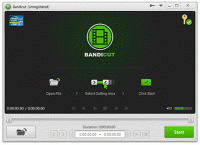
Software power is useless if you need a PhD to figure out how to use it. Many video tools are cluttered with hundreds of buttons, complex timelines, and confusing menus. Bandicut takes the opposite approach. Its user interface is clean, modern, and incredibly intuitive. You open a file, move the sliders to select the part you want to keep, and hit "Start." It is so simple that a child could use it, yet powerful enough that a professional would want it.
But don't let the simple look fool you; under the hood, this thing is a beast. It supports Hardware Accelerated H.264 video encoders. If you have a modern computer with an Intel, NVIDIA, or AMD processor/graphics card, Bandicut can offload the heavy lifting to your hardware. This means even when you do need to re-encode a file (perhaps because you are changing the format), it happens significantly faster than software that relies on the CPU alone. It balances the ease of use for the human with the high-tech power of the machine.
Furthermore, the support for various compression codecs like Xvid, MPEG-1, and Motion JPEG ensures that you have full control over the output if you choose to go beyond the lossless mode. It is rare to find a tool that scales so well from the "I just want to cut this fast" user to the "I want to tweak my encoding settings" power user.
The Verdict: Why You Should Download This Now
We are currently in a "video-first" world. We record our meetings, our games, our family events, and our creative ideas. But raw video is often messy. It has "dead air" at the beginning, interruptions in the middle, and useless space at the end. Keeping these raw files wastes storage space and makes sharing them a chore.
Bandicut is the solution to the digital clutter. It allows you to refine your video library with surgical precision and lightning speed. By downloading this giveaway, you are gaining a tool that preserves the highest possible quality of your footage while saving you hours of frustration. It is lightweight, it doesn't nag you with unnecessary features, and it does exactly what it promises: it cuts video fast and losslessly.
In my years of reviewing tech, I have found that the best tools are the ones that solve a specific problem perfectly. Bandicut solves the "I just need to cut this video" problem better than almost anything else on the market. Whether you are looking to save space on your hard drive, prepare clips for YouTube, or just trim a video to send to a friend, this software makes the process effortless. Do not miss the chance to add this powerhouse to your digital toolkit. It is a download you will find yourself using week after week, year after year. It is simple, it is fast, and it is lossless—exactly what every video enthusiast needs.
In conclusion, the combination of its "High-Speed Mode" and "Frame-Accurate" precision puts Bandicut in a league of its own. Most free tools will give you one or the other; Bandicut gives you both in a package that is easy on your system resources and even easier on your eyes. Grab this giveaway, install it, and the next time you have a video that’s just a little too long, you’ll be glad you have the fastest cutter in the business ready to go.


Reviews for Bandicut
Click Here to Read Reviews for Bandicut >> Click Here to Submit Reviews for Bandicut >>