What Does Wondershare PDF Editor Pro for Mac Do?
Wondershare PDF Editor Pro for Mac serves as a comprehensive toolset for managing and processing digital documents. Designed for individual users and small-to-medium businesses, the software facilitates the handling of professional files such as legal documents, tax returns, medical reports, and business invoices.
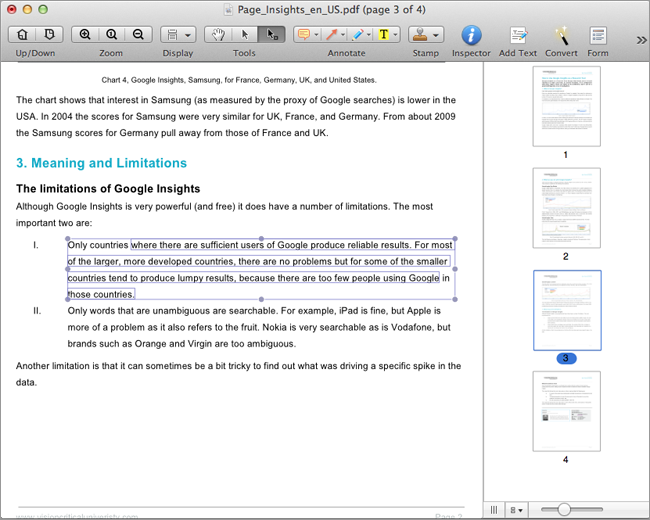
The application allows for the direct creation of PDF files from web pages, images, and text documents. Users can edit existing content by adding or deleting text with automatic reflow, as well as manipulating images through cropping and insertion. Page-level management features include the ability to merge multiple files, split existing documents, and extract specific pages to create new PDF files.
For professional workflows, the software includes annotation tools, markup capabilities, and the creation of custom stamps via typing or drawing. Security features enable password protection for sensitive data. Beyond basic editing, the tool facilitates the conversion of native and image-based PDFs into editable formats including Microsoft Word, Excel, PowerPoint, and HTML. An integrated Optical Character Recognition (OCR) engine allows for the conversion of scanned documents into searchable, editable text. Additionally, users can fill out static PDF forms or customize new forms using provided templates.
Top 5 Reasons To Download Wondershare PDF Editor Pro for Mac
Before we dive into the nitty-gritty of why this software is a total game-changer for your workflow, let’s look at the highlights. If you are tired of struggling with static, uncooperative documents, here are the five biggest reasons you need to get your hands on Wondershare PDF Editor Pro for Mac right now:
- Seamless and Intuitive Document Editing: Edit text and images with the same ease as a word processor, featuring automatic reflow technology.
- Advanced OCR (Optical Character Recognition) Technology: Transform scanned, image-based PDFs into fully searchable and editable documents.
- Versatile Format Conversion: Move your data anywhere by converting PDFs into Word, Excel, PowerPoint, EPUB, HTML, and more.
- Professional Form Management: Fill out static forms, customize your own templates, and use digital stamps for a truly paperless office.
- Robust Security and Organization: Protect sensitive data with high-level password encryption while easily merging, splitting, or reordering pages.
Let’s be honest for a second: we all have a love-hate relationship with PDF files. On one hand, they are the universal standard for sharing documents. Whether it is a tax return, a legal contract, or a medical report, the PDF ensures that what I see on my screen is exactly what you see on yours. On the other hand, the moment you need to actually change something in that PDF, the frustration begins. Most of us have spent far too much time trying to "hack" our way through a PDF edit, only to end up with broken formatting or a document that looks like a ransom note. If you are a Mac user, you might think the built-in Preview app is enough, but once you start dealing with professional-grade tasks, you quickly realize you are bringing a knife to a gunfight.
That is where Wondershare PDF Editor Pro for Mac enters the scene. This isn’t just another viewer; it is a comprehensive, all-in-one powerhouse designed specifically for individuals and small-to-medium businesses who need to take control of their digital paperwork. If you’ve been looking for a reason to upgrade your digital toolkit, this is it. Let’s break down exactly why this software is a must-download.
1. Seamless and Intuitive Document Editing
The primary reason anyone looks for a PDF editor is, well, to edit. But not all editors are created equal. Most budget tools allow you to slap a text box over existing text, which looks unprofessional and messy. Wondershare PDF Editor Pro for Mac treats your PDF like a living document. The standout feature here is the automatic reflow technology. When you change a sentence or add a paragraph, the rest of the text adjusts naturally, maintaining the layout and professional appearance of the original file.
Imagine you are looking at a business invoice or a legal document and you spot a typo in the middle of a paragraph. With this tool, you simply click and type. You can correct the text, change the font style, or adjust the size without worrying that you’re going to ruin the alignment of the rest of the page. It’s the kind of "set it and forget it" ease that we usually only associate with Microsoft Word. But it isn't just about text. This software gives you total control over the imagery in your documents as well. You can insert new images, delete outdated ones, or crop existing graphics directly within the interface. For anyone managing marketing materials or medical reports that require precise visual data, this level of control is indispensable.
Furthermore, the page management tools are incredibly fluid. If you have a massive administration form and you realize page three should actually be page one, you can simply drag, drop, and extract pages as needed. It turns the rigid structure of a PDF into something flexible and manageable, saving you hours of frustration and re-work.
2. Advanced OCR (Optical Character Recognition) Technology
We have all been there: someone sends you a "PDF" that is actually just a picture of a piece of paper. You can’t search for keywords, you can’t highlight text, and you certainly can’t edit it. For many professionals, this is a productivity dead end. However, the Pro version of Wondershare’s editor includes a high-end OCR (Optical Character Recognition) engine that feels like magic. It analyzes the pixels in an image-based PDF and "reads" the characters, converting them back into actual, editable text.
This is a lifesaver for small and medium businesses that are trying to digitize their archives. If you have stacks of old tax returns or legal documents that were scanned years ago, you can run them through the OCR tool and suddenly have a searchable database. You can find specific clauses in a twenty-page contract in seconds rather than reading through the whole thing manually. The OCR technology in Wondershare PDF Editor Pro for Mac is remarkably accurate, even with complex layouts. It preserves the look of the document while giving you the underlying power of a digital file. This feature alone justifies the download, as it bridges the gap between the physical paper world and the modern digital workflow.
3. Versatile Format Conversion
In a perfect world, everything would stay in one format. In the real world, you often need your data to be somewhere else. Maybe you have a PDF table that needs to be analyzed in Excel, or a long report that would be better served as a PowerPoint presentation for a board meeting. Wondershare PDF Editor Pro for Mac excels at document conversion, offering a level of versatility that is rare in this category.
You can convert native PDF files into Microsoft Word, Excel, and PowerPoint with just a few clicks. The software does an incredible job of maintaining the original formatting, so you don’t have to spend your whole afternoon fixing broken tables or misaligned bullet points. But it goes beyond the standard Office suite. You can also convert PDFs into EPUB for easy reading on mobile devices, or HTML for quick web publishing. You can even turn them into plain text files when you just need the raw data. This flexibility ensures that you are never "locked in" to the PDF format. It turns your documents into liquid assets that can flow into whatever software or platform your project requires.
Additionally, the ability to create PDFs from web pages, images, and text files means that the conversion works both ways. You can take a snippet of a website and turn it into a permanent, professional PDF record in seconds. This is perfect for researchers, students, or anyone who needs to curate information from multiple sources into a single, cohesive document.
4. Professional Form Management
Forms are the backbone of modern administration, but they are often the most annoying part of any job. Whether you are dealing with tax returns, medical reports, or administration forms, Wondershare PDF Editor Pro for Mac turns a tedious chore into a streamlined process. The software allows you to fill out and save static PDF forms with ease. No more printing, handwriting, scanning, and emailing back. You can type directly into the fields, ensuring that your submissions are legible and professional.
But what if you need to create a form? This tool has you covered there as well. You can customize and edit PDF forms from templates, allowing you to create professional-looking documents for your own business or personal use. You can add checkboxes, buttons, and text fields, giving you the power to create interactive documents that your clients or employees will actually find easy to use. To add that final professional touch, the software includes a comprehensive stamp tool. You can create stamps by typing, drawing, or even capturing a picture. Whether it’s a "Received" stamp, a "Top Secret" watermark, or your own digital signature, you can mark up your documents in a way that looks official and keeps your workflow moving forward.
The annotation tools also deserve a mention here. You can mark up PDFs with highlights, sticky notes, and drawing tools, making it an excellent collaborative tool. If you are reviewing a legal document with a partner, you can leave comments directly on the page, ensuring that everyone is on the same page (literally).
5. Robust Security and Organization
Finally, we have to talk about security. In an era of constant data breaches and privacy concerns, you cannot afford to be casual with your sensitive information. Whether you are handling personal tax returns, confidential business invoices, or sensitive medical reports, you need to know that your files are safe. Wondershare PDF Editor Pro for Mac provides professional-grade password protection. You can restrict who can open the file, or you can set permissions to prevent people from printing, copying, or editing the content. This is essential for anyone dealing with intellectual property or private client data.
Beyond security, the organizational power of this software is a major selling point. The ability to merge or split PDF files is something you will use more often than you think. Imagine you have five different reports from five different departments, and you need to present them as one single document. Instead of struggling with a printer or a clunky online tool, you can simply merge them into a single, polished PDF. Conversely, if you have a massive manual and you only want to send the first ten pages to a client, you can split the file in seconds. This level of organization makes you look more professional and keeps your digital filing cabinet lean and efficient.
By combining this security with the ability to mark up and annotate, you create a workflow that is not only safe but also highly communicative. You can protect your work while still ensuring that authorized users can collaborate and provide feedback through the range of annotation tools provided.
The Final Verdict
Wondershare PDF Editor Pro for Mac is not just a utility; it is a productivity suite. It bridges the gap between the rigid nature of the PDF format and the dynamic needs of a modern professional. In the world of tech, we often talk about "frictionless" experiences, and that is exactly what this software provides. It removes the friction from editing, the friction from scanning, and the friction from sharing documents across different platforms.
For Mac users, who are often forced to choose between the basic features of Preview and the bloated, expensive subscriptions of other industry giants, this software hits the absolute "sweet spot." It provides all the high-end features you need—like OCR, reflow editing, and advanced conversion—without the steep learning curve or the unnecessary fluff. It is specifically tailored for the needs of individuals and small businesses who need to look like big corporations without the massive overhead.
If you handle documents of any kind—be it for school, for your side hustle, or for your full-time career—you owe it to yourself to download this tool. It transforms the way you interact with your files. No longer will you dread receiving a PDF that needs "just one little change." With Wondershare PDF Editor Pro for Mac, you are the master of your documents, not the other way around. Don't let this giveaway pass you by; this is the kind of software that you’ll use every single day, and once you start using it, you’ll wonder how you ever managed without it. Download it now and take the first step toward a more efficient, professional, and stress-free digital life.


Reviews for Wondershare PDF Editor Pro for Mac
Click Here to Read Reviews for Wondershare PDF Editor Pro for Mac >> Click Here to Submit Reviews for Wondershare PDF Editor Pro for Mac >>