What Does Tipard PDF to Word Converter with OCR Do?
Tipard PDF to Word Converter is a dedicated utility designed to transform PDF documents into editable Microsoft Word or RTF formats. The software utilizes Optical Character Recognition (OCR) technology to improve the accuracy of text recognition, particularly when dealing with scanned documents. Users can customize the conversion process by selecting from three distinct OCR modes: Accuracy, Balance, and Speed.
The application offers granular control over document output, allowing users to define specific page ranges or convert single pages rather than entire files. A batch processing feature is included to handle multiple documents simultaneously, while an integrated preview window enables users to verify content before finalizing the conversion. These features are intended to bridge the compatibility gap between static PDF files and standard word-processing software.
The software’s interface supports four languages—English, French, German, and Japanese—and features an automated update system to maintain the latest version. Designed with a focus on ease of use, the UI provides a straightforward workflow for converting read-only documents into formats that are more accessible for editing and distribution across various devices.
Top 5 Reasons To Download Tipard PDF to Word Converter with OCR
If you have ever spent your afternoon manually retyping a ten-page document because the original was trapped in a "read-only" PDF format, you know the true meaning of digital frustration. PDF files are the gold standard for document sharing because they preserve formatting across any device, but they are notoriously difficult to edit without expensive, bloated software. That is where the Tipard PDF to Word Converter comes in. This is not just another utility; it is a precision tool designed to bridge the gap between static documents and editable content. Here are the top five reasons why you need to download this giveaway today:
- Industry-Leading OCR Accuracy: The built-in Optical Character Recognition (OCR) ensures that even scanned images and complex layouts are converted into perfectly editable text with minimal errors.
- Ultra-Fast Batch Processing: Stop wasting time converting files one by one; the software allows you to dump entire folders of PDFs into the queue and process them at lightning speed.
- Granular Page Control and Previewing: You do not have to convert a 500-page manual just to get one paragraph. The selective page range and preview function give you total control over what gets exported.
- Comprehensive Multilingual Support: With support for numerous languages and a localized interface, it handles international documents and diverse character sets without breaking a sweat.
- Seamless User Experience: A clean, intuitive interface means there is zero learning curve. You can go from installation to your first successful conversion in less than sixty seconds.
Now, let’s dive deep into why these features make Tipard PDF to Word Converter a "must-have" addition to your digital toolkit. As a tech reviewer, I see hundreds of utilities, but few offer this level of reliability and specialized focus.
1. Industry-Leading OCR Accuracy
The biggest hurdle in the world of PDF conversion is the "scanned" document. We have all been there: someone sends you a PDF that is essentially just a photograph of a piece of paper. You can’t highlight the text, you can’t search for keywords, and you certainly can’t edit it. Most free online converters fail miserably here, turning your document into a mess of "garbage text" or simply refusing to recognize the characters at all.
Tipard PDF to Word Converter utilizes advanced Optical Character Recognition (OCR) technology to solve this exact problem. What sets this software apart is the ability to choose between different conversion modes: Accuracy, Balance, and Speed. When you select the "Accuracy" mode, the software performs a deep dive into the pixels of your document, identifying font styles, sizes, and even complex formatting structures. This ensures that the resulting Word or RTF file looks as close to the original as humanly possible.
In a professional environment, accuracy is everything. Whether you are dealing with legal contracts, medical records, or academic research, a single typo introduced by a poor conversion engine can have serious consequences. By using Tipard's OCR, you are effectively giving yourself a safety net. It recognizes the nuances of different typefaces and maintains the structural integrity of your tables and lists, saving you hours of manual proofreading and formatting corrections.
2. Ultra-Fast Batch Processing
In the modern workspace, efficiency is the currency of success. Nobody has the luxury of sitting around waiting for a progress bar to crawl across the screen. One of the standout features of this giveaway is the sheer speed of the conversion engine. Tipard has optimized the underlying code to take full advantage of your computer's hardware, resulting in an "ultra-fast" conversion process that leaves web-based alternatives in the dust.
But speed isn't just about how fast one file converts; it is about how the software handles a massive workload. The Batch Conversion feature is a game-changer for office workers, students, and researchers. Imagine you have a folder containing fifty different PDF reports that all need to be synthesized into a single Word document. Instead of opening, converting, and saving each one individually, you can simply drag and drop the entire batch into the Tipard interface. The software will move through the list systematically, churning out high-quality Word or RTF files while you focus on more important tasks.
This local processing also offers a hidden benefit: Privacy. When you use online "cloud" converters, you are uploading your potentially sensitive data to a third-party server. With Tipard PDF to Word Converter, every bit of data stays on your local machine. You get the speed of desktop software combined with the security of an offline workflow.
3. Granular Page Control and Previewing
We have all encountered the "Mega-PDF"—those massive files that contain hundreds of pages of documentation when you only actually need a single page of data. Traditional converters often force an "all or nothing" approach, leaving you with a massive Word file that lags your computer and requires you to manually delete 99% of the content.
Tipard offers a much more "humanized" approach. The Page Range selection tool allows you to be surgical. You can choose to convert the "Current Page," "All Pages," or a specific "Page Range" (e.g., pages 5-12, 45, and 102-110). This level of precision is incredibly useful for extracting specific chapters from eBooks, specific clauses from long legal filings, or specific data tables from annual financial reports.
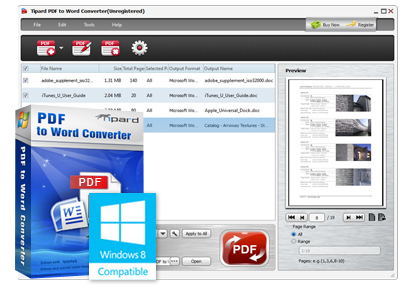
To make this even easier, the software includes a built-in Preview Function. You don't have to open the PDF in a separate reader like Adobe Acrobat just to find the page numbers you need. You can scroll through the document directly within the Tipard interface, confirm exactly which pages contain the relevant information, and then hit convert. It is a streamlined, all-in-one workflow that respects your time and your computer's storage space.
4. Comprehensive Multilingual Support
We live in a globalized world, and our documents reflect that. A common flaw in many PDF converters is their inability to recognize characters outside of the standard English alphabet. If you are working with documents in French, German, Japanese, or any other major language, you need a tool that understands the specific diacritics and character sets associated with those languages.
Tipard PDF to Word Converter is built with a global audience in mind. It supports a wide array of output languages, ensuring that the OCR engine is tuned to recognize the specific linguistic patterns of the source text. Whether it’s an accent grave in a French business proposal or complex Kanji in a Japanese technical manual, this software handles the transition to Word with incredible fidelity.
Furthermore, the User Interface itself is available in English, French, German, and Japanese. This consideration for the user's native language makes the software accessible to a much broader range of people. It shows that the developers are committed to a "considerate and friendly" user experience, rather than just dumping a generic tool onto the market. If your work involves international clients or multi-language research, this feature alone makes the giveaway worth its weight in gold.
5. Seamless User Experience
Perhaps the most underrated aspect of any software is its "usability." We have all downloaded "professional" tools that look like they were designed in 1995, with cluttered menus and confusing icons that require a 100-page manual just to understand the basics. Tipard takes the opposite approach.
The interface of Tipard PDF to Word Converter is delicate, clean, and modern. It follows a logical "left-to-right" or "top-to-bottom" flow. You add your files, you select your settings (format, OCR mode, page range), and you click the big "Start" button. It is designed so that "everyone can operate it at the very first sight." This lack of friction is vital. When you are in the middle of a high-stress project, you don't want to fight with your software; you want your software to work for you.
Additionally, the software includes a Smart Auto-Update feature. Tech environments change rapidly—Windows updates, new Word versions, and evolving PDF standards can sometimes break older software. Tipard ensures that you always have the latest version of their conversion engine, keeping your workflow smooth and uninterrupted for the long haul. It is a "set it and forget it" solution that provides consistent value without requiring constant maintenance from the user.
Final Thoughts: Why You Should Grab This Now
The Tipard PDF to Word Converter is more than just a simple file changer. It is a productivity powerhouse that addresses the three biggest pain points of digital document management: Accuracy, Speed, and Flexibility. By combining high-end OCR technology with a user-friendly design, it transforms the "nightmare" of PDF editing into a simple, three-click process.
Think about the time you will save. Think about the frustration you will avoid. Whether you are a student trying to quote a textbook, a lawyer needing to redact and edit a contract, or an office administrator managing a mountain of invoices, this software is designed to make your life easier. The ability to export to both Word (.doc/.docx) and RTF (Rich Text Format) ensures that your output files will be compatible with almost any word processor on the planet, from Microsoft Word to Google Docs and LibreOffice.
This giveaway is a rare opportunity to snag a professional-grade utility that usually carries a premium price tag. In the world of tech, we often say that the best tools are the ones that do one thing perfectly. Tipard PDF to Word Converter does exactly that. It takes the "un-editable" and makes it editable. It takes the "static" and makes it fluid. Do not miss your chance to download this essential tool and take control of your documents once and for all.
In summary: You are getting a tool with world-class OCR, the ability to batch process massive amounts of data, the surgical precision of page-range selection, global language support, and an interface that anyone can master in seconds. It is efficient, it is powerful, and it is exactly what your computer is missing. Download it today and experience the best user experience that a PDF converter can possibly offer!

Reviews for Tipard PDF to Word Converter with OCR
Click Here to Read Reviews for Tipard PDF to Word Converter with OCR >> Click Here to Submit Reviews for Tipard PDF to Word Converter with OCR >>