What Does FileMenu Tools Do?
FileMenu Tools is a comprehensive utility designed to enhance the Windows Explorer context menu. The software allows users to modify the right-click menu by adding, removing, or reconfiguring entries to streamline file management workflows. It is built for accessibility, enabling both novice and advanced users to manage shell extensions through a centralized configuration interface.
The application includes over 30 integrated utilities for common file operations. These features include:
- Batch renaming and folder synchronization.
- Advanced file shredding and checksum generation.
- Folder size analysis and file splitting.
- Direct path and name copying to the clipboard.
- Moving or copying files to specific destination folders.
Beyond its native toolkit, FileMenu Tools provides granular control over manual customization. Users can create submenus, insert separators, and define custom commands with specific icons, arguments, and administrative privileges. The software also manages the Send To submenu and permits the enabling or disabling of shell extensions added by third-party applications. This level of oversight ensures the context menu remains decluttered while providing immediate access to specialized power-user functions. By centralizing these controls, the program acts as a bridge between standard Windows functionality and advanced file system management.
Top 5 Reasons To Download FileMenu Tools
- Instant Access to Over 30 Professional-Grade Built-in Utilities
- Total Mastery Over the "Send To" and Third-Party Context Menus
- Fully Scriptable and Customizable User-Defined Commands
- Deep System Integration with Advanced Administrative Controls
- Zero-Learning-Curve Interface Designed for Every Skill Level
If you have been using Windows for any length of time, you know the frustration of the "Right-Click Shuffle." It is that repetitive, soul-crushing dance where you right-click a file, realize the tool you need isn't there, open a separate application, navigate through five layers of folders to find the same file, and finally perform the action. Windows Explorer is the backbone of our digital lives, yet its default context menu is—to put it politely—severely lacking. It is a wasted space that could be a powerhouse of productivity. This is exactly where FileMenu Tools steps in to revolutionize your workflow. This is not just another utility; it is the ultimate upgrade for your operating system’s interface. As a reviewer who has tested hundreds of system tweakers, I can confidently say that this is the one tool that actually respects your time. Let’s dive deep into the five primary reasons why you need to download this giveaway immediately.
1. Instant Access to Over 30 Professional-Grade Built-in Utilities
The sheer volume of functionality packed into FileMenu Tools is staggering. When you first install it, you are greeted with over 30 built-in commands that handle almost every file management task you could possibly imagine. We aren't just talking about simple shortcuts here; we are talking about robust, high-performance utilities that usually require standalone software. For example, have you ever needed to batch rename a hundred photos from a vacation? Usually, you’d have to download a dedicated renamer. With this tool, it is a single right-click away. You can find and replace text in filenames, add sequences, or change case settings instantly.
The utility list goes even deeper. Think about folder synchronization. Keeping two directories in sync is often a chore involving complex backup software. FileMenu Tools integrates this directly into your right-click menu. You can also shred files to ensure they are unrecoverable, which is a massive win for privacy-conscious users. Then there is the size viewer, which allows you to see exactly how much space every sub-folder is taking up without the tedious process of checking "Properties" on every single one. You can split files into smaller chunks for easier emailing or generate checksums (MD5, SHA-1) to verify the integrity of a download. The beauty of these utilities is that they are natively integrated. They don't feel like "extra" software; they feel like the features Windows should have had from day one. By downloading this, you are effectively replacing a dozen other niche apps with one elegant solution.
2. Total Mastery Over the "Send To" and Third-Party Context Menus
We have all been there: you install a new program like a PDF reader or a cloud storage app, and it rudely hijacks your context menu. Before you know it, your right-click menu is six inches long, filled with options you never use and icons that clutter your screen. It’s an organizational nightmare. One of the most powerful features of FileMenu Tools is its ability to act as a gatekeeper for your system. It gives you a centralized dashboard where you can enable or disable commands added by other applications. Want to get rid of that "Scan with Antivirus" option that you only use once a year? Done. Want to remove the "Open with [Random App]" entry that appeared after a trial installation? It takes one click.
Furthermore, the tool gives you complete control over the "Send To" menu. This is one of the most underutilized areas of Windows because it is notoriously difficult to customize manually. With this giveaway, you can prune the "Send To" menu of its useless defaults and add your own specific folders, applications, or scripts. This turns the "Send To" function from a forgotten relic into a high-speed routing system for your data. You can organize your digital life by sending documents to specific archives or images to specific editors with surgical precision. This level of decluttering doesn't just make your computer look cleaner; it reduces "cognitive load," allowing you to find what you need faster and finish your work with less frustration.
3. Fully Scriptable and Customizable User-Defined Commands
For the power users and the "tinkerers," this is where FileMenu Tools truly shines and separates itself from every other utility on the market. While the 30+ built-in tools are fantastic, the developers understood that every workflow is unique. This software allows you to create your own custom commands from scratch. You aren't just limited to opening an .exe file; you can define exactly how that file opens. You can set command-line arguments, specify the working folder, and even choose whether the application should run in administrative mode by default. This is a game-changer for developers, designers, and data analysts.
Imagine being able to right-click a folder and instantly run a custom Python script that organizes its contents, or right-clicking a text file to immediately push it to a private server via a command-line tool. You can create submenus to group your custom tools, use separators to keep things organized, and even assign custom icons to every entry so you can identify them visually in a split second. The level of granularity is insane—you can even set modifier keys, meaning a command only shows up if you are holding down the Shift or Ctrl key while right-clicking. This allows you to keep a clean menu for daily use while having a "secret" powerhouse menu available only when you need it. It is the ultimate playground for anyone who wants to tailor their operating system to their specific professional needs.
4. Deep System Integration with Advanced Administrative Controls
A common problem with many shell extension tools is that they feel "tacked on." They often crash Explorer or feel sluggish. FileMenu Tools is built with a level of deep system integration that makes it feel like an organic part of the Windows architecture. It supports both 32-bit and 64-bit systems flawlessly and handles the permissions issues that often plague other software. One of the standout features for tech-savvy users is the ability to configure multiple instances of a command or specify that a certain command should only appear for specific file extensions or element types (folders vs. files).
For example, you can set a custom "Optimize Image" command to only appear when you right-click on .jpg or .png files, keeping your menu lean when you are clicking on documents or music. You can also configure commands to run with elevated privileges (Admin mode) automatically, which saves you from the "Run as Administrator" extra step. This is especially useful for system administrators who frequently need to register DLLs, run PowerShell scripts, or modify system files. The software also allows you to copy path names or UNC paths directly to the clipboard with various formatting options—a feature that sounds simple but is a massive time-saver for anyone working in a networked office environment. This isn't just a "pretty" skin for your menu; it is a high-performance engine designed for heavy-duty file manipulation.
5. Zero-Learning-Curve Interface Designed for Every Skill Level
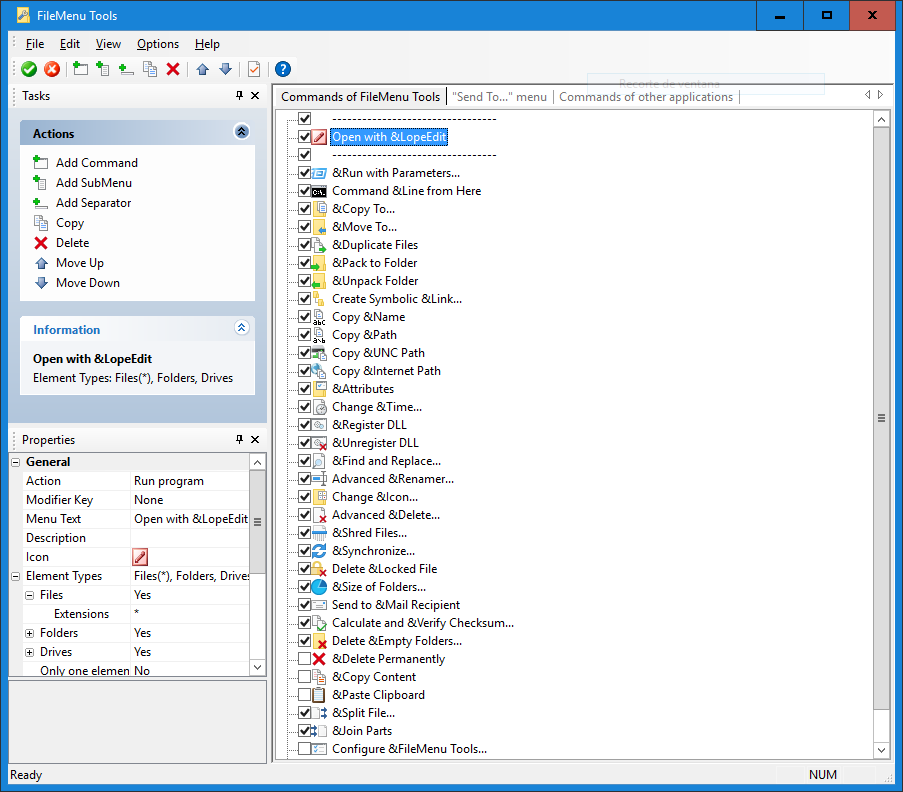
Despite all the advanced features I’ve mentioned, the most impressive thing about FileMenu Tools is its accessibility. Often, when a program offers this much power, it comes with a user interface that looks like it was designed in the 1980s or requires a degree in computer science to navigate. This tool breaks that mold. The configuration window is clean, intuitive, and remarkably easy to use. Even if you consider yourself a "less experienced" user, you can start customizing your menu within seconds of the first launch. It uses a simple checkbox system to enable or disable features, and the properties for custom commands are laid out in a clear, readable list.
The ease of installation is another major plus. It doesn't bog your system down with bloatware or complicated setup procedures. Once it’s installed, the changes are instant. You don't have to be a registry wizard to get the results you want. If you make a mistake or decide you don't like a change, you can simply uncheck a box or move an item back to its original place. It is a "sandbox" for your context menu where you can experiment without fear of breaking your system. This makes it the perfect download for everyone from the casual home user who just wants to "Copy to Folder" more easily, to the hardcore developer who wants to automate their entire deployment process. It bridges the gap between simplicity and power in a way very few apps manage to achieve.
FileMenu Tools is more than just a utility; it is a fundamental workflow enhancement. In an era where we are constantly looking for ways to be more efficient, the ability to shave seconds off every file operation adds up to hours of saved time over a month. You are essentially giving your mouse a "brain upgrade." By downloading this giveaway, you are reclaiming your workspace from the cluttered defaults of Windows and turning it into a precision-tuned machine. Don't let this opportunity pass you by—your right-click menu will never be the same again, and you will wonder how you ever managed to use your computer without it. Efficiency, customization, and power are all just one download away. Get it now and start experiencing Windows the way it was meant to be used.
In conclusion, the value proposition here is undeniable. You are getting a suite of tools that would normally cost a premium, all wrapped in a package that is lightweight, stable, and incredibly versatile. Whether you want to sync folders, batch rename, shred sensitive data, or build your own custom scripts, FileMenu Tools is the definitive answer. It is rare to find a piece of software that appeals equally to my grandmother and my lead developer, but this is it. It simplifies the simple things and makes the complex things possible. This is a must-have for any serious PC user. Download it, configure it, and watch your productivity soar.

Reviews for FileMenu Tools
Click Here to Read Reviews for FileMenu Tools >> Click Here to Submit Reviews for FileMenu Tools >>