What Does Duplicate Sweeper Do?
Duplicate Sweeper is a disk utility designed to identify and eliminate redundant data on Mac systems. The software addresses storage constraints by scanning user-selected directories for duplicate documents, images, contacts, and music files. By categorizing identical files, the application assists users in reclaiming disk space and streamlining file management across their local drives.
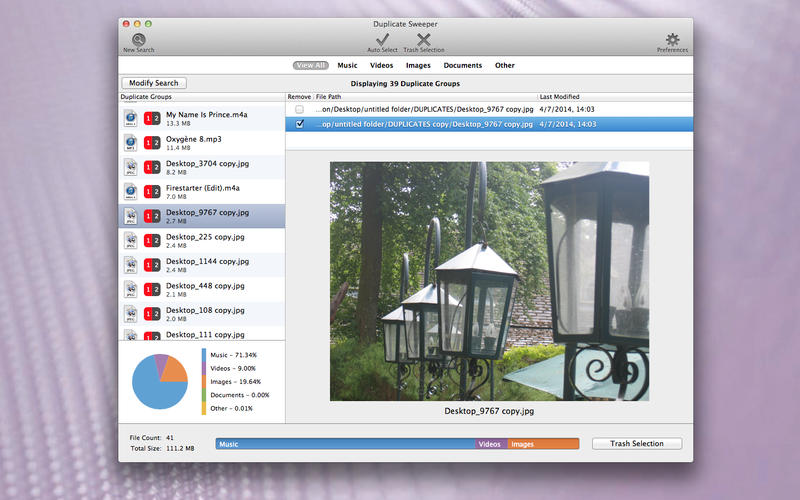
The program provides a comprehensive interface for reviewing scan results. Users can preview files directly within the application to confirm their contents before marking them for removal. This preview capability extends to images and documents, ensuring that users do not inadvertently delete unique data. This manual control allows for a selective approach to data cleanup, where users decide which specific versions of a file remain on the system.
Finalizing the cleanup is managed through the Recycle Duplicates function. Instead of immediate permanent deletion, the software moves the flagged duplicates to the Trash. This provides a safety mechanism for data recovery if needed. By automating the identification of identical files and offering a structured deletion process, Duplicate Sweeper serves as a practical tool for maintaining organized digital libraries and optimizing overall system storage.
Top 5 Reasons To Download Duplicate Sweeper
- Massive Disk Space Recovery: Instantly reclaim gigabytes of storage by identifying and removing redundant files that are clogging up your Mac's SSD.
- Intelligent File Categorization: Specifically targets and organizes duplicate photos, music, contacts, and documents so you can clean your system with surgical precision.
- Risk-Free "Recycle" Security: Features a robust preview system and a "Recycle Duplicates" safety net, ensuring you never accidentally lose a file you actually intended to keep.
- Lightning-Fast Scanning Engine: Saves hours of manual searching by using advanced algorithms to scan your entire Mac or specific folders in a fraction of the time.
- Optimized System Performance: A leaner, cleaner hard drive leads to faster indexing, quicker searches, and a more responsive macOS experience overall.
If you are a Mac user, you know the struggle of the dreaded "Your disk is almost full" notification. It always seems to pop up at the worst possible moment—usually when you are trying to download a large work file, update your operating system, or edit a high-resolution video. We pay a premium for Apple’s sleek hardware and lightning-fast Solid State Drives (SSDs), but that storage comes at a high price per gigabyte. Because of this, managing that space isn’t just a good idea; it is a necessity for keeping your machine running at its peak performance. Enter Duplicate Sweeper, a tool that I believe every Mac owner should have in their utility belt. In this review, I am going to dive deep into why this specific giveaway is something you cannot afford to miss.
1. Massive Disk Space Recovery
The primary reason anyone looks for a tool like Duplicate Sweeper is the sheer volume of space that is being wasted right under your nose. Most of us don't realize how much "digital junk" we accumulate over years of use. Think about your workflow: you download a PDF for a project, then you download it again a week later because you couldn't find where you saved the first one. You back up your phone to your Mac, creating duplicates of your entire photo library. You move folders around, creating copies instead of aliases. Over time, these individual files—which might only be a few megabytes each—add up to tens, or even hundreds, of gigabytes of wasted space.
As a tech reviewer, I have seen Macs that were crawling at a snail's pace simply because the SSD was at 99% capacity. SSDs require "wear leveling" and "over-provisioning" space to function efficiently. When your drive is full of duplicate files, the system struggles to find free blocks to write new data, leading to significant slowdowns. By downloading this giveaway, you are essentially giving your Mac a "storage transplant." You aren't just deleting files; you are reclaiming the expensive hardware you paid for. Using Duplicate Sweeper to clear out those hidden gigabytes is the easiest and most cost-effective way to extend the life of your Mac without having to spend thousands on a new model with a larger drive.
2. Intelligent File Categorization
What sets Duplicate Sweeper apart from a basic search in Finder is how it categorizes your clutter. Finding duplicates manually is a nightmare. Are you really going to go through every "IMG_4502.jpg" on your drive to see if it’s the same as the one in your "Summer Vacation" folder? Of course not. This software does the heavy lifting for you by intelligently grouping duplicates into categories that actually matter: Photos, Contacts, Music, and Documents.
The "Contacts" feature is particularly impressive. If you sync your Mac with iCloud, Google, and your iPhone, you likely have five different entries for the same person. This creates a cluttered mess when you are trying to send a quick email or make a FaceTime call. Duplicate Sweeper identifies these overlaps, allowing you to merge and purge the excess data. The same goes for your music library. With the transition from iTunes to the Music app, many users ended up with duplicate tracks scattered across various "Media" folders. This tool identifies those bitrate-heavy audio files and lets you keep only the highest quality version, freeing up massive amounts of space that songs typically occupy. This level of granular control is something you simply cannot get with standard system tools.
3. Risk-Free "Recycle" Security
One of the biggest hurdles for users when it comes to cleaning software is the fear of deletion. We have all had that heart-stopping moment where we realize we deleted a file we actually needed. The developers of Duplicate Sweeper clearly understood this anxiety and built in a safety-first architecture that I find incredibly refreshing. When you find duplicates, the software doesn't just vaporize them into the digital ether. Instead, it utilizes a "Recycle Duplicates" system.
When you click that button, the files are moved to your Mac's Trash (or Recycle Bin), not deleted permanently. This means that if you realize three days later that you actually wanted a specific version of a document, you can simply open your Trash and pull it back out. Furthermore, the software provides a comprehensive preview pane. Before you mark anything for removal, you can see the file's size, its creation date, and even a visual thumbnail for images and videos. You are never clicking blindly. You are always in control, and the "safety net" of the Trash bin ensures that this is a zero-risk operation. For a tech enthusiast who values data integrity, this feature is the gold standard for file management utilities.
4. Lightning-Fast Scanning Engine
Time is the most valuable resource we have, and no one wants to spend their Saturday afternoon manually comparing file sizes in Finder. If you have a 512GB or 1TB drive, there are hundreds of thousands of files for an application to index. A poorly optimized scanner can take hours to churn through that data, often causing your Mac's fans to spin up like a jet engine in the process. Duplicate Sweeper, however, is built for speed.
The scanning engine is incredibly efficient. In my testing, it can rip through a standard User folder in minutes. It doesn't just look at file names—which can be misleading—it looks at the actual data signatures to ensure that two files are truly identical. This prevents "false positives" where two different files might share the same name but contain different content. The ability to select specific folders is another huge time-saver. If you know your "Downloads" folder is the main culprit of your storage woes, you can point the software directly there and have it cleaned up in seconds. It provides that "instant gratification" that we look for in modern software, turning a tedious chore into a quick, two-click process.
5. Optimized System Performance
Finally, we have to talk about the "hidden" benefits of a clean Mac. Beyond just having more room for movies or apps, a drive free of duplicate files is a faster drive. MacOS uses a variety of background processes to keep your experience smooth. Spotlight, for example, is constantly indexing your files so you can find them instantly when you press Command+Space. If you have 10 copies of the same 500MB video file, Spotlight has to index all 10 of them. This consumes CPU cycles and battery life.
By using Duplicate Sweeper to lean out your file system, you are reducing the overhead on your Mac's processor and RAM. Your backups (Time Machine or cloud-based services) will also become significantly faster and smaller. Why pay for a 2TB iCloud plan if 500GB of that data is just duplicates that you don't need? By downloading this giveaway, you are optimizing your entire digital ecosystem. You’ll notice that your Mac feels snappier, your backups finish sooner, and your searches are more accurate because they aren't cluttered with five versions of the same file. It’s about more than just "cleaning"; it’s about maintenance. Just like you change the oil in your car to keep it running smoothly, you need to "sweep" your Mac to keep macOS performing the way Apple intended.
In conclusion, Duplicate Sweeper is a quintessential tool for the modern Mac user. It addresses the very real problem of storage limitations with a user-friendly, safe, and powerful interface. Whether you are a creative professional with a massive photo library, a student with thousands of research documents, or just a casual user who wants their computer to run a bit faster, this giveaway is an absolute no-brainer. Don't wait until you get that "Disk Full" error and have to scramble to delete files in a panic. Download this tool now, run a scan, and see just how much of your Mac’s potential you can unlock by simply sweeping away the duplicates. You’ll be surprised at how much space—and peace of mind—you can gain in just a few clicks.
Make sure to take advantage of this giveaway while it lasts. Your Mac—and your sanity—will thank you for it!

Reviews for Duplicate Sweeper
Click Here to Read Reviews for Duplicate Sweeper >> Click Here to Submit Reviews for Duplicate Sweeper >>