What Does Tipard PDF Converter Platinum with OCR Do?
Tipard PDF Converter Platinum is a comprehensive utility designed to transform PDF documents into editable file formats and high-resolution images. The software facilitates the conversion of PDFs into Microsoft Word, Excel, PowerPoint, ePub, HTML, and plain text documents. Additionally, users can export files into various image formats, including JPEG, PNG, GIF, and BMP, with options to adjust DPI, color depth, and quality levels.
The application integrates OCR technology to handle both textual and scanned PDF files. This engine features three distinct processing modes—Accuracy, Balanced, and Speed—to optimize the output based on the complexity of the source document. The OCR system supports a wide array of languages, including English, Arabic, Chinese, Greek, and Japanese, ensuring character recognition accuracy across different character sets.
Operational efficiency is managed through several specific workflow features:
- Batch Conversion: Process multiple files simultaneously to various target formats.
- Page Range Control: Select specific pages, the current page, or custom ranges for targeted extraction.
- Layout Preservation: Maintains original text, images, and formatting integrity during the transition.
- Preview Function: Allows users to inspect the document structure and formatting before initiating the conversion process.
The interface is designed for streamlined navigation, providing tools to rename files and modify output settings without requiring external plugins. This tool is built for users needing to digitize or repurpose PDF content while retaining the metadata and visual style of the original source.
Top 5 Reasons To Download Tipard PDF Converter Platinum with OCR
- Cutting-Edge OCR Technology: Transform scanned images and non-textual PDFs into fully editable documents with three distinct optimization modes.
- Incredible Format Versatility: Move beyond simple Word docs with support for Excel, ePub, HTML, PPT, and high-resolution image formats.
- Unrivaled Multi-Language Recognition: Seamlessly convert documents in over ten major languages, including Chinese, Japanese, Arabic, and more.
- Granular Customization and Preview: Take total control over page ranges, output quality, and layout preservation before you even click convert.
- High-Efficiency Batch Processing: Save hours of manual work by converting entire folders of documents at once through a streamlined, user-friendly interface.
We have all been there. You receive a PDF that contains critical data, a beautiful layout, or a long-form report that you desperately need to edit, but it is locked tight. It is essentially a digital brick. Maybe it is a scanned document where the text isn't even selectable, or perhaps it is a complex spreadsheet that would take you hours to re-type into Excel. This is the "PDF Wall," and for years, it has been the bane of productivity for students, office workers, and creative professionals alike. But today, that wall is coming down. I am here to tell you why Tipard PDF Converter Platinum is the one tool you need to download immediately during this giveaway. This isn't just another basic converter; it is a professional-grade suite that treats your documents with the respect they deserve.
As someone who spends most of my day looking at software, I have seen plenty of PDF tools that promise the world and deliver a mess of broken formatting and garbled text. Tipard is different. It approaches the conversion process with a level of precision that is usually reserved for high-priced enterprise software. If you are looking to reclaim your time and ensure your digital workflow is as smooth as possible, here is a deep dive into why this specific giveaway is a total game-changer for your desktop toolkit.
1. Cutting-Edge OCR Technology
The absolute "crown jewel" of Tipard PDF Converter Platinum is its advanced Optical Character Recognition (OCR) technology. Most free converters can handle "digital-born" PDFs—files that were saved directly from a Word doc. However, the moment you throw a scanned piece of paper or a non-textual PDF at them, they fall apart. This software is designed specifically to solve that problem. With its OCR engine, it doesn't just "look" at the file; it reads it. It identifies characters, words, and sentences in images, turning "dead" pixels into live, editable text.
What sets this apart from the competition is the choice of modes: Accuracy, Balanced, and Speed. If you have a high-priority legal document where every comma matters, you can set it to Accuracy mode to ensure the engine spends extra time perfecting the recognition. If you have five hundred pages of notes to digitize and you are in a rush, Speed mode will fly through the task. This level of user control is rare. It means you aren't just stuck with a "one size fits all" algorithm. Furthermore, it handles non-textual PDFs with a level of grace that keeps your formatting intact, which is half the battle when you are trying to reconstruct a document from a scan.
2. Incredible Format Versatility
A lot of people think PDF conversion starts and ends with Microsoft Word. While converting to .doc or .docx is certainly important, Tipard recognizes that the modern professional needs much more. This software is a Swiss Army Knife for document formats. Have you ever tried to copy a table from a PDF into Excel? It is usually a nightmare of misaligned columns and lost data. Tipard PDF Converter Platinum allows you to convert directly to Excel (.xls or .xlsx), maintaining the tabular structure so you can get straight to data analysis without the manual entry headache.
But it doesn't stop there. For those who want to build presentations, you can convert PDFs into PowerPoint (.pptx) files. For web developers or those needing to host documents online, the HTML conversion is a lifesaver. And for the readers among us, the ability to turn a static PDF into a reflowable ePub file is massive. It means you can take a technical manual or a textbook and read it comfortably on your e-reader or smartphone without constantly zooming in and out. It even handles high-quality image exports, supporting JPEG, JPG, GIF, and BMP. Whether you are dealing with text, data, or visuals, this software has a dedicated output path for you.
3. Unrivaled Multi-Language Recognition
We live in a globalized world, and your software should reflect that. One of the biggest failures of standard PDF converters is their inability to handle non-Latin scripts. If you try to convert a document written in Japanese or Arabic with a basic tool, you often end up with a page full of boxes and question marks. Tipard PDF Converter Platinum addresses this head-on by supporting a massive array of languages including English, Turkish, Thai, Latin, Korean, Greek, Slavonic, Arabic, Japanese, and Chinese.
This is particularly huge for business professionals who deal with international clients or researchers working with global archives. The software allows you to select the output language to match the source material, which significantly boosts the accuracy of the OCR engine. By "telling" the software what language to expect, you are essentially giving it the dictionary it needs to produce a flawless conversion. It covers almost all common languages used in the global marketplace, making it an indispensable tool for anyone who works across borders.
4. Granular Customization and Preview
Efficiency isn't just about how fast a program runs; it is about how much control you have over the output. This software excels by offering user-customized page ranges. We have all had that 200-page PDF where we only really need pages 45 through 52. With Tipard, you don't have to convert the whole thing and then delete what you don't need. You can simply input the specific page numbers or ranges, and the software will focus exclusively on those. It saves time, it saves disk space, and it keeps your workspace clean.
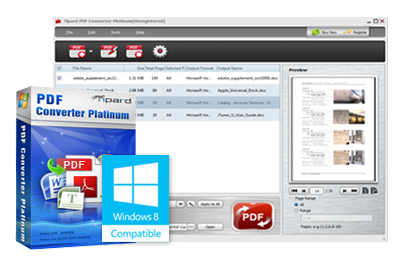
Furthermore, the customization options for image conversion are surprisingly deep. You aren't just clicking "save as image." You can adjust the size (pixel or DPI), choose between color, grayscale, or monochrome, and even set the quality from 1% to 100%. This is perfect if you need to create a small, low-res thumbnail of a PDF page or a high-resolution, print-ready asset. To top it off, there is a preview window in the top right of the interface. This allows you to see exactly what you are going to get before you commit to the conversion. In the tech world, we call this "measure twice, cut once," and Tipard makes it incredibly easy to do.
5. High-Efficiency Batch Processing
If you are downloading this software, chances are you have more than one PDF to deal with. Time is our most valuable resource, and Tipard respects that through its Batch Conversion feature. You can drag and drop an entire folder of diverse PDF files into the interface, assign different output formats to each if you wish, and let the software work its magic while you go grab a coffee. The "blazing conversion speed" mentioned in the specs isn't just marketing fluff; the engine is optimized to utilize your hardware effectively to get the job done fast.
The user interface (UI) is specifically designed to be "friendly and comfortable." You won't find yourself digging through nested menus or cryptic icons. Everything is laid out logically: add files, select output settings, choose your destination, and hit convert. There is even a Rename function that allows you to change the output file names before they are generated, helping you stay organized from the very beginning. This software isn't just a utility; it is a workflow optimizer. It takes a tedious, manual task and turns it into a "set it and forget it" process.
In Conclusion: Why should you download this giveaway right now? Because Tipard PDF Converter Platinum represents the pinnacle of document management technology. It bridges the gap between static, unchangeable files and dynamic, editable content. It preserves 100% of your original quality—including text, images, and watermarks—while giving you the freedom to move that content into the format that best suits your needs. Whether you are a student trying to extract quotes for a thesis, a business owner trying to digitize years of paper records, or a creative looking to repurpose PDF assets, this tool is the answer.
Don't settle for "good enough" when it comes to your documents. Don't waste your time re-typing data or struggling with broken layouts from inferior free online converters that often pose security risks to your private data. Download Tipard PDF Converter Platinum today and experience what professional-grade conversion feels like. It is fast, it is accurate, and most importantly, it puts you back in control of your digital life. This is one giveaway you absolutely cannot afford to miss.
By integrating OCR technology with a user-friendly interface and multi-language support, Tipard has created a comprehensive solution for the modern age. It is rare to find software that balances such high-level technical capability with an accessible design. Usually, you have to choose between "powerful but complicated" or "simple but weak." Tipard gives you the best of both worlds. It is a professional and advanced tool that feels intuitive from the moment you open it. Make sure to take advantage of this offer and see for yourself why this is the top-rated choice for PDF conversion.
Final Thought: Remember that the ability to accurately convert PDF to Word, Excel, and other formats while preserving the layout is a massive productivity boost. The OCR Accuracy, Balanced, and Speed modes alone make this worth the download. When you add in the capability to handle textual and non-textual files with equal precision, it becomes clear that Tipard PDF Converter Platinum is in a league of its own. Secure your copy, explore the multi-language options, and never let a "locked" PDF slow you down again!

Reviews for Tipard PDF Converter Platinum with OCR
Click Here to Read Reviews for Tipard PDF Converter Platinum with OCR >> Click Here to Submit Reviews for Tipard PDF Converter Platinum with OCR >>