What Does Vole Windows Expedition Professional Edition Do?
Vole Windows Expedition Professional Edition is an advanced file management utility designed to expand the organizational capabilities of the standard Windows environment. At its core, the software utilizes a three-layer topology structure that allows users to create and manage multiple "Explorer Projects." These projects serve as dedicated workspaces—such as Work, Learn, or Research—that can be swapped rapidly via a central control panel.
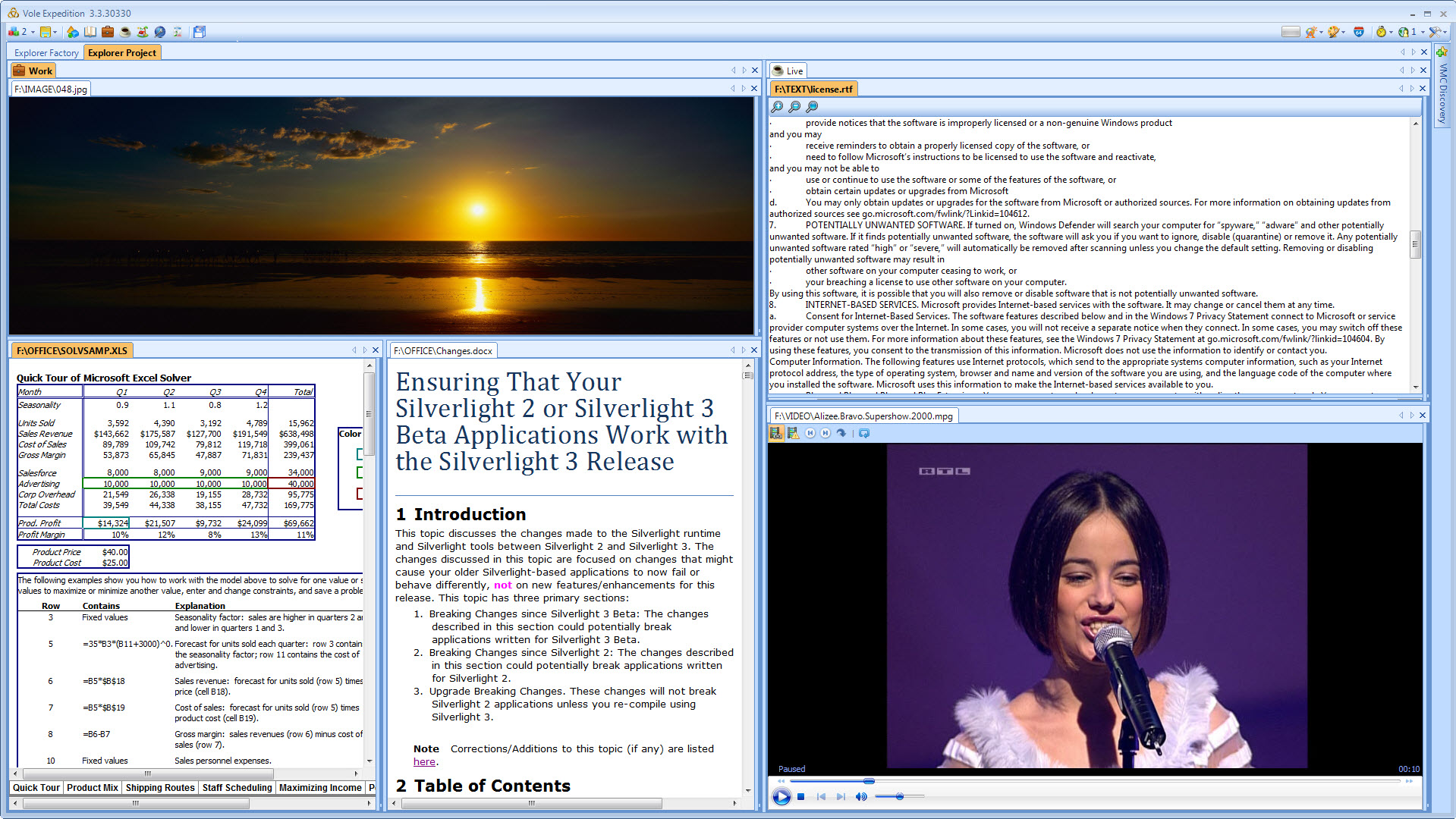
The interface is built around dockable windows, enabling users to arrange multiple directory explorers and preview panes side-by-side. This layout is specifically optimized for document comparison and file synchronization. To maintain workflow continuity, the software features Scene Reproduce technology, which automatically restores all explorer pages and their exact docking positions upon restart.
For media handling, the application includes a built-in previewer and a Demonstration system. It supports the immediate viewing of video, audio, and images, as well as office documents like Word, Excel, and PDF files. Multimedia files benefit from automatically generated thumbnails for easier navigation. Additionally, the VMC Discovery feature integrates cloud-based media libraries, allowing the software to find, download, and preview content hosted on platforms like Google Drive. Users can also organize double directory explorers to facilitate efficient file copying and directory management.
Top 5 Reasons To Download Vole Windows Expedition Professional Edition
- Scene Reproduce Technology: Automatically restores your entire workspace, including all open folders, previewed files, and window positions, every time you launch the software.
- Massive Three-Layer Topology Structure: Organizes your digital life into specialized "Explorer Projects" like Work, Home, and Research, providing virtually infinite organized space.
- Universal Built-In Previewer and Demonstration System: View almost any file type—including Word, Excel, PDF, and Video—without ever opening a secondary application.
- Professional Docking and Multi-Directory Management: A fully customizable interface that allows you to dock, tile, and compare multiple directories and files simultaneously for maximum efficiency.
- VMC Discovery and Web Integration: Automatically finds and previews media libraries from web sources like Google Drive and Weebly, turning your file manager into a cloud-connected hub.
If you are a power user, a researcher, or someone who simply spends too many hours a day clicking through the endless, identical yellow folders of the standard Windows Explorer, then listen up. We have all been there: you are in the middle of a massive project, you have twelve different folders open, three spreadsheets for reference, a PDF manual on the side, and a folder of images you are sorting through. Then, you have to restart your computer or close everything down for the night. The next morning, you spend twenty minutes just trying to find where you left off. It is a productivity killer, and frankly, it is an outdated way to work.
Enter Vole Windows Expedition Professional Edition. This isn't just another "file explorer replacement" that changes the icons or adds a dark mode. This is a complete reimagining of how we interact with our local and cloud data. It is a "page-reproduce, massive space, and dockable file manager" that treats your file system like a high-end production studio. If you have the chance to grab this as a giveaway, you would be doing your future self a massive disservice by passing it up. Let’s dive deep into why this software is about to become the most important tool in your digital arsenal.
1. Scene Reproduce Technology: The Ultimate Time Saver
The "Scene Reproduce" feature is, quite simply, the crown jewel of Vole Windows Expedition Professional Edition. In the world of tech productivity, we talk a lot about "flow state"—that moment when you are fully immersed in your work and firing on all cylinders. Nothing breaks that flow faster than having to manually recreate your workspace every single day. Most file managers, including the native one built into your OS, treat every session as a blank slate. They forget where you were, what you were looking at, and how you had your windows arranged.
With Scene Reproduce, the software remembers everything. When you close the program and reopen it later—or even after a full system reboot—the software reproduces the exact appearance of your last session. All your Explorer pages, your docking positions, your specific directory paths, and even the files you were previewing are right back where you left them. As the developers say, you can "turn on your computer, start the software, and go have a cup of coffee." By the time you sit back down, your digital office is perfectly arranged. This isn't just a convenience; it is a fundamental shift in how we manage long-term projects. It turns your file manager into a persistent environment rather than a temporary window.
Imagine you are a researcher working on a thesis. You need a folder of academic papers open on the left, a Word document preview in the center, and a directory of raw data on the right. With Vole Windows Expedition Professional Edition, that specific layout becomes a "scene." You can switch between different projects or shut down for the weekend, knowing that your "Research Scene" will be waiting for you exactly as you left it. The "graceful way to manage documents" is not an overstatement—it is a lifestyle change for the digital worker.
2. Massive Three-Layer Topology Structure
One of the biggest frustrations with standard file management is "page overcrowding." Once you have more than five or six tabs or windows open, everything becomes a cluttered mess. You lose track of which window belongs to which task. Vole Windows Expedition Professional Edition solves this with its innovative three-layer topology structure. Instead of just giving you a list of folders, it allows you to create "Explorer Projects."
Think of an Explorer Project as a completely separate instance of a file manager tailored to a specific part of your life. The software comes with six preset Explorers: General, Learn, Work, Leisure, Live, and Assistant. But the real power lies in the fact that you can create and rename as many as you want. You could have a project called "Q4 Market Research," another called "Family Photo Archiving," and another called "Coding Projects." Each one of these projects can host its own set of directories, previews, and docked windows.
This massive space means you no longer have to worry about browser pages not fitting or the constant, repetitive opening and closing of directory lists. You can host an unlimited number of Explorer Projects and switch between them rapidly via the central control panel. It is like having multiple monitors’ worth of organization condensed into a single, manageable interface. This hierarchical approach to file management ensures that your work files never mingle with your leisure files, and your learning resources are always exactly where you expect them to be.
3. Universal Built-In Previewer and Demonstration System
How many times a day do you double-click a file just to see what is inside it? You wait for Microsoft Word to splash-screen, or for a heavy PDF reader to initialize, or for a media player to launch—all just to realize it was the wrong file. It is a waste of system resources and a waste of your time. Vole Windows Expedition Professional Edition eliminates this friction with its powerful built-in previewer.
This isn't just a simple text previewer. We are talking about a robust engine that can handle video, audio, images, Word documents, Excel spreadsheets, PowerPoint presentations, PDF files, Flash, and almost any text format. You can browse through a folder and see the contents of these files instantly within the Vole interface. It even generates thumbnails for multimedia files automatically, making visual searching a breeze.
Beyond just viewing, the software includes a sophisticated "Demonstration System." This allows you to easily build beautiful galleries for images, videos, and documents. If you are a professional who needs to present files to a client or a team, you can use Vole to create a seamless demonstration environment. You can organize directory galleries and file galleries into a cohesive presentation without ever needing to export them to another program. It turns your file manager into a media center and a presentation tool all in one.
4. Professional Docking and Multi-Directory Management
If you have ever tried to move files between four different folders while also trying to read a reference document, you know the "Alt-Tab" nightmare. You spend more time managing windows than you do managing files. Vole Windows Expedition Professional Edition introduces a professional-grade docking system that makes this headache a thing of the past. Every explorer page and every individual Explorer project is fully dockable.
You can snap windows to the sides, top, or bottom, creating a custom tiled interface that suits your specific workflow. This is incredibly useful for document comparison or referencing. For example, you can have two different versions of a spreadsheet docked side-by-side to look for discrepancies. Or, you can use the "Double Directory Explorer" setup to make file copying and moving as simple as a drag-and-drop across a clear, visual divide. In fact, you aren't limited to just two; you can organize as many directory explorers as you want on a single screen.
The flexibility of the docking system means that the software adapts to your screen real estate. Whether you are working on a small laptop screen or a massive 4K monitor, you can arrange your workspace to be as dense or as spacious as you need. This level of customization is usually reserved for high-end IDEs (Integrated Development Environments) used by software engineers, but Vole brings that same level of power to everyday file management.
5. VMC Discovery and Web Integration
In the modern era, our files aren't just on our hard drives anymore; they are in the cloud. However, most file managers treat the cloud as a distant, separate entity. Vole Windows Expedition Professional Edition bridges this gap with its VMC Discovery feature. This system is designed to automatically find, download, and preview VMC media libraries hosted on the web.
Currently, the software supports Google Drive and Weebly, with more platforms on the way. This means you can put your VMC media library on a cloud drive, share it with others, and have the software discover and integrate it directly into your file management workflow. It treats web-based resources with the same fluid ease as local files. This integration is a game-changer for collaborative environments or for users who want to access their media libraries from multiple locations without the clunky interface of a standard web browser.
By combining local file management with cloud-based library discovery, Vole positions itself as a central hub for all your data. You can manage your local backups, browse your cloud-hosted media, and organize your work projects all within the same "Three-Layer Topology." It is a unified approach that recognizes the reality of modern computing—that our data is everywhere, and we need a single, powerful tool to make sense of it all.
Final Verdict: Why You Need To Download This Now
Let’s be honest: standard file explorers are boring. They are the "white bread" of the software world—functional, but uninspired and often inefficient for anyone doing serious work. Vole Windows Expedition Professional Edition is a gourmet meal by comparison. It is designed for the person who feels limited by the standard "folder and file" metaphor. It is for the person who wants their computer to adapt to them, rather than the other way around.
The combination of Scene Reproduce and Explorer Projects alone is enough to justify the download. The amount of mental energy you save by not having to re-orient yourself every time you sit down at your desk is immense. When you add in the Universal Previewer, which saves you from the "application bloat" of opening ten different programs, and the Professional Docking system that gives you total control over your screen space, you have a productivity powerhouse that is hard to beat.
The software’s ability to "reproduce the same appearance" when it starts again is more than just a feature—it is a promise of a more organized, less stressful digital life. No more hunting for that one PDF you were reading yesterday. No more trying to remember which folder you were using as your primary source for a copy-paste job. Everything is exactly where you left it, every single time. This is the definition of "graceful" document management.
As a tech reviewer, I see a lot of "utility" software come and go. Most of it is fluff. But Vole Windows Expedition Professional Edition addresses the actual pain points of daily computer use. It addresses the clutter, the lost time, the inefficiency of multi-tasking, and the disconnect between local and cloud storage. It is a professional tool for people who take their digital organization seriously.
If you are looking for a way to streamline your workflow, clear your digital clutter, and finally feel like you are in control of your files (instead of your files being in control of you), then this is the software you have been waiting for. The "Massive Space" topology ensures you will never run out of room to grow, and the "Discovery" features ensure you are always connected to your data, no matter where it lives. Do not let this giveaway pass you by. Download it, set up your first "Work" and "Leisure" projects, and experience what it feels like to have a file manager that actually works for you. Your "cup of coffee" morning routine is waiting.

Reviews for Vole Windows Expedition Professional Edition
Click Here to Read Reviews for Vole Windows Expedition Professional Edition >> Click Here to Submit Reviews for Vole Windows Expedition Professional Edition >>