What Does Movavi Video Editor 11 SE Do?
Movavi Video Editor SE provides a suite of tools designed for fundamental post-production and media management. The software allows users to perform standard video editing tasks such as rotating, cropping, and splitting or joining clips. Users can also integrate subtitles and manage audio tracks by adjusting volume or adding background music.
The application features comprehensive capture capabilities for both video and audio. It supports recording from TV tuners and DV cameras, alongside a dedicated function for digitizing VHS cassettes via compatible capture devices. For audio, the software can record live input from microphones or other external sources, facilitating voiceovers or custom soundtracks.
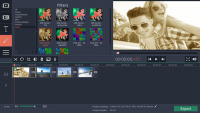
Visual enhancement is handled through a collection of professional filters, including Denoise, Deblock, and manual adjustments for Brightness, Contrast, and Gamma. Additionally, the software includes specialized modules for creating 3D movies and generating slideshows from static images. These slideshows can be customized with transition fades and integrated into larger video projects as introductions or conclusions.
Top 5 Reasons To Download Movavi Video Editor 11 SE
- Professional-Grade Editing Tools with Minimal Learning Curve
- Powerful Media Capture and VHS Digitization Capabilities
- Innovative 3D Video Creation Tools
- High-End Visual Filters and Audio Enhancement Features
- Versatile Slideshow and Multimedia Storytelling
In the modern digital age, we are all creators. Whether you are capturing a few seconds of your cat doing something hilarious, recording a milestone birthday party, or trying to launch a career as a professional YouTuber, the footage you capture is only half the battle. The real magic happens in the edit. However, most users find themselves trapped between two frustrating extremes: software that is so simple it offers no creative control, or professional suites that cost a fortune and require a four-year degree just to understand the interface. This is exactly where Movavi Video Editor SE steps in, and why this giveaway is an absolute game-changer for anyone with a hard drive full of raw footage.
As a tech reviewer, I have seen countless editing apps come and go. Many promise the world and deliver a cluttered mess of icons and crashes. Movavi Video Editor SE is different because it prioritizes the user experience without stripping away the features that actually matter. It is a "Special Edition" for a reason—it packs a punch that rivals much heavier software while maintaining a lightweight footprint on your system. If you have been looking for an excuse to finally organize those family videos or start your creative journey, this is the sign you have been waiting for. Let’s dive deep into the five core reasons why you need to click that download button right now.
1. Professional-Grade Editing Tools with Minimal Learning Curve
The first and most important reason to jump on this giveaway is the sheer accessibility of the editing suite. When we talk about "video editing," we aren't just talking about cutting a clip in half. We are talking about the ability to rotate and crop your video to fit different social media formats, adding the perfect musical score to set the mood, and managing subtitles to ensure your message is clear even when the volume is off. Movavi Video Editor SE provides a timeline-based interface that feels intuitive from the moment you open it.
Many people shy away from video editing because they fear the "technical" side of things. They worry about aspect ratios, bitrates, and complex layering. This software removes those barriers. If you have a video that was shot vertically on a phone but needs to be horizontal, or vice versa, the rotation tools are seamless. The split and join features are equally impressive. Have you ever had a ten-minute video where only thirty seconds were actually interesting? With this tool, you can trim the "fat" with surgical precision and join the best moments together into a highlight reel that people will actually want to watch. This isn't just about making videos; it's about storytelling. By giving you the power to manipulate your clips so easily, the software allows your creativity to take center stage rather than your technical frustrations.
Furthermore, the inclusion of music and volume control cannot be overstated. We have all seen videos where the background wind noise is deafening or the music drowns out the person speaking. Movavi Video Editor SE gives you the granular control needed to balance these elements. You can fade music in and out, adjust the gain on specific clips, and ensure that your final product sounds as good as it looks. In the world of content creation, audio is often more important than video, and this software treats it with the respect it deserves.
2. Powerful Media Capture and VHS Digitization Capabilities
This second reason is perhaps the most unique aspect of this giveaway. While many editors focus solely on files already sitting on your computer, Movavi Video Editor SE acts as a bridge between the analog past and the digital future. We all have that box in the attic—the one filled with VHS cassettes containing weddings, graduations, and baby’s first steps. Those tapes are degrading every single day. The magnetic strips are fading, and soon, those memories could be lost forever. One of the standout features of this software is its ability to work with VHS capture devices to revive your old videos.
Think about the value of that for a moment. Instead of paying a professional service hundreds of dollars to digitize your family history, you can do it yourself with the help of this software. But it doesn't stop at VHS. The app allows for capturing video from TV-tuners and DV cameras, as well as recording live video directly. This makes it a powerhouse for anyone looking to archive old media or even for those who still prefer the look and feel of older digital camcorders. The "Live Capture" feature is also a massive boon for creators who want to record tutorials or live reactions without needing a separate, complicated recording suite.
The ability to capture live audio—be it your voice, an instrument, or a stream—further expands the utility. You are essentially getting a recording studio and an editing suite in a single package. Whether you are "ripping" audio for a podcast or grabbing a snippet of a live broadcast to use in a documentary project, the capture tools are robust, stable, and incredibly easy to configure. This utility alone makes the software worth the download, as it transforms your PC into a media hub capable of handling almost any input source.
3. Innovative 3D Video Creation Tools
We live in an era where "standard" video is often no longer enough to catch someone's eye. We are constantly looking for the next dimension of immersion. This is where Movavi Video Editor SE truly surprises the user. It includes dedicated tools for creating 3D video. While 3D might seem like something reserved for high-budget Hollywood blockbusters, this software brings that capability to the average consumer. You can actually create your own 3D movie right from your desktop.
Why is this a reason to download the giveaway? Because 3D editing is typically a feature locked behind "Enterprise" or "Pro" versions of software that cost hundreds of dollars a year in subscription fees. Having the ability to experiment with 3D depth and spatial video for free is an opportunity that doesn't come around often. Imagine the look on your friends' or family's faces when you present a vacation video that they can watch with 3D glasses. It adds a layer of "wow factor" that is hard to replicate with standard filters.
The software handles the technical heavy lifting of the 3D process, allowing you to focus on the composition. This feature is particularly exciting for hobbyists who want to push the boundaries of what home movies can look like. Even if you aren't planning on making an IMAX-style epic, having the 3D toolset in your back pocket allows you to stay ahead of the curve as display technology continues to evolve. It’s about future-proofing your content and having fun with a medium that is usually too complex for the casual user to touch.
4. High-End Visual Filters and Audio Enhancement Features
Even the best camera in the world can sometimes produce footage that looks a bit "off." Maybe the lighting was poor, the room was too dark, or there is a strange digital grain (noise) flickering across the screen. This is where the professional-grade Filters and Effects in Movavi Video Editor SE come into play. A great editor doesn't just cut clips; they "clean" them. This software includes high-end tools like Denoise and Deblock, which are essential for salvaging footage shot in low-light conditions.
As a reviewer, I often tell people that the difference between a "home movie" and a "film" is the color grading and the clarity. With the Brightness/Contrast, Gamma, and other color correction tools, you can take a flat, dull clip and make it pop with vibrant colors and deep blacks. The "Denoise" filter is a literal lifesaver for those of us who record on smartphones or older cameras that struggle with sensor noise. It smoothes out the image without making it look like a blurry mess, preserving the details while removing the distractions.
But it's not just about "fixing" things; it's about "enhancing" them. The software allows you to apply artistic filters that can change the entire mood of your piece. Want a nostalgic, sepia-toned look for a flashback? Or a high-contrast, gritty look for an action sequence? It's all there. And because these filters are optimized for performance, you can preview them in real-time without your computer slowing to a crawl. This encourages experimentation. You can try five different looks in five minutes and see which one tells your story the best. When you combine these visual enhancements with the ability to capture and edit live audio, you have a suite that ensures your final file is polished to a professional sheen.
5. Versatile Slideshow and Multimedia Storytelling
Not every story needs to be told through moving pictures. Sometimes, the most powerful way to remember an event is through a series of perfectly timed photographs. However, a folder full of JPEGs is boring. Movavi Video Editor SE includes a dedicated feature for Creating Slideshows that transforms your static images into a dynamic cinematic experience. This is perfect for weddings, anniversaries, or even business presentations where you want to keep the audience engaged.
What makes this slideshow creator stand out is the ability to append images with fades and transitions. You aren't just jumping from one picture to the next; you are weaving them together. You can add music, voiceover narration, and even incorporate video clips into the mix. This hybrid approach to storytelling—mixing photos and videos—is the gold standard for modern digital albums. The software allows you to add fades to the beginning and end of your video, providing that "fade in from black" professional look that signals to the audience that they are about to see something special.
For many users, this will be the most-used feature of the app. We all take thousands of photos on our phones, and most of them sit in the cloud, never to be seen again. By downloading this giveaway, you are giving yourself the tool to turn those "digital dust-collectors" into beautiful, shareable movies. It’s about taking the raw data of our lives and turning it into something meaningful. The ease with which you can drag in photos, pick a transition, and export a high-definition slideshow is exactly why Movavi has such a loyal following. It takes the "work" out of the process and leaves only the "reward."
Final Thoughts: Why You Can't Miss This
When you look at these five reasons as a whole, a clear picture emerges. Movavi Video Editor SE is not just a tool for "editing video." It is a comprehensive media laboratory. It covers the past (VHS capture), the present (HD editing and filters), and the future (3D creation). It handles audio with as much care as it handles video, and it understands that sometimes, a simple slideshow is the best way to share a memory.
The tech industry is moving more and more toward "Software as a Service" (SaaS), where you never truly own your tools and must pay every month just to keep your projects accessible. Giveaways like this are a rare opportunity to break that cycle and secure a powerful, permanent piece of software for your creative arsenal. Whether you are a student looking to ace a film project, a grandparent looking to save old home movies, or a budding influencer trying to find your voice, this software provides the foundation you need.
Movavi Video Editor SE strikes that perfect balance of power and simplicity. It doesn't insult your intelligence by being too basic, but it doesn't overwhelm you with unnecessary complexity. It is built for the "do-it-yourself" creator who values their time and their results. Don't let your footage sit idle on your camera or, worse, your old tapes rot in the basement. Grab this giveaway, install the editor, and start bringing your vision to life. You have the stories; now you finally have the tools to tell them the way they deserve to be told.
In conclusion, this is a "must-download." The combination of legacy media support (VHS/DV), modern editing capabilities, and experimental features like 3D creation makes it a versatile Swiss Army knife for any PC user. The filters will make your low-light videos look professional, the slideshow tool will make your photos come alive, and the intuitive interface will ensure you actually enjoy the process instead of tearing your hair out. This is your chance to elevate your digital presence—don't let it pass you by.


Reviews for Movavi Video Editor 11 SE
Click Here to Read Reviews for Movavi Video Editor 11 SE >> Click Here to Submit Reviews for Movavi Video Editor 11 SE >>