What Does 3herosoft DVD Creator Do?
3herosoft DVD Creator is a utility designed to convert a broad array of video formats into DVD-compatible media. The software supports a wide variety of standard file types, including AVI, MPEG, WMV, MP4, H.264, and VOB. Beyond burning physical discs, the application allows users to generate DVD folders or ISO files for local storage and future use.
The application provides tools for customizing the viewer experience through a built-in menu editor. Users can select from various templates, add background music, and incorporate custom images to create a personalized interface. A specific function enables the selection of video segments or individual frames to serve as title thumbnails within the DVD menu. To streamline playback, a "Skip Menu" feature allows the movie to start immediately while maintaining menu accessibility during playback.
Technical adjustments include support for both NTSC and PAL video standards, along with 4:3 and 16:9 aspect ratios. Basic editing features, such as trimming and resizing, allow for precise control over video clips before the burning process begins. The software is compatible with multiple disc formats, including DVD-R, DVD+RW, DVD-5, and DVD-9. It also features batch conversion capabilities to process multiple files simultaneously and increase production efficiency.
Top 5 Reasons To Download 3herosoft DVD Creator
- Universal File Compatibility: Convert virtually any video format (AVI, MP4, WMV, etc.) into a high-quality DVD.
- Professional Menu Customization: Create stunning, interactive DVD menus with custom backgrounds, music, and templates.
- Precision Video Editing: Trim unwanted segments, resize clips, and set custom thumbnails for a polished final product.
- Versatile Output and Format Support: Create physical discs (DVD-5, DVD-9), ISO files, or DVD folders to suit any playback or storage need.
- Optimized Workflow and Batch Processing: Save time with batch conversions and an intuitive interface designed for users of all skill levels.
In an era where everything seems to live in the "cloud," there is a certain undeniable security and charm in having a physical copy of your most precious memories or your favorite digital content. Whether you are looking to preserve family wedding footage, create a physical backup of your digital library, or craft a personalized gift for a loved one, the right software makes all the difference. Today, we are looking at 3herosoft DVD Creator, a powerhouse utility that bridges the gap between digital files and the timeless DVD format. If you have been looking for a reason to finally organize those gigabytes of video sitting on your hard drive, this giveaway is exactly what you need. Here is a deep dive into why 3herosoft DVD Creator is a must-have tool for your digital arsenal.
1. Universal File Compatibility
The biggest headache in the world of digital video is the "alphabet soup" of file formats. We have all been there: you have a video file you want to watch on your home theater system, but your player doesn’t recognize the codec, or the file container is unsupported. 3herosoft DVD Creator eliminates this frustration by offering massive support for almost every popular video format under the sun. From standard definitions to high-definition formats, this software acts as a universal translator for your media.
Imagine having a collection that spans decades—old AVI files from the early 2000s, WMV files from Windows Movie Maker projects, 3GP clips from an old flip phone, and modern MP4 or H.264 files from your latest smartphone. Usually, you would need three different converters just to get these ready for burning. With this tool, you can toss them all into the same project. It handles MPEG, DAT, MPG, ASF, DV, VOB, and even 3G2 files with ease. This "one-stop-shop" approach is a massive time-saver for anyone who deals with diverse media sources. You no longer have to worry about whether your video is "the right kind"—if it’s a video file, 3herosoft can likely turn it into a DVD.
Furthermore, this compatibility extends beyond just the file extension. The software is designed to handle different encoding standards, ensuring that the transition from a compressed digital file to a DVD-compliant stream is handled with high fidelity. This means you won’t lose the heart and soul of your videos during the conversion process. For tech enthusiasts who demand that their software just works without constant troubleshooting, this universal support is the primary reason to hit that download button.
2. Professional Menu Customization
A DVD is more than just a video on a disc; it is an experience. Think back to the best retail DVDs you have owned—the ones with the atmospheric music, the beautiful background art, and the clear, easy-to-navigate menus. 3herosoft DVD Creator allows you to bring that professional level of polish to your home-grown projects. This isn't just about functionality; it's about style and personalization.
The software comes packed with a variety of menu templates that serve as the foundation for your project. You aren't stuck with a boring, generic list of files. Instead, you can select a theme that matches the mood of your content. But the customization doesn't stop at the template. You have the power to swap out background images for your own photos, add a custom background music track to set the tone, and even edit the "menu topic" or titles to something meaningful. This makes it an incredible tool for creating gifts. Imagine a "Vacation 2023" DVD that opens with a slideshow of your favorite photos and a soundtrack of the music you heard on the trip.
For those who want a truly bespoke look, the ability to set any specific segment or even a single frame of your video as the title miniature (thumbnail) in the menu is a game-changer. It gives the viewer a "sneak peek" at what each chapter or title contains, much like a professional Hollywood release. This level of granular control over the aesthetic of the DVD ensures that your final product looks as good as it plays. It turns a simple backup into a professional-grade media production.
3. Precision Video Editing
Most DVD burning software is "dumb"—it takes a file and burns it exactly as it is. 3herosoft DVD Creator, however, understands that sometimes the source material isn't perfect. Maybe you have a video clip that starts with ten seconds of "dead air," or perhaps there is a segment in the middle that you would rather leave on the cutting room floor. This software includes built-in editing tools that allow you to refine your content before the burning process ever begins.
The video trimming feature is exceptionally intuitive. You can specify a start and end time with precision or simply use the drag-and-drop slider bar to isolate the exact segment you want to keep. This is perfect for cleaning up home movies or removing unwanted segments from recorded broadcasts. Beyond trimming, the software also offers video resizing and the ability to set specific video standards. Whether you need NTSC for North American players or PAL for European systems, 3herosoft has you covered. You can also toggle between 4:3 (standard) and 16:9 (widescreen) aspect ratios, ensuring that your video fills the screen correctly without awkward stretching or pillar-boxing.
These editing features mean you don't need to open a separate, complex video editing suite like Premiere or Final Cut just to make minor adjustments. By integrating these tools directly into the DVD creation workflow, the software provides a streamlined experience that respects your time and your creative vision. You are the director of your DVD, and 3herosoft gives you the scissors to make the perfect cut.
4. Versatile Output and Format Support
In the world of physical media, one size does not fit all. Different projects require different storage capacities and different output types. One of the most compelling reasons to download this software is its robust support for a wide array of disc formats and digital output options. Whether you are working with a standard 4.7GB disc or a high-capacity dual-layer disc, this tool handles it all.
3herosoft DVD Creator supports DVD-R, DVD+R, DVD-RW, DVD+RW, DVD+R DL, DVD-R DL, and even DVD-RAM. It covers both DVD-5 (single layer) and DVD-9 (dual layer) formats. This is crucial for users who have longer videos or high-quality footage that requires more space than a standard disc provides. You won't find yourself hitting a wall because your software can't handle the hardware in your disc drive.
Perhaps even more importantly for the modern user, this software isn't limited to physical burning. It allows you to create ISO files or DVD folders on your hard drive. Why is this important? Because it allows for "future-proofing." You can create the entire DVD structure, test it on your computer using a media player like VLC, and then burn it later or store it on a media server or NAS (Network Attached Storage). ISO files are also perfect for sharing over the internet; you can send a single file to a friend, and they can burn it to a disc on their end. This flexibility makes the software a powerful tool for both physical media enthusiasts and digital archivists alike.
5. Optimized Workflow and Batch Processing
As a tech reviewer, I am always looking for software that respects the user's time. A program can have a million features, but if it takes forever to use, it's not going to stay on my hard drive. 3herosoft DVD Creator excels here by offering a "no learning curve" experience combined with high-performance features like batch conversion.
Batch conversion is the "secret sauce" for productivity. If you have twenty different video clips that you want to put onto a single DVD, or if you want to create multiple different DVD projects from various files, you don't want to sit and wait for each one to finish before starting the next. This software allows you to load up multiple files, apply different profiles if necessary, and let the program work through the queue automatically. This "set it and forget it" approach is boosted by the software's optimization for speed, making the conversion process as fast as your hardware allows.
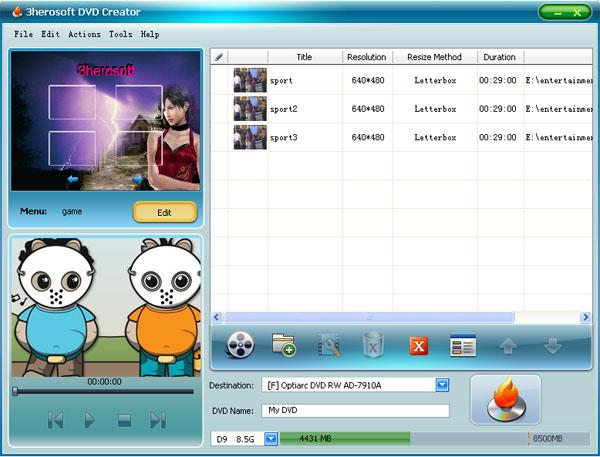
The interface itself is highly visualized and user-friendly. It avoids the cluttered, text-heavy menus found in older legacy burning tools, opting instead for a layout that guides you through the process: add files, edit/specialize, design menu, and burn. There is also a unique "Skip Menu" feature for those who want a minimalist experience. When enabled, your DVD will play immediately upon insertion into a player, skipping the menu entirely—though the menu is still there if you need to access it during playback. It's these thoughtful little touches that prove the developers understood the needs of real-world users. It’s fast, it’s efficient, and it produces professional results every single time.
Conclusion: In a world filled with complicated subscription-based video tools, 3herosoft DVD Creator stands out as a reliable, powerful, and versatile utility that does exactly what it promises. It empowers you to take control of your digital media, giving it a permanent, professional home on a DVD. Whether you are archiving for the future or creating for the present, this software provides the tools you need to do it right. Don't miss out on this giveaway—it is time to turn those digital files into something you can actually hold in your hand.

Reviews for 3herosoft DVD Creator
Click Here to Read Reviews for 3herosoft DVD Creator >> Click Here to Submit Reviews for 3herosoft DVD Creator >>