What Does Password Depot 17 Do?
Password Depot 17 is an on-premises security solution designed to centralize and protect sensitive digital credentials. Utilizing AES-256 encryption, the software processes all data locally on the user's device, ensuring that master passwords and login details remain under direct user control. Beyond basic storage, the utility provides automated password generation and an integrated strength checker to mitigate risks associated with weak or reused credentials.
The software supports secure synchronization across multiple operating systems, including Windows, macOS, iOS, and Android. Users can automate their workflow through browser add-ons that handle autofill and auto-login tasks. For those requiring collaborative environments, the package includes an Enterprise Server component, which is free for up to three users, facilitating encrypted sharing and permission-based access to shared databases.
Security is further bolstered by several key technical features:
- Multi-Factor Authentication (MFA): Support for biometric data and one-time codes.
- Secure Sharing: Encrypted transmission of credentials to trusted recipients via password-protected keys.
- Data Portability: Tools for importing existing databases and exporting encrypted backups to local or cloud storage.
- Comprehensive Access: All features are included in the base version without additional tier-based costs.
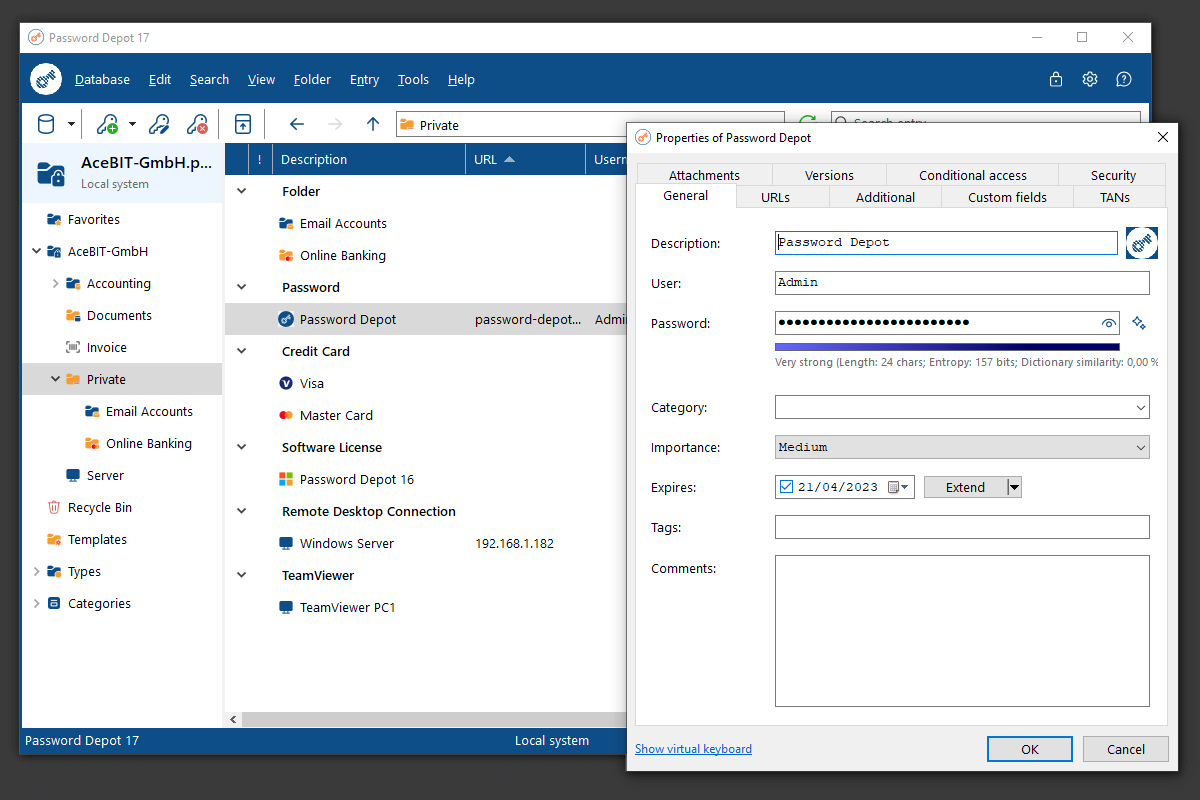
The interface is designed for both individual and professional use, focusing on organization and rapid retrieval of encrypted information without compromising security protocols.
Top 5 Reasons To Download Password Depot 17
Before we dive into the nitty-gritty details of why this software is a must-have for your digital arsenal, here is the quick breakdown of the top five reasons you need to download Password Depot 17 right now:
- Military-Grade On-Premises Security: Your data stays under your control with AES-256 encryption that happens locally on your device, not on a vulnerable third-party server.
- Seamless Cross-Platform Synchronization: Whether you are on Windows, macOS, iOS, or Android, your credentials follow you securely, ensuring you are never locked out of your accounts.
- Ultimate Productivity with Autofill and Auto-Login: Eliminate the manual entry of usernames and passwords with intelligent add-ons that handle the heavy lifting for you.
- Comprehensive Password Health Tools: From a high-end password generator to a sophisticated strength checker, you can ensure every one of your accounts is protected by an unhackable barrier.
- Professional-Grade Features with No Hidden Costs: Get access to every single feature, including secure sharing and enterprise-level server capabilities, without the constant annoyance of "premium" upsells.
In the modern digital landscape, we are all juggling dozens, if not hundreds, of different logins. From banking and social media to work portals and shopping sites, the sheer volume of credentials we need to remember is staggering. Most people fall into the dangerous trap of reusing the same simple password across multiple platforms, which is essentially handing a master key to your entire digital life to the first hacker who comes along. This is exactly why a professional-grade password manager isn't just a "nice to have" utility anymore—it is a fundamental requirement for staying safe online. After spending significant time testing the latest version, I can confidently say that Password Depot 17 is the tool you have been waiting for. Here is a deep dive into why this specific giveaway is the upgrade your digital security deserves.
1. Military-Grade On-Premises Security
When it comes to password managers, the biggest concern for most users is where that data actually lives. We have all seen the headlines about major cloud-based password managers suffering data breaches. This is where Password Depot 17 truly shines and sets itself apart from the competition. It is designed as an on-premises solution. This means your sensitive information is stored locally on your own hardware, giving you total sovereignty over your data. You aren't trusting a giant corporation's server in a distant country; you are trusting your own secure environment.
The security protocols used here are nothing short of elite. The software utilizes AES-256 encryption, which is the same standard used by governments and military organizations to protect top-secret information. What makes the Password Depot implementation particularly impressive is that the encryption and decryption processes happen entirely on your local machine. Even if someone were to intercept your encrypted database file, it would be a useless jumble of characters without your master password. By keeping the keys to the kingdom in your hands, Password Depot 17 provides a level of privacy and peace of mind that cloud-only services simply cannot match. If you are serious about security, on-premises is the only way to go, and this software is the gold standard for that model.
2. Seamless Cross-Platform Synchronization
A password manager is only useful if it is available whenever and wherever you need it. There is nothing more frustrating than needing to log into an app on your phone only to realize your complex, 20-character password is saved on a desktop computer three rooms away. Password Depot 17 solves this problem elegantly with its robust Cross-Platform Synchronization capabilities. While the core software is a powerhouse on Windows, the ecosystem extends to macOS, iOS, and Android through complimentary apps.
The synchronization process is handled with the same focus on security that defines the rest of the application. You can sync your vault across your various devices, ensuring that when you update a password on your laptop, it is instantly reflected on your smartphone and tablet. This creates a unified "source of truth" for your digital identity. Whether you are a professional moving between a workstation and a mobile device or a home user who wants their Netflix password available on every screen, the synchronization is fast, reliable, and, most importantly, encrypted. It bridges the gap between high-level security and everyday convenience, making sure your digital life is always at your fingertips without compromising your safety.
3. Ultimate Productivity with Autofill and Auto-Login
Let’s be honest: the reason most people hate secure passwords is that they are a pain to type. A truly secure password like "k9#Lp!29mZ*qRT5" is impossible to memorize and tedious to enter manually. Password Depot 17 eliminates this friction entirely with its Autofill and Auto-Login features. Through the use of browser add-ons and system integration, the software recognizes when you are on a login page and offers to fill in your credentials automatically.
This isn't just about saving a few seconds; it’s about a fundamental shift in how you interact with the web. With auto-login enabled, you can go from a blank login screen to being fully authenticated in a single click. The software handles the username, the password, and even secondary fields with precision. This feature also serves as a subtle security layer: because the software fills in the details, you are protected against keyloggers that record your physical keystrokes. It makes the "secure way" of doing things actually faster than the insecure way. Once you experience the workflow of Password Depot 17’s autofill, you will wonder how you ever managed without it. It turns a chore into a seamless, invisible process.
4. Comprehensive Password Health Tools
Most of us have "password debt"—a collection of old, weak, or reused passwords that we’ve been meaning to change for years. Password Depot 17 acts as a personal security consultant to help you clean up this mess. The software includes an integrated Password Generator that creates truly random, high-entropy strings of characters. You can customize the length and the types of characters used to meet the specific requirements of any website, ensuring that your new passwords are practically impossible to crack via brute force.
Beyond just creating new passwords, the Strength Checker is a revelation. It scans your existing vault and provides an honest assessment of your security posture. It flags passwords that are too short, too common, or reused across multiple accounts. This proactive approach allows you to identify the "weak links" in your digital chain before a hacker does. Furthermore, the inclusion of Multi-Factor Authentication (MFA) support adds a critical secondary barrier. By requiring a fingerprint or a one-time code to even open your database, Password Depot 17 ensures that even if someone physically stole your computer, your passwords would remain locked tight. These tools collectively transform you from a passive target into an active defender of your own data.
5. Professional-Grade Features with No Hidden Costs
One of the most refreshing aspects of Password Depot 17 is its business model. In an era where every piece of software seems to require a monthly subscription or hides its best features behind a "Pro" paywall, Password Depot takes a different approach. When you download this software, you get the full suite of features. There is no "lite" version here; you are getting the real deal. This includes advanced features like Secure Sharing, which allows you to share credentials with trusted family members or colleagues using encrypted keys, ensuring that sensitive info never travels over insecure channels like email or text.
Additionally, the software is incredibly scalable. For small teams or families, the Password Depot Enterprise Server is included and is free of charge for up to three users. This allows you to set up a central hub for shared passwords, which is a game-changer for small businesses or households managing shared utility bills and streaming services. The user interface is the cherry on top: it is clean, modern, and intuitive. You don't need a degree in computer science to organize your vault; it is designed so that beginners can start securing their lives in minutes, while still offering the deep configuration options that power users crave. This giveaway represents a massive value proposition, providing a professional-grade security environment that usually costs a premium, all in one comprehensive package.
In conclusion, if you are looking for a way to simplify your digital life while simultaneously making it significantly more secure, downloading Password Depot 17 is a no-brainer. It combines the raw power of AES-256 encryption with the convenience of modern synchronization and automation. It moves your security away from the "cloud" and back into your own hands, where it belongs. Don't wait for a data breach to happen to you before you take action. Grab this software, run the strength checker, and start building your digital fortress today. You’ll save time, reduce stress, and, most importantly, you’ll be protected by one of the most respected names in the password management industry.
Between the secure backups, the easy import features for those moving from other managers, and the total lack of hidden fees, Password Depot 17 stands out as a premier choice for anyone who values their privacy. This is more than just a utility; it is a total security overhaul for your digital world. Download it, set your master password, and enjoy the peace of mind that comes with knowing your sensitive information is finally safe.

Reviews for Password Depot 17
Click Here to Read Reviews for Password Depot 17 >> Click Here to Submit Reviews for Password Depot 17 >>