What Does ActivePresenter Professional Edition Do?
ActivePresenter is a comprehensive software suite designed for high-resolution screencasting and rapid eLearning development. At its core, the tool utilizes smart screen capture technology to record desktop activity, which users can then refine within a built-in authoring environment. The editor allows for detailed annotations, voiceovers, and interactive elements to be layered over raw footage.
The software supports a wide range of export options. For standard video consumption, users can generate files in formats such as MP4, AVI, WMV, MKV, and WebM. Beyond passive video, ActivePresenter produces interactive HTML5 simulations, enabling learners to engage directly with the content. For those requiring digital or physical documentation, the tool converts projects into various formats, including:
- PDF and Microsoft Word documents
- PowerPoint presentations
- Excel spreadsheets and HTML handouts
For corporate and educational environments, ActivePresenter streamlines the distribution process. Output can be bundled into SCORM-compliant packages, ensuring seamless compatibility with most Learning Management Systems (LMS) and Learning Content Management Systems (LCMS). This functionality positions the tool as an end-to-end solution for creating professional-grade training materials, software demonstrations, and educational courses without requiring multiple third-party plugins or complex coding.
Top 5 Reasons To Download ActivePresenter Professional Edition
In the fast-paced world of digital content creation, having the right tools at your fingertips isn't just a luxury—it is a necessity. Whether you are a corporate trainer, a YouTube educator, or a software developer looking to showcase your latest creation, the quality of your output reflects the quality of your work. That is why I am so excited to dive into today’s featured software giveaway. ActivePresenter is not just another screen recorder; it is an all-in-one powerhouse designed to turn your screen captures into professional-grade educational content. If you have been looking for a reason to upgrade your workflow, here are the top five reasons you need to download this giveaway immediately.
- Pro-Level Screen Recording with Smart Capture Technology: ActivePresenter goes beyond simple video recording by capturing screen movements, mouse clicks, and keyboard strokes with intelligent precision.
- A Comprehensive, Built-In Video and Audio Editing Suite: You don’t need to export your files to a third-party editor; everything from cutting and splicing to audio normalization and noise reduction is handled within the app.
- Unrivaled Multi-Format Export Capabilities: Whether you need an MP4 video, a Word document, a PDF handout, or a PowerPoint presentation, this tool exports to virtually any format with a single click.
- Advanced Interactive HTML5 Simulation: Create engaging, "clickable" tutorials and software simulations that allow your audience to learn by doing, all without writing a single line of code.
- Industry-Standard SCORM Compliance for LMS Integration: For those in the education or corporate training sector, the ability to pack content into SCORM-compliant files is a game-changer for tracking learner progress in any Learning Management System.
1. Pro-Level Screen Recording with Smart Capture Technology
Most of us have used basic screen recording software. Usually, it’s a "what you see is what you get" affair where you hit record, do your thing, and hope you didn't make too many mistakes. ActivePresenter changes the game with its "Smart Capture" technology. This isn't just a video camera for your monitor; it is an intelligent observer. When you record a software demonstration, the app actually understands the elements you are interacting with. It can automatically generate callouts, annotations, and instructions based on where you click and what you type.
This level of automation is a massive time-saver. Imagine recording a ten-minute tutorial on how to use a complex accounting software. Instead of manually adding "Click here" bubbles for every step, the software recognizes the button clicks and places the annotations for you. The result is a crisp, high-definition recording that feels like it was produced by a professional video editor, even if you’re just a beginner. The "Smart Capture" feature ensures that your focus remains on the content, while the software handles the heavy lifting of documentation.
Furthermore, the recording quality is second to none. It supports high-frame-rate captures that ensure smooth motion, which is crucial for demonstrating fast-moving software interfaces or transitions. In my experience as a reviewer, many "free" or "lite" tools struggle with lag or frame drops when recording resource-intensive applications. ActivePresenter handles these with ease, providing a rock-solid foundation for any project you have in mind.
2. A Comprehensive, Built-In Video and Audio Editing Suite
One of the biggest headaches in content creation is "software bloat"—the need to have five different programs open just to finish one project. You record in one, edit the video in another, fix the audio in a third, and add graphics in a fourth. ActivePresenter eliminates this fragmented workflow by offering a complete, professional-grade editing suite right inside the application. This is a massive reason to jump on this giveaway; you are essentially getting a full-featured video editor for free.
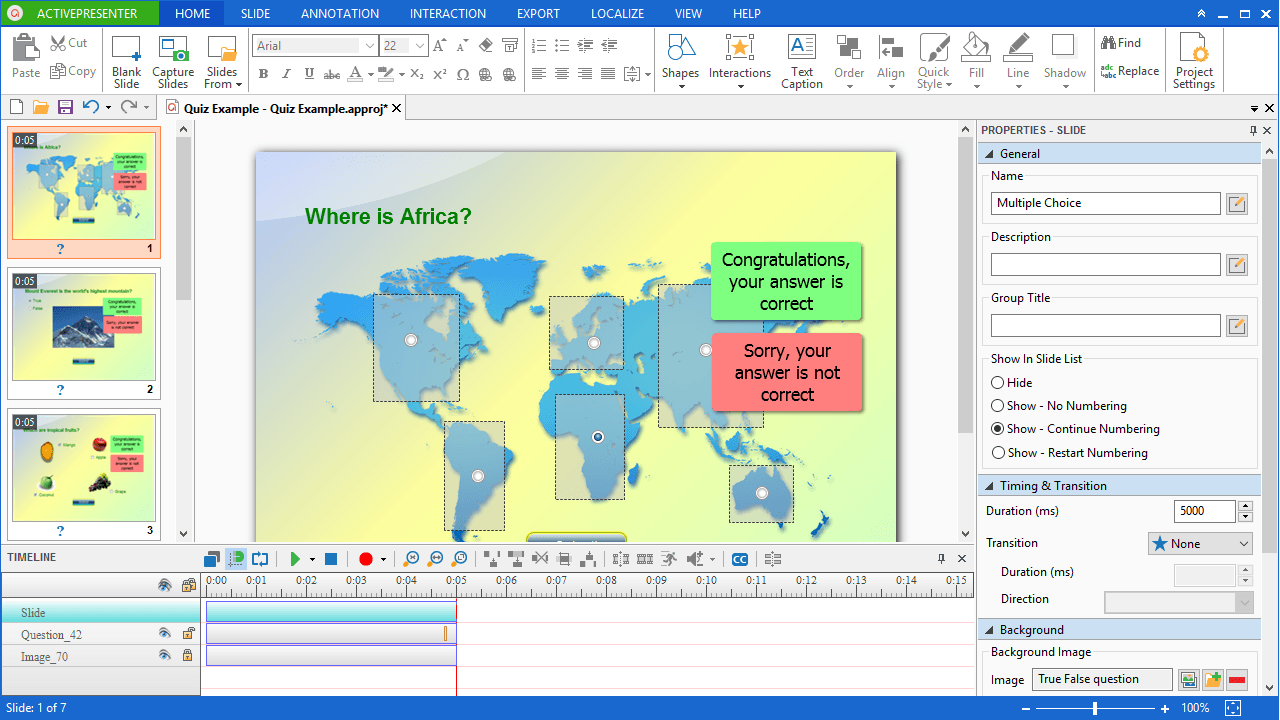
The timeline-based editor is intuitive yet powerful. You can easily cut, crop, join, or split segments of your video. But it goes much deeper than that. You have access to advanced features like Chroma Key (green screen), which allows you to overlay yourself onto your digital content for a more personal touch. You can also manipulate the speed of specific segments, blur sensitive information on the screen, and add sophisticated transitions between scenes.
Don't even get me started on the audio capabilities. We all know that bad audio can ruin a great video. ActivePresenter includes tools for audio fading, noise reduction, and volume normalization. If you’ve ever recorded a voiceover and realized there was a hum from your computer fan in the background, you will appreciate how easy it is to clean up that audio within the app. By providing these tools in one place, the software ensures that your final product is polished, professional, and ready for primetime without the need for expensive additional subscriptions.
3. Unrivaled Multi-Format Export Capabilities
As a tech reviewer, I am constantly asked about compatibility. "Will this work on my iPad?" "Can I send this to my boss who only uses Word?" "How do I turn this into a slide deck?" The brilliance of this software lies in its extreme versatility. When you finish a project, you aren't locked into a single file type. You have a literal menu of options that covers every professional and creative base.
For video enthusiasts, you can export to MP4, AVI, WMV, MKV, and WebM. This covers everything from high-quality archival formats to web-optimized files. But what if your audience needs something they can print or read? This is where ActivePresenter leaves the competition in the dust. With just a few clicks, your entire video project can be converted into a PDF, a Microsoft Word document, a PowerPoint presentation, or even an Excel sheet. It takes your screenshots and annotations and automatically formats them into a manual or handout.
Think about the productivity boost this offers. You record a training session once, and in ten minutes, you have a video for YouTube, a PDF manual for the students to print, and a PowerPoint deck for your next meeting. This "create once, publish everywhere" philosophy is exactly why professional educators and developers swear by this tool. Downloading this giveaway means you are gaining a multi-tool that replaces half a dozen file converters and document creators.
4. Advanced Interactive HTML5 Simulation
In the world of modern e-learning, "passive" content is out, and "active" content is in. People don't just want to watch a video; they want to interact with it. ActivePresenter specializes in creating interactive HTML5 simulations. This means you can create a tutorial where the video actually pauses and waits for the user to click the correct button or enter the correct text before proceeding. It transforms a simple screen recording into a living, breathing software simulation.
The beauty of the HTML5 output is that it is fully responsive. It works perfectly on desktops, laptops, tablets, and smartphones. This is critical in today’s mobile-first world. You don’t have to worry about your viewers having the right plugin or app; if they have a web browser, they can interact with your content. You can build quizzes, branching scenarios, and "choose-your-own-adventure" style training modules that significantly increase engagement and retention rates.
For anyone involved in software testing or user onboarding, this feature alone is worth the price of admission. Instead of just showing a user how a feature works, you can give them a safe, simulated environment where they can practice using the software without the risk of breaking anything. It’s the ultimate way to bridge the gap between "knowing" and "doing," and this software makes the creation of such simulations accessible to everyone, regardless of their technical background.
5. Industry-Standard SCORM Compliance and LMS Integration
Finally, we have to talk about the professional educators, school teachers, and HR managers. If you work in a professional learning environment, you know the acronym SCORM. It stands for Shareable Content Object Reference Model, and it is the "gold standard" for how e-learning content communicates with a Learning Management System (LMS). If your content isn't SCORM-compliant, you can't easily track who has watched it, how well they did on the quiz, or if they finished the module.
ActivePresenter handles SCORM (and AICC) with ease. You can package your interactive lessons into a single zip file and upload it directly to platforms like Moodle, Blackboard, or TalentLMS. This integration is what separates "hobbyist" tools from "professional" authoring environments. It gives you the power to create a curriculum, track learner data, and report on results with the same level of sophistication as major educational institutions.
Even if you aren't using an LMS today, having this capability is "future-proofing" your career. As you grow your brand or your business, you will eventually need a way to organize and track your training. By starting with a tool that is already SCORM-compliant, you won't have to re-create all your work down the road. You are getting a top-tier e-learning authoring tool that grows with you, making this giveaway a truly valuable asset for your digital toolkit.
Final Thoughts: Why You Should Grab This Now
Every now and then, a piece of software comes along that truly simplifies the complex. ActivePresenter is that software. It takes the daunting task of creating professional, interactive, and multi-format educational content and breaks it down into an intuitive, manageable process. From the initial Smart Capture of your screen to the final SCORM-compliant export, every step of the journey is optimized for quality and speed.
As a reviewer, I see hundreds of apps that claim to be "all-in-one" solutions, but few actually live up to the hype. ActivePresenter is the exception. It combines the features of a high-end screen recorder, a professional video editor, a document generator, and an e-learning authoring suite into a single, cohesive package. Whether you are looking to create a simple YouTube tutorial or a complex corporate training program, this is the tool that will get you there.
Opportunities to download high-caliber software like this don't come around often. If you want to elevate your digital presence, save hours of editing time, and produce content that truly stands out, do not let this giveaway pass you by. Download it, explore the features, and start creating. Your audience—and your workflow—will thank you.
In summary, you are getting:
- Intelligent automation that makes recording a breeze.
- Professional editing tools that save you money on extra software.
- Extreme flexibility with dozens of output formats.
- Modern interactivity through HTML5 to keep your viewers engaged.
- Enterprise-level standards that ensure your work is compatible with the world's leading educational platforms.
This is a must-have for any digital creator's library. Make sure you take advantage of this offer today and start producing the high-quality content you’ve always wanted to create.


Reviews for ActivePresenter Professional Edition
Click Here to Read Reviews for ActivePresenter Professional Edition >> Click Here to Submit Reviews for ActivePresenter Professional Edition >>