What Does AltrixSoft Chronograph Do?
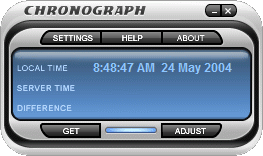
Chronograph is a system utility designed to synchronize a computer’s internal clock with the atomic time provided by the National Institute of Standards and Technology (NIST). While standard hardware clocks are prone to drift and inaccuracy, this software automates the correction process to maintain temporal precision. This functionality is particularly relevant for professionals who require high-accuracy timekeeping, such as stock traders or network administrators.
The application ensures that the difference between the local system time and the actual atomic time rarely exceeds 0.5 seconds. This marginal variance is primarily the result of unavoidable network transmission delays. Chronograph is designed for low-maintenance operation; after an initial setup process that typically lasts one minute, the utility runs in the background without requiring further user intervention.
Main Benefits
- Flexible Operating Modes: The software supports manual, periodical, and wait-for-connection modes, allowing users to choose how frequently the system synchronizes based on their specific needs.
- High Stability: To ensure consistent performance, the program features a failover mechanism that automatically connects to an alternative atomic clock server if the primary server becomes unavailable.
- Ease of Use: The utility is built for automation. Once the parameters are set, it maintains the system clock autonomously, ensuring that the computer remains synchronized with NIST standards indefinitely.
Top 5 Reasons To Download AltrixSoft Chronograph
- Professional-Grade Atomic Precision: Synchronizes your system clock with the National Institute of Standards and Technology (NIST) atomic servers for accuracy within 0.5 seconds.
- Set-and-Forget Automation: A streamlined one-minute setup process allows the utility to run silently in the background without requiring further user intervention.
- Intelligent Server Redundancy: High-stability architecture that automatically switches to alternative time servers if a primary connection is unavailable.
- Customizable Synchronization Modes: Features manual, periodical, and "wait-for-connection" triggers to suit any workflow or internet connectivity situation.
- Mission-Critical Reliability for High-Stakes Environments: Provides the essential time-stamping accuracy required for stock trading, forensic logging, and sensitive network operations.
In the fast-paced world of modern computing, we often take the smallest details for granted. We obsess over processor clock speeds, the refresh rates of our monitors, and the throughput of our internet connections. Yet, there is one fundamental element of our digital lives that is almost universally flawed, yet frequently ignored: the system clock. You might think your computer is a master of precision, but the reality is that the internal hardware clock on most motherboards is notoriously unreliable. Known as "clock drift," these internal components can lose or gain several seconds every week, leading to a system that is fundamentally out of sync with the rest of the world. This is where Chronograph comes in. As a tech reviewer who has seen countless utilities promise to optimize your workflow, I can tell you that this is the one "under the hood" tool you didn't know you needed until now. Here is a deep dive into why Chronograph is an essential download for anyone who values precision and reliability.
1. Professional-Grade Atomic Precision
The primary reason to download Chronograph is its uncompromising commitment to accuracy. Your computer relies on a small quartz crystal oscillator to keep time. While these are fine for general use, they are susceptible to fluctuations in temperature, voltage, and the physical age of the hardware. Over time, your 12:00 PM is no longer the world’s 12:00 PM. For most users, a few seconds might not seem like a tragedy, but in the digital age, a few seconds is an eternity.
Chronograph solves this by bypassing the inherent flaws of local hardware and reaching out to the most reliable sources of time on the planet: the atomic clock servers maintained by the National Institute of Standards and Technology (NIST). By leveraging the same time standard used by global positioning systems, military operations, and international research laboratories, Chronograph ensures your computer is a beacon of accuracy. The program provides a degree of precision where the discrepancy between your local time and the actual atomic time rarely exceeds 0.5 seconds. This tiny margin is almost entirely due to unavoidable network transmission delays (latency), meaning your computer is effectively as accurate as the laws of physics allow it to be over a standard internet connection. When you download Chronograph, you aren't just setting a clock; you are synchronizing your digital life with the heartbeat of the world.
2. Set-and-Forget Automation
As tech enthusiasts, the last thing we want is another bulky application that demands our constant attention, sends us annoying notifications, or eats up precious system resources. One of the most compelling reasons to grab this giveaway is the sheer ease of use and the "silent" nature of the software. The developers of Chronograph clearly understood that a utility’s greatest strength is its ability to be invisible.
The initial setup of the program takes roughly one minute. You define your preferences, choose your synchronization intervals, and that’s it. From that point forward, the software moves into the background. It doesn’t nag you for updates, and it doesn’t clutter your taskbar with unnecessary icons if you don't want it to. It works as a dedicated servant to your operating system, ensuring that every file you save, every email you send, and every calendar event you schedule is stamped with the exact right time. This level of automation is perfect for users who want the benefits of a high-end utility without the overhead of managing it. In a world of "bloatware," Chronograph is a refreshing example of a "lean and mean" utility that does one thing perfectly.
3. Intelligent Server Redundancy
If you have ever tried to rely on the built-in time synchronization features of standard operating systems, you have likely encountered the dreaded "synchronization failed" error message. This usually happens because the default server is congested or temporarily offline. Most systems simply give up at that point, leaving your clock to drift further out of alignment until the next scheduled check, which could be days away.
Chronograph stands out due to its high stability and intelligent redundancy. It is designed to be resilient. If the primary atomic clock server it attempts to reach is down or unresponsive, the program doesn't just quit. It automatically switches to an alternative server, cycling through a list of reliable nodes until it establishes a solid connection. This fail-safe mechanism ensures that your time is corrected regardless of individual server outages. For anyone who leaves their computer running for long periods—such as servers, media centers, or remote workstations—this stability is a game-changer. You can trust that the software is fighting to keep you synchronized even when the network environment is less than ideal.
4. Customizable Synchronization Modes
Flexibility is the hallmark of great software, and Chronograph offers multiple operating modes to fit the specific needs of different users. Not everyone has a constant, high-speed fiber connection, and not everyone needs their clock checked every hour. The program offers three distinct modes: manual, periodical, and wait-for-connection.
The manual mode is perfect for the "power user" who wants total control, allowing for a one-click sync whenever they feel the need. The periodical mode is the standard for most, allowing you to set specific intervals—perhaps once a day or once every few hours—to keep things tidy. However, the real hero is the wait-for-connection mode. This is particularly brilliant for laptop users or those with intermittent internet access. Instead of trying and failing to sync while you are offline, Chronograph waits patiently in the background. The moment it detects an active internet connection, it performs its duty and updates your clock. This ensures that even if you are traveling or working from a remote location, your system time is corrected the very instant you rejoin the digital world. This level of granular control ensures that the software adapts to your lifestyle, rather than forcing you to adapt to its requirements.
5. Mission-Critical Reliability for Professionals
While Chronograph is an excellent tool for the casual user, it is an absolute must-have for professionals. In many industries, time is not just a measurement; it is a legal and financial requirement. Consider the world of stock trading or cryptocurrency exchange. When prices are fluctuating by the millisecond, having a system clock that is off by even five seconds can result in "slippage," where your trade is executed at a significantly different price than you intended. Chronograph provides the precision needed to ensure your trade orders are timestamped accurately, giving you the edge you need in high-stakes environments.
Beyond finance, think about network security and administration. Many security protocols, such as Kerberos authentication, rely on time-sensitive "tickets." If the time difference between a client and a server is too great, the login will fail, potentially locking users out of vital systems. Furthermore, for those involved in software development or data logging, accurate timestamps are the only way to reconstruct a sequence of events during debugging or forensic analysis. If your logs are out of sync, your data is essentially useless. By downloading Chronograph, you are adding a layer of professional integrity to your workstation that standard system tools simply cannot match. It transforms your PC from a general-purpose machine into a precision instrument capable of handling the most demanding professional tasks.
Conclusion: Why You Need To Act Now
In the grand scheme of software giveaways, it is easy to overlook small utilities. We often hunt for the big photo editors or the high-end system suites. But often, the most valuable tools are the ones that fix the fundamental flaws in our hardware. Chronograph is exactly that kind of tool. It is a lightweight, stable, and incredibly accurate solution to a problem that affects every single computer user, whether they realize it or not.
We live in an era where everything is connected, and in a connected world, synchronization is everything. Whether you are trying to ensure your automated backups happen at the exact right moment, making sure your auction bids land in the final second, or simply wanting the peace of mind that comes with knowing your computer is accurate to the atomic level, Chronograph is the answer. It removes the guesswork, eliminates the drift, and provides a level of stability that is rare in today’s software landscape. Don't let your computer fall behind the rest of the world. Take advantage of this giveaway, spend that one minute on setup, and enjoy the benefits of having a perfectly timed digital heartbeat for years to come. This isn't just a download; it's an upgrade for your entire computing experience.

Reviews for AltrixSoft Chronograph
Click Here to Read Reviews for AltrixSoft Chronograph >> Click Here to Submit Reviews for AltrixSoft Chronograph >>