What Does Aplus Combo PDF Tools Do?
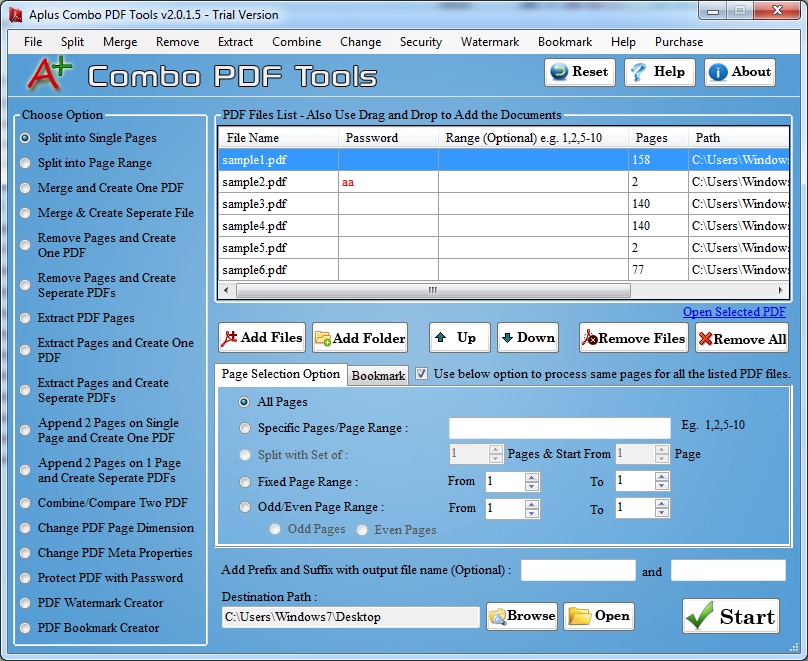
Combo PDF Tools is a utility designed for the comprehensive management and manipulation of PDF documents through a single interface. The software addresses common document workflow requirements, such as merging multiple files and splitting larger documents into individual pages or specific sets based on user requirements.
The application provides several granular editing functions, including the ability to extract specific pages or permanently remove unwanted content. Users can reorder pages, append new documents, and utilize a booklet feature that formats two PDF pages into a single-page layout. Beyond structural changes, the tool allows for the modification of metadata properties and page dimensions, including resizing and orientation adjustments.
Key features of the software include:
- Security and Encryption: Users can secure documents with password protection and set specific restrictions on printing or editing.
- Batch Processing: The utility supports processing multiple files simultaneously to improve workflow efficiency.
- Document Protection: Options include adding watermarks for intellectual property protection and bookmarks for page indexing.
- Broad Compatibility: The software handles both protected and unprotected PDF documents of varying file sizes.
This tool serves as a centralized solution for users needing to manage, compare, and protect digital documentation. By consolidating these features, it eliminates the need for multiple disparate applications to perform standard PDF maintenance tasks.
Top 5 Reasons To Download Aplus Combo PDF Tools
- All-In-One Document Manipulation Suite: Effortlessly merge, split, and extract pages with a single click to manage your digital library.
- High-Grade Security and Intellectual Property Protection: Secure your sensitive data with enterprise-level encryption, password protection, and custom watermarking.
- Professional Layout and Formatting Control: Transform documents with advanced resizing, booklet creation, and orientation adjustments that usually require expensive software.
- High-Efficiency Batch Processing: Save hours of manual labor by applying complex changes to dozens of files simultaneously with the integrated batch mode.
- Universal Compatibility and Metadata Management: Work with any PDF file regardless of size or existing protection, while maintaining full control over backend metadata.
If you have ever spent an afternoon wrestling with a PDF document, you know the specific brand of frustration that comes with this file format. We use PDFs for everything because they are reliable, they look the same on every device, and they are the industry standard for professional communication. However, that same "fixed" nature makes them a nightmare to edit or reorganize without the right tools. Most of the time, users are stuck between using sketchy online converters that compromise privacy or paying a massive monthly subscription for "Pro" software that includes a hundred features they will never use. This is exactly why the Combo PDF Tools giveaway is a total game-changer for anyone who handles digital paperwork.
In the world of tech, we often look for that "Swiss Army Knife" utility—the one program that sits on your desktop and solves five different problems the moment they arise. After putting this software through its paces, it is clear that this isn't just another basic viewer. It is a comprehensive management system designed to give you total sovereignty over your documents. Whether you are a student trying to compile research, a lawyer managing discovery documents, or a small business owner organizing invoices, the utility provided here is indispensable. Let’s dive deep into the five core reasons why you need to grab this download while it is available.
1. All-In-One Document Manipulation Suite
The primary reason anyone looks for a PDF tool is the need to reorganize pages, and Combo PDF Tools handles this with a level of granularity that is frankly impressive. Most basic tools allow you to "split" a file, but this software understands that different tasks require different strategies. You aren't just limited to cutting a document in half. You can split documents into single pages, which is perfect for when you need to turn a 50-page manual into individual reference sheets. Alternatively, you can split by a specific set of pages or ranges, allowing you to extract exactly what you need and nothing more.
The merging feature is equally robust. We have all been in a situation where we have five different PDF files—perhaps a cover letter, a resume, a portfolio, and a list of references—that need to be a single, cohesive document. Instead of struggling with "copy-paste" methods that ruin formatting, this tool allows you to merge multiple files into one seamless PDF with a single click. The software handles the heavy lifting of aligning the formatting and ensuring the file remains readable.
Beyond just merging and splitting, the ability to extract and remove pages is what sets this apart for power users. If you have a massive 200-page report but only pages 45 through 52 are relevant to your meeting, you can retrieve those valuable pages in seconds. Conversely, if you have a document with "worthless" or unwanted pages—like blank sheets, old appendices, or redundant cover pages—you can delete them instantly. This keeps your files lean, professional, and focused on the content that actually matters.
2. High-Grade Security and Intellectual Property Protection
In today's digital landscape, security isn't just an "extra" feature; it is a fundamental requirement. One of the most compelling reasons to download Combo PDF Tools is its integrated suite of security options. When you are sharing sensitive financial data, legal contracts, or proprietary business plans, you cannot simply send them out into the void and hope for the best. This software empowers you to take control of who sees your content and what they can do with it.
The encryption features allow you to wrap your documents in password protection. This means that even if a file is intercepted or sent to the wrong person, the contents remain unreadable without the specific key you have set. But the security goes deeper than just a simple "open" password. The software provides restriction settings that are vital for professional environments. You can set permissions that prevent users from printing your document, editing the text, or even copying and pasting the content. This is a massive win for creators who want to share their work for review without giving away the ability to alter or steal the raw data.
Furthermore, the inclusion of PDF Watermarking is a standout feature for intellectual property protection. Whether you want to mark a document as "DRAFT," "CONFIDENTIAL," or simply overlay your company logo to ensure you get credit for your work, the watermarking tool is intuitive and effective. It provides a visual layer of security that discourages unauthorized sharing and establishes ownership immediately. When you combine these features, you aren't just managing files; you are protecting your professional reputation.
3. Professional Layout and Formatting Control
Have you ever received a PDF that was formatted for a massive A3 poster when you needed to print it on standard letter paper? Or perhaps you have a series of pages that are in "landscape" mode when they should be "portrait"? Combo PDF Tools offers an array of "domain features" that allow you to fix these layout headaches without having to recreate the document from scratch. The ability to resize PDF page dimensions and orientations is a feature often hidden behind a paywall in other applications, but it is front and center here.
One of the coolest features—and one that I find myself using more often than I expected—is the booklet creation mode. This utility allows you to take two separate pages and condense them into a single page as a booklet. This is perfect for creating programs, brochures, or even just saving paper when printing out long reading assignments. It manages the margins and alignment automatically, ensuring that the resulting document looks like it was professionally typeset.
We also need to talk about Metadata and Bookmarking. Most people ignore the "Meta properties" of a PDF, but they are essential for organization and SEO. This software lets you change properties like the author, title, and keywords, which makes your files much easier to find in a large database or through a system search. Additionally, the bookmarking feature is a lifesaver for long-form documents. By creating a proper page index, you turn a flat file into an interactive document that users can navigate with ease. These are the "pro touches" that separate a hobbyist from a professional.
4. High-Efficiency Batch Processing
Time is the one resource we can’t make more of, and this is where Combo PDF Tools truly earns its keep on your hard drive. If you have to password-protect 50 different files or watermark an entire archive of documents, doing it one by one is a soul-crushing task. It leads to errors, fatigue, and hours of wasted time. The batch mode processing supported by this software is the answer to that problem.
The workflow is simple: you load your queue of documents, select the action you want to perform—whether it is merging, resizing, or encrypting—and let the software do the work. The engine is optimized to handle multiple files in a single pass without crashing or slowing down your system. As a reviewer, I am always looking for software that respects the user's time, and the "set and forget" nature of this batch processing is exactly what a high-productivity environment requires.
Imagine you have just finished a large project and you have 20 different PDF reports that all need to be watermarked with your company logo and restricted from editing. With this giveaway, that entire process takes about thirty seconds of setup. Without it, you’re looking at a tedious afternoon of opening, editing, and saving files individually. The efficiency gain alone makes this an essential download for anyone who deals with high volumes of digital documentation.
5. Universal Compatibility and Ease of Use
Finally, we have to talk about the sheer reliability of this tool. The PDF world is full of different versions and standards; some files are "protected," some are "unprotected," and some are so large they cause basic viewers to hang or crash. Combo PDF Tools has been built to handle both larger and smaller files with equal stability. It provides support for all kinds of PDF documents, meaning you won't get those annoying "Format Not Supported" errors that plague cheaper alternatives.
What I find most refreshing about this tool is the "one-click" philosophy. The interface doesn't bury its best features under six layers of menus. Whether you are appending one document to the end of another, arranging pages in a specific order, or comparing two files to see the differences, the process is streamlined. The developers clearly understood that the people using this software aren't necessarily "tech experts"—they are people who have a job to do and want the software to get out of the way and let them do it.
Because the popularity of PDF files has made them an "essential" part of modern life, having a tool that can "retrieve" valuable pages from a corrupted or poorly formatted file can be a lifesaver. This utility serves as a safety net for your digital workflow. It gives you the power to "fix" files that other programs simply can't handle, and it does so with an interface that is easy to navigate from the very first time you open it.
In conclusion, the Combo PDF Tools giveaway is an opportunity to add a high-value utility to your digital toolkit for free. It bridges the gap between a simple PDF reader and a complex, expensive document editor. By offering deep control over page manipulation, robust security features, professional layout options, and the sheer power of batch processing, it solves the most common (and most frustrating) problems associated with the PDF format. Don't wait until you are in the middle of a document emergency to find a solution. Download this tool now, explore its features, and experience the peace of mind that comes with knowing you have total control over your digital documents.
Whether you are cleaning up a messy scan, securing a contract, or organizing a massive digital archive, this software provides the "several strategies" promised in its description. It is efficient, versatile, and—most importantly—built for the modern user who needs results fast. Grab this giveaway today and stop being a victim of the PDF format; start being its master.


Reviews for Aplus Combo PDF Tools
Click Here to Read Reviews for Aplus Combo PDF Tools >> Click Here to Submit Reviews for Aplus Combo PDF Tools >>