What Does Downie for Mac Do?
Downie is a media utility designed to facilitate the downloading of online video content for offline viewing. The application currently supports over 1,100 different websites, including major platforms like YouTube and Vimeo, using smart content detection to identify media files across diverse web architectures.
The software provides high-resolution support, allowing users to capture YouTube videos at up to 4K resolution. This distinguishes it from many standard web-based capture tools that often limit download quality. Beyond simple file acquisition, Downie includes automated postprocessing capabilities. Users can configure the software to convert videos into MP4 format for iTunes compatibility or isolate audio tracks into standalone files.
Key technical features of the application include:
- Extensive Site Support: Compatibility with over 1,100 sites, with new additions integrated regularly.
- 4K YouTube Support: High-definition and ultra-high-definition video downloading capabilities.
- Automated Postprocessing: Options to convert videos to MP4 or extract audio tracks automatically upon download completion.
- Localization: The interface is localized into various languages and supports country-specific hosting sites.
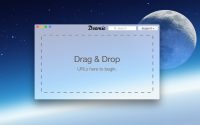
Downie functions as a localized tool for an international audience, supporting region-specific media services. Its streamlined interface focuses on efficiency, allowing users to drag and drop links directly into the app for immediate processing. This tool serves as a comprehensive solution for managing digital media archives and building offline content libraries.
Top 5 Reasons To Download Downie for Mac
- Unrivaled Site Compatibility Across the Web
- True 4K Resolution and High-Definition Support
- Seamless Automated Post-Processing and Conversion
- Comprehensive Localization and International Support
- Intuitive User Experience and Smart Content Detection
In the digital age, we are constantly bombarded with a never-ending stream of video content. From educational tutorials and professional webinars to viral social media clips and high-fidelity music videos, the internet is a treasure trove of moving images. However, there is a persistent problem that every tech enthusiast and casual browser has faced: the ephemeral nature of the web. Videos get deleted, accounts get suspended, and internet connections fail right when you need to reference a specific clip the most. This is where a robust video downloader becomes an essential part of your software toolkit. After testing dozens of utilities that promise the world but deliver a buggy, ad-ridden experience, I have found the gold standard. It is called Downie, and if you have the chance to grab this as a giveaway, you should not hesitate for a single second. This isn't just another browser extension; it is a powerhouse utility designed for those who value their time and the quality of their media library.
As a tech reviewer, I see a lot of "one-trick ponies." Downie is different because it understands the complexity of modern web architecture. It doesn't just scrape a link; it interprets the page to give you the best possible file. Whether you are building an offline library for travel, archiving precious family videos from social media, or saving research material for a project, Downie is the tool that makes it happen with a single click. Below, I have broken down the top five reasons why Downie stands head and shoulders above the competition and why it is a mandatory download for any serious user.
1. Unrivaled Site Compatibility Across the Web
The primary reason any user looks for a video downloader is utility. A tool is only as good as the sites it supports. Many free tools or online converters work well enough for the biggest video platforms but crumble the moment you try to save a video from a niche news site, a private educational portal, or a specialized social network. Downie shatters these limitations by offering dedicated support for over 1,200 different websites. This is a staggering number that represents almost the entirety of the video-hosting landscape.
Think about the diversity of your browsing habits. You might start your day watching a tech review on a major video platform, move to a professional development course on a proprietary learning management system, and end your evening scrolling through short-form content on various social media apps. Downie is engineered to recognize the video protocols across all these disparate environments. The developers are incredibly proactive, constantly updating the software to include new sites and adapt to changes in the coding of existing ones. This means that when a site changes its security measures or its video delivery method, Downie is usually the first to provide a fix.
Furthermore, this compatibility isn't just about "supporting" a site in name only. It means the app can navigate through the clutter of a webpage to find the actual video file. We have all been on those sites that are laden with advertisements, pop-ups, and confusing layouts where the "Play" button is buried under layers of junk. Downie’s engine cuts through that noise, identifies the core video stream, and prepares it for download without you ever having to interact with the site's more annoying elements. This breadth of coverage makes it the "Swiss Army Knife" of media acquisition.
2. True 4K Resolution and High-Definition Support
We live in a world of high-bitrate displays. From Retina screens to 4K monitors and OLED televisions, we are used to seeing crisp, vibrant imagery. One of the biggest disappointments with standard video downloaders is that they often cap the quality at 720p or 1080p, even if the source material is available in much higher resolutions. This is often due to the technical difficulty of handling "DASH" (Dynamic Adaptive Streaming over HTTP) streams, where the video and audio are served as separate files. Many downloaders simply can't handle the complexity of merging these high-quality streams back together.
Downie excels where others fail. It offers full support for HD video, reaching all the way up to 4K resolution. When you download a video using Downie, you aren't getting a compressed, washed-out version of the original. You are getting the highest quality possible that the hosting site allows. This is crucial for anyone who wants to watch content on a large screen or for professionals who need high-quality source material for their own projects. If a creator uploaded a stunning 4K travel vlog or a technical tutorial with small, detailed text, you can be certain that Downie will preserve every pixel of that clarity.
For those who are conscious of storage space, Downie also gives you the flexibility to choose your quality. But knowing that the 4K option is there, and that it works reliably, provides a level of future-proofing for your media collection that few other apps can match. It treats the video as a piece of art that deserves to be seen in its best light, ensuring that your offline viewing experience is just as good, if not better, than the online one.
3. Seamless Automated Post-Processing and Conversion
A download is only useful if the file format works with your devices. We have all experienced the frustration of downloading a video only to find out that it is in a strange, proprietary format that won't play on an iPhone, an iPad, or a smart TV. In the past, this meant you had to download the file and then run it through a separate video converter—a time-consuming and often confusing process for the average user. Downie eliminates this entire secondary step through its powerful, automated post-processing engine.
If you need your video in an MP4 format to ensure it works perfectly with iTunes or your mobile devices, Downie can handle that automatically as soon as the download finishes. You simply set your preference, and the software does the heavy lifting. But the utility doesn't stop at video-to-video conversion. One of the most popular features is the ability to extract the audio track from a video. Perhaps you’ve found a great lecture, a podcast that is only available in video form, or a music performance where you only want the song. Downie can strip the video and save just the high-quality audio file for you.
This level of automation is a massive productivity booster. Instead of managing a chain of different apps, you have a single workflow: find video, drag into Downie, and receive the exact file type you need. It even supports metadata tagging, ensuring that your files are organized and look great in your media player of choice. It’s this attention to the "after-download" experience that proves Downie was built by people who actually use their own software and understand the pain points of media management.
4. Comprehensive Localization and International Support
The internet is global, and video content knows no borders. However, many software developers focus solely on the English-speaking market, leaving users in other countries with tools that don't support their local sites or are difficult to navigate due to language barriers. Downie takes a refreshingly different approach. It is an internationalized application that supports country-specific sites that are often ignored by Western developers. Whether it is a regional news outlet in Europe, a media platform in Asia, or a social network popular in South America, Downie’s reach is truly global.
Beyond site support, the interface itself is localized into numerous languages. This makes the software accessible to a much wider audience, ensuring that users can comfortably navigate the settings and features in their native tongue. But what truly stands out is the developer's commitment to this localization. They have an open invitation for users to help with translations. If you find that your language is missing or could be improved, you can contact the team and offer a translation. In exchange, they often offer a free license. This creates a community-driven atmosphere where the software grows and improves through the contributions of its users.
This international focus also means that the software is better at handling non-Latin characters in filenames and metadata. If you are downloading content with titles in Japanese, Arabic, Cyrillic, or any other script, Downie handles it with grace, preventing the "garbled text" issues that plague lesser apps. It is a world-class tool designed for a worldwide audience.
5. Intuitive User Experience and Smart Content Detection
All the features in the world don't matter if the software is a nightmare to use. Many tech tools feel like they were designed by engineers for engineers, with cluttered menus and a steep learning curve. Downie, however, is a masterclass in user interface design. It manages to be incredibly powerful while remaining deceptively simple. The most common way to use it is a simple "drag and drop." You take a URL from your browser, drop it onto the Downie icon or window, and the download starts. It’s that easy.
But the real magic lies in the "Smart Content Detection." Modern websites are complex, often hiding video links behind scripts or using "lazy loading" techniques that confuse standard scrapers. Downie’s internal engine acts like a browser itself. It can "see" what is happening on the page and identify the actual video content even if it’s not immediately apparent. For those extra-tricky sites that require a login or have complex interactions, Downie includes a built-in browser extension and a "User-Guided Extraction" feature. This allows you to log in to a site within a secure Downie window, navigate to the video, and tell the app exactly what to capture. It gives you the power to download content that is essentially "un-downloadable" by any other means.
The app also stays out of your way. It can run in the background, handling a queue of dozens of videos while you continue with your work. It provides subtle notifications when tasks are complete, and it integrates beautifully with the operating system. It doesn't feel like a third-party add-on; it feels like a native feature that should have been part of your computer from the start. This combination of "one-click" simplicity and "deep-dive" power is what makes Downie an essential download.
In conclusion, if you are looking for a way to take control of your digital media, this giveaway is your golden ticket. Downie isn't just a utility; it is a liberation tool for your video content. It removes the barriers between you and the media you love, providing a high-quality, reliable, and incredibly versatile solution for offline viewing. With its massive site support, 4K capabilities, automated processing, global reach, and brilliant design, it is easily the best in its class. Do yourself a favor and download it today—your future, offline self will thank you.
Whether you are a student needing to save lectures, a parent wanting to keep kids entertained during a long flight, or a media professional building an inspiration board, Downie is the reliable partner you’ve been looking for. The internet moves fast, and content disappears even faster. Don't let your favorite videos vanish into the digital ether. Capture them, convert them, and keep them forever with Downie. This is a rare opportunity to get a premium piece of software that truly delivers on its promises, so make sure you take advantage of this giveaway before it’s gone. Experience the web on your own terms, at your own resolution, and on your own schedule. That is the power of Downie, and that is why it is my top recommendation for anyone who spends time watching video online.
Final Thought: The sheer volume of updates this app receives is a testament to the developer's dedication. You aren't just downloading a static tool; you are investing in a living piece of software that evolves alongside the internet itself. That kind of reliability is rare in the tech world, making this giveaway an absolute "must-have" for every user.


Reviews for Downie for Mac
Click Here to Read Reviews for Downie for Mac >> Click Here to Submit Reviews for Downie for Mac >>