What Does AI Automator Do?
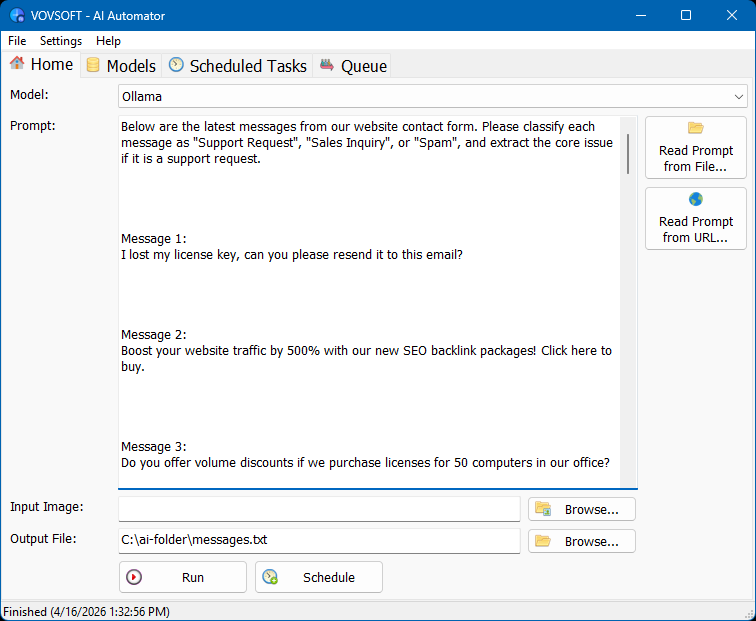
AI Automator is a lightweight Windows desktop utility designed to orchestrate and automate large language model (LLM) workflows. The software provides a unified interface for managing both local AI runtimes and cloud-based APIs. Users can leverage Ollama to run models locally on NVIDIA, AMD, or Intel hardware, ensuring data privacy, or connect to external services like OpenAI, Anthropic Claude, and Google Gemini for high-speed cloud processing.
The application specializes in unattended background operations. Through a customizable execution timer, users can schedule specific prompts to run at set intervals. When combined with the auto-run at startup and system tray features, the tool can continuously process tasks and save generated results directly to a local drive. This functionality is ideal for users who need to automate repetitive AI interactions without manual oversight.
Key technical features include:
- Batch Queueing: Load and process large sequences of text or image prompts sequentially.
- JSON Configuration: Manually edit workflows and model behaviors via tasks.json and models.json files for full control.
- Flexible Inputs: Load prompts directly from local files or fetch dynamic content from remote web addresses.
By routing systematic inputs to chosen models, AI Automator transforms complex API interactions into a streamlined, scalable process for power users and developers who require local file outputs and scheduled task management.
Top 5 Reasons To Download AI Automator
- Total Data Sovereignty and Privacy via Local AI Models
- Effortless Automation and Background Task Scheduling
- A Hybrid Powerhouse: Switching Between Local and Cloud APIs
- Industrial-Grade Batch Processing with the Queue System
- Maximum Flexibility Through External Prompt Sources and JSON Control
Introduction: Why This Utility is a Game-Changer for AI Power Users
In the rapidly evolving landscape of artificial intelligence, we have reached a point where everyone is using AI, but very few people are using it efficiently. Most users are stuck in a cycle of manual labor: opening a browser, logging into a portal, typing a prompt, waiting for a response, and then manually copying that data into a local file. It is a tedious, repetitive process that completely undermines the "intelligence" of the tool you are using. If you are serious about productivity, you need to move beyond the chat box and start thinking about automated workflows.
This is where the AI Automator comes into play. It is not just another wrapper for a chatbot; it is a dedicated Windows desktop utility designed for users who want to treat Large Language Models (LLMs) like the powerful computational engines they actually are. By offering a lightweight, local-first approach to AI management, this software bridges the gap between manual experimentation and professional-grade automation. Whether you are a developer, a data researcher, or a content creator, the ability to schedule and batch AI tasks locally on your PC is an absolute necessity. Let’s dive deep into the top five reasons why this giveaway is a must-have for your digital toolkit.
Reason 1: Total Data Sovereignty and Privacy via Local AI Models
The single most significant concern in the modern tech era is privacy. When you send a prompt to a cloud-based AI service, your data is leaving your machine, traveling across the internet, and landing on a server owned by a multi-billion-dollar corporation. While these companies have privacy policies, for many professionals—lawyers, developers working on proprietary code, or researchers handling sensitive information—that level of exposure is unacceptable. This software solves that problem by prioritizing local model execution.
By integrating seamlessly with Ollama, this utility allows you to run powerful models like Llama 3, Mistral, or Phi-3 directly on your own hardware. Your data never leaves your computer. There is no middleman, no cloud logging, and no risk of your sensitive prompts being used to train the next generation of a public model. This is total data sovereignty. You are in control of the hardware, the software, and the data.
Furthermore, the software is optimized to take full advantage of your local hardware. Whether you have an NVIDIA RTX GPU with CUDA cores, an AMD setup, or even a modern Intel processor with integrated graphics, the program can leverage your CPU and GPU to ensure that local inference is snappy and responsive. This means you don’t need an active internet connection to be productive. You can work in a cabin in the woods or on a secure, air-gapped machine and still have the full power of an LLM at your fingertips. For anyone concerned with security and privacy, this feature alone makes the download worth it.
Reason 2: Effortless Automation and Background Task Scheduling
We often think of AI as a conversational partner, but its real value lies in its ability to perform tasks. However, most tasks are not one-off events; they are periodic. Perhaps you need to summarize a daily log, check a specific file for updates every hour, or generate a daily report based on changing data. Doing this manually is a waste of human potential. The AI Automator transforms your PC into a 24/7 AI workstation through its scheduling engine.
The software allows you to set precise intervals for your prompts. You can configure a task to run every few minutes, every hour, or at any specific frequency you require. This is "set it and forget it" technology at its finest. Once you have configured your prompt and your model, the software can auto-run at Windows startup and minimize to the system tray. It becomes a silent, invisible worker that operates in the background while you focus on more creative or complex endeavors.
Imagine the possibilities: you could have the software monitor a local text file that you update throughout the day and have it process that data every 30 minutes, saving the results to a separate directory. Because it saves outputs directly to your local drive, you create a permanent, timestamped record of every AI interaction without ever having to click "Export." This level of unattended operation is what separates casual AI hobbyists from power users who know how to scale their output.
Reason 3: A Hybrid Powerhouse: Switching Between Local and Cloud APIs
While local models are fantastic for privacy and cost-efficiency, there are times when you need the massive "brainpower" of a giant cloud model like GPT-4, Claude 3.5 Sonnet, or Gemini Pro. The beauty of this utility is that it doesn’t force you to choose one or the other. It is a hybrid solution that gives you the best of both worlds.
The interface allows you to easily toggle between your local Ollama instance and various cloud-based APIs. This flexibility is crucial for complex workflows. For example, you might use a lightweight local model like TinyLlama to handle simple text formatting or data cleaning tasks for free, and then switch to OpenAI or Anthropic for a high-stakes creative writing task or complex logical reasoning.
This hybrid approach also acts as a built-in redundancy system. If your local hardware is busy with a heavy rendering task, you can offload your AI processing to the cloud. Conversely, if you run out of API credits or lose internet access, your local models are ready to take over. Having a single, unified interface to manage all these different providers—OpenAI, Claude, and Gemini—streamlines your workflow and eliminates the need to maintain dozens of different browser tabs or specialized scripts. It is a centralized command center for all your AI needs.
Reason 4: Industrial-Grade Batch Processing with the Queue System
If you have ever tried to process 500 different snippets of text through a web-based AI interface, you know the meaning of frustration. The constant "copy, paste, wait, copy, paste, wait" cycle is soul-crushing. This software addresses this pain point head-on with its robust queue system. It is designed to handle high-volume processing with ease.
You can load massive batches of text prompts or even image inputs to be processed sequentially. The "step away" philosophy is fully realized here. You can line up hundreds of tasks in the morning, go about your day, and return to find every single task completed and the results neatly saved to your drive. The software systematically routes each input to your chosen LLM, manages the response time, and handles the filing of the output.
For power users who want even more control, the software allows for manual editing of the tasks.json and models.json files. This means you can programmatically structure your workflows outside of the GUI and then let the software's engine execute them at scale. Whether you are performing large-scale sentiment analysis, batch-translating documents, or generating thousands of product descriptions, the queue system transforms what would be weeks of work into a few hours of background processing. This is industrial-grade efficiency brought to the desktop level.
Reason 5: Maximum Flexibility Through External Prompt Sources and JSON Control
One of the most frustrating aspects of many AI tools is how "locked in" the prompts are. Usually, you have to type them into a specific box and leave them there. This utility breaks that mold by allowing you to fetch prompts from external sources. This is a massive win for flexibility and version control.
First, you can load prompts directly from a local file. This means you can keep a library of .txt or .md files containing your "perfected" prompts. You can edit these in your favorite text editor, use version control like Git to track changes to them, and simply point the software to the file. When the software runs its scheduled task, it reads the current state of that file, ensuring your automation is always using the most up-to-date instructions.
Second, and perhaps most impressively for a lightweight utility, is the URL fetch capability. You can set the software to pull its prompt content from a web address. This opens up incredible possibilities for remote management. You could host your prompt on a private server or a GitHub Gist and update it from anywhere in the world. Your home or office PC, running this software, will automatically fetch the new instructions and adjust its behavior accordingly. This turns the application into a dynamic agent that can be controlled remotely without needing any complex remote desktop software.
Combine this with the JSON-based configuration, and you have a tool that is as simple or as complex as you want it to be. If you want a simple "Click and Run" experience, the GUI is there. If you want to dive into the config files and build a complex, multi-model automated pipeline, the architecture fully supports you. This software respects the user's intelligence by providing the tools for deep customization.
Conclusion: The Verdict from a Tech Perspective
In a world where software is increasingly moving toward "rent-only" subscription models and cloud-only dependency, a tool like AI Automator is a breath of fresh air. It is lightweight, efficient, and respects your privacy. It takes the mystery out of AI automation and puts the power back into the hands of the individual user.
We are currently in the "Wild West" phase of AI, and the people who will succeed are those who can automate the mundane to make room for the exceptional. By downloading this utility, you aren't just getting another app; you are getting a digital assistant engine that works on your terms, on your hardware, and according to your schedule.
To summarize, the reasons to grab this are clear:
- Privacy: Run models locally with Ollama.
- Productivity: Schedule tasks to run while you sleep.
- Versatility: Use the best models from OpenAI, Anthropic, or Google.
- Scale: Process huge queues of data without lifting a finger.
- Control: Use external files and URLs to manage your prompts dynamically.
If you are looking to take your AI game to the professional level, this is a no-brainer download. It is time to stop chatting with AI and start automating with it. This giveaway is your ticket to a more efficient, private, and powerful way of working with Large Language Models. Don't let the opportunity pass you by—your future, more productive self will thank you.

Reviews for AI Automator
Click Here to Read Reviews for AI Automator >> Click Here to Submit Reviews for AI Automator >>